
ComfyUI-API-Pack
Call external APIs: remote ComfyUI, Grok, OpenAI-compatible inference, zero-shot classification a/Inference: OpenAI-compatible API Inference a/ZeroShot: zero-shot classification a/API: remote ComfyUI API execution
Nodes (10)
The half of fire-and-forget remote rendering nobody ships you
Run a full workflow on a remote ComfyUI and get the image back, no screen required
Fire a workflow at a remote ComfyUI and keep your local queue moving
Pick up your finished Grok video when it's done, without babysitting the API
Animate a still image with Grok's video model, from inside ComfyUI
Queue a Grok image-to-video job without blocking your whole graph
Stop hand-copying workflow JSON into your remote-graph nodes
One node for every OpenAI-compatible LLM backend, with vision and thinking mode
Zero-Shot Answer Doesn't Call Anything — It Just Picks One Answer Out of the JSON
Ask Five Typed Questions, Get Answers Without Any Text Generation
ComfyUI-API-Pack
Nodes that call external APIs: zero-shot classification on llama-server, OpenAI-compatible inference, remote ComfyUI API execution and Grok image-to-video.
Example
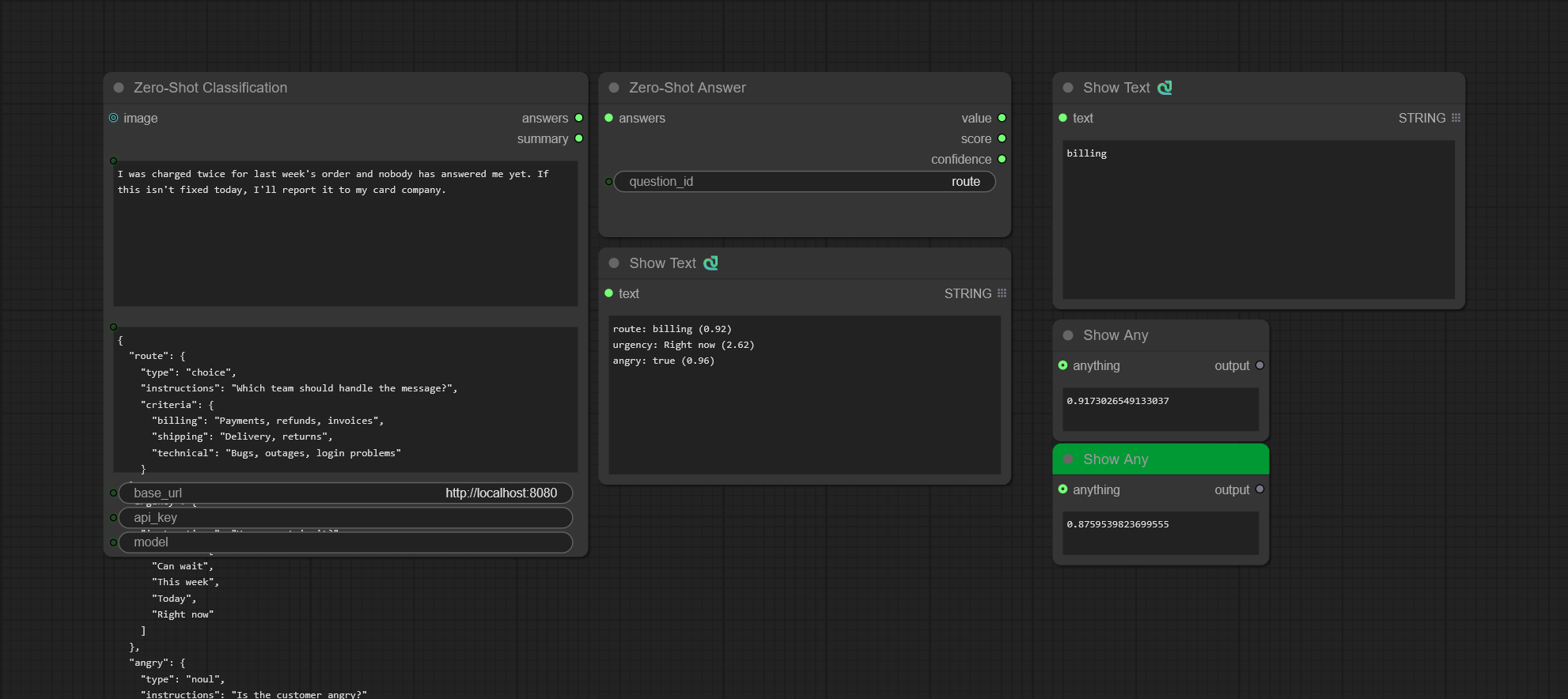
The zero-shot workflow asks three questions about a customer message. Zero-Shot Classification answers all of
them in one request and prints one line per question, and Zero-Shot Answer picks out the route answer.
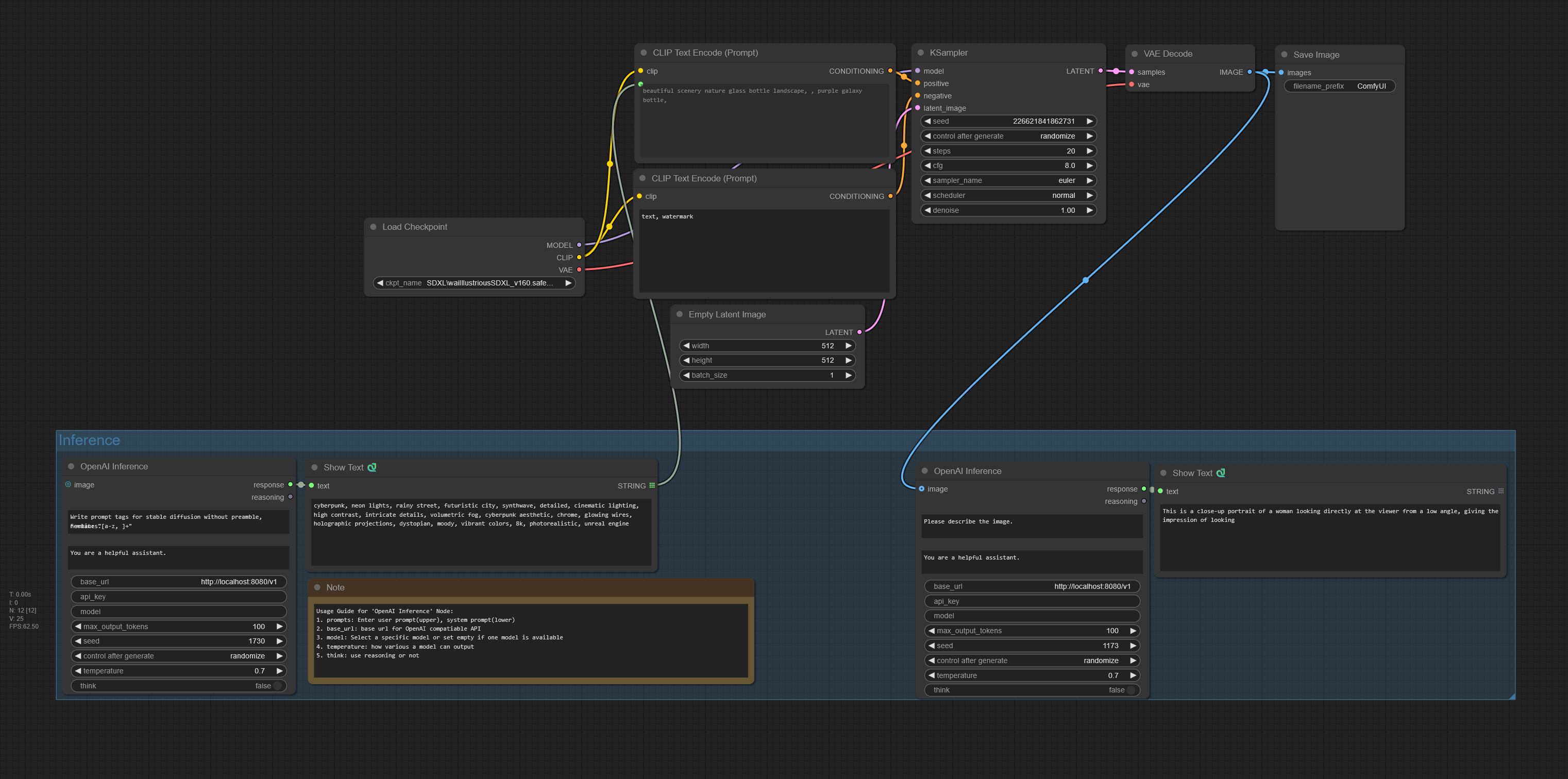
The inference workflow writes prompts with OpenAI Inference and generates an image from them.
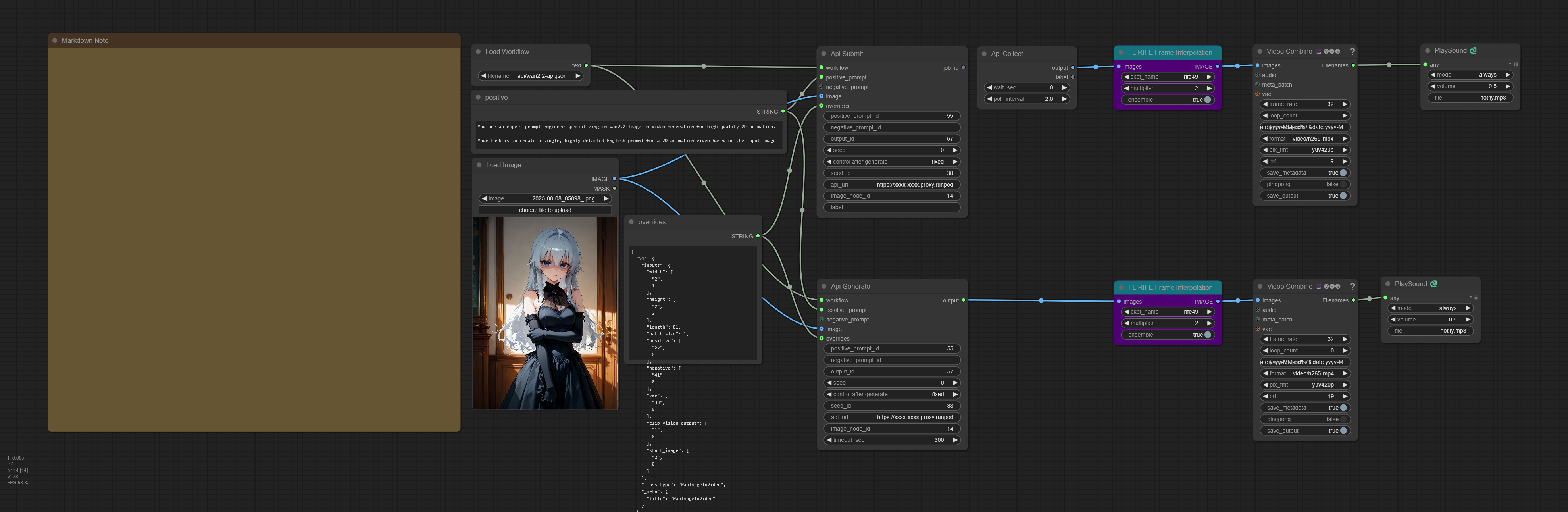
The API workflow loads a workflow with Load Workflow and runs it on a remote ComfyUI, once with Api Generate and once with Api Submit and Api Collect.
Usage
Zero-Shot Classification
Write the labels in questions, feed the text into state, read the answers out of summary and answers. It calls
/v1/systemone on a llama-server running a decision model such as
clef-flash, which scores every label in one forward pass instead of
generating text.
| Widget | What it does |
|--------|--------------|
| state | The content to classify |
| questions | A JSON object mapping a question id to a typed question, see below |
| base_url | llama-server base URL. Default http://localhost:8082 |
| api_key | Sent as a Bearer token when set |
| model | Sent when set. A server with one model ignores it |
| image (input) | Images placed before the state, one per batch item. The server must be started with --mmproj |
| answers (output) | The response's answers as indented JSON, keyed by question id |
| summary (output) | One id: value (score) line per question, with value and score as in Zero-Shot Answer |
| Type | criteria | Answer |
|------|------------|--------|
| choice | {"option": "description" or null, ...} | choice, confidence, probabilities |
| score | ["lowest", ..., "highest"], 2 to 10 levels | expected score, confidence, legend, probabilities |
| noul | Optional {"true": "description", "false": "description"} | noul, the probability of true |
{
  "route": {
    "type": "choice",
    "instructions": "Which team should handle the message?",
    "criteria": {"billing": "Payments or invoices", "technical": "Bugs or outages"}
  },
  "urgency": {"type": "score", "instructions": "How urgent is it?", "criteria": ["Can wait", "This week", "Today"]},
  "outage": {"type": "noul", "instructions": "Is a service down?"}
}
With the state Our checkout started returning errors and orders are blocked., summary is:
route: technical (0.96)
urgency: Today (1.88)
outage: true (0.81)
The same input always gives the same answers. There is no temperature, top_k, top_p or seed: nothing is
sampled, and the model file fixes how the probabilities are scaled.
OpenAI Inference
Feed a prompt into OpenAI Inference, read the answer out of response. Works with any OpenAI-compatible backend:
OpenAI, vLLM, Ollama's /v1 endpoint, Gemini's OpenAI-compatible endpoint.
| Widget | What it does |
|--------|--------------|
| prompt / system_instruction | User and system prompts |
| base_url | API base URL, e.g. https://api.openai.com/v1. Empty reads OPENAI_BASE_URL |
| api_key | Empty reads OPENAI_API_KEY |
| model | Empty picks the model from /models when the server has exactly one |
| max_output_tokens | Up to 131072. Default 100 |
| seed / temperature | Sampling. temperature 0.0 to 2.0, default 0.7 |
| think | Turns on thinking mode |
| image (input) | Input image for vision models |
| response (output) | The answer, with any <think> block stripped out |
| reasoning (output) | The thinking trace from reasoning_content or an inline <think>...</think> block, empty if none |
The last 10 distinct requests are cached in memory, so running an identical request again does not call the API.
Api Generate / Api Submit / Api Collect
Run a workflow on a remote ComfyUI over its HTTP API, such as a RunPod pod. The workflow is
the API-format JSON (ComfyUI menu: "Save (API Format)"), not the UI format. Api Generate waits for the result;
Api Submit returns a job_id at once and Api Collect picks the result up later.
| Widget | What it does |
|--------|--------------|
| workflow (input) | API-format workflow JSON, or a path to one. Load Workflow reads one from user/default/workflows/ |
| api_url | Remote ComfyUI base URL, e.g. https://xxxx-8188.proxy.runpod.net/ or http://127.0.0.1:8188 |
| positive_prompt (input) / positive_prompt_id | The prompt and the node id that receives it |
| negative_prompt (input) / negative_prompt_id | Same for the negative prompt. Skipped when empty |
| seed / seed_id | The seed and the node whose seed/noise_seed receives it. -1 keeps the workflow's seed |
| image (input) / image_node_id | An image uploaded to the remote and bound to that LoadImage node |
| output_id | The node whose images/gifs output is fetched. Animated outputs become frames |
| overrides (input) | JSON {node_id: <full node dict>}. Each entry replaces the whole node, applied last |
| timeout_sec | Api Generate only. Polling limit in seconds, default 300 |
| label | Api Submit only. Recorded with the job and returned by Api Collect |
| wait_sec / poll_interval | Api Collect only. wait_sec 0 collects if ready and otherwise skips at once |
Api Collect returns the frames when the job is done. Otherwise it returns an ExecutionBlocker, which skips the nodes
downstream.
Grok Generate / Grok Submit / Grok Collect
Turn one image into a Grok Imagine video clip, saved to the output folder as a native VIDEO with an inline preview.
Grok Generate waits for the clip; Grok Submit returns a request_id at once and Grok Collect picks the
clip up later.
| Widget | What it does |
|--------|--------------|
| image (input) | The first frame |
| prompt | Motion or scene description, optional |
| duration / resolution | 1 to 15 seconds, 720p or 480p |
| model | Default grok-imagine-video-1.5-preview |
| filename_prefix | Output path under the ComfyUI output directory. Default grok/GrokVideo |
| poll_interval / timeout | Grok Generate polling. Defaults 5 and 600 seconds |
| access_token / refresh_token / client_id | Empty reads GROK_ACCESS_TOKEN / GROK_REFRESH_TOKEN / GROK_CLIENT_ID. The access token refreshes itself on a 401/403 |
| label | Grok Submit only. Recorded with the job and returned by Grok Collect |
| wait_sec / poll_interval | Grok Collect only. wait_sec 0 collects if ready and otherwise skips at once |
Grok Collect calls the Grok API too, so it needs the tokens as well. They are not stored with the job.
The API and Grok nodes keep one in-flight job each in jobs.lock in the pack directory. Submit skips while a job of
its kind is in flight, and Collect frees the slot once it finishes. Run Collect in a loop (e.g. /loop) to pick up
the result when it is done.
Installation
Search for ComfyUI-API-Pack in ComfyUI Manager, or:
cd ComfyUI/custom_nodes
git clone https://github.com/alchemine/comfyui-api-pack
pip install -r comfyui-api-pack/requirements.txt
Nodes
ApiPack/Inference
Zero-Shot Answer: picks one question out of the Zero-Shot Classification answers.
| Output | choice | score | noul |
|--------|----------|---------|--------|
| value (STRING) | The chosen option | The description of the nearest level | "true" if the probability is 0.5 or more, else "false" |
| score (FLOAT) | Probability of the chosen option | Expected level | Probability of true |
| confidence (FLOAT) | confidence | confidence | \|2p - 1\|, as for a two-option choice |
ApiPack/API
Load Workflow: reads an API-format workflow JSON from user/default/workflows/ as a STRING.
Configuration
.env is optional. Copy .env.example to .env and set only what you use; the node inputs take
priority over it. A missing credential raises an error when the node runs, not when the pack loads.
OPENAI_BASE_URL=https://api.openai.com/v1
OPENAI_API_KEY=your-api-key

GROK_ACCESS_TOKEN=...
GROK_REFRESH_TOKEN=...
GROK_CLIENT_ID=...
A Grok token refresh failed (...) error means the refresh token or client_id has expired or been revoked:
re-authenticate with x.ai and update them.
License
GPL-3.0. See LICENSE.