
Gallery4ComfyUI
Dual-source image gallery for ComfyUI: browse, search and filter ComfyUI & Stable Diffusion WebUI outputs, with artist gallery, artist database, favorites and advanced tag search.
🖼️ Gallery4ComfyUI
双来源图片图库 —— 浏览、搜索、筛选 ComfyUI 与 Stable Diffusion WebUI 生成的图片,支持高级 tag 搜索、多收藏夹与全屏浏览。
A dual-source image gallery for ComfyUI — browse, search and filter images generated by ComfyUI and Stable Diffusion WebUI, with advanced tag search, multi-folder favorites and a fullscreen viewer.
<p> <img alt="Version" src="https://img.shields.io/badge/version-v1.3.4-3b6ef5"> <img alt="License" src="https://img.shields.io/badge/license-MIT-green"> <img alt="ComfyUI" src="https://img.shields.io/badge/ComfyUI-0.3x+-blueviolet"> <img alt="Dependencies" src="https://img.shields.io/badge/dependencies-none-orange"> </p>🆕 v1.3.4 更新 / What's New
-
修随机排序:选「随机」排序时,网格里点开的大图和网格里那张对不上。 原因:服务端每次请求都重新洗牌(且没有种子),网格第 N 页与灯箱续翻请求拿到的是两次不同的洗牌结果。现在由前端生成一个种子、网格与灯箱共用,服务端按种子确定性洗牌;切换排序或刷新页面才会换新顺序。 另修一处隐患:
get_index()返回的是缓存列表本身,就地shuffle会连缓存一起改掉,导致同一个种子也得不到同一个顺序 —— 改用random.sample(新建列表)。 -
Fixed random sorting: with the "random" sort, the image you clicked in the grid was not the image the lightbox opened. The server reshuffled on every request with no seed, so the grid's page N and the lightbox's neighbour-page requests got two different orderings. The frontend now generates one seed shared by the grid and the lightbox, and the server shuffles deterministically from it; a new order only appears when you change the sort or reload. Also fixed a latent trap:
get_index()hands back the cached list itself, so an in-placeshufflemutated the cache and the same seed no longer produced the same order. It now usesrandom.sample, which builds a new list. -
修 v1.3.2 的致命漏提交:v1.3.2 只提交了前端
web/index.html,漏掉了三个后端文件(gallery_core.py/__init__.py/standalone.py),结果/api/artlib/status返回 404,前端走不到下载面板 —— 「下载画师库数据」这个功能完全不可用。v1.3.3 已补齐。功能本身没问题,纯粹是发布时漏了文件。 -
Fixed a fatal omission in v1.3.2: v1.3.2 only committed the frontend (
web/index.html) and dropped three backend files (gallery_core.py,__init__.py,standalone.py), so/api/artlib/statusreturned 404 and the UI never reached the download panel — the "download artist data" feature was completely broken. v1.3.3 restores the missing files. The feature itself was fine; the release was incomplete. -
画师库数据改为「网页内按需下载」:数据不再塞进仓库/发布包,改由 GitHub Release 附件托管(
artists-data.zip,3.3 MB,解压 18 MB)。插件「画师库」页在未安装时显示下载按钮 + 进度条,下完自动加载,不用重启 ComfyUI。想自己抓或换镜像也支持(GALLERY4_DATA_DIR/GALLERY4_ARTLIB_URL)。 -
修了一个会让该功能完全失效的 bug:数据文件路径原先在模块导入时被固化成常量,导致下载完数据后画师库仍显示 0 条、只能重启才生效。现改为每次读取前重解析。
-
修了 standalone 模式画师库 404:
/api/artlib/facets、/search、/preview、/release四个路由此前只注册在 ComfyUI 侧,standalone 跑起来画师库一直不可用。 -
Artist-DB data is now downloaded on demand from the web UI: the dataset is no longer bundled in the repo/package; it is hosted as a GitHub Release asset (
artists-data.zip, 3.3 MB, 18 MB unpacked). The Artist-DB tab shows a download button with a progress bar when the data is missing, and loads automatically once installed — no ComfyUI restart. Self-hosting and mirrors are supported (GALLERY4_DATA_DIR/GALLERY4_ARTLIB_URL). -
Fixed a bug that made the feature useless: the data-file paths were frozen into module constants at import time, so after downloading, the artist DB still showed 0 entries until a restart. Paths are now re-resolved on every read.
-
Fixed 404s for the artist DB in standalone mode:
facets,search,previewandreleasewere only registered on the ComfyUI side. -
补回画师库数据:v1.3.0 误删了约 19 MB 的 Danbooru 公开画师数据(名录 / 分类 / 定性 / 风格),导致全新安装的「画师库」是空的。v1.3.1 已恢复,并额外补上
artlib_style.jsonl。用户自己的数据依旧不带(收藏的画师、用哪些画师出图、备注 / 封面 / 权重)。 -
Restored the artist dataset: v1.3.0 accidentally dropped the ~19 MB public Danbooru artist data (roster / classification / specialty / style), leaving a fresh install with an empty Artist-DB tab. v1.3.1 restores it and additionally ships
artlib_style.jsonl. Your own data is still excluded (favorited artists, which artists you generate with, notes / covers / weights). -
灯箱跨页续翻:翻页不再被「当前页 60 张」卡住 —— 翻到边缘自动接上下一页 / 上一页,可一路翻到整个结果集首尾;计数改为全局序号(如
61 / 18,320)。 -
关闭灯箱自动定位:回到图库会滚动到刚才看的那张图并短暂高亮;若它不在当前页,图库会先自动切到该页。
-
图库跟随翻页:在灯箱里翻页时,底层图库静默跟随切页(连续快翻合并成一次,不阻塞大图切换)。
-
图库卡片显示画师:每张图下方直接列出它用到的画师,多个全部列出。
-
灯箱内直接收藏画师:点开大图即可 ★ 收藏 / 取消收藏画师,不用回到画师页。
-
画师 / 画师库右键「查看大图」:以图库同一套灯箱浏览该画师的作品(参数、全屏、左右切换完全一致)。
-
中英翻译补全:补齐 30+ 处只有中文的界面文案,并新增定性标签中英映射表(82 个标签,英文界面不再显示中文分类名)。
-
健壮性修复:修复畸形 PNG 元数据会打死索引线程、导致该来源永远卡在「未就绪」的问题。
-
画师库数据随包分发:约 19 MB 的 Danbooru 公开画师数据(名录 / 分类 / 定性 / 风格)开箱即用,装完就能看「画师库」。不含任何用户数据(收藏的画师、用哪些画师出图、备注 / 封面 / 权重都不在仓库里)。想自己重新抓取或换一份数据,见下文。
-
Cross-page lightbox paging: no longer capped at the current 60-image page — paging past an edge automatically loads the next/previous page, all the way to either end of the result set; the counter is now a global index (e.g.
61 / 18,320). -
Auto-locate on close: closing the lightbox scrolls back to the image you were viewing and briefly highlights it; if it lives on another page, the gallery switches there first.
-
Gallery follows paging: the grid silently follows the page you browse to (bursts are coalesced; large-image switching is never blocked).
-
Artists shown on gallery cards: each image lists the artist tags it uses — all of them when there are several.
-
Favorite artists from the lightbox: ★ favorite / unfavorite an artist right where you opened the image.
-
Right-click → "View large image" in the Artist and Artist-DB tabs: browse that artist's works in the same lightbox (params, fullscreen, paging).
-
Translation completed: 30+ previously Chinese-only UI strings fixed, plus a new label translation table (82 labels) so the English UI no longer shows Chinese category names.
-
Robustness fix: malformed PNG metadata could kill the index thread and leave a source permanently "not ready".
-
Artist DB data is bundled: the ~19 MB Danbooru public artist dataset (roster / classification / specialty / style) works out of the box — open the Artist-DB tab and it's there. No user data is included (your favorited artists, which artists you generate with, notes / covers / weights are all kept out of the repo). See below to re-scrape or swap in your own copy.
🖼️ 界面预览 / Interface
从节点打开 / Open from the Node
在 ComfyUI 画布中添加节点 Gallery4ComfyUI(分类 Gallery),点击节点上的「打开图库」按钮即可进入图库 —— 就这么简单。
Add the Gallery4ComfyUI node (category: Gallery) in the ComfyUI canvas and click the「打开图库」button on the node — that's all it takes.
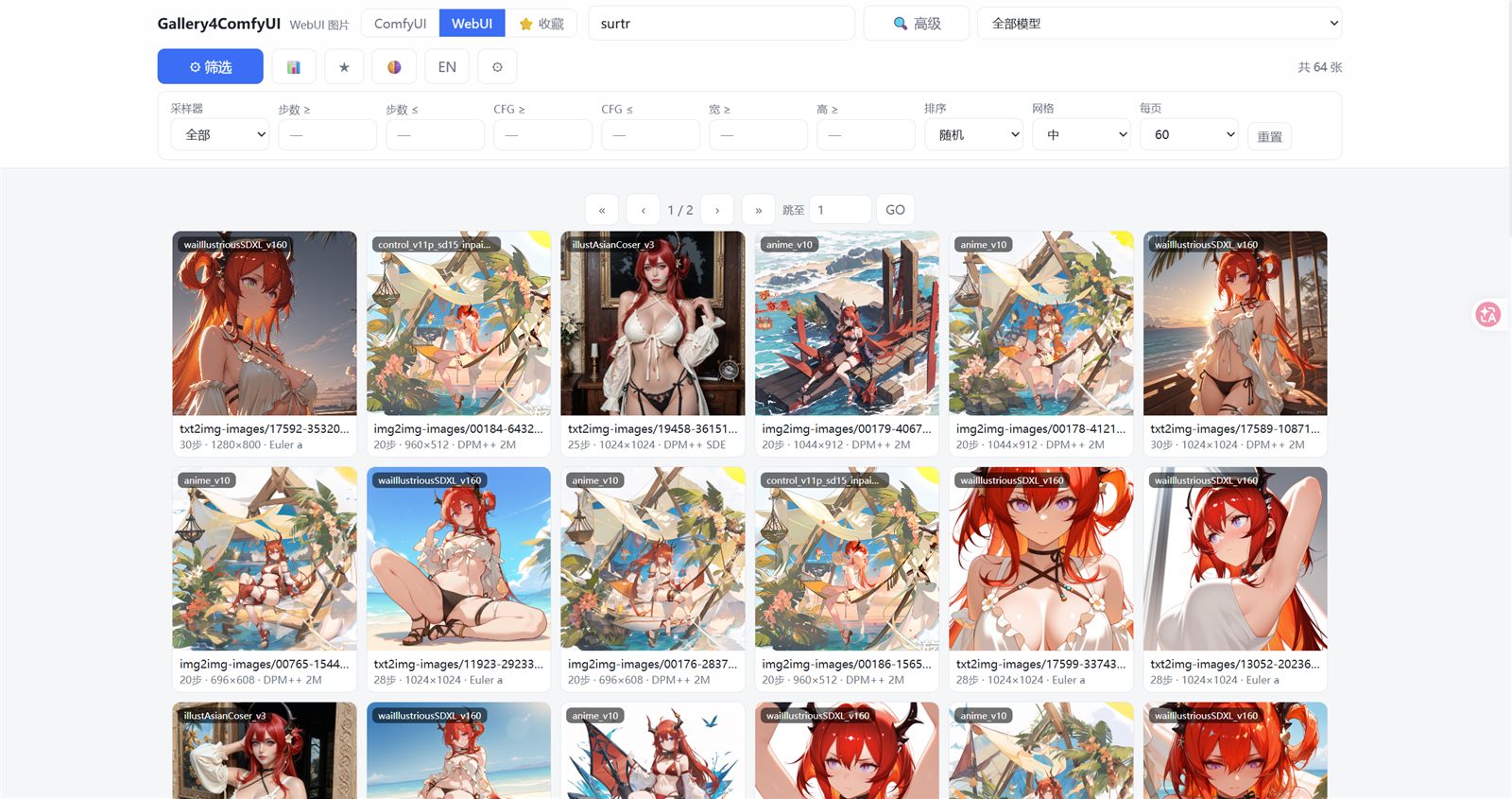
主界面 / Main Interface
打开图库后的主界面:顶部为来源标签页(ComfyUI / WebUI / ⭐收藏)、搜索框与快捷按钮,中间为图片网格,网格上下都有翻页条。
The main gallery view: source tabs (ComfyUI / WebUI / ⭐Favorites), search box and quick buttons on top; the image grid in the center with pagination bars on both top and bottom.
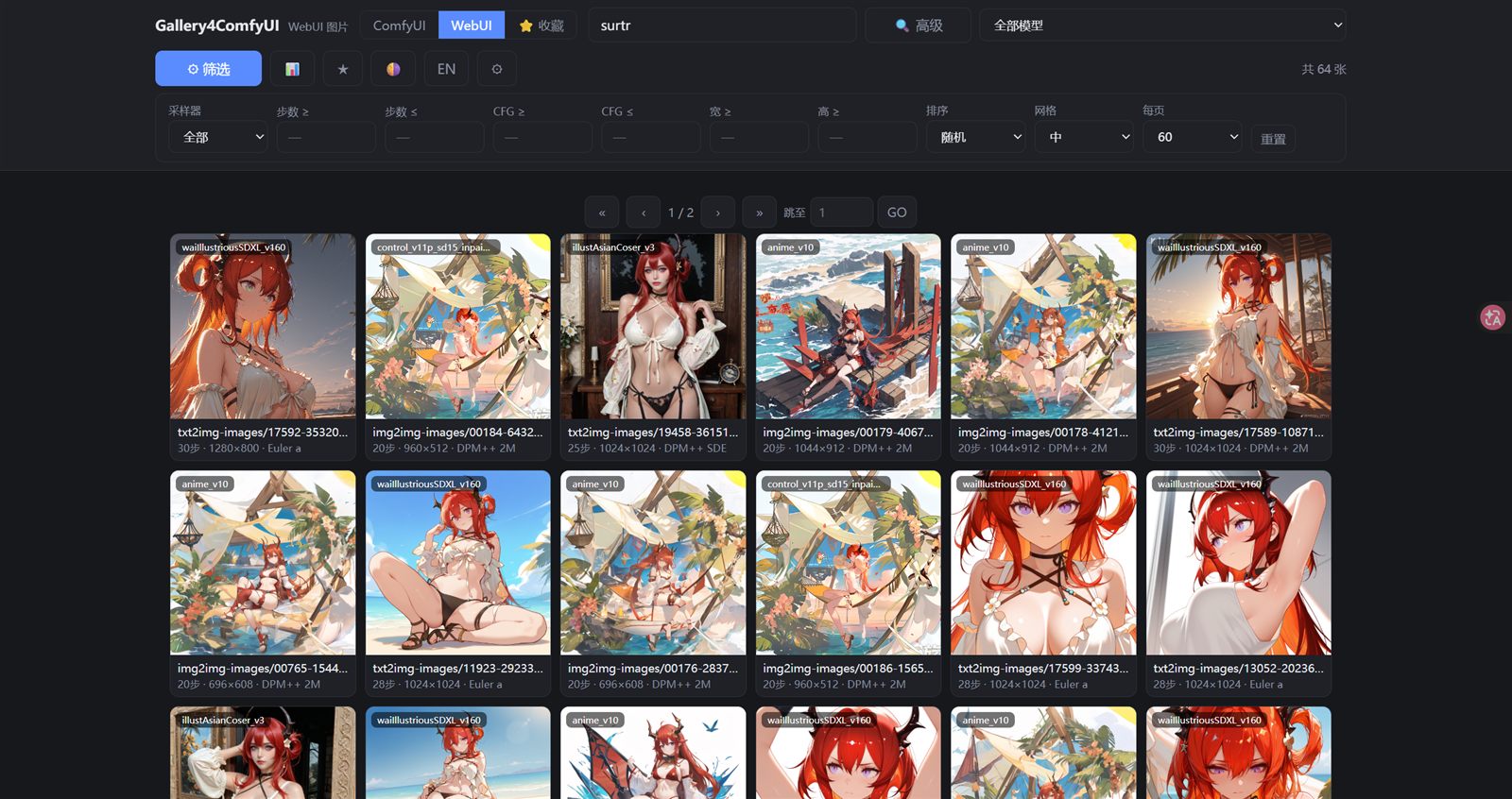
深色主题 / Dark Theme
一键切换浅色 / 深色主题,颜色随主题自动适配。
Switch between light and dark themes with one click — all colors adapt automatically.
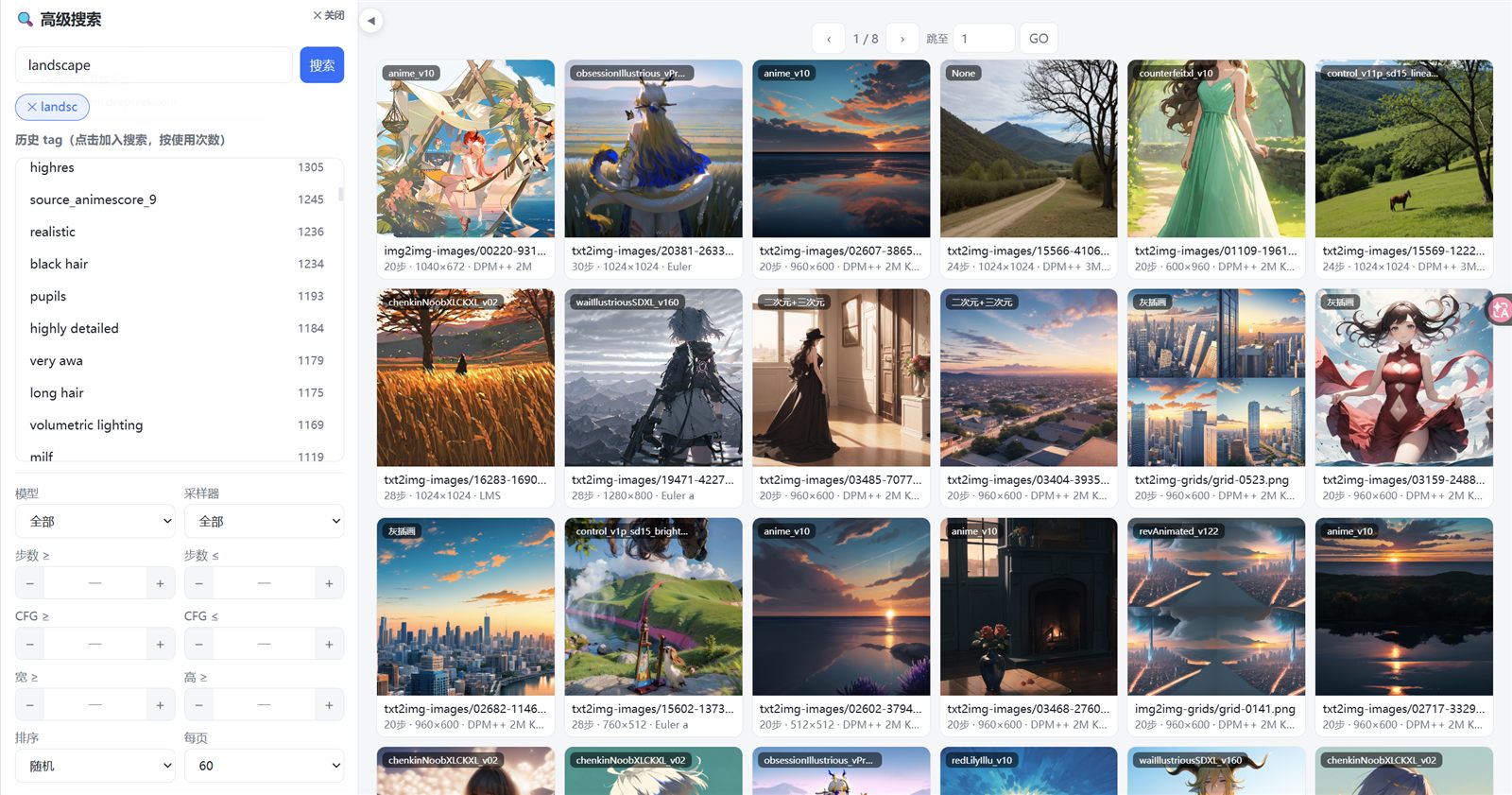
高级搜索 / Advanced Search
高级搜索侧栏:上方是历史 tag 统计(按使用次数排序,点击即加入搜索),带键盘补全的搜索框,下方继承普通搜索的全部筛选;右侧为搜索结果,可折叠侧栏。
The advanced search sidebar: history tag statistics (sorted by usage, click to add to search) with keyboard-autocomplete search box, all normal filters inherited below; search results on the right, collapsible panel.
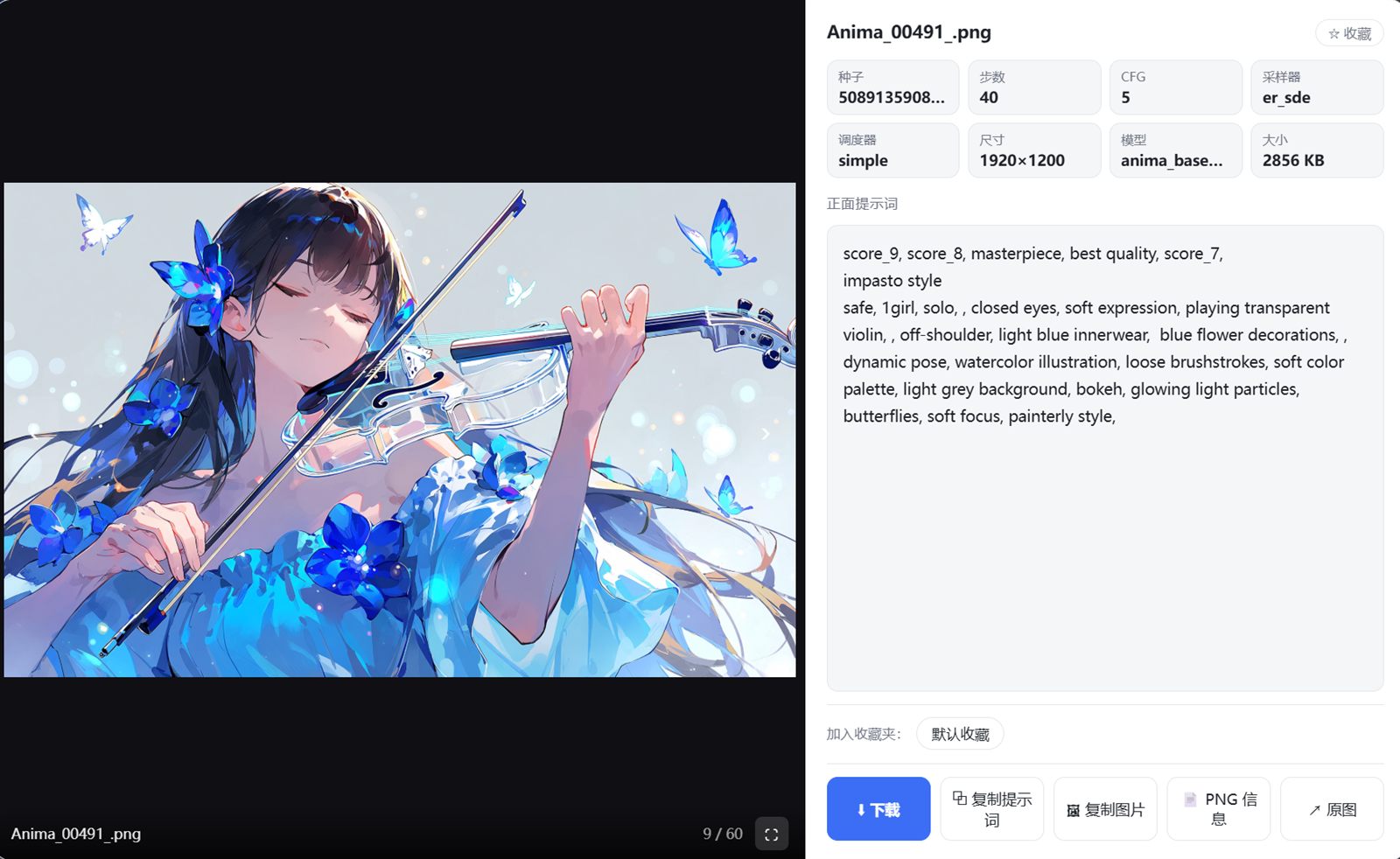
点开图片 / Lightbox
点击图片打开灯箱:左侧大图(底部文件名与页码),右侧参数徽章(种子 / 步数 / CFG / 采样器 / 尺寸 / 模型)、提示词面板、收藏夹与操作按钮;⛶ 按钮进入全屏浏览,滚轮翻图。
Click an image to open the lightbox: large preview on the left (filename & page counter at bottom), parameter badges (seed / steps / CFG / sampler / size / model), prompt panel, favorites and action buttons on the right; the ⛶ button enters fullscreen mode with mouse-wheel navigation.
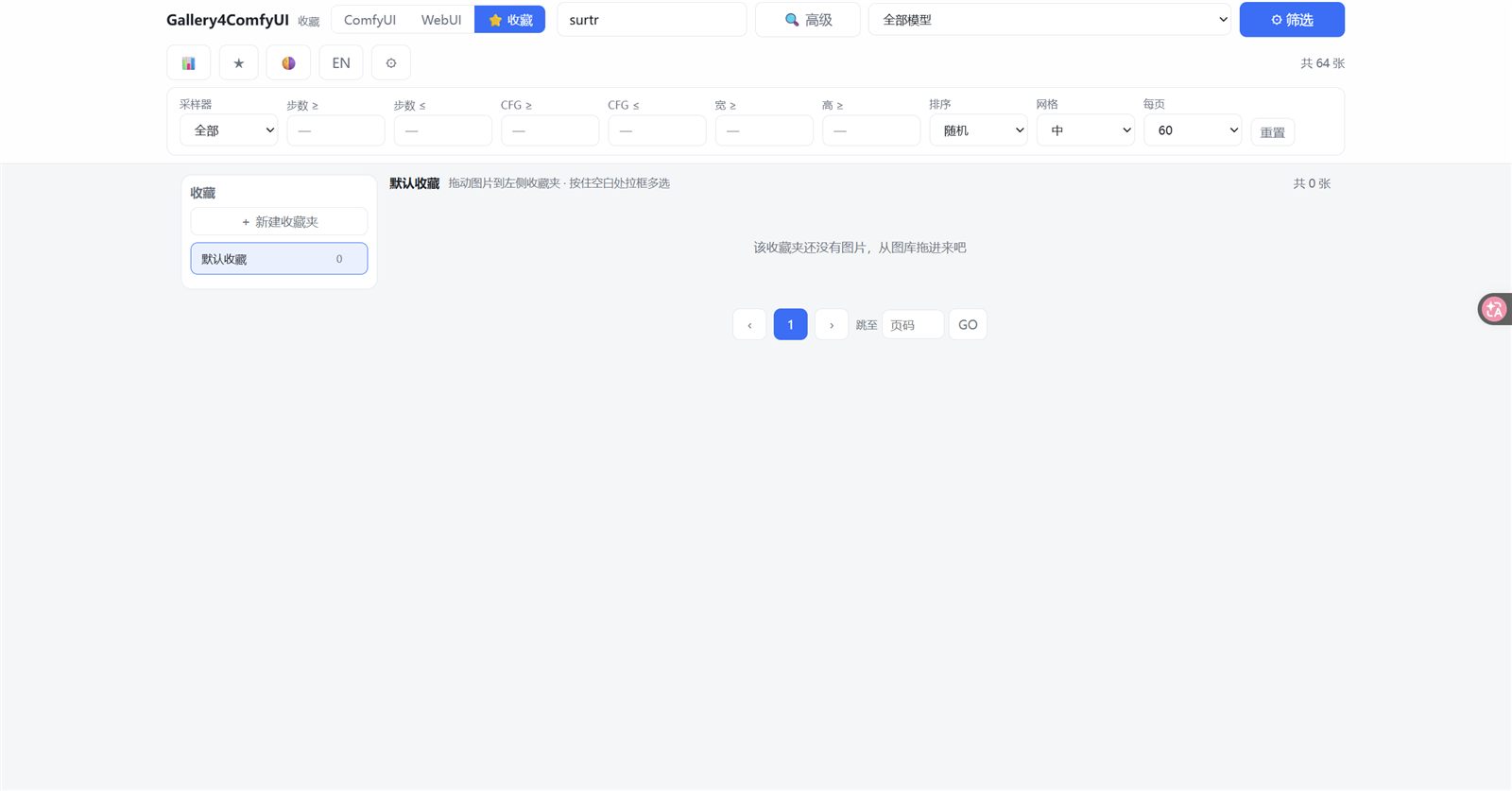
收藏界面 / Favorites
收藏页:左侧收藏夹列表(可新建 / 删除 / 重命名),右侧为当前收藏夹的图片;支持拖拽入夹与拉框多选批量操作。
The favorites page: folder list on the left (create / delete / rename), images of the current folder on the right; drag-and-drop into folders and drag-select for batch operations.
✨ 功能详解 / Features
🗂️ 双来源 / Dual Source
图库同时支持两个图片来源,标签页互斥切换:ComfyUI(输出目录)与 SD WebUI(outputs 目录),另有独立的 ⭐收藏 页。SD WebUI 来源为可选功能,首次运行可跳过配置。
The gallery supports two image sources with mutually-exclusive tabs: ComfyUI (output directory) and SD WebUI (outputs directory), plus a dedicated ⭐Favorites page. The SD WebUI source is optional — you can skip the setup on first run.
⚡ 懒启动 / Lazy Start
ComfyUI 启动时插件零开销:不扫描、不占资源。点击节点「打开图库」按钮才触发索引构建,顶部显示实时进度条;索引为增量缓存,第二次打开秒开,只重新处理新增或修改的文件。
Zero overhead when ComfyUI boots — no scanning, no resource usage. Indexing starts only when you open the gallery (via the node button), with a live progress bar on top. The index is cached incrementally: reopening is instant, only new or modified files are re-parsed.
🔍 搜索与筛选 / Search & Filter
支持按文件名 / 正面提示词 / 负面提示词搜索;可按模型(数百种)、采样器、步数、CFG、尺寸组合筛选;排序支持最新 / 最旧 / 随机 / 文件名;经典分页在网格上下都有,每页数量可选(30 / 60 / 120 / 240)。
Search by filename / positive prompt / negative prompt; filter by model (hundreds), sampler, steps, CFG and size; sort by newest / oldest / random / name; classic pagination on both top and bottom of the grid, with selectable page size (30 / 60 / 120 / 240).
🧬 LoRA 筛选与识别 / LoRA Filter & Recognition
树形折叠 LoRA 筛选器:点击顶栏「LoRA」按钮弹出树形面板,按文件夹层级(如 Anima/画风/self)折叠展开,所有文件夹默认收起,点击展开下一级,点选某 LoRA 即筛选;无筛选时显示全部,选中后仅显示用过该 LoRA 的图。
Tree-collapsible LoRA filter: click the "LoRA" button to open a tree panel grouped by folder hierarchy (e.g. Anima/画风/self), collapsed by default — click a folder to expand the next level, click a LoRA to filter; no filter shows all, and after selection only images using that LoRA appear.
准确识别 weilin/Anima 堆叠节点:正确解析 WeiLinPromptUIOnlyLoraStack / AnimaMultiLoraLoader 等堆叠节点,只统计实际激活(hidden=false)的 LoRA,忽略堆着未启用的——避免把未使用的 LoRA 计入。ComfyUI 源只看 ComfyUI 自己的 loras 目录,不再混入 WebUI 挂载的 LoRA。
Accurate weilin/Anima stack recognition: parses WeiLinPromptUIOnlyLoraStack / AnimaMultiLoraLoader etc., counting only actually enabled (hidden=false) LoRAs and ignoring unused stacked ones — so unused LoRAs are not over-counted. The ComfyUI source scans only ComfyUI's own loras folder, no longer mixing in WebUI-mounted LoRAs.
🔄 独立索引刷新 / Independent Index Refresh
顶栏提供两个独立刷新按钮 —— 🔄 ComfyUI 与 🔄 WebUI,各自强制重建对应来源的索引(显示实时进度),互不干扰;可分别手动修正某个来源的错误缓存。
Two dedicated refresh buttons — 🔄 ComfyUI and 🔄 WebUI — each force-rebuilds its own source index (live progress shown) without affecting the other, letting you fix one source's stale cache independently.
🧠 高级搜索 / Advanced Search
高级搜索侧栏提供历史 tag 统计:从你的历史图片中提取全部 tag 并按使用次数从高到低排列,每个 tag 标注使用次数;点击即加入搜索框(逗号分隔,支持多 tag AND 组合)。搜索框带键盘补全:输入时弹出候选,↑↓ 选择、Tab / Enter 确认。侧栏可折叠,结果区向左平滑延伸,动画过渡。
The advanced search sidebar provides history tag statistics: every tag is extracted from your historical images and ranked by usage count (each shows its count); click to add it to the search box (comma-separated, multi-tag AND combination). The search box has keyboard autocomplete: candidates pop up as you type, ↑↓ to select, Tab / Enter to confirm. The sidebar collapses with a smooth animation, letting the result area extend leftward.
⭐ 收藏 / Favorites
支持创建多个收藏夹,图片可拖拽进任意收藏夹;在网格空白处拉框多选后可批量拖入 / 移出收藏夹;灯箱内一键加入收藏(按钮变金色 + 提示)。普通搜索中的 ★ 星标会收藏到「默认收藏」。
Create multiple folders; drag images into any folder; drag-select on the grid for batch drag-in / remove; one-click favorite in the lightbox (button turns gold with a toast). The ★ star in normal search saves to "Default favorites".
🖥️ 灯箱与全屏 / Lightbox & Fullscreen
点击图片打开灯箱:左侧大图,右侧参数徽章(种子 / 步数 / CFG / 采样器 / 调度器 / 尺寸 / 模型 / 大小)、提示词面板(自动填满空间不留白)、PNG 原始信息、收藏夹选择与操作按钮(下载为主按钮)。⛶ 全屏观看:隐藏信息区纯图全屏,滚轮或左右按钮切换图片,Esc 退出。
Click an image to open the lightbox: large preview on the left; parameter badges (seed / steps / CFG / sampler / scheduler / size / model / filesize), prompt panel (fills remaining space, no blank gaps), raw PNG info, folder picker and action buttons (download as primary) on the right. ⛶ Fullscreen: pure-image fullscreen mode, flip images with the mouse wheel or the side buttons, Esc to exit.
🎬 视频来源 / Video Source
独立的 🎬 视频 标签页:扫描 ComfyUI 输出目录中的视频文件并生成索引,卡片以 16:9 预览,点击即在大图弹窗中播放;同一拍摄批次的 PNG 参数会自动关联显示。
A dedicated 🎬 Videos tab: scans video files in the ComfyUI output directory, shows 16:9 previews, plays in the lightbox on click; same-batch PNG parameters are matched and shown automatically.
🎨 画师模块 / Artist Gallery
🎨 画师 标签页从你的历史图片中自动提取 @画师 tag 并聚合:卡片大字显示定性/备注、小字显示 @tag 与作品数(优先显示 Danbooru 收录数,未收录则显示本库数量),支持左右切换封面、右键菜单(查看大图 / 设置封面 / 查看全部作品 / 改备注 / 调整默认权重 / 复制 tag / 收藏画师 / 简介)。单击复制 @tag,双击加入右侧画师串权重栏(环形权重图、随机权重、可复制提示词)。
The 🎨 Artists tab auto-extracts and aggregates @artist tags from your history: cards show the note/specialty as big text and the @tag plus work count (Danbooru count preferred, local count fallback), cover switching, and a right-click menu (view large image / set cover / view all works / edit note / default weight / copy tag / favorite / profile). Single click copies the @tag, double click adds to the right-side artist weight chain (donut chart, random weights, copyable prompt).
🌐 Danbooru 画师库 / Artist Database
🌐 画师库 标签页内置约 4.8 万位 Danbooru 画师的检索库(懒加载:不点开该页就不读数据);支持按类型 / 来源 / 向性 / 主体 / 技法 / 题材 / 作品数筛选与随机排序;卡片大字为 AI 生成的定性(专长 / 特征,如「巨乳萝莉 · 触手 · 束缚」),下方以标签形式展示涩涩特色与氛围;右键可查看简介弹窗(左侧作品库小图、点图看大图与参数,右侧完整档案)、把画师加入画师串;有本地使用记录的画师还会自动显示本地预览封面并支持左右切换与设封面。
The 🌐 Artist DB tab ships a searchable database of ~48k Danbooru artists (lazy-loaded — no data is read until you open the tab); filter by type / origin / rating / subject / technique / theme / post count, plus random sorting; cards show an AI-generated specialty line (e.g. 「巨乳萝莉 · 触手 · 束缚」) with fetish focus tags below; right-click opens a profile dialog (local work mini-library on the left — click to view large + params, full profile on the right) and can add the artist to the chain; artists with local usage automatically show local preview covers with switching and cover-setting.
画师库数据说明 / Data Notice: 画师库数据(画师名录、收录数、分类与定性描述)由 AI 从 Danbooru 公开数据爬取与归纳生成,可能存在缺失或判断不准确,仅供参考,请以 Danbooru 官方页面为准。数据不随仓库分发,请在插件「画师库」页点「⬇ 下载画师库数据」一键获取(GitHub Release 附件,3.3 MB,下完自动加载);也可
python tools/build_artist_db.py自行抓取名录(约 3 请求/秒,全量约需数小时),或用GALLERY4_DATA_DIR指向自备目录、GALLERY4_ARTLIB_URL指向镜像。懒加载:不打开「画师库」页就不会读这些文件;没有数据时该页显示下载入口,不影响图库其余功能。不含任何用户数据 / No user data: 仓库里没有你收藏的画师(
userdata/artist_favs.json)、你用哪些画师出图(data/*用户自定义*)、画师备注 / 封面 / 默认权重 / 画师串 —— 这些都在userdata/与data/*用户自定义*,已被.gitignore排除。英文界面下,分类/类型/题材等定性标签会通过内置映射表显示英文;AI 生成的自由描述(风格长句)仍为中文原文。
NSFW 提醒 / NSFW Notice: 该画师库及本图库可能包含成人(NSFW)画师与成人内容,本插件不做内容审查与过滤。如果你不希望看到成人内容,请勿启用画师库相关数据;浏览内容的责任由使用者自负,请遵守你所在地区的法律法规。
🌐 体验细节 / UX
支持中 / EN 双语切换(记忆选择)、浅色 / 深色主题、自定义滚动条、SD WebUI 根目录目录选择器(盘符 → 目录树浏览,标注含 outputs 的目录)、搜索框旁「🔍 高级」快捷入口。
中 / EN language switch (remembered), light / dark themes, custom scrollbars, a directory picker for the SD WebUI root (drives → folder tree with "has outputs" badges), and a one-click "🔍 Advanced" shortcut next to the search box.
📦 安装 / Installation
方式一:ComfyUI Manager(推荐)
打开 ComfyUI Manager,在 Install Custom Nodes 搜索 Gallery4ComfyUI,点 Install,重启 ComfyUI 即可。
Method 1: ComfyUI Manager (recommended) — open ComfyUI Manager → Install Custom Nodes → search Gallery4ComfyUI → Install → restart ComfyUI.
方式二:GitHub 下载
从 Release 页下载最新 zip,或克隆本仓库(分支 main)到 ComfyUI/custom_nodes/:
Method 2: GitHub — download the latest release zip, or git clone this repo (branch main) into ComfyUI/custom_nodes/.
1. 下载最新 Release 的 zip
2. 解压出 "Gallery4ComfyUI" 文件夹,放入  ComfyUI/custom_nodes/
3. 重启 ComfyUI
4. 画布添加节点 "Gallery4ComfyUI"(分类 Gallery)→ 点击「打开图库」
   —— 或直接访问:  http://127.0.0.1:8188/gallery4comfyui/
- Download the latest release zip.
- Extract the
Gallery4ComfyUIfolder intoComfyUI/custom_nodes/. - Restart ComfyUI.
- Add node
Gallery4ComfyUI(categoryGallery) → click「打开图库」— or openhttp://127.0.0.1:8188/gallery4comfyui/directly.
🚀 首次运行 / First Run
首次打开会弹窗引导配置 SD WebUI 根目录(含 outputs 的目录)——可跳过,跳过也能正常使用 ComfyUI 图库,之后随时可在 ⚙ 中配置。索引在首次打开时后台构建(顶部进度条可见),之后增量缓存秒开。
On first open a dialog asks for your SD WebUI root folder (the one containing outputs) — optional, skip it and the ComfyUI gallery works fine; configure anytime via the ⚙ button. The index builds in the background on first open (progress bar on top); afterwards it loads from cache instantly and only re-scans changed files.
🗂️ 数据存储 / Data Storage
所有运行时数据都在插件目录内,不修改 ComfyUI 任何原有文件:
All runtime data lives inside the plugin folder — nothing touches your ComfyUI files:
custom_nodes/Gallery4ComfyUI/userdata/
├── index/comfyui_index.json   # ComfyUI 图片索引(提示词/参数/模型)
├── index/webui_index.json     # SD WebUI 图片索引
├── index/video_index.json     # 视频索引
├── settings.json              # SD WebUI 根目录路径
├── folders.json               # 你的收藏夹
├── artist_notes.json          # 画师备注(用户自定义)
├── artist_covers.json         # 画师封面(用户自定义)
├── artist_weights.json        # 画师默认权重
└── artist_favs.json           # 收藏的画师

custom_nodes/Gallery4ComfyUI/data/        # 画师库数据(**不随仓库分发**,网页内一键下载)
├── artists.jsonl                        # Danbooru 画师名录(id / 名字 / 收录数)48,531 位
├── sample_artists_classified.csv        # 画师分类(类型/来源/题材/技法…)
├── toppost_artists_classified.csv       # 同上(高作品数档)
├── artlib_specialty.jsonl               # 定性 / 涩涩特色标签
├── artlib_style.jsonl                   # 风格定性 / 擅长 / 特征 / 简介
└── danbooru_posts.json                  # 名字→收录数映射(画师模块显示用)

custom_nodes/Gallery4ComfyUI/sample_data/ # 极小示例(20 位画师),GALLERY4_DATA_DIR 可指向它
怎么拿到数据 / How to get the data
- 推荐:打开插件「画师库」页 → 点「⬇ 下载画师库数据」(3.3 MB,下完自动加载)
- 或手动下载 Release 附件
artists-data.zip解压到data/:https://github.com/ainghhh/Gallery-for-ComfyUI/releases/latest/download/artists-data.zip- 或自己抓:
python tools/build_artist_db.py(可选--min-posts 100 --out <目录>)- 镜像 / 自备数据:
GALLERY4_ARTLIB_URL(zip 地址)、GALLERY4_DATA_DIR(数据目录)仓库里没有的东西 / Not in the repo:整个
data/(数据靠下载)与userdata/(你收藏了哪些画师、备注、封面、默认权重、画师串、收藏夹),以及data/*用户自定义*(你用哪些画师出图)—— 已被.gitignore排除,不会随仓库分发。
删除插件目录即可完全卸载(索引会在下次使用时重建)。
Delete the plugin folder to fully uninstall (indexes rebuild on next use).
🧩 兼容性 / Compatibility
- ComfyUI 0.3x+
- Chrome / Edge / Firefox(全屏模式需要 Fullscreen API)
- SD WebUI 来源为可选
- 零第三方依赖(仅使用 ComfyUI 内置 aiohttp / folder_paths)
❓ FAQ
Q: 为什么第一次打开很慢? A: 首次索引构建需要几分钟(数万张图),顶部有进度条;之后增量缓存秒开。
Q: Why is the first open slow? A: The first index build takes a few minutes (tens of thousands of images) with a visible progress bar; afterwards the incremental cache makes it instant.
Q: 没有 SD WebUI 能用吗? A: 能。跳过配置即可,仅使用 ComfyUI 图片来源。
Q: Can I use it without SD WebUI? A: Yes. Skip the setup — the ComfyUI source works on its own.
Q: 索引会占用 ComfyUI 空间吗? A: 不会,索引存在插件自己的 userdata/ 目录,删除插件即完全清理。
Q: Does the index take up ComfyUI space?
A: No — it lives in the plugin's own userdata/; deleting the plugin removes everything.
📜 免责声明 / Disclaimer
-
NSFW 提醒:本图库浏览的是你本机已生成的文件,其中可能包含成人内容;Google/ComfyUI Manager 等平台上的展示图片与描述不含成人内容,但实际数据可能包含。插件本身不做内容审查,是否浏览由你自行决定,请遵守当地法律法规。
-
画师库数据准确性:画师名录、收录数与「定性 / 涩涩特色」标签由 AI(DeepSeek)自动爬取与归纳,未经人工逐条校对,可能存在错误、遗漏或偏差,仅作参考;请以 Danbooru 官方页面为准。
-
用户对自己浏览的内容负责;本图库仅浏览你本机已有的文件。
-
NSFW Notice: this gallery browses files already on your machine, which may include adult content. Showcase images/descriptions on platforms contain no adult content, but the actual data may. The plugin applies no content filtering — viewing is at your own discretion and subject to local laws.
-
Data accuracy: the artist database, post counts and AI-generated specialty/fetish tags were scraped and summarized automatically by AI (DeepSeek) without per-item human review — they may contain errors or omissions and are provided for reference only. Refer to Danbooru for authoritative data.
-
Users are responsible for their own content. This gallery merely browses files already present on your machine.
⭐ Support
如果这个项目对你有帮助,请点个 Star 支持一下!遇到问题或建议,欢迎提交 Issue。
If this project helps you, please give it a Star! For bugs or suggestions, feel free to open an Issue.