
Universal Prompt Optimizer
Universal prompt optimizer for any ComfyUI model, with R2V bridges for both MiniMax H3 Director and TimelineDirector.
Nodes (7)
The Max Director that swallows your whole MiniMax H3 graph
The adapter that turns one prompt into a MiniMax H3 storyboard
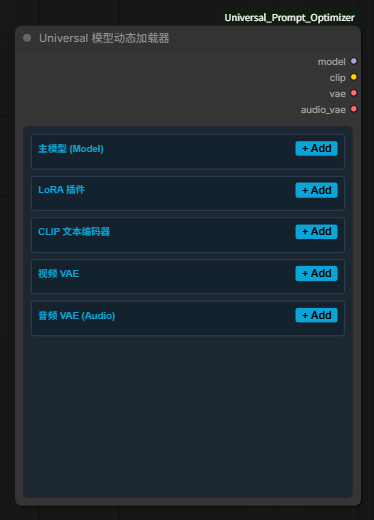
The Universal dynamic model loader
Long MiniMax H3 video without Loop nodes — this sampler builds the loop for you
Model in, video out, no widget soup
Turn \"girl on a beach, make it cinematic\" Into a Prompt Your Model Can Actually Use
Shoving your optimized prompt into AIMixer's H3 Director
ComfyUI Universal MiniMax H3 Ecosystem
English
The ultimate, all-in-one ecosystem for MiniMax H3 video generation. Turn rough ideas into production-ready videos with just 3 nodes, keeping your canvas clean and your workflow lightning fast.
🌟 Director Max Core Features
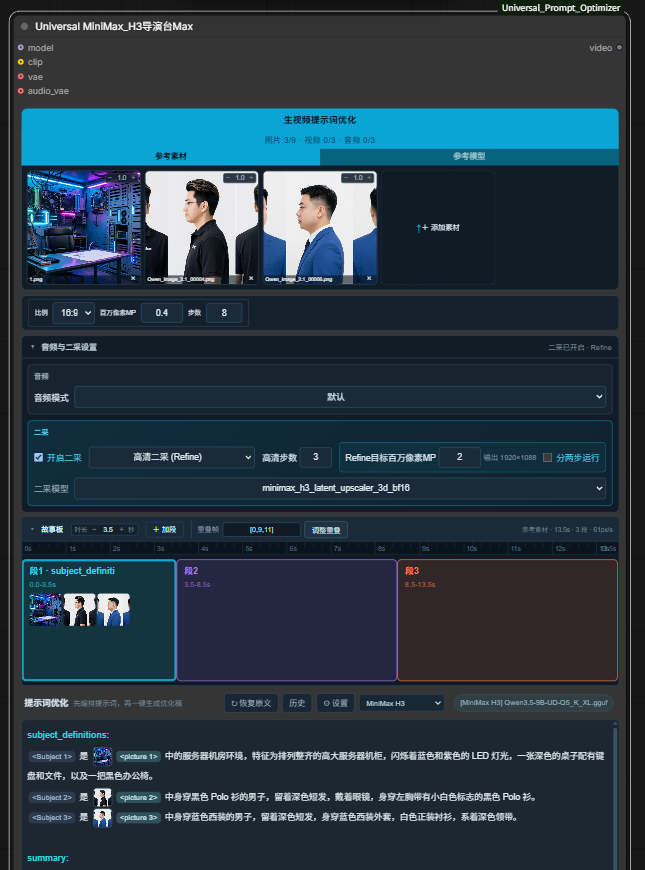
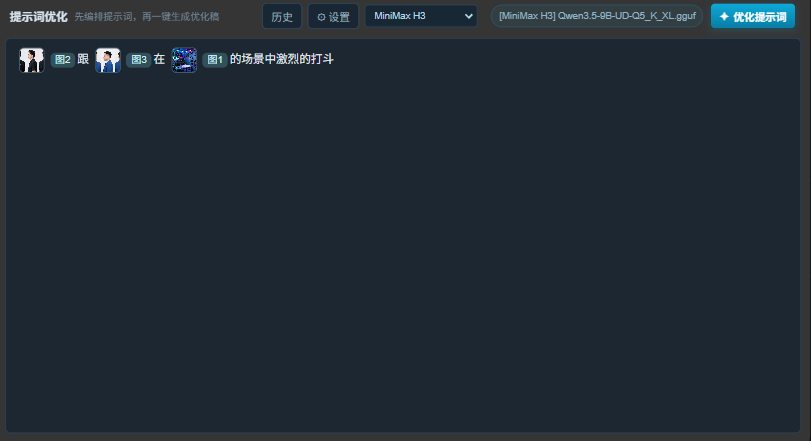
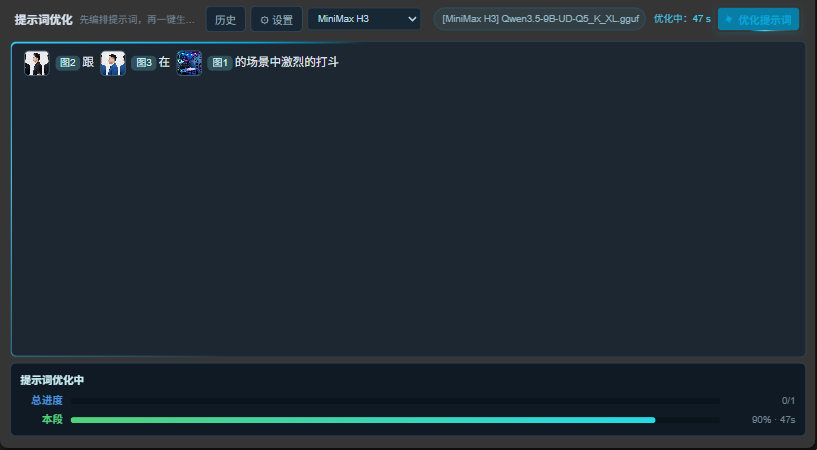
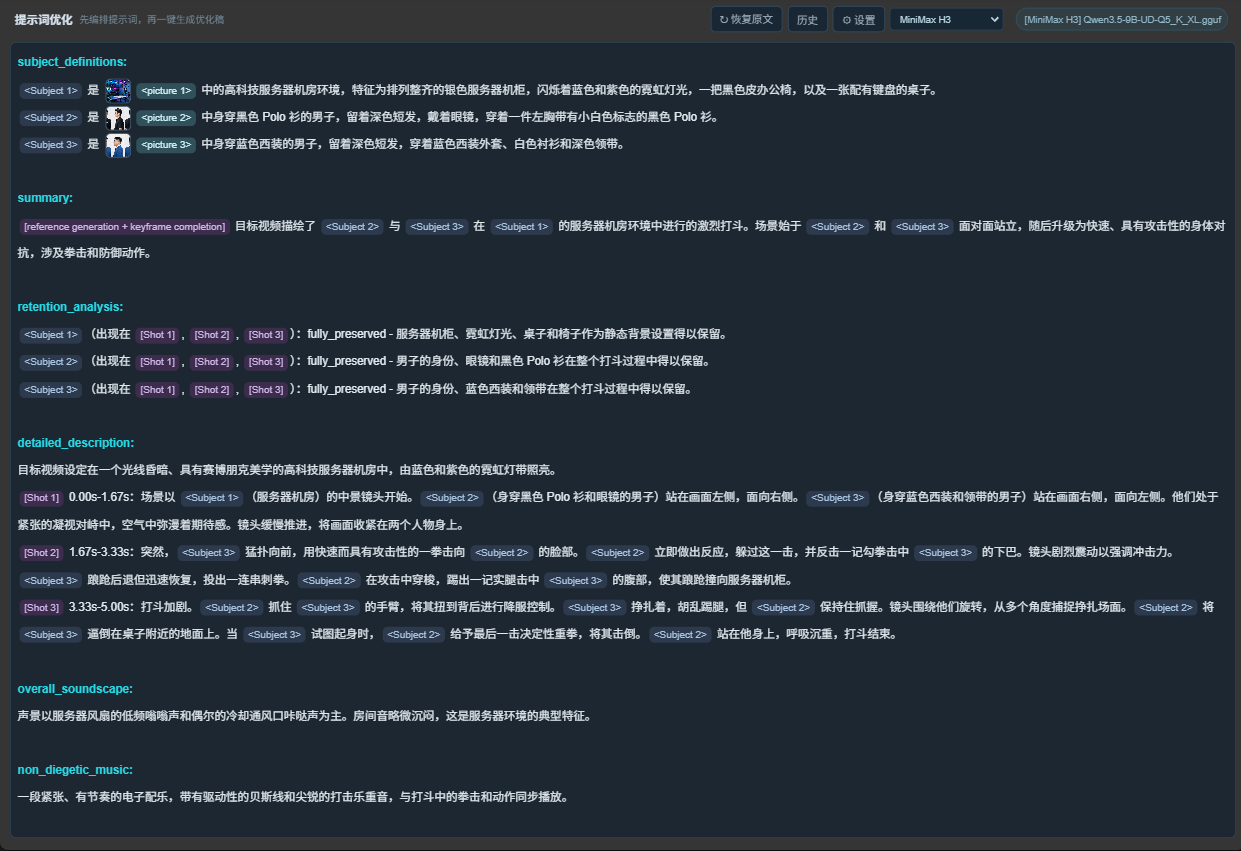
- Auto-Prompt Engine: Built-in LLM optimizer (Local GGUF / Online API). Converts plain language (e.g., "Image 1 and 2 fight in Image 3's scene") into H3's standard 6-section prompt, automatically adapting action beats based on your target duration.
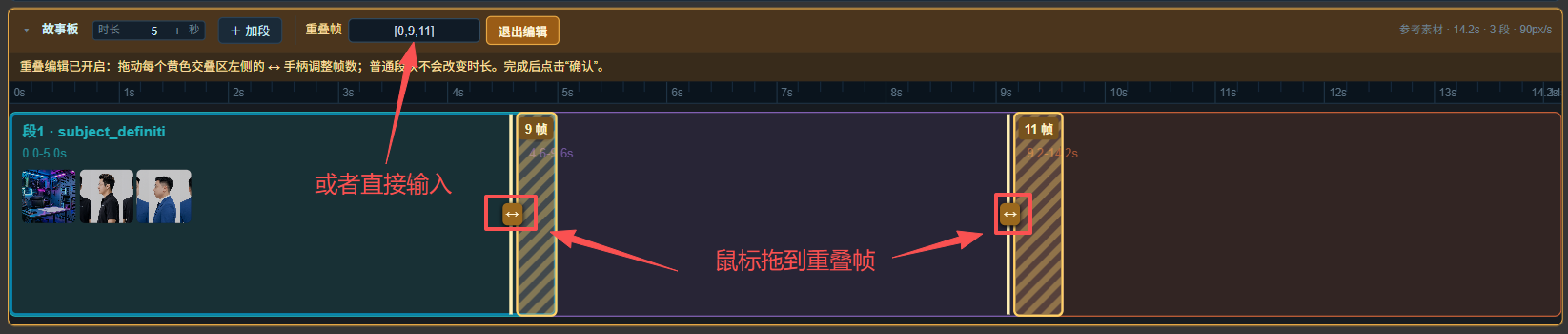
- Infinite Length & Smart Storyboard: Seamless multi-segment video generation. Adjust "overlap frames" for silky-smooth transitions or use hard cuts. Generate videos of any length (limited only by your VRAM).
- Audio Driving: Supports reference audio for voice cloning. Lock audio tracks as BGM or force specific dialogue (single track).
- Dual 2-Stage Upscaling:
- Selflift (Speed): Fully automated 1st + 2nd stage. Benchmark (5070Ti, 0.4mp, 8 steps): Only 79.9 seconds!
- Refine (Quality): High-definition automated pipeline.
- Manual Mode: Generate a draft first, pick the best one, then manually trigger the 2nd stage.
- Video Reference: Use a reference video to guide the motion and action of your generated video.
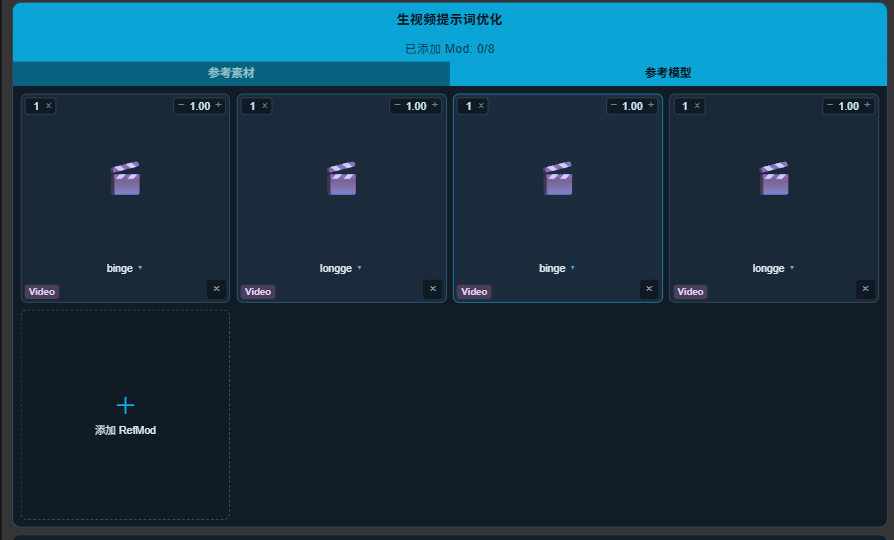
- RefMod Character Consistency: Pre-injects latent features for incredible biological character consistency. Keep faces identical even during turns, occlusions, and re-appearances.
🧩 The 3-Node Workflow Architecture
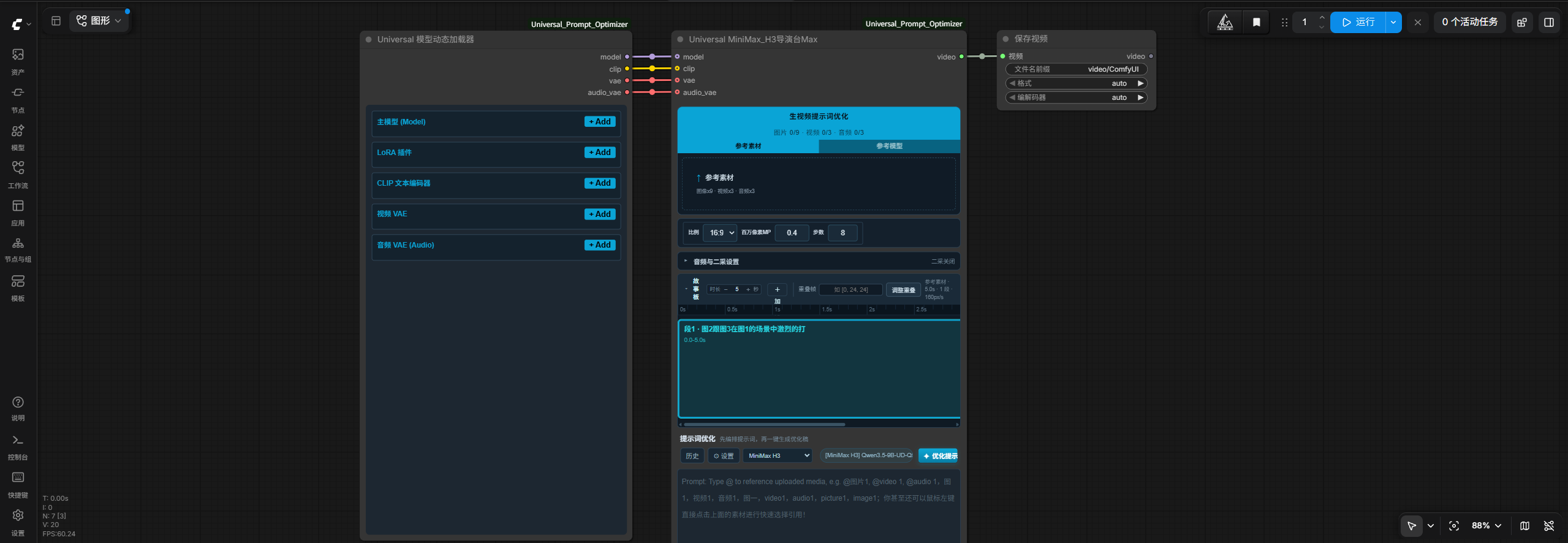
Forget messy spaghetti graphs. The ecosystem includes a dynamic Universal Model Loader (loading Models, LoRA, CLIP, VAE, audio VAE in one node).
Loader → Director Max → Save Video
📦 Backward Compatibility & Bridges
- Prompt Optimizer Node: Still fully supported for image generation (Flux, Z-Image, etc.) and video prompts.
- AIMixer R2V Bridge: Connect the optimizer to AIMixer's Director for single-segment generation.
- TimelineDirector Bridge: Connect for multi-segment and two-stage sampling via Songssx's TimelineDirector.
📸 Screenshots
Director Max Core UI & Node Workflow
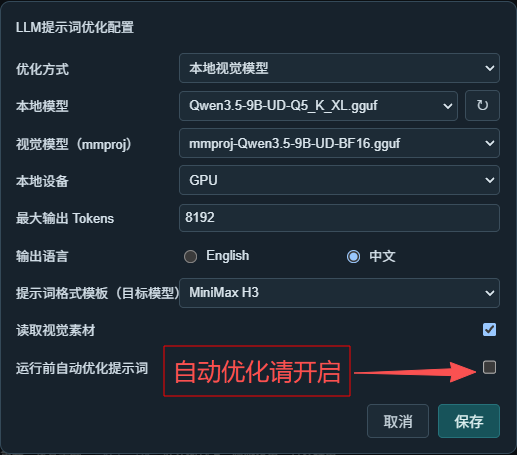
Auto-Prompt Engine (Before / Processing / After)
Smart Storyboard & Segment Overlap
Universal Model Loader & RefMod Support
🗂️ Example Workflows
Load these files directly into ComfyUI:
workflows/00-MiniMax_H3全能导演台Max.json— The Ultimate Default Workflow for Director Max (Start Here!)workflows/01-director-full-r2v导演台外接.json— Legacy pipeline with AIMixer Director integration.workflows/02-image-demo-生图.json— Image prompt optimization demo.workflows/03-unlimited-two-stage-小黄瓜多段.json— Legacy unlimited-length workflow via TimelineDirector.
Installation
cd ComfyUI/custom_nodes
git clone https://github.com/aihaipan/ComfyUI-Universal_Prompt_Optimizer.git
Restart ComfyUI.
Configuration
Open the ⚙ settings panel to configure your LLM backend (Local GGUF or Online API) and output language.
Credits
Core prompt optimization pipeline and frontend editor framework derived from goohai's Goohai-MiniMax-H3_Integration. Licensed under GPL-3.0.
Special thanks to:
AIMixer/ComfyUI_MiniMaxH3_Director for the R2V bridge foundation.
Songssx/ComfyUI-MiniMaxH3-TimelineDirector for the Finite Segment bridge.
Luisacaotica for the ComfyUI-MiniMaxH3Mod plugin powering RefMod support.
License
GPL-3.0-or-later
中文
终极的 MiniMax H3 视频生成全能生态。仅需 3 个节点,即可将大白话想法转化为高质量视频,告别凌乱的画布,体验极致的生成速度。
🌟 导演台 Max 核心功能
全自动提示词引擎:内置本地 GGUF / 在线 API 优化器。一键将大白话转为 H3 标准 6 段式提示词,并根据设定时长自动增删打斗动作与分镜。
无限时长与智能故事板:集成多段故事板衔接。支持调整“重叠帧”实现段与段之间的丝滑过渡,或选择硬切。突破单次生成时长限制。
音频驱动与音轨锁定:支持参考音频生成对白,支持锁定音轨作为 BGM 或强制对白(单轨锁定)。
双二采放大模式:
Selflift (极速):全自动一采+二采。实测数据(5070Ti,0.4mp,8步):仅需 79.9 秒!
Refine (高清):全自动一采+二采,追求极致画质。
手动模式:支持“手动一采+手动二采”,先抽卡,满意后再放大,极致节省时间。
视频动作参考:支持让素材参考视频动作,生成动作一致的视频。
RefMod 角色一致性:兼容以上所有功能。通过提前注入 latent,让模型更清晰生动,特别针对生物模型,保证脸部在转身、遮挡重新出现等场景下高度一致。
🧩 极致精简的 3 节点生态
包含一个强大的 Universal 模型动态加载器(单节点即可加载主模型、LoRA、CLIP、VAE、VAE_Audio 等)。告别凌乱连线。
模型动态加载器 → 导演台 Max → 保存视频
📦 兼容与桥接
万能提示词优化节点:依然保留,支持生图(Flux/Z-Image等)及单段提示词优化。
AIMixer R2V 桥接:连接至 AIMixer 导演台(单段)。
TimelineDirector 桥接:连接至小黄瓜采样器(多段 + 二采)。
📸 界面截图
导演台 Max 核心 UI 与节点工作流
全自动提示词引擎(优化前 / 优化中 / 优化后 / 自动优化设置)
智能故事板与段间重叠
动态模型加载器与 RefMod 支持
🗂️ 示例工作流
直接在 ComfyUI 中拖入这些 JSON 文件即可加载:
- 00-MiniMax_H3全能导演台Max.json — 导演台 Max 终极默认工作流(强烈推荐从这里开始!)
- 01-director-full-r2v导演台外接.json — 旧版:含 AIMixer 导演台整合。
- 02-image-demo-生图.json — 生图提示词优化演示。
- 03-unlimited-two-stage-小黄瓜多段.json — 旧版:通过 TimelineDirector 实现的无限时长生成。
安装
cd ComfyUI/custom_nodes
git clone https://github.com/aihaipan/ComfyUI-Universal_Prompt_Optimizer.git
重启 ComfyUI。
提示词优化配置
打开 ⚙ 设置面板配置优化方式(本地 GGUF 或在线 API)及输出语言。
致谢 / Credits
本插件的核心提示词优化管线及前端编辑器框架源自 goohai 的开源项目 Goohai-MiniMax-H3_Integration。遵循 GPL-3.0 协议。
同时特别感谢:
AIMixer/ComfyUI_MiniMaxH3_Director 提供的 R2V 桥接底子。
Songssx/ComfyUI-MiniMaxH3-TimelineDirector 提供的有限分段采样底子。
Luisacaotica 提供的 ComfyUI-MiniMaxH3Mod 插件与 RefMod 支持。
许可证
GPL-3.0-or-later