
ComfyUI-FeiFei
FeiFei's custom nodes: LLM-driven Prompt Director, prompt enhancing, vision captioner, aspect-ratio sizing, style/character templates, watermark, WebP save/load.
Nodes (15)
Turn a render into a movie still
Stop doing resolution math in your head
Before and after in one frame, so you stop squinting at two windows
The cheapest way to stop an image looking AI
An image in, a prompt out — but you bring the vision model
One dropdown instead of pasting the same forty keywords again
Three keywords in, a whole shot out
Find out your crop ate the subject before you save it
There is no API key field, and that is on purpose
The boring node that unbreaks your upscaler
Getting the prompt back out of a WebP
It doesn't need to be Qwen, it needs an endpoint
Small files that remember how they were made
780 styles, one dropdown, and a random button
Stamping a logo onto your generations (the opposite of watermark removal)
ComfyUI-FeiFei
FeiFei's ComfyUI custom nodes (CATEGORY = FeiFei): LLM-driven Prompt Director, prompt enhancing, subtitle translation, image captioning, aspect-ratio sizing, style/character template assembly, negative-prompt library, film grain and tone grading, before/after compare, safe-area check, watermark, cinematic frame cropping with subtitles, format conversion, WebP save/load.
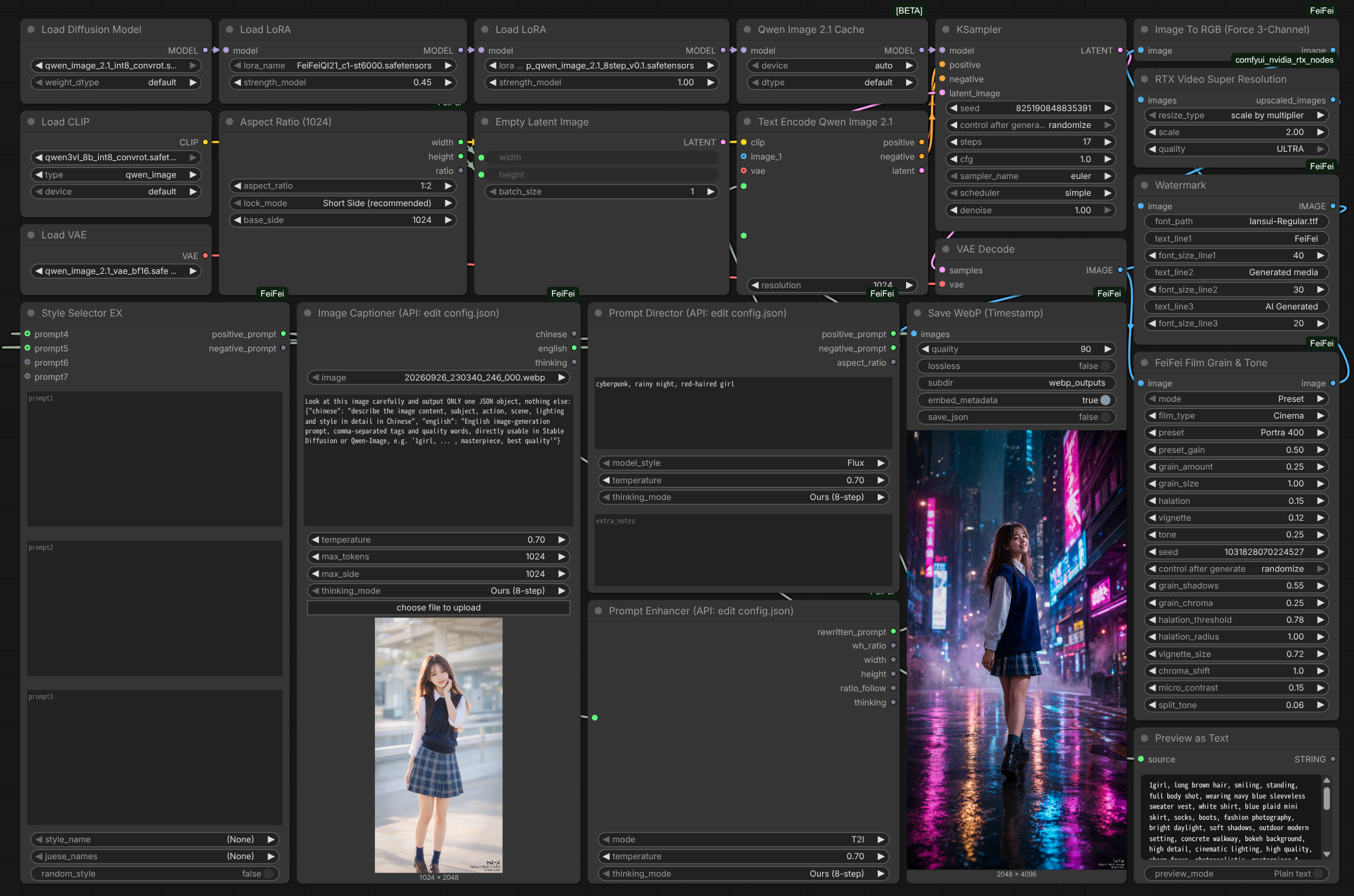
Example workflow
The screenshot above comes with the full workflow JSON: Workflow/ComfyUI-FeiFei.json. Download it and drag-and-drop onto the ComfyUI canvas to load (missing custom nodes will show as red boxes if you haven't installed this pack).
A second workflow runs Flux 3 Klein (distilled T2I) end to end, with Prompt Enhancer on prompt_set = Flux-3-Klein-PUP: Workflow/image_flux3_klein_distilled_t2i.json. It also uses the NVIDIA RTX Video Super Resolution node, so comfyui_nvidia_rtx_nodes has to be installed as well.
Install
cd ComfyUI/custom_nodes
git clone https://github.com/aifeifei798/ComfyUI-FeiFei.git
# Restart ComfyUI, nodes appear under the FeiFei category
Requirements: stock ComfyUI torch / numpy / Pillow plus openai>=1.40 (see requirements.txt). If openai is missing, LLM calls automatically fall back to the standard library — the pack still imports and runs.
Nodes
| Node | File | Notes |
|---|---|---|
| Prompt Director | prompt_director_node.py | Type a few minimal keywords (e.g. "cyberpunk, rainy night, red-haired girl"); an LLM director expands them into a ready-to-use shot. Outputs positive_prompt (subject + scene + mood + camera/lighting merged), negative_prompt, and aspect_ratio (clamped to the Aspect Ratio node's whitelist — convert that node's widget to input and connect it). model_style switches prompt dialect: Flux natural language / SDXL comma tags / Qwen-Image bilingual prose. Endpoint comes from config.json |
| Prompt Enhancer | qwen_prompt_node.py | Prompt rewriting via OpenAI-compatible API (llama.cpp :8080 by default). Inputs: user_prompt / mode / temperature / thinking_mode / prompt_set / timeout. Outputs rewritten prompt + ratio + size + thinking. /v1/chat/completions with /completion fallback, Qwen-Image-2.1 and Flux-3-Klein-PUP system prompts. Endpoint comes from config.json |
| Image Captioner | image_caption_node.py | Upload image → vision model writes Chinese description + English prompt. Requires a vision model behind the API (e.g. Qwen-VL / MiniCPM-V); max_side caps upload size (default 1024). timeout in optional. Endpoint comes from config.json |
| Subtitle Translator | subtitle_translator_node.py | Translates the two cinematic subtitle lines to English/Chinese via the same OpenAI-compatible API. Wire its outputs into Cinematic Frame & Subtitle. timeout in optional. Endpoint comes from config.json (per_node.FeiFeiSubtitleTranslator) |
| Negative Library | negative_library_node.py | Curated negative stacks (SDXL Base / Photoreal Skin / Anime Clean / Hands & Faces / Text & Logo Free) + custom box + optional upstream extra string, deduped like Style Selector. No network |
| Before / After Compare | compare_node.py | Grain A/B and grade review in one frame: Side by Side / Stack / two Wipe splits with divider + labels. after is fitted to before; single frames broadcast across batches |
| Aspect Ratio (1024) | aspect_ratio_node.py | No more megapixel math: pick ratio + lock mode (Short Side / Fixed Width / Fixed Height) + base side (default 1024), outputs 16-aligned width/height straight into Empty Latent. Its aspect_ratio widget accepts a connected ratio string (e.g. from Prompt Director) after Convert to input |
| Watermark | watermark_node.py | Three-line bottom-right watermark, per-line font size, white text with black stroke, cross-platform font lookup (font_path input first, then system fonts) |
| Film Grain & Tone | film_grain_node.py | Physical film post-processing, pure torch with no external models. Sits after your sampler, before the watermark. Organic grain + halation + lens chromatic aberration + print curve + micro-contrast |
| Image To RGB (Force 3-Channel) | image_to_rgb.py | Forces 3-channel RGB + contiguous(), tolerates NCHW / grayscale / RGBA, for picky downstream nodes (e.g. NVIDIA RTX VSR) |
| Cinematic Frame & Subtitle | cinematic_frame_node.py | Movie-still framing: aspect sizing shared with Aspect Ratio (1024), cinematic crop or letterbox bars, two-line subtitle with soft drop shadow, optional dashed timecode. Sits after the upscale, before the Watermark, so the crop and the line land inside the frame and the watermark stays on top. |
| Safe Area Overlay | safe_area_node.py | Framing check before the cinematic crop: rule-of-thirds grid + action-safe rectangle + center cross. Bypass for the final save |
| Style Selector EX | style_selector_node_zh_ex.py | prompt1/2/3 text boxes + four extra input sockets prompt4~prompt7 (link-only, appended after the boxes) → character template (juese_data.py) → style template (style_data.py), optional random style. Add styles/characters by editing the two data files |
| Save WebP (Timestamp) | ComfyUI_SaveWebP/save_webp_node.py | Timestamped WebP (millisecond + index, no overwrites). Prompt + seeds auto-saved to EXIF + sidecar .json (below); lossless, embed_metadata / save_json toggles |
| Load WebP Info | same | Reads back prompt/seeds: sidecar JSON first, EXIF fallback. Outputs positive / negative / seeds / info_json |
Shared LLM helpers (_post_chat_completions, thinking-mode constants, JSON extraction, base-URL normalization) live in llm_common.py so the LLM nodes don't depend on each other.
Endpoint settings: config.json
Prompt Enhancer, Prompt Director, Subtitle Translator and Image Captioner read api_base / api_key / model from config.json in this folder. None of them has those inputs in the node panel — edit the config file instead. The file is re-read on every run, so changes apply immediately with no ComfyUI restart.
{
  "api_base": "http://127.0.0.1:8080",
  "api_key": "",
  "model": "",
  "per_node": {
    "FeiFeiImageCaptioner": { "api_base": "", "api_key": "", "model": "" },
    "FeiFeiPromptDirector": { "api_base": "", "api_key": "", "model": "" },
    "QwenImagePromptEnhancer": { "api_base": "", "api_key": "", "model": "" },
    "FeiFeiSubtitleTranslator": { "api_base": "", "api_key": "", "model": "" }
  }
}
- Top-level keys set the shared endpoint. A
per_nodeentry overrides it for that node only; an empty string inherits the top-level value. Image Captioner often needs its own host, since it requires a vision model. api_baseaccepts a host root (http://127.0.0.1:8080) or a full/v1URL. Cloud endpoints (OpenAI / DeepSeek / Moonshot / any OpenAI-compatible server) work the same way.- Leave
api_keyempty for local llama.cpp, which needs no key. Cloud APIs need a real key there, and needmodelset (leave it empty only for llama.cpp-style servers that ignore it). - No environment variable is read anywhere in this pack — not
OPENAI_API_KEY, notOPENAI_BASE_URL, not proxy variables.config.jsonis the single source of truth, so what the pack sends is entirely determined by that file and nothing else on the machine. - Why not a node input: ComfyUI writes widget values verbatim into every saved workflow and into image metadata, and a workflow stores those values as a positional array with no field names — so a key typed into a panel would land on disk, travel with any shared workflow or exported image, and could not even be scrubbed afterwards. Keeping the key in
config.jsonkeeps it out of everything a workflow produces.
LLM access: openai SDK first, urllib fallback
- Requests go through the official
openaiPython SDK when installed (with retries and auth handled for you). If the SDK is missing or fails to initialize, the node falls back to standard-libraryurllibwith anAuthorizationheader — a broken proxy env or missing package never kills the pack. - No environment variable is read and no LLM node has an
api_keywidget. The only source of a key isconfig.json, so no ambient credential on the machine can be handed to a host named by someone else's workflow.
thinking_mode (Prompt Enhancer + Captioner + Prompt Director)
| Mode | System prompt | enable_thinking | Measured (same prompt) |
|---|---|---|---|
| Ours (8-step) (default) | Full 8-step file / instruction box | false | ~1600 chars content |
| Model native | Built-in minimal prompt (JSON keys only) | true | ~550 chars content |
| Both | Full prompt / instruction box | true | For future Qwen3-class models |
If the server rejects enable_thinking with 400, the node retries once without it. Old workflows pick up the default mode, no changes needed.
Film Grain & Tone (physical film post-processing)
Takes the "too clean, too plastic" look off AI images. No external models, torch only, about 0.2s at 1024² and 10ms at 4K on CUDA.
The stages run in the order a real film does: lens (vignette / lateral chromatic aberration) → film base (halation) → print (S-curve / split tone / micro-contrast) → emulsion (grain). Grain goes last so the print curve can't crush it.
Sits between VAEDecode and Watermark.
Choosing: mode / film_type / preset / preset_gain
mode is a hard switch, not a blend. Preset and custom never mix.
| mode | Who drives the look |
|---|---|
| Preset (default) | The stock in preset decides every effect. All sliders are ignored; preset_gain sets how strong it is. |
| Custom | The sliders decide everything. film_type, preset and preset_gain are ignored. |
There is deliberately no in-between state: with a per-parameter mix factor it is never clear whether a slider you moved actually did anything. The sliders stay visible in Preset mode because ComfyUI cannot hide widgets, so they simply have no effect there.
preset_gain scales the seven effect amounts (grain, halation, vignette, print curve, micro-contrast, split tone, colour fringing) together and leaves the stock's own character alone (grain size, shadow bias, glow threshold). So 0.5 is a half-strength Tri-X rather than half of Tri-X's parameters, and 0.0 leaves the image untouched.
film_type only groups the preset list. It applies no effect of its own.
preset only changes the film's character (grain size, tonal response, halation tint, lens falloff) and never applies a colour grade, so your image keeps its own colours, it just looks like it was shot on film.
If you change film_type without changing preset, the node falls back to the first stock of the new family, so switching families never silently appears to do nothing.
Widgets are ordered by how you use them: mode first, then film_type / preset / preset_gain as one group, then the five main sliders, then seed. The fine-tuning inputs sit in the optional section, grouped by pipeline stage.
preset_mixwas replaced bymodeandpreset_gain, and the widgets were reordered, so a workflow saved before this version needs its film node re-picked once.
Every widget has a tooltip explaining what breaks at which value (e.g.
grain_amountpast 0.6 starts looking like TV snow).
| film_type | Stocks | |---|---| | Color Negative | Portra 160 / 400 / 800, Ektar 100 / 500, Gold 200 / 400, Fuji C200, Pro 400H | | Slide | Ektachrome E100, Fuji Provia 100F | | B&W Negative | Tri-X 400, HP5 Plus 400, FP4 Plus 125, TMax 100 / 400, Delta 100 / 3200, Acros 100 | | Cinema | CineStill 400D / 800T, Vision3 250D / 500T, Cine 50D, 500T Expired | | Special | Cinestack 800T, Push +2 Stops, Cross Process | | Other | Digital Clean (adds almost nothing, handy as an A/B baseline) |
Each stock only declares the traits that differ from a shared "normal negative" baseline, so tuning one film never shifts the others.
Main sliders
Read in Custom mode, ignored in Preset mode.
| Widget | Default | Notes |
|---|---|---|
| grain_amount | 0.25 | Grain strength. Default is about ±3.5/255; 1.0 is about ±14/255. Past that it reads as TV snow, not film |
| grain_size | 1.0 | Clump size, scaled automatically from the 1024 short side, so 4K gets physically larger grain |
| halation | 0.15 | Highlight glow. Push to 0.3–0.5 for a light-leak feel |
| vignette | 0.12 | Corner falloff |
| tone | 0.25 | Print S-curve strength, including a ~0.015 black lift |
The optional section adds grain_shadows (how far grain leans into the shadows), grain_chroma (0 = fully monochrome grain, 1 = independent per channel), halation_threshold, halation_radius, vignette_size, chroma_shift (in pixels of corner fringing on a 1024px image), micro_contrast (the single most effective slider against waxy AI skin), and split_tone.
Why the grain doesn't look like salt-and-pepper noise
Real silver halide grain is clumped, not independent per pixel. So the noise is generated on a low-resolution grid and bicubic-upscaled, with only 6% per-pixel detail mixed in, then weighted by luminance — strongest in the midtones, falling off fast in the highlights, tilting into the shadows per grain_shadows. That per-pixel detail ratio is the critical part: turn it up and it immediately degrades into digital noise.
Notes
- Grain below 1/255 is destroyed by 8-bit saving or
VAEEncodequantization — don't dropgrain_amountbelow 0.02 seedis reproducible; each image in a batch gets independent grain (seed + index), so feeding a frame sequence will not flicker- RGBA input processes RGB only and passes alpha through untouched; grayscale and 2-channel inputs work too
Cinematic Frame & Subtitle
Turns a generated image into a movie screenshot. Wire it after Film Grain and the upscale, before the Watermark: the crop and the subtitle land inside the finished frame, and the watermark then sits on top of it instead of being cropped away.
Aspect ratio
Sizing is shared with the Aspect Ratio (1024) node: same aspect_ratio list, same lock_mode, same base_side, and the same calc_size() behind it. One ratio can drive both nodes and the frames come out identical.
| Control | Values |
|---|---|
| aspect_ratio | 1:1 1:2 2:1 3:4 4:3 9:16 16:9 9:21 21:9. 21:9 is the default scope look |
| lock_mode | Short Side (recommended) / Fixed Width (width=base) / Fixed Height (height=base) |
| base_side | The pinned side; the other follows the ratio. Always a multiple of 16 |
Sizes at base_side 1024: 21:9 → 2384×1024, 16:9 → 1824×1024, 4:3 → 1360×1024, 9:16 → 1024×1824.
Convert aspect_ratio to an input to feed it a custom ratio string such as 2.39:1 (→ 2448×1024) — the same trick the Aspect Ratio node supports for Prompt Director output.
The picture always fills the frame, so there is no inset strip and no stray black frame.
Fill mode
| Mode | Behaviour |
|---|---|
| Cinematic Crop (fill frame) (default) | Scales the image to fill the frame and cuts the overflow off the centre. The frame is always completely covered: a 16:9 render in 21:9 loses its top and bottom, never gains side bars |
| Letterbox (black bars) | The one mode that shows the whole image, adding black bars on the leftover axis — top/bottom for a wide source, left/right for a tall one |
Subtitle
subtitle_topsets first and largest;subtitle_bottomsets under it at 82% size. Empty fields are skipped, so a single line works fine on its own.subtitle_sizeis a fraction of the frame's short side, so the line keeps the same optical size in 21:9 and in 9:16. Keying it off the height would set the type nearly twice as large on a portrait frame and wrap it into four lines.- Long lines wrap automatically at 86% of the picture width — per word for Latin, per character for CJK.
position = Bottomcentres the line inside the lower black bar whenLetterboxleaves room for it, and sets it just above the bottom edge of the picture otherwise.Centeris the title-card placement.shadowis the soft drop shadow scaled to the font size; 0 turns it off.font_pathempty falls back to DejaVu / Arial for a Latin line, and to Noto CJK / YaHei / PingFang when the line needs CJK glyphs, so those characters never render as empty boxes.
Timecode
Fill timecode (e.g. 01:23:45:12) for a dashed burn-in box in the top-right corner of the picture. A leading TC is added automatically.
Pipeline position
Wire it after Film Grain and the upscale, before the Watermark: the crop and the subtitle land inside the finished frame, and the watermark then sits on top of it instead of being cropped away.
LLM prompt nodes (Director / Enhancer / Captioner)
All three read their endpoint from config.json, take an optional timeout (seconds), and return API Error: ... strings instead of raising, so the workflow keeps running when the LLM is unreachable.
- Prompt Director: type minimal keywords → get
positive_prompt(subject + scene + mood + camera/lighting merged, ready to use standalone),negative_prompt, andaspect_ratioalready clamped to the Aspect Ratio whitelist. Convert the Aspect Ratio node'saspect_ratiowidget to an input and connect it.model_styleswitches the dialect (Flux prose / SDXL tags / Qwen-Image bilingual);extra_notesforces director constraints. - Prompt Enhancer:
user_prompt→rewritten_prompt+wh_ratio+width/height+ratio_follow+thinking.modeT2Idefaults to3:2;I2Ireturns an empty ratio meaning "keep the source size". When/v1/chat/completionsfails it falls back to llama.cpp's native/completionendpoint automatically.
prompt_set — which system prompt rewrites the request
| prompt_set | Reply | wh_ratio |
|---|---|---|
| Qwen-Image-2.1 (default) | JSON {rewritten_prompt, wh_ratio, ratio_follow}, forced with response_format | from the model, 3:2 when it omits one (T2I) |
| Flux-3-Klein-PUP | the bare caption (or instruction) the image model consumes, no JSON | canvas, empty when none |
prompt_set picks the prompt family; mode picks t2i / i2i. The Flux set also splits each mode into a plain and a bbox variant, so bbox = true returns the caption plus a JSON bounding-box table in the same string — exactly what a box-aware model expects. prompt_set = Flux-3-Klein-PUP reads flux-3-image-klein-pup.system_prompts.json (missing file/key falls back to the Qwen .txt). thinking_mode = Model native still asks for the JSON shape, so it stays independent of prompt_set.
canvas (Flux T2I only) is the target canvas as W:H. It is prepended as a TARGET CANVAS: W:H line — the Flux prompt composes for it — and echoed back through wh_ratio / width / height; leave it empty to let the model choose and get 1536².
image_1 … image_4 attach reference images to an I2I request, in order, the way the Flux i2i / i2i_bbox prompts expect them. Longest side is capped at 1024 and they need a vision model behind the API; the /completion fallback has no image support, so an I2I request carrying images returns API Error: ... instead of silently dropping them.
- Image Captioner: pick an image from the ComfyUI input folder →
chinesedescription +englishgeneration prompt +thinking. Needs a vision model behind the API;max_side(default 1024) caps the upload so the base64 payload stays small. When the model ignores the JSON shape, the full text lands inchineseandenglishstays empty.
Subtitle Translator
Bilingual subtitles for the cinematic frame. Feed it the two subtitle lines, get translated_top / translated_bottom, and wire those into Cinematic Frame & Subtitle.
target_lang:EnglishorChinese(defaultChinese, so an English line rides under the original).temperaturedefaults to 0.3 — translation wants fidelity, not creativity.extra_notesforces terminology or tone;timeoutsits in optional.- Both lines empty returns an error string; otherwise failures return
API Error: ...intranslated_top. - Endpoint comes from
per_node.FeiFeiSubtitleTranslatorinconfig.json(inherits the shared endpoint when empty), so it can point at a small fast model while captioning uses a vision host.
Negative Library
One dropdown instead of a pasted tag wall. Pick a preset stack, add your own terms in custom, optionally feed an upstream string into extra — the output is a single deduped negative_prompt (terms deduped case-insensitively, so a custom term repeating a preset term never stacks twice).
| Preset | Covers |
|---|---|
| SDXL Base (default) | Anatomy, hands, blur, quality loss, watermark/text/logo |
| Photoreal Skin | Waxy/plastic skin, smoothing, CG look, deformities |
| Anime Clean | Anatomy, hands, limbs, blur, compression, signatures |
| Hands & Faces | Hands, fingers, face asymmetry, eyes |
| Text & Logo Free | Text, watermark, logo, subtitles, captions |
| Blur & Noise Free | Blur, defocus, noise, JPEG artifacts |
(None) with empty boxes outputs an empty string. No network, no models. In the example workflow it feeds the negative side with SDXL Base.
Before / After Compare
Grain A/B checks and grade reviews in one frame. before is the reference size — after is Lanczos-fitted onto it, so an upscaled render still compares cleanly. A single frame on either side broadcasts across the other side's batch.
| Mode | Layout |
|---|---|
| Side by Side (H) (default) | Two frames wide, divider in the middle |
| Stack (V) | Two frames tall |
| Wipe (Left-Right) | before left of the split, after right of it |
| Wipe (Top-Bottom) | before above the split, after below it |
divider (0–1) only moves the split in the two Wipe modes; line_width 0 hides the divider line; show_labels toggles the corner tags with customizable label_before / label_after text. Typical wiring: before = raw VAEDecode, after = Film Grain output.
Safe Area Overlay
A framing check before the cinematic crop — rule-of-thirds grid, action-safe rectangle, and center cross burned onto a preview copy. safe_margin (default 0.1) is the inset as a fraction of each side; both overlays toggle independently. Bypass it for the final save — it is a viewfinder, not a grade. In the example workflow it sits right after the decode with thirds and center on.
Style Selector EX
Three prompt boxes plus four link-only sockets (prompt4~prompt7, e.g. Prompt Director's positive_prompt) joined in order → character template appended → substituted into the style template's {prompt}. Outputs positive_prompt / negative_prompt straight into conditioning.
style_name/juese_namesdropdowns;(None)on either side passes through.random_stylere-rolls every run and prints the pick to the console.- Styles live in
style_data.py, characters injuese_data.py— copy an entry, keep the leading(None), and it shows up in the dropdown. Old Chinese/Japanese template names in saved workflows resolve through the alias tables. - Cleanup matches the rest of the pack: redundant commas and whitespace collapsed.
Image To RGB (Force 3-Channel)
One input, one output, no widgets. Place it directly before picky downstream nodes (e.g. NVIDIA RTX VSR) that read the buffer through raw pointers and require contiguous 3-channel RGB.
- NCHW input is permuted to BHWC (ambiguous square frames stay BHWC).
- Grayscale is tripled, RGBA drops alpha, 2-channel is zero-padded, >4 channels truncated — then
contiguous(). - Non-tensor input or bad dims raise immediately (fail-fast), since passing garbage downstream would only crash further away.
Watermark
Three text lines pinned bottom-right, each with its own size. Empty text skips that line, so one or two lines work fine.
font_pathfirst, then the system chain (DejaVu → Noto CJK → YaHei/SimHei). A missing file falls back with a console warning, never an error.- Opaque white glyphs with a black stroke sized to the font, so the text reads on bright frames too.
- Batch-safe: every frame in the batch gets stamped. Wire it last, after the cinematic crop, so the frame can never cut it off.
Aspect Ratio (1024)
No megapixel math: pick aspect_ratio + lock_mode + base_side (default 1024), get 16-aligned width / height (+ echo ratio) straight into Empty Latent.
Short Side (recommended): landscape ratios pin height, portrait ratios pin width,1:1pins both.Fixed Width/Fixed Height:base_sideis that side, whatever the ratio.base_sideis 16-aligned internally, so any integer works.- Convert the
aspect_ratiowidget to an input to accept upstream strings — Prompt Director output or a custom ratio like2.39:1.
WebP metadata
- Save: full workflow prompt comes via hidden
PROMPT; positive/negative resolved by tracing workflow links (falls back to order); seeds collected fromseed/noise_seed. Summary → EXIFImageDescription, full prompt + workflow → sidecar.json. - Read:
PIL.Image.open(p).getexif()[270],exiftool -ImageDescription xxx.webp, or the Load WebP Info node. - Note: ComfyUI's native drag-to-restore only understands PNG; WebP EXIF is for archiving. Old/external images return empty strings + a note.
LLM backend requirements
- Prompt enhancing / Prompt Director / Subtitle Translator: any text LLM behind an OpenAI-compatible API — local llama.cpp on
:8080, or a cloud endpoint configured inconfig.json. - Captioning: vision model behind the same API; leave
modelempty (llama.cpp) or set it (vLLM/Ollama-style servers).
License
See LICENSE.