
Conjurer
A chat assistant that lives inside ComfyUI's web UI — picks workflows, generates new ones from scratch, debugs broken graphs, all from natural language.
Conjurer
A chat assistant that lives inside ComfyUI's web UI. Talk to it in plain English; it picks the right workflow, writes the prompts, loads the graph onto your canvas, fills in the prompt nodes, and (optionally) queues the render.
Like ComfyUI-Copilot, but: free, self-hosted, no MCP server required, and works with any LLM — your local vLLM tiers, Ollama, LM Studio, or any cloud API (DeepSeek, OpenAI, Anthropic, Grok, etc.).
⭐ If Conjurer saves you time, please star this repo — that's the only currency we accept. The whole project is free and stays free.
See it in action
"make video of dog running in park" → 30 seconds later, you have a video.
| Step | What happens |
|---|---|
| 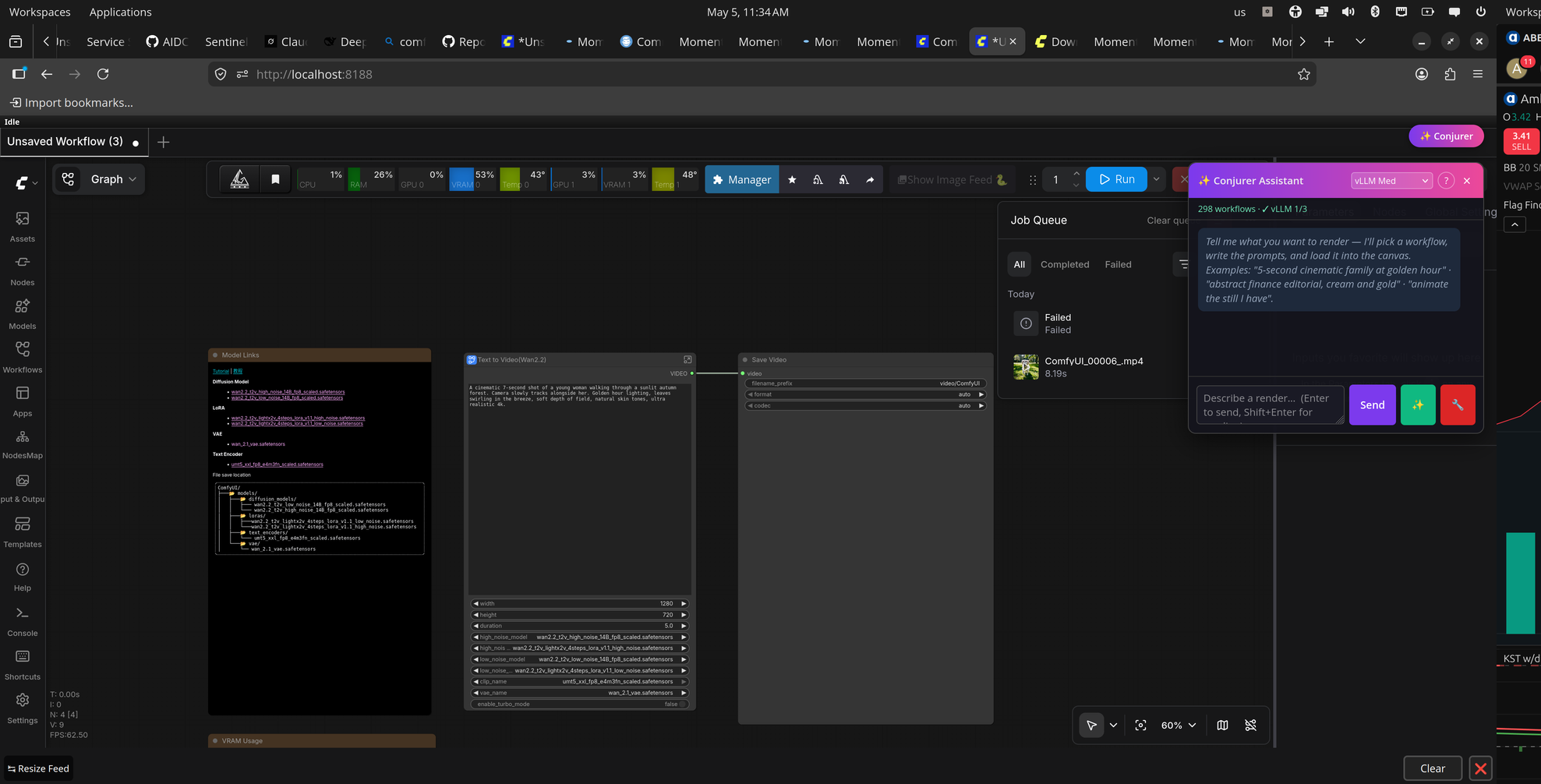 | 1. Click the ✨ Conjurer button (top-right) — the chat panel slides in. Status banner shows you have 298 workflows + which LLMs are reachable. |
|
| 1. Click the ✨ Conjurer button (top-right) — the chat panel slides in. Status banner shows you have 298 workflows + which LLMs are reachable. |
| 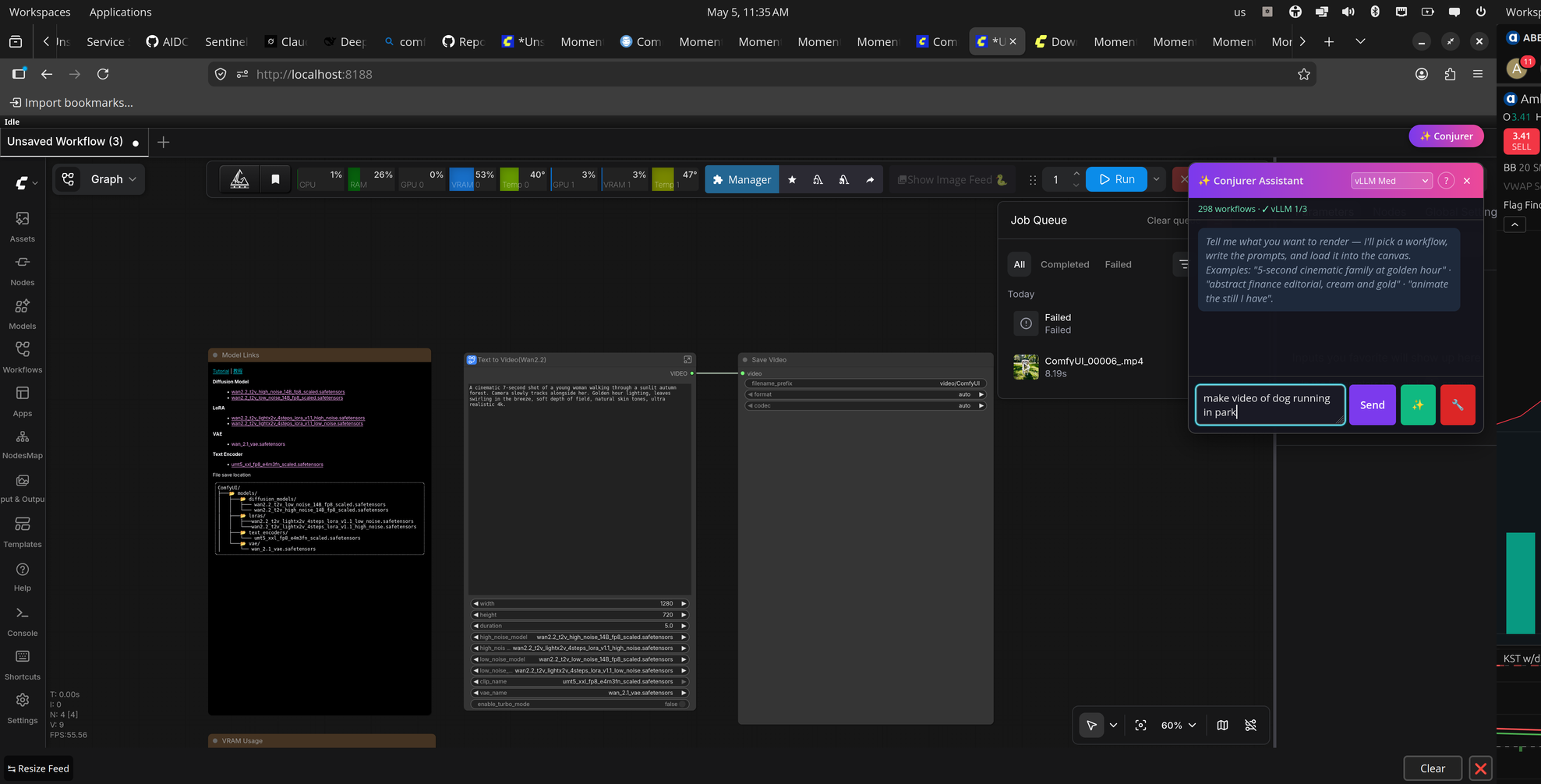 | 2. Type a description in plain English — "make video of dog running in park" — and hit Send. |
|
| 2. Type a description in plain English — "make video of dog running in park" — and hit Send. |
| 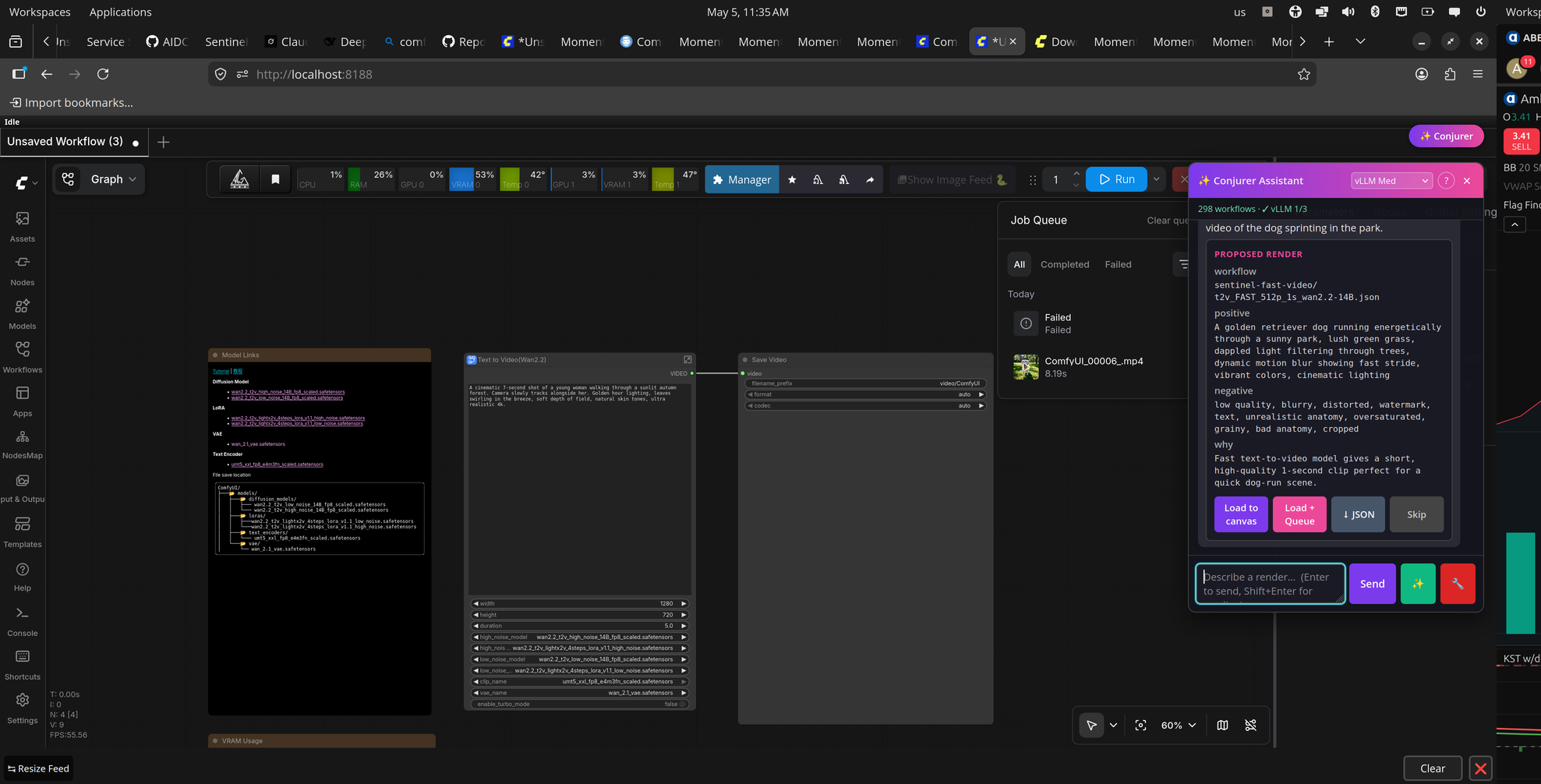 | 3. Conjurer picks the right workflow (
t2v_FAST_512p_1s_wan2.2-14B), writes positive + negative prompts, explains why it picked that one. Load to canvas, Load + Queue, or ↓ JSON. |
| 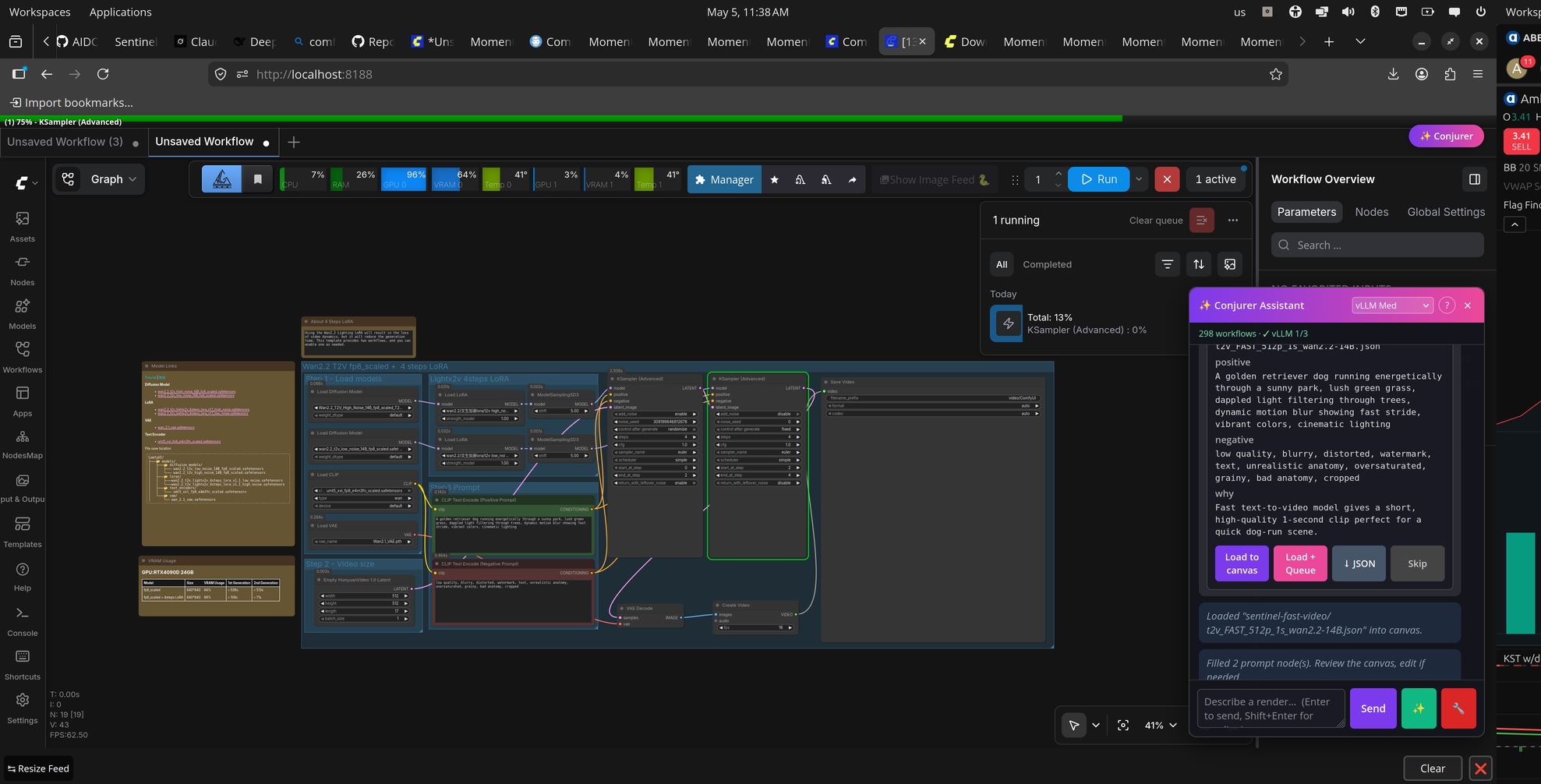 | 4. Workflow drops onto your canvas with prompts auto-filled. Queue starts — progress bar runs along the top. |
|
| 4. Workflow drops onto your canvas with prompts auto-filled. Queue starts — progress bar runs along the top. |
| 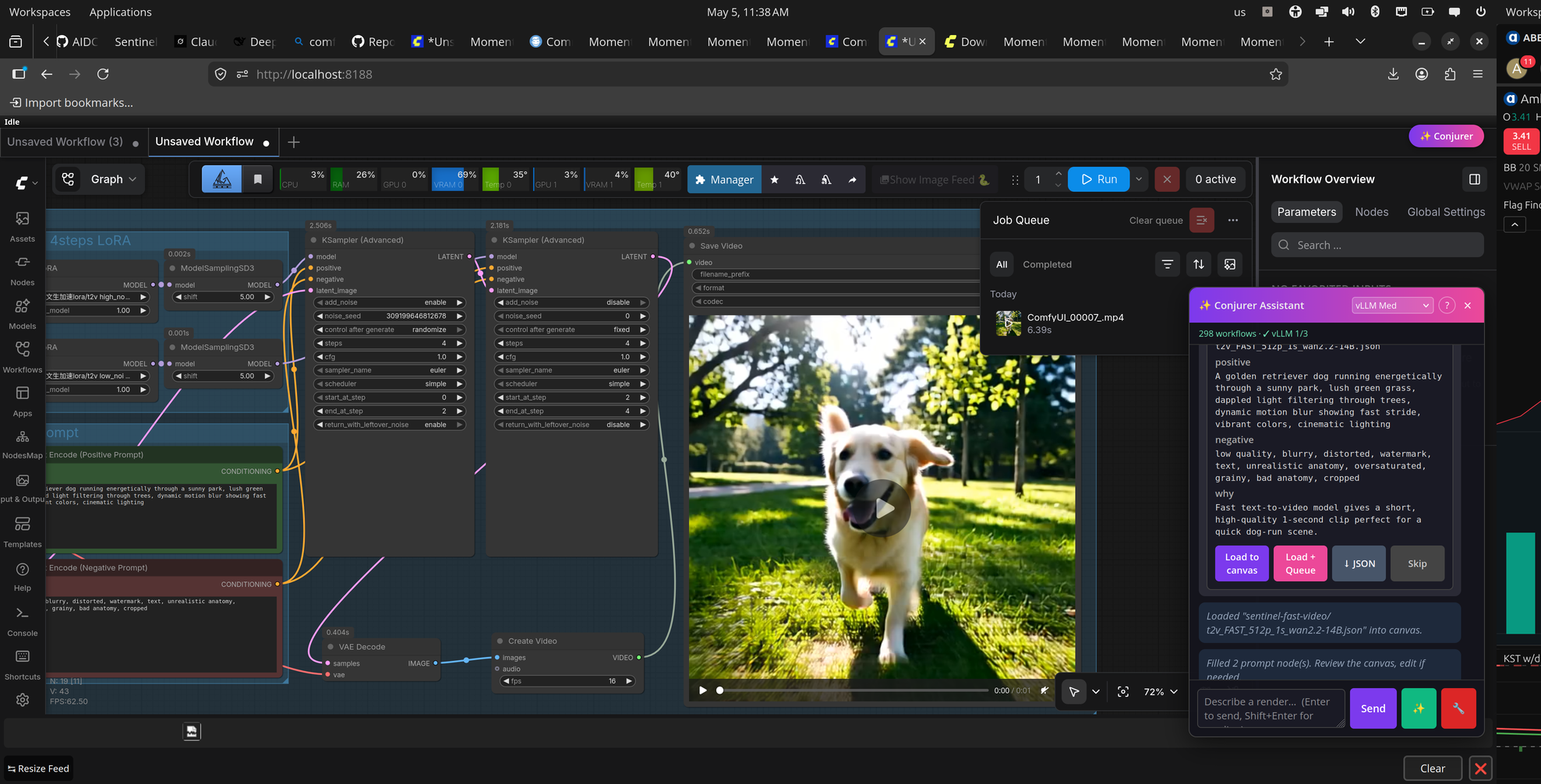 | 5. Done. Inline video preview right in the canvas. The whole flow took ~30 seconds end-to-end. |
What it does
- Render — "5 second cinematic family at golden hour" → picks a video workflow, writes the prompts, loads it on the canvas, ready to queue.
- Generate from scratch ✨ — describe the workflow you want, the LLM
composes a new graph using the live
/object_infoschema, validates every node, fills in defaults you forgot. - Debug 🔧 — click after a failed render. Captures the broken graph
- last error, returns root cause + 1-3 specific fixes.
- Ask — "what does CLIPTextEncode do?" / "find me a workflow for face swap" / "how do I make a person dance from a reference video?"
- Auto-catalog — scans your workflows recursively, groups by category (photo / video / edit / upscale / dance / etc.) so the LLM picks correctly even with hundreds of workflows.
Install
Option 1 — ComfyUI Manager (recommended, all platforms)
- Open ComfyUI Manager.
- Search for Conjurer.
- Click Install.
- Restart ComfyUI.
(Coming once we publish to https://registry.comfy.org/.)
Option 2 — Manual install
Linux / macOS
git clone https://github.com/ai-xcode/conjurer ~/conjurer
python3 ~/conjurer/install.py
cp ~/conjurer/.env.example ~/conjurer/.env
chmod 600 ~/conjurer/.env
nano ~/conjurer/.env       # paste your DeepSeek key (or any other supported provider)
# Restart ComfyUI; click ✨ Conjurer in the top-right.
Windows (PowerShell)
git clone https://github.com/ai-xcode/conjurer $HOME\conjurer
python $HOME\conjurer\install.py
copy $HOME\conjurer\.env.example $HOME\conjurer\.env
notepad $HOME\conjurer\.env    # paste your API key
# Restart ComfyUI; click ✨ Conjurer in the top-right.
Windows note: symlinks need either Developer Mode (Settings → Privacy & Security → For Developers) OR run
install.pyas Administrator. If neither works, runpython install.py --copy-mode— the project is copied instead of symlinked (slower to update, but always works).
The installer:
- auto-detects ComfyUI (override with
--comfyui /path/to/ComfyUI), - symlinks (or junctions, or copies) the project into
<ComfyUI>/custom_nodes/conjurer, - copies 5 starter workflows into
<ComfyUI>/user/default/workflows/conjurer-starter/, - installs
requirements.txtdeps into ComfyUI's venv if one exists.
To uninstall: python install.py --uninstall.
Configure
Edit ~/conjurer/.env (already chmod 600). At least one of:
DEEPSEEK_API_KEY=sk-...                           # cloud, ~$0.004 / request
VLLM_BASE_URL=http://127.0.0.1:8001/v1            # local vLLM
LMSTUDIO_BASE_URL=http://127.0.0.1:1234/v1        # local LM Studio
OLLAMA_HOST=http://127.0.0.1:11434                # local Ollama
OPENAI_API_KEY=sk-...
ANTHROPIC_API_KEY=sk-ant-...
GROQ_API_KEY=gsk_...                              # fast cloud
XAI_API_KEY=xai-...                               # Grok (more permissive)
OPENROUTER_API_KEY=sk-or-v1-...                   # gateway to ~250 models
GEMINI_API_KEY=...
The provider dropdown in the chat panel picks which one is used per request.
Pricing — what's free, what's not
| Tier | What it is | Cost to you | |---|---|---| | Conjurer (this repo, v1.0) | Local extension. Runs on your machine. | Free forever. Bring your own LLM (any local model: $0; or any cloud key, you pay the provider per request). | | Conjurer Cloud (future, planned) | Optional hosted MCP server with curated workflow library + RAG. Free 50-call trial per user, then BYO key. | Trial: free. After trial: $0 if you supply your own LLM key; small subscription only if you want us to host the LLM too. |
Right now (v1.0): Conjurer Cloud is not running yet. Everything you see
runs entirely on your machine. There's no hosted server collecting your
queries. Your prompts go directly from your browser to whatever LLM provider
you configured in .env over HTTPS.
We'll announce when Cloud opens for trials. ⭐ the repo to get notified.
Security — your API key never leaves your machine (today)
.envischmod 600(owner-read-only) and listed in.gitignore. Never bundled into commits or releases.- The
/conjurer/statusendpoint returns onlydeepseek_key: true|false— it does not expose the value of any key. - Outbound LLM calls go directly from your machine to the provider's API over HTTPS. Conjurer is not a relay; there is no Conjurer server in between.
comfy_out/,logs/,pids/,venv/,__pycache__/are gitignored.
If you fork:
git status                    # .env should NOT appear
git check-ignore -v .env      # should print: ".gitignore:1:.env  .env"
Layout
| Path | Purpose |
|---|---|
| __init__.py | ComfyUI custom_node entry — registers routes + WEB_DIRECTORY |
| server.py | HTTP routes (/conjurer/status, /conjurer/chat, /conjurer/generate, /conjurer/debug-graph, /conjurer/workflow, /conjurer/nodes) |
| web/conjurer.js | Chat panel injected into ComfyUI's UI (toggle via ✨ Conjurer button) |
| llm_client.py | Provider abstraction (vLLM / Ollama / DeepSeek / Anthropic / OpenAI / Grok / etc.) |
| install.py | Cross-platform installer (Linux/macOS/Windows) |
| pyproject.toml | Package metadata for ComfyUI Registry |
| .env.example | Template — copy to .env |
| workflows/starter/ | 5 minimal generic workflows bundled with the install |
How the integration works
When you click "Load to canvas" or "Load + Queue":
- The panel calls
/conjurer/workflow?path=<filename>to fetch the JSON. - ComfyUI's own JS API
app.loadGraphData(json)deserialises and draws it. - Two
CLIPTextEncodenodes are auto-filled with the LLM's positive + negative prompts. - If you chose "Load + Queue",
app.queuePrompt()runs — same path as ComfyUI's own "Queue Prompt" button. Format conversion (UI → API) is done by ComfyUI itself, so you never hit the "resave as API" error.
The ✨ Generate button skips the catalog and asks the LLM to compose a
new graph using /object_info as the node schema, with 2-3 in-context
examples and validation against the live ComfyUI before returning.
Roadmap
- [x] v1.0 — Local extension. Pick / Generate / Debug / Q&A. Free.
- [ ] v1.1 — RAG over your local workflow library (better picks at scale).
- [ ] v2.0 — Conjurer Cloud (optional hosted MCP). 50 free calls per user using shared key, then BYO. Workflow library auto-grows from community contributions.
Contributing
PRs welcome. Workflow contributions especially welcome — drop new starter
workflows into workflows/starter/ and open a PR. They'll ship with the
next release.
License
MIT — do whatever, just don't sue me.