
ComfyUI llama-swap
A ComfyUI custom node for llama-swap the hot-swap model manager for llama.cpp.
Nodes (2)
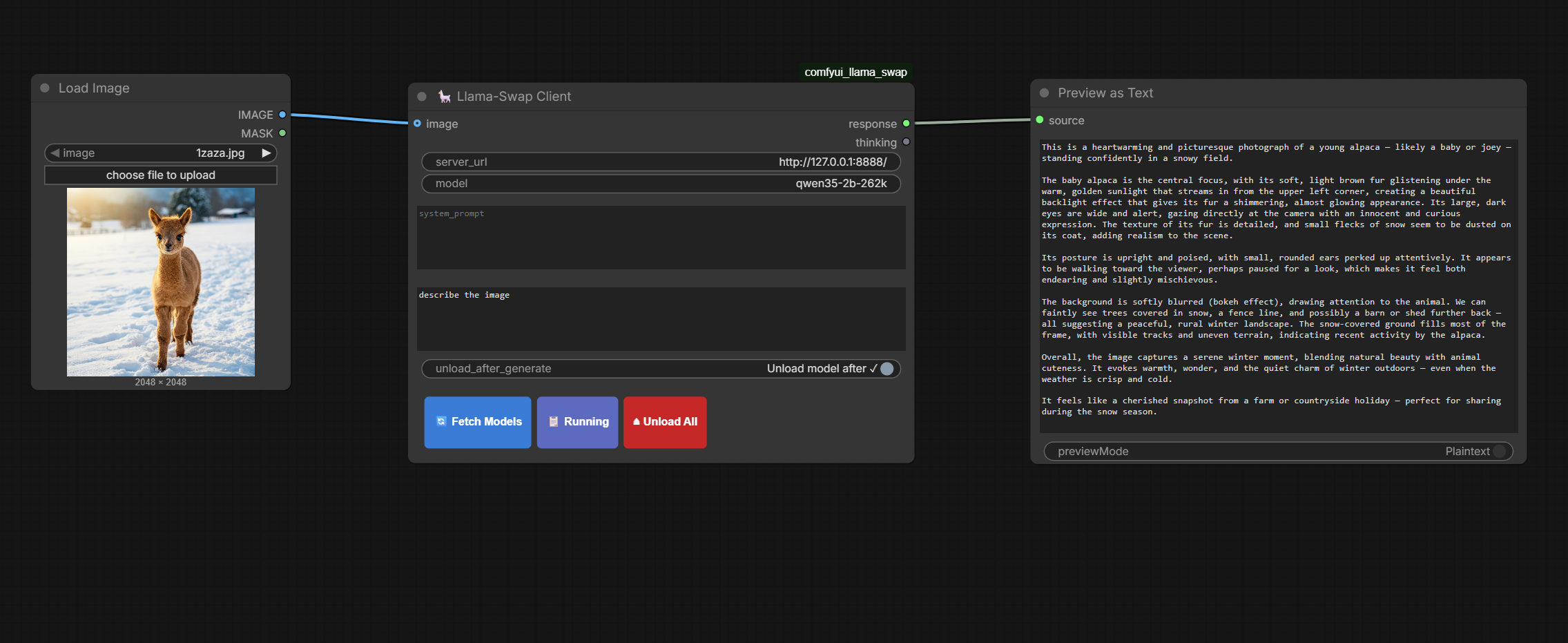
🦙 ComfyUI Llama-Swap Client
A native ComfyUI node for llama-swap — hot-swap any llama.cpp model without leaving your workflow.
✨ Features
| | |
|---|---|
| 🔄 Live model picker | Fetches /v1/models from your running server and shows a floating dropdown — click to set |
| 🖼️ Vision support | Connect any ComfyUI IMAGE node; the first frame is base64-encoded and sent as image_url |
| 🧠 Thinking extraction | <think> / <thinking> blocks are stripped from response and surfaced in a separate thinking output |
| ⏏️ Auto-unload toggle | Calls /unload automatically after every generation — great for VRAM-constrained setups |
| 📋 Running button | Shows which model is currently warm in GPU memory via a toast notification |
| 🔴 Unload All button | Manually frees VRAM from inside ComfyUI without touching the terminal |
🗂️ Nodes
🦙 Llama-Swap Client
The main inference node.
| Input | Type | Description |
|---|---|---|
| server_url | STRING | llama-swap base URL (default http://localhost:8080) |
| model | STRING | Model name — populated via 🔄 Fetch Models |
| system_prompt | STRING (multiline) | System role message |
| prompt | STRING (multiline) | User message / question |
| unload_after_generate | BOOLEAN | Auto-call /unload after every run |
| image (optional) | IMAGE | Vision input — first frame sent as JPEG base64 |
| Output | Description |
|---|---|
| response | Clean human-readable text — <think> blocks removed |
| thinking | Extracted reasoning chain (empty string if the model produced none) |
🦙 Llama-Swap Model Selector
A standalone picker that outputs model_name as a STRING.
Useful to share the same model choice across multiple inference nodes.
⚡ Installation
cd ComfyUI/custom_nodes
git clone https://github.com/yourname/comfyui_llama_swap
Dependencies:
requestsandpillow— both already present in any standard ComfyUI environment.
Restart ComfyUI after cloning.
🚀 Quick Start
- Add a 🦙 Llama-Swap Client node
- Set
server_urlto your llama-swap address - Click 🔄 Fetch Models → select a model from the dropdown
- Connect a Preview Text node to
response - (Optional) Connect a second Preview Text node to
thinkingto debug reasoning chains - Hit Run 🎉
🧠 Thinking Output
Models like DeepSeek-R1, QwQ, Qwen3 and other reasoning models wrap their chain-of-thought in <think> tags.
This node automatically separates them:
response  →  clean answer, ready to use downstream
thinking  →  full reasoning trace for inspection / debugging
Both <think> and <thinking> variants are handled.
🔌 Backend Routes
Three lightweight proxy routes are registered on ComfyUI's PromptServer at startup to avoid CORS issues:
| Route | Proxies to |
|---|---|
| GET /llama_swap/models | GET {url}/v1/models |
| GET /llama_swap/running | GET {url}/running |
| GET /llama_swap/unload | GET {url}/unload |
📄 License
MIT