
afloy_audio_tools
Professional audio editing nodes for ComfyUI — trim, measure, and inspect audio without leaving your workflow.
Nodes (3)
Afloy Audio Tools
Professional audio editing nodes for ComfyUI — trim, measure, and inspect audio without leaving your workflow.



Contents
Installation
[!IMPORTANT] This is a single package containing all 3 nodes. You install it once — all nodes appear automatically.
Option A — Download ZIP (easiest)
- Download ZIP (or click the green button above).
- Extract the archive — you'll get a folder
afloy_audio_tools-main. - Move the whole folder into your ComfyUI
custom_nodesdirectory. - Restart ComfyUI.
After installation your folder structure should look like this:
ComfyUI/
└── custom_nodes/
    └── afloy_audio_tools-main/  ← the folder you moved
        ├── __init__.py          ← all 3 nodes live here
        ├── web/
        │   └── trim_audio.js
        ├── docs/
        ├── LICENSE
        └── README.md
Option B — Git clone
cd ComfyUI/custom_nodes
git clone https://github.com/afloy011-spec/afloy_audio_tools.git "Afloy Audio Tools"
Restart ComfyUI.
<p align="right"><a href="#contents">↑ Back to top</a></p>[!NOTE] No extra pip packages needed — the nodes use
numpy,Pillow, andtorchthat already ship with ComfyUI. After restart, find all three nodes under Add Node → audio → Afloy Audio Tools.
Quick Start
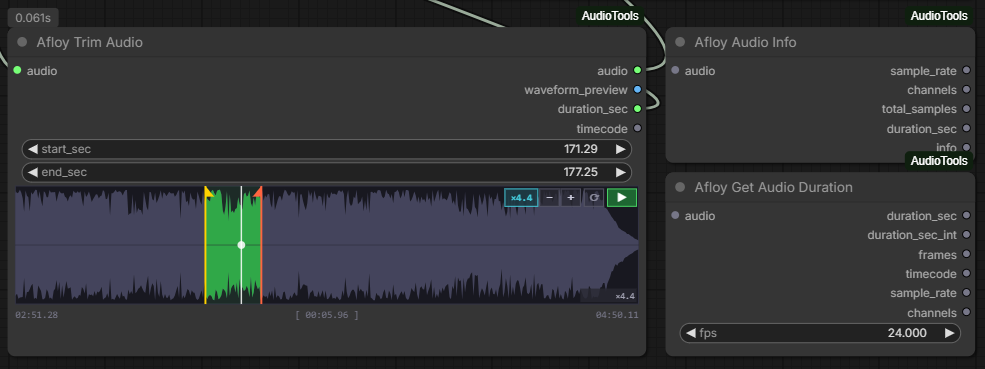
[!TIP] Use Afloy Audio Trim to trim audio directly inside your workflow.
- Add an Afloy Audio Trim node and connect
audio. - Drag
start_sec/end_secmarkers (or pressTabto switch,I/Oto set from cursor). - Drag the white scrub cursor to seek; press
Spaceto play / stop (does not re-fetch the file). - After you change the file in Load Audio, click Reload in the node toolbar or press
F5. - Use
+/-(or mouse wheel) to zoom,Shift + mouse wheelto scroll.
Widget Features
<table> <thead><tr><th align="left"><img width="400" height="1" alt=""><br>Feature</th><th align="left"><img width="600" height="1" alt=""><br>Details</th></tr></thead> <tbody> <tr><td><b>Toolbar</b></td><td>Reload (<code>F5</code>), zoom, loop, play — controls stay above the waveform</td></tr> <tr><td><b>Waveform</b></td><td>Filled-polygon, classic DAW look</td></tr> <tr><td><b>Markers</b></td><td>Draggable start / end with zero-crossing snap</td></tr> <tr><td><b>Scrub Cursor</b></td><td>Click to place, drag to seek</td></tr> <tr><td><b>Playback</b></td><td>From cursor position, constrained to selection</td></tr> <tr><td><b>Region Drag</b></td><td>Grab inside selection to move both markers</td></tr> <tr><td><b>Zoom</b></td><td>Up to 50× via <code>+</code> / <code>-</code> buttons or mouse wheel</td></tr> <tr><td><b>Scroll</b></td><td>Horizontal with <code>Shift + mouse wheel</code></td></tr> <tr><td><b>Loop</b></td><td>In-node playback with loop toggle</td></tr> <tr><td><b>Tooltip</b></td><td>Hover to see time under cursor</td></tr> </tbody> </table>Keyboard Shortcuts
<table> <thead><tr><th align="left"><img width="400" height="1" alt=""><br>Key</th><th align="left"><img width="600" height="1" alt=""><br>Action</th></tr></thead> <tbody> <tr><td><code>F5</code></td><td>Reload waveform from disk (after changing file in Load Audio)</td></tr> <tr><td><code>Space</code></td><td>Play / Stop</td></tr> <tr><td><code>Shift + ← →</code></td><td>Nudge active marker by 1 s</td></tr> <tr><td><code>Tab</code></td><td>Switch active marker (start / end)</td></tr> <tr><td><code>I</code></td><td>Set <b>start</b> marker to cursor position</td></tr> <tr><td><code>O</code></td><td>Set <b>end</b> marker to cursor position</td></tr> </tbody> </table> <p align="right"><a href="#contents">↑ Back to top</a></p>Nodes
[!NOTE] All three nodes appear under audio → Afloy Audio Tools in the Add Node menu.
Afloy Audio Trim
Interactive audio trimmer with a DAW-style waveform widget.
Inputs
<table> <thead><tr><th align="left"><img width="280" height="1" alt=""><br>Name</th><th align="left"><img width="140" height="1" alt=""><br>Type</th><th align="left"><img width="580" height="1" alt=""><br>Description</th></tr></thead> <tbody> <tr><td><code>audio</code></td><td><code>AUDIO</code></td><td>Source audio signal</td></tr> <tr><td><code>start_sec</code></td><td><code>FLOAT</code></td><td>Trim start (seconds)</td></tr> <tr><td><code>end_sec</code></td><td><code>FLOAT</code></td><td>Trim end (<code>-1</code> = end of file)</td></tr> </tbody> </table>Outputs
<table> <thead><tr><th align="left"><img width="280" height="1" alt=""><br>Name</th><th align="left"><img width="140" height="1" alt=""><br>Type</th><th align="left"><img width="580" height="1" alt=""><br>Description</th></tr></thead> <tbody> <tr><td><code>audio</code></td><td><code>AUDIO</code></td><td>Trimmed audio segment</td></tr> <tr><td><code>waveform_preview</code></td><td><code>IMAGE</code></td><td>Static waveform image</td></tr> <tr><td><code>duration_sec</code></td><td><code>FLOAT</code></td><td>Segment length in seconds</td></tr> <tr><td><code>timecode</code></td><td><code>STRING</code></td><td><code>MM:SS.ms</code> timecode</td></tr> </tbody> </table>Afloy Audio Duration
Returns audio length in multiple formats — useful for syncing with video or animation frames.
Inputs
<table> <thead><tr><th align="left"><img width="280" height="1" alt=""><br>Name</th><th align="left"><img width="140" height="1" alt=""><br>Type</th><th align="left"><img width="580" height="1" alt=""><br>Description</th></tr></thead> <tbody> <tr><td><code>audio</code></td><td><code>AUDIO</code></td><td>Source audio signal</td></tr> <tr><td><code>fps</code></td><td><code>FLOAT</code></td><td>Frames per second (default <code>24</code>)</td></tr> </tbody> </table>Outputs
<table> <thead><tr><th align="left"><img width="280" height="1" alt=""><br>Name</th><th align="left"><img width="140" height="1" alt=""><br>Type</th><th align="left"><img width="580" height="1" alt=""><br>Description</th></tr></thead> <tbody> <tr><td><code>duration_sec</code></td><td><code>FLOAT</code></td><td>Duration in seconds</td></tr> <tr><td><code>duration_sec_int</code></td><td><code>INT</code></td><td>Rounded duration</td></tr> <tr><td><code>frames</code></td><td><code>INT</code></td><td>Frame count at given FPS</td></tr> <tr><td><code>timecode</code></td><td><code>STRING</code></td><td><code>MM:SS.ms</code></td></tr> <tr><td><code>sample_rate</code></td><td><code>INT</code></td><td>Sample rate (Hz)</td></tr> <tr><td><code>channels</code></td><td><code>INT</code></td><td>Mono / Stereo</td></tr> </tbody> </table>Afloy Audio Info
Diagnostic node — outputs audio metadata as individual values and a human-readable summary.
Inputs
<table> <thead><tr><th align="left"><img width="280" height="1" alt=""><br>Name</th><th align="left"><img width="140" height="1" alt=""><br>Type</th><th align="left"><img width="580" height="1" alt=""><br>Description</th></tr></thead> <tbody> <tr><td><code>audio</code></td><td><code>AUDIO</code></td><td>Source audio signal</td></tr> </tbody> </table>Outputs
<table> <thead><tr><th align="left"><img width="280" height="1" alt=""><br>Name</th><th align="left"><img width="140" height="1" alt=""><br>Type</th><th align="left"><img width="580" height="1" alt=""><br>Description</th></tr></thead> <tbody> <tr><td><code>sample_rate</code></td><td><code>INT</code></td><td>Sample rate in Hz</td></tr> <tr><td><code>channels</code></td><td><code>INT</code></td><td>Number of channels</td></tr> <tr><td><code>total_samples</code></td><td><code>INT</code></td><td>Total sample count</td></tr> <tr><td><code>duration_sec</code></td><td><code>FLOAT</code></td><td>Duration in seconds</td></tr> <tr><td><code>info</code></td><td><code>STRING</code></td><td>Human-readable summary</td></tr> </tbody> </table> <p align="right"><a href="#contents">↑ Back to top</a></p>Requirements
- ComfyUI — any recent version
- Python — 3.10+
- Extra pip packages — none
License
This project is licensed under the MIT License.