
ComfyUI-GROUT
Custom ComfyUI nodes for GROUT (Geometric Reasoning Over Unstructured Tessellations) - a deep learning model for detecting and segmenting grout lines in mosaic images.
Nodes (3)
ComfyUI-GROUT
Custom ComfyUI nodes for GROUT (Geometric Reasoning Over Unstructured Tessellations) - a deep learning model for detecting and segmenting grout lines in mosaic images.
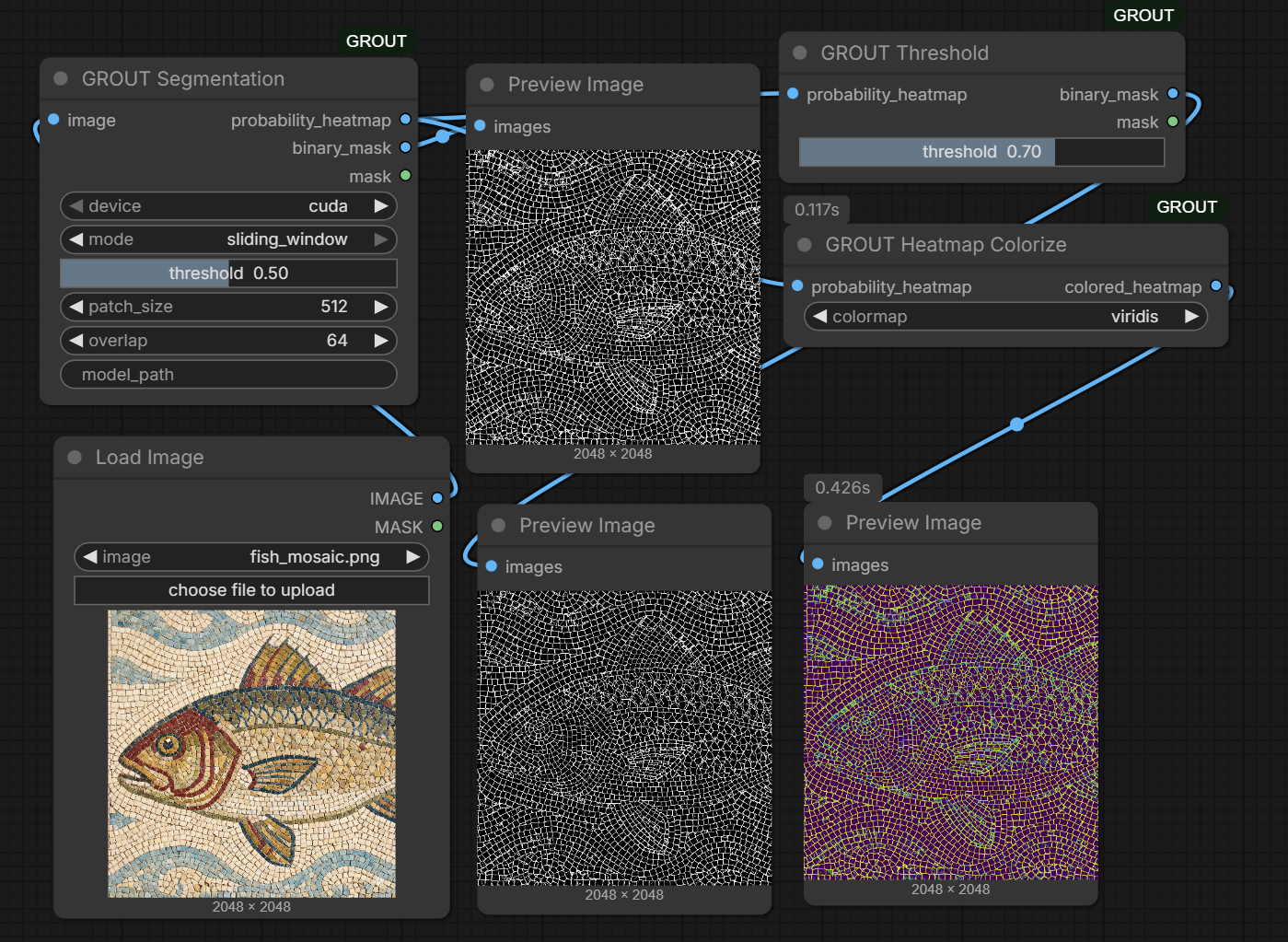
Nodes
GROUT Segmentation
Main segmentation node that processes mosaic images.
Inputs:
image: Input mosaic imagedevice: Select CUDA or CPU for inferencethreshold: Initial threshold for binary mask (0.0 - 1.0)model_path(optional): Custom path to model weights. Leave empty to auto-download from HuggingFace.
Outputs:
probability_heatmap: Grayscale probability map (0-1 range)binary_mask: Thresholded binary mask as imagemask: ComfyUI MASK format for compositing
GROUT Threshold
Post-processing node to adjust threshold without re-running inference.
Inputs:
probability_heatmap: Output from GROUT Segmentation nodethreshold: Threshold value (0.0 - 1.0)
Outputs:
binary_mask: Thresholded binary mask as imagemask: ComfyUI MASK format
GROUT Heatmap Colorize
Visualization node to apply colormap to probability heatmap.
Inputs:
probability_heatmap: Output from GROUT Segmentation nodecolormap: Select from magma, viridis, plasma, inferno, hot, jet
Outputs:
colored_heatmap: Colorized visualization
Installation
Option 1: ComfyUI Manager
Search for "GROUT" in ComfyUI Manager and install.
Option 2: Manual Installation
-
Navigate to your ComfyUI custom nodes folder:
cd ComfyUI/custom_nodes/ -
Clone this repository:
git clone https://github.com/advancedtech-sk/ComfyUI-GROUT.git -
Install dependencies:
cd ComfyUI-GROUT
pip install -r requirements.txt
For standalone Windows version (portable/embedded Python):
cd ComfyUI-GROUT ..\..\..\python_embeded\python.exe -m pip install -r requirements.txt -
Restart ComfyUI
Model Download
The model will be automatically downloaded from HuggingFace on first use. It will be saved to:
ComfyUI/models/grout/grout_b3_zeroshot_v1.pth
Alternatively, you can manually download from:
Example Workflow
[Load Image] -> [GROUT Segmentation] -> [probability_heatmap] -> [GROUT Threshold] -> [binary_mask]
                         |
                         +-> [GROUT Heatmap Colorize] -> [Preview Image]
Workflow Tips:
- Use GROUT Segmentation to run inference once
- Connect the
probability_heatmapoutput to GROUT Threshold - Adjust the threshold slider in GROUT Threshold to tune the mask without re-running the model
- Use GROUT Heatmap Colorize for visualization with different colormaps
Links
License
MIT License
Author
Radoslav Lovecky, Arperon s.r.o, Institute of Advanced Technologies, Slovakia