
AP Optical Flow + Loop + Inpaint Crop/Stitch
RAFT-based optical flow nodes for ComfyUI with robust batch/index handling, flow save/load, and inpaint crop/stitch support.
Nodes (24)
The node that actually moves your frame — applying optical flow the way it should work
Warp your latent, skip two VAE round-trips — optical flow applied in latent space
Region-limited latent warping — flow inside a mask, no pixel detour, no background drift
Warp only the part that moves — masked optical flow without smearing your background
A preview node that shows every frame in the batch, not just the last one
Save images and masks together from one node, and let them ride through as outputs
The node that decides who wins — blending warped and original frames without ghosting
Where the flow lies — the occlusion mask that keeps warps from ghosting
The node that turns two frames into motion, and why it's the only one you should trust
The return wire — feed your processed frame back into the loop and get the whole sequence out
Your frame-by-frame feedback loop starts here — history, first frame, and a token that carries state
Crop to the mask, inpaint, stitch back — the batch-safe crop that remembers where everything goes
Put the inpainted crop back — the node that remembers where the crop came from
A frame counter that remembers — persistent indexing for loop pipelines
The latent loop's return wire — collect processed latents without touching the VAE
A feedback loop that never leaves latent space — history for iterative latent workflows
Skip the slow part — load precomputed flow instead of rerunning RAFT
Compute the flow once, reuse it forever — the cache node that skips RAFT on every rerun
Grab the one flow you need — slicing a batched flow by frame index
Kill the flicker — blending your frame history so video stops shimmering
Kill the flicker without leaving latent space
The no-dials temporal blend for latent loops
Warp an image by real motion (and take its mask along)
Warp a masked region and blend it back, occlusion-aware, in one node
AP_OpticalFlow
AP_OpticalFlow is a RAFT-based optical flow node pack for ComfyUI focused on real workflow stability: correct input/output contracts, batch-safe behavior, and loop/index support.
Motivation
I got tired of incomplete optical flow packages that did not support correct configurations or reliable inputs/outputs in real ComfyUI graphs.
This pack exists to make optical-flow workflows practical for production-style use: temporal consistency, masked warping, index-driven loops, and clean handoff between nodes.
Recent Changes
- Added full index-aware loop support through
current_frame_indexon flow-application nodes. - Added
flow_skipandframes_skipcontrols to handle offset starts and delayed flow activation. - Added explicit batch alignment modes for flow application:
autoby_indexrepeat_image
- Added
AP Indexer(APIndexer) for persistent frame indexing in iterative pipelines. - Added
AP Select Flow By Index(APSelectFlowByIndex) to pick the correct flow entry for a frame. - Added flow persistence nodes:
AP Save Optical Flow(APSaveOpticalFlow)AP Load Optical Flow(APLoadOpticalFlow)
- Added frame-wise recursive loop nodes for image and latent pipelines:
AP Loop Open/AP Loop CloseAP Loop Open (Latent)/AP Loop Close (Latent)
- Added temporal-consistency blend nodes:
AP Temporal Blend ImagesAP Temporal Blend Latents
- Added lockstep
additional_dataiteration support to image/latent loop nodes, allowing any parallel payload (for example LATENT with IMAGE loop). - Added inpaint rectangle workflow nodes with batch support:
AP ImageMask InpaintCrop(AP_ImageMaskInpaintCrop)AP ImageMask Stitch(AP_ImageMaskStitch)
- Added
AP_STITCHmetadata handoff type for reliable crop->inpaint->stitch roundtrips. - Improved file path handling for load/save with output/input/current-dir resolution.
- Improved runtime robustness for some CUDA/cuDNN setups by retrying RAFT inference in float32 with cuDNN disabled when needed.
Included Nodes
AP Get RAFT Optical Flow(APGetRAFTOpticalFlow)AP Apply RAFT Optical Flow(APApplyRAFTOpticalFlow)AP Flow Occlusion Mask(APFlowOcclusionMask)AP Apply RAFT Optical Flow (Masked)(APApplyRAFTOpticalFlowMasked)AP Apply RAFT Optical Flow (Latent)(APApplyRAFTOpticalFlowLatent)AP Apply RAFT Optical Flow (Latent, Masked)(APApplyRAFTOpticalFlowLatentMasked)AP Warp Image + Mask by RAFT Flow(APWarpImageAndMaskByRAFTFlow)AP Flow Composite(APFlowComposite)AP Warp Masked Composite Blend (Occlusion)(APWarpMaskedCompositeOcclusion)AP Loop Open(APImageLoopOpen)AP Loop Close(APImageLoopClose)AP Loop Open (Latent)(APLatentLoopOpen)AP Loop Close (Latent)(APLatentLoopClose)AP Temporal Blend Images(APTemporalBlendImages)AP Temporal Blend Latents(APTemporalBlendLatents)AP Indexer(APIndexer)AP Select Flow By Index(APSelectFlowByIndex)AP Save Optical Flow(APSaveOpticalFlow)AP Load Optical Flow(APLoadOpticalFlow)AP Image Mask Inpaint Crop(AP_ImageMaskInpaintCrop)AP Image Mask Stitch(AP_ImageMaskStitch)
Install
- Put this folder in ComfyUI custom nodes (or symlink it) at:
custom_nodes/AP_OpticalFlow
- Install dependencies in your ComfyUI environment:
python -m pip install -r custom_nodes/AP_OpticalFlow/requirements.txt
- Restart ComfyUI.
Quick Workflows
A) Temporal warp and blend
APGetRAFTOpticalFlowwith frame A and frame B.AP Warp Masked Composite Blend (Occlusion)for one-step masked warp + occlusion + composite.- Set
blend_images = trueto output blended image, orfalseto return masked-warp output directly.
Manual chain equivalent (for advanced control / debugging):
APFlowOcclusionMaskfromflow_data.APApplyRAFTOpticalFlowMasked(orAPApplyRAFTOpticalFlow) to warp with flow.APFlowCompositeto blend warped result back using valid/occlusion masks.
Professional anti-blur compositing (recommended):
- Connect
warped_maskoutput fromAPApplyRAFTOpticalFlowMaskedtoAPFlowComposite.effect_mask. - Set
alpha_mode = flow_confidence_x_mask. - Enable
use_difference_gate = truewith a lowdifference_threshold(for example0.005 - 0.02). - This prevents blending untouched background/non-masked areas and keeps changes focused on actually warped regions.
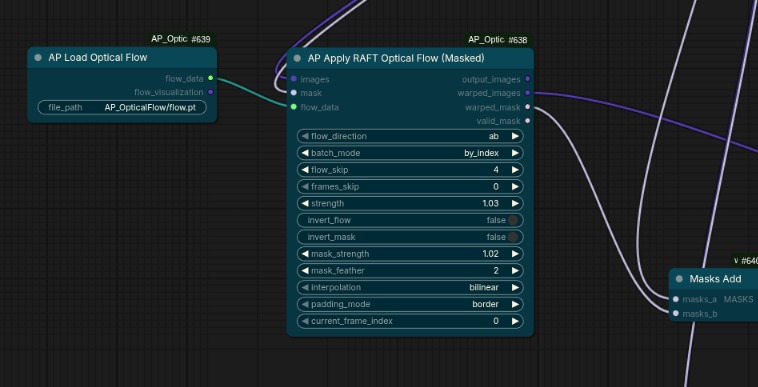
B) Loop/index pipeline
APIndexerto producecurrent_frame_index.- Feed
current_frame_indexinto flow nodes that support it. - Use
flow_skipandframes_skipto align flow timing with your loop start. - Optionally use
APSelectFlowByIndexfor explicit flow slicing.
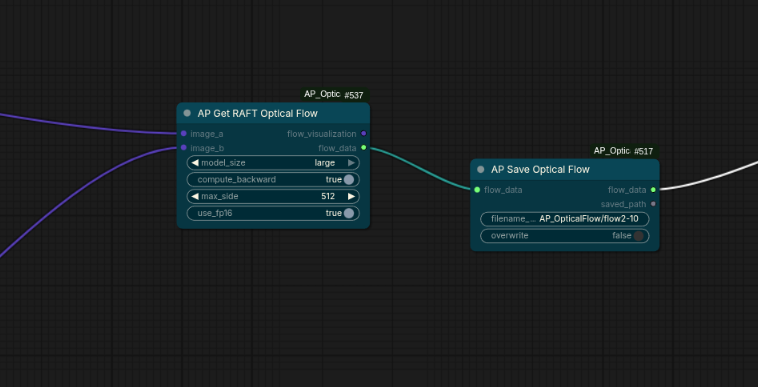
B.1) Save/Load flow cache
- Use
AP Save Optical Flowto writeflow_datato.ptin your Comfy output path. - Reuse it later with
AP Load Optical Flowto skip recomputing flow.
C) Inpaint crop/stitch pipeline
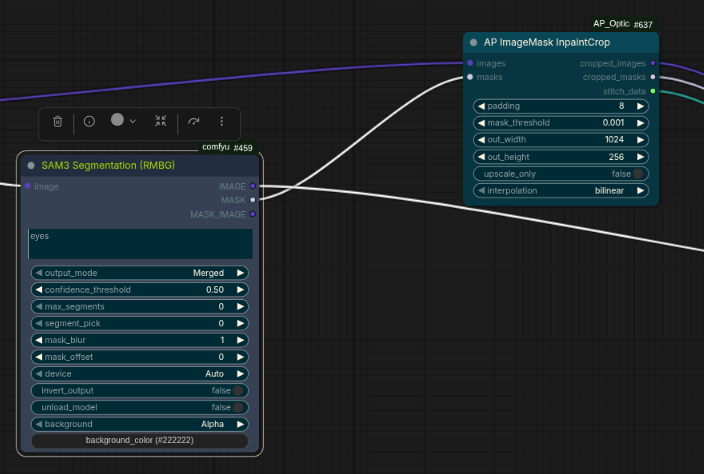
AP Image Mask Inpaint Cropto extract padded crop + crop mask +AP_STITCHdata.- Run your inpaint model on the cropped image/mask.
AP Image Mask Stitchto place the inpainted crop back into the original frame.
D) Latent warp pipeline (with optional masking)
- Build flow with
APGetRAFTOpticalFlowfrom neighboring frames. - Warp latent directly with
AP Apply RAFT Optical Flow (Latent). - For region-limited latent warping, use
AP Apply RAFT Optical Flow (Latent, Masked)and provide your mask. - Use
flow_skip/frames_skip/current_frame_indexexactly like image-flow nodes for loop pipelines.
E) Recursive loop pipeline (images and latents)
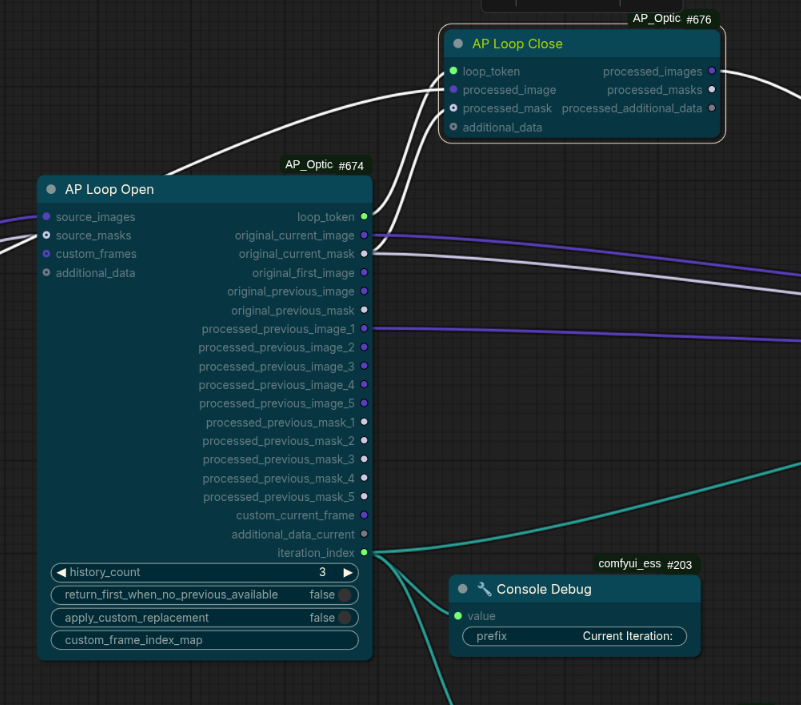
AP Loop Open / AP Loop Close are made for frame-by-frame processing with feedback:
AP Loop Open outputs:
current_image/current_maskfirst_imageprevious_image/previous_mask(unprocessed source timeline)previous_processed_image_1 .. previous_processed_image_5and matching masks (history depth controlled byhistory_count)current_custom_frames(optional index-mapped custom sources for current iteration, can contain multiple matches)current_additional_data(optional wildcard payload iterated at the same index)iteration_index(current loop index for this iteration)
Loop Open fallback option:
return_first_when_no_previous_available=truemakes missing previous slots (previous_image/previous_maskandprevious_processed_*) return the first frame (or first latent/mask in latent mode) instead of zeros.
AP Loop Close takes your processed result and feeds it into the next iteration automatically.
AP Loop Close now reads iteration/history state from loop_token, so you do not need explicit iteration_index / iteration_count / history_count wiring between open and close.
In the simplified API, AP Loop Close requires only loop_token plus your processed frame/latent (and optional mask/additional payload).
It can also collect additional_data through the loop and output processed_additional_data at the end.
Custom frame replacement:
- Connect optional
custom_framesand setcustom_frame_index_map(comma-separated, e.g.0,12,48). current_custom_framesoutput provides all mapped replacement frames for the current index.- Enable
apply_custom_replacement=trueto forcecurrent_imageto use this replacement.
Latents use the same pattern:
AP Loop Open (Latent)/AP Loop Close (Latent)- same iteration behavior
- same up-to-5 processed history concept
- same token-driven state model (
loop_tokencarries iteration and history metadata) - avoids repeated VAE encode/decode in iterative latent workflows
additional_data usage (both image and latent loops):
- Connect any type to
additional_dataon Loop Open. - Loop Open emits
current_additional_dataaligned with the current internal loop index. - Connect your per-iteration processed payload back to Loop Close
additional_data. - Final Loop Close output includes
processed_additional_dataaggregated over all iterations. - Practical example: image loop + parallel latent loop payload in one recursion.
F) Temporal consistency blend nodes
AP Temporal Blend Images and AP Temporal Blend Latents accept up to 5 inputs and blend with temporal-robust modes:
weighted_mean: stable baseline, fastestsimilarity_weighted: per-pixel/feature weighting against current frame; best default for flicker reductionmedian: strong outlier suppression (good for sporadic artifacts)trimmed_mean: robust against outliers while preserving smoother gradients than medianrobust_huber: adaptive robust weighting; helps in unstable inpaint regions
Mask-aware blending:
- Optional
masklimits temporal blend to masked regions only. - Outside mask, output stays at current frame/latent.
Recommended temporal-inpaint setup:
- Use loop nodes to process one frame at a time.
- Keep
previous_processed_image_1..N(or latent equivalent) connected as blend history inputs. - Start with
blend_mode=similarity_weightedandrecency_decay=0.25 - 0.45. - Use mask-limited blending to prevent background drift.
- Increase
detail_preservationwhen blend becomes too soft.
G) Examples and tests
- Example workflows and dedicated test workflows are currently in progress.
- Existing screenshots in
examples/show core usage patterns, and JSON test graphs will be expanded next.
Recommended Settings
For better quality (faces/eyes):
model_size:largecompute_backward:truemax_side:1536(or2048if VRAM allows)use_fp16:falsefor best precision,truefor speed
For low VRAM / memory stability:
model_residency:unload_after_use(prevents persistent VRAM allocation)compute_mode:sequential(processes batch one frame-pair at a time)compute_device:cpu(slowest, but minimizes GPU pressure)clear_cached_models_first:trueif you suspect old cached models are still resident
For RAM/storage offloading of flow data:
flow_offload:cpu_ramkeeps flow tensors in system RAM (default)flow_offload:disk_storagewrites flow tensors to.ptand passes a lightweight AP_FLOW handledisk_filename_prefix: choose output subpath/name for auto-saved flow files
For masked warping:
strength:0.6 - 1.0mask_feather:3 - 8mask_strength:0.8 - 1.0
For stitch blending:
blend_with_mask:truefeather: start low and increase only when seam is visible
Notes
- Flow direction matters: if motion looks reversed, switch
ab/baor toggleinvert_flow. - Occlusion handling is important for reducing ghosting and stretching.
- In
autobatch mode, index-based behavior is preferred whencurrent_frame_indexis connected. - For fast motion or heavy blur, flow quality can still degrade.
- If you had VRAM stuck from older runs, run one flow pass with
model_residency=unload_after_useandclear_cached_models_first=true.
Known Limitations
- Depends on
torchvisionRAFT availability and compatible Torch/Torchvision versions. - Very large inputs can be slow and VRAM-heavy.
- Not a replacement for full multi-shot tracking systems in extreme scenes.
License
This project is open source under the MIT License. See LICENSE.