
◧ AP ClipSEG Mask Light
Lightweight ComfyUI node for text-prompted segmentation masks ◧ using CLIPSeg and mask auto-aligned trim. numpy 2.x safe, TensorFlow-free, auto model caching.
Nodes (2)
AP ClipSEG Light
A lightweight ComfyUI custom node pack that generates segmentation masks from plain-text prompts using CLIPSeg.
Features
- Text-driven masking — describe what you want masked in plain language (e.g.
face,sky,person) - Multi-prompt averaging — separate prompts with
|to blend multiple heatmaps:face | head | eyes - Soft or hard masks — output a feathered sigmoid heatmap or a crisp binary mask
- numpy 2.x safe — all image I/O goes through torch/PIL, no numpy array ops
- Auto model caching — models are kept in GPU/CPU memory after the first load; no reload cost on subsequent runs
- numpy 2 / TF crash fix — automatically stubs broken TensorFlow imports caused by transformers ≥ 4.50 on numpy 2.x systems
- Mask Trim utility — trim any mask by percentage along X/Y axes with feathered edges
Requirements
| Package | Minimum version |
|---|---|
| torch | any recent |
| torchvision | ≥ 0.15 |
| transformers | any recent |
| Pillow | any recent |
Models are downloaded automatically from the HuggingFace Hub on first use:
| Model | Size | Quality |
|---|---|---|
| clipseg_rd64 (default) | ~350 MB | Higher |
| clipseg_rd16 | ~100 MB | Faster |
Installation
# Option A – ComfyUI Manager (search "AP ClipSEG Light")
# Option B – manual
git clone https://github.com/adampolczynski/ComfyUI_AP_ClipSEG_Light \
  ComfyUI/custom_nodes/AP_ClipSEG_Light
pip install transformers Pillow
Node: AP CLIPSeg Text Mask
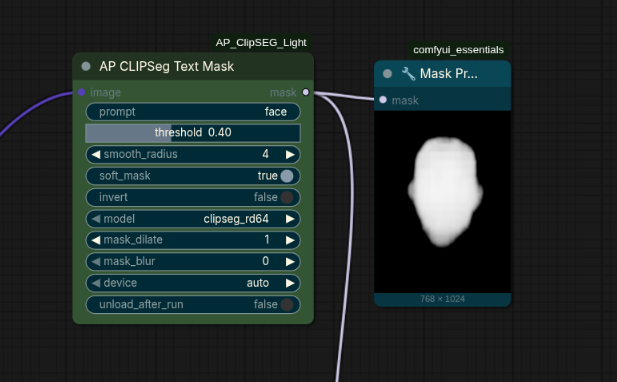
| Input | Type | Description |
|---|---|---|
| image | IMAGE | Input image batch |
| prompt | STRING | Text description of the region to mask. Use \| to separate multiple prompts |
| threshold | FLOAT (0.01–0.99) | Heatmap threshold. Lower → larger mask, higher → tighter mask |
| smooth_radius | INT (0–32) | Gaussian blur radius applied before thresholding |
| soft_mask | BOOLEAN | True = feathered sigmoid output, False = binary mask |
| invert | BOOLEAN | Invert the output mask |
| model | ENUM | clipseg_rd64 or clipseg_rd16 |
| device | ENUM | auto / cuda / cpu |
| unload_after_run | BOOLEAN | Free model VRAM after each run |
Output: MASK — float32 tensor [B, H, W] in [0, 1]
Node: AP Mask Trim
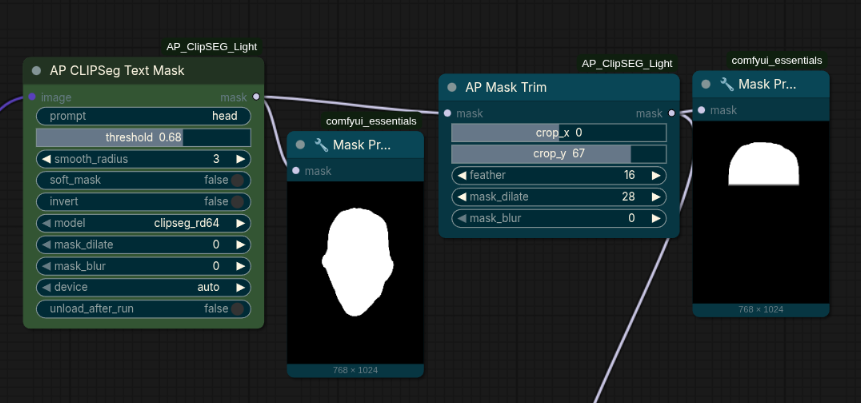
Trims a mask by percentage along the X and/or Y axis. The output canvas size is unchanged — trimmed pixels fade to black.
| Input | Type | Description |
|---|---|---|
| mask | MASK | Input mask |
| crop_x | INT (-100–100) | Trim from right (positive) or left (negative). Example: 30 removes rightmost 30 % |
| crop_y | INT (-100–100) | Trim from bottom (positive) or top (negative). Example: -40 removes top 40 % |
| auto_align | BOOLEAN | When True, trim axes rotate to match the mask's principal orientation (PCA). crop_y trims the mask's own "bottom" regardless of rotation |
| feather | INT (0–200) | Soft-edge width in pixels at the cut boundary |
| mask_dilate | INT (0–64) | Expand the trimmed mask outward by this many pixels |
| mask_blur | INT (0–64) | Gaussian blur applied to the final mask |
Output: MASK — trimmed float32 tensor, same dimensions as input
Tip: chain AP CLIPSeg Text Mask (prompt=hair) → AP Mask Trim (crop_y=-50, feather=20) to isolate the top of the head.
License
MIT — see LICENSE.