
ComfyUI-Universal-Model-Loader
Universal ComfyUI model loader for checkpoints, diffusers, diffusion models, UNet, GGUF, dual CLIP outputs and dual VAE outputs with dynamic UI, Registry Node Pack Info previews, selected-model metadata cleanup, and auto CLIP/VAE detection for latest model families including Qwen Image 2.1/QWN2 and MiniMax Music3/MM3.
Nodes (3)
The Universal MODEL Loader does what the name promises
One Node Instead of Five Loaders — and the Filename You Keep Retyping
MOSS-Image Won't Load in a KSampler, and No Dropdown Can Fix That
ComfyUI Universal Model Loader
Author: Zoltar358
Version: 1.3.1
A local ComfyUI custom node pack that provides one loader node with a first-step model_type selector. The browser UI hides irrelevant parameters after you choose the type, while optional second CLIP and VAE selectors support workflows that need additional encoders or VAEs.
Installation
ComfyUI Manager
This nodepack has been submitted for ComfyUI Manager listing. After it is accepted, install it from:
- Open ComfyUI.
- Click Manager.
- Click Install Custom Nodes.
- Search for ComfyUI-Universal-Model-Loader.
- Click Install and restart ComfyUI.
Comfy Registry / comfy-cli
After the registry package is published, install it with:
comfy node install universal-model-loader
Manual install
From your ComfyUI/custom_nodes directory:
git clone https://github.com/Zoltar358-ComfyUI/ComfyUI-Universal-Model-Loader.git
Then restart ComfyUI and hard-refresh the browser page.
Updating
From the installed nodepack directory:
git pull
Then restart ComfyUI and hard-refresh the browser page.
Optional dependency for GGUF mode
gguf_unet mode requires ComfyUI-GGUF:
cd ComfyUI/custom_nodes
git clone https://github.com/city96/ComfyUI-GGUF.git
Node
Universal MODEL Loader (model/loaders)
Outputs:
model—MODELmodel_name—STRING: filename without the final extension; Diffusers folder basenameclip—CLIPvae—VAEloaded_info—STRINGclip2—CLIPoptional second CLIP/text encoder, ornonevae2—VAEoptional second VAE, ornone
Supported modes:
checkpoint— loads frommodels/checkpoints, returns MODEL/CLIP/VAE.diffusers— loads a folder undermodels/diffuserscontainingmodel_index.json, returns MODEL/CLIP/VAE.diffusion_model/unet— loads frommodels/unetormodels/diffusion_models, returns MODEL, CLIP and VAE.gguf_unet— loads.ggufdiffusion models using ComfyUI-GGUF, returns MODEL, CLIP and VAE.
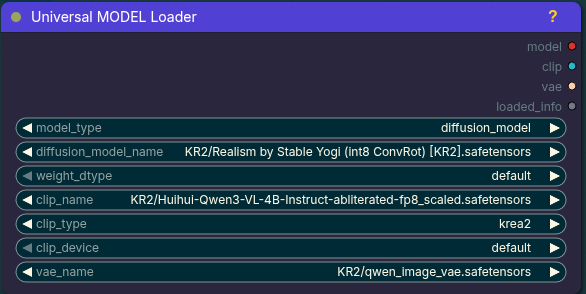
The node uses a purple/dark-teal theme matching the screenshot you provided. The frontend extension collapses every widget not relevant to the selected model_type; MODEL-only types always load CLIP and VAE from this node.
Optional clip2 and vae2 selectors default to none, so existing one-CLIP/one-VAE workflows remain simple. Select a second text encoder or VAE only for model families/workflows that require one.
Auto CLIP type selection recognizes current ComfyUI model-family hints including Krea2/KR2, Qwen Image/Qwen Image 2.1/QWN2, Hunyuan Image, Ideogram 4, Boogu, JoyImage, Mage, MiniMax/MiniMax Music3/MM3/RVQ, LongCat Image, PixelDiT, Omnigen2, Flux.2/FK9, Wan, HiDream, Chroma, Ovis, Lens, CogVideoX, Cosmos, LTXV, Mochi, PixArt, Lumina2, ACE, SD3, Stable Audio, and Stable Cascade when those CLIP types are available in the installed ComfyUI build.
1.3.1: MOSS routing from the universal node
The reported failure was core UNETLoader rejecting mossImage_sft_pruned_int8.safetensors before CLIP loading, not a missing dropdown entry. Adding a fictional moss CLIP type cannot make this checkpoint compatible.
- Recognized MOSS filenames selected in the core universal loader now fail before weight allocation, with instructions for the typed route. Inactive hidden selectors are ignored. Renamed/unrecognized files still rely on the backend's own validation.
- Right-click an existing Universal MODEL Loader → Add MOSS-Image loader (typed). This adds a separate typed node beside it, copies the selected model/encoder/VAE filenames verbatim, and leaves the old node and all links intact. It does not convert files, validate compatibility, reconnect incompatible sockets, or silently substitute a VAE. Unsupported copied choices must be replaced explicitly.
- Select independently exported MOSS components in the new node and connect its outputs to the
moss-image-t8official encode/sample/decode nodes below. Raw/pruned INT8 remains unsupported. Noclip_typeexists or is needed on this typed node. - Restart ComfyUI and refresh the browser after updating. Existing API and output contracts are unchanged.
1.3.0: model names and grounded MOSS-Image integration
- The new Universal MODEL Loader (
UniversalModelLoaderV2) placesmodel_namedirectly aftermodel. It uses the selected filename without its final extension (including Windows paths); Diffusers uses the folder basename unchanged. Name formatting performs no hashing, file reads, or network requests. - Existing UI workflows with recognized four/six-output schemas migrate before graph configuration: the class changes to V2, and outgoing slots after MODEL shift together with their sockets. Migration is idempotent and handles nested graph definitions and array/object links. Unknown schemas stay untouched.
- API compatibility: the original
UniversalModelLoaderclass remains registered with the original six-output contract, shown as Universal MODEL Loader (legacy API). Old API prompts keep working unchanged. For new API prompts, useUniversalModelLoaderV2and output indices0=model, 1=model_name, 2=clip, 3=vae, 4=loaded_info, 5=clip2, 6=vae2. Do not merely rename an old API class without updating its consumer indices.
Universal MOSS-Image Loader
The inspected core does not have a MOSS CLIP type or native MOSS model implementation. The installed moss-image-t8 integration uses its own typed component descriptors. Consequently MOSS support is a separate Universal MOSS-Image Loader (UniversalMOSSLoader), not an invented clip_type=moss, wildcard socket, or MOSS mode pretending to return core MODEL/CLIP/VAE.
Requires the optional integration providing MOSSOfficialDiffusionLoader, MOSSOfficialTextEncoderLoader and MOSSOfficialVAELoader. Without it, the rest of this pack still works and executing the MOSS node gives an actionable dependency error. The adapter uses the registered loaders and their selectors; it never downloads, converts, or automatically substitutes models.
Outputs, in order:
model—MOSS_IMAGE_DIT→ MOSSOfficialSamplerditmodel_name—STRING, filename without extensiontext_encoder—MOSS_IMAGE_TE→ MOSSOfficialTextEncodetext_encodervae—MOSS_IMAGE_VAE→ MOSSOfficialVAEDecodevae
Use the dependency's independently exported Base/SFT DiT, Qwen3.5-9B text encoder with local tokenizer sidecars, and explicit FLUX.2 VAE component package. Raw INT8/ConvRot/AIO files are not supported by this adapter; their presence on disk does not establish compatibility. Do not connect these outputs to standard KSampler/CLIPTextEncode/VAEDecode. Device and DiT precision are forwarded; the dependency retains its own component validation, integrity hashing, and cache-invalidation checks. Those checks are separate from the zero-I/O model_name formatting.
Verification boundary: real local Base and SFT component loaders, text encoder and VAE passed the dependency's complete metadata/manifest/weight-integrity validation. Raw INT8 rejection was also verified. This exercises descriptor loading, not tensor allocation or image generation. Core contracts and all existing model routes have separate regression coverage.
# Optional real component test; reads/hashes existing local packages, never downloads:
/path/to/ComfyUI/.venv/bin/python tests/moss_integration.py /path/to/ComfyUI /path/to/shared/models
1.2.0: reliable automatic CLIP selection
autostays selected and resolves on every execution, including after model changes and workflow reloads. Resolution is shared by primary and secondary encoders: a specific encoder-family hint, then the loaded model's supported configuration class, then the model filename/path. Generic Qwen names alone are ambiguous and require an explicit type if no family context is available.- Explicit CLIP types (including
stable_diffusion) are never rewritten. Known automatic families unavailable in the installed core produce an actionable error instead of silently using a wrong type. Unknown names without a specific family use the historicalstable_diffusionfallback; choose manually when that is not appropriate. - Token-aware matching handles Windows paths, tags and underscored names without matching
mageinsideimageorwaninsideswan. Adds YuE2 and uses the installed core's supported type list. - VAE selection is now strictly explicit: neither the UI nor backend replaces your selected VAE. For Qwen Image 2.1, select its matching 2.1 VAE yourself. This supersedes the 1.1.0 automatic VAE heuristic and removes redundant VAE discovery scans.
- Removed duplicate frontend family heuristics; compiled backend patterns and cached supported-type discovery reduce repeated work. No model-weight caching or inference changes.
- Output socket order and widget order are unchanged. Hidden selectors still return valid execution values while clearing inactive saved metadata.
Existing workflows: old versions may have saved a concrete CLIP type after automatic selection. Select auto again to enable dynamic resolution; existing concrete values are deliberately treated as manual selections. clip2 is an independent CLIP output, not a replacement for ComfyUI's DualCLIPLoader combined encoder.
Regression checks
python -m unittest discover -s tests -v
node --test tests/frontend.test.mjs
# Optional installed-core contract check (no weight loading or inference):
/path/to/ComfyUI/venv/bin/python tests/core_integration.py /path/to/ComfyUI
The core check imports the real node schema/config classes and exercises the real CLIPLoader with weight I/O mocked. These tests do not claim end-to-end generation coverage.
1.0.2 Node Pack Info update
Version 1.0.2 adds richer Comfy Registry metadata for ComfyUI Extensions' Node Pack Info panel:
- Registry icon and banner assets.
- README, author, keyword and project URL metadata in
pyproject.toml. - Hardened node metadata extraction so the Registry can parse and render the node preview card even in lean extraction environments.
- A clearer node description for the preview card in the NODES section.
Version 1.0.3 hardens the Registry extraction path further by avoiding ambiguity between this package's nodes.py and ComfyUI core nodes.py during node schema discovery.
Version 1.0.4 adds optional second CLIP and VAE loading with new clip2 and vae2 outputs. The extra selectors default to none for workflows that only need the original primary CLIP/VAE.
Version 1.0.5 makes the optional VAE selector easier to see by placing vae2_name directly after clip2_name, keeping it visible for every mode, and hiding clip2_type/clip2_device until a real second CLIP is selected.
Version 1.0.6 improves compatibility with latest MiniMax Music3 naming by auto-selecting ComfyUI CLIP type minimax for MM3, Music3, RVQ, and qwen-rvq file/folder hints. For Music3 workflows, pair the loaded MODEL/CLIP/VAE with ComfyUI's built-in MiniMax Music3 Text Encode and Empty MiniMax Music3 Latent Audio nodes.
Version 1.0.7 fixes saved workflow/image metadata for dynamic model modes. Inactive hidden model selectors now serialize as null, so PNG workflow metadata exposes the model selected by model_type instead of the first checkpoint list entry.
Version 1.0.8 fixes the 1.0.7 queue-time regression: inactive hidden model selectors still write null into saved workflow metadata, but return their real valid widget values to ComfyUI's execution serializer so queued prompts are not rejected as invalid input.
Version 1.1.0 adds Qwen Image 2.1/QWN2 support: QWN2, Qwen Image 2.1, qwen_image_2.1, and related filename hints auto-select CLIP type qwen_image, and Qwen Image 2.1 model-only loads prefer the matching 2.1 VAE when it is installed.
Notes
For MODEL-only modes, choose the CLIP/text encoder and VAE directly in the Universal MODEL Loader.
GGUF mode requires custom_nodes/ComfyUI-GGUF to be installed.