
MOSS Storyboard & Layout
ComfyUI nodes for MOSS-Image: storyboard grids (3/4/6/8/9), visual layout editor, face swap, and an LLM prompt node (caption / expand / edit / assemble) with up to 9 reference images and MiniMax-H3 output; also targets Flux, SDXL and Qwen-Image. No extra pip dependencies for the core nodes, MIT.
Nodes (8)
Drag the boxes where you want them, then generate
Slice a grid into panels without losing a pixel
The grid math you'd otherwise get wrong
Fix one panel, leave the other seven alone
Eight panels in one run, already cut apart
ComfyUI-MOSS-Storyboard
🌐 English · 中文
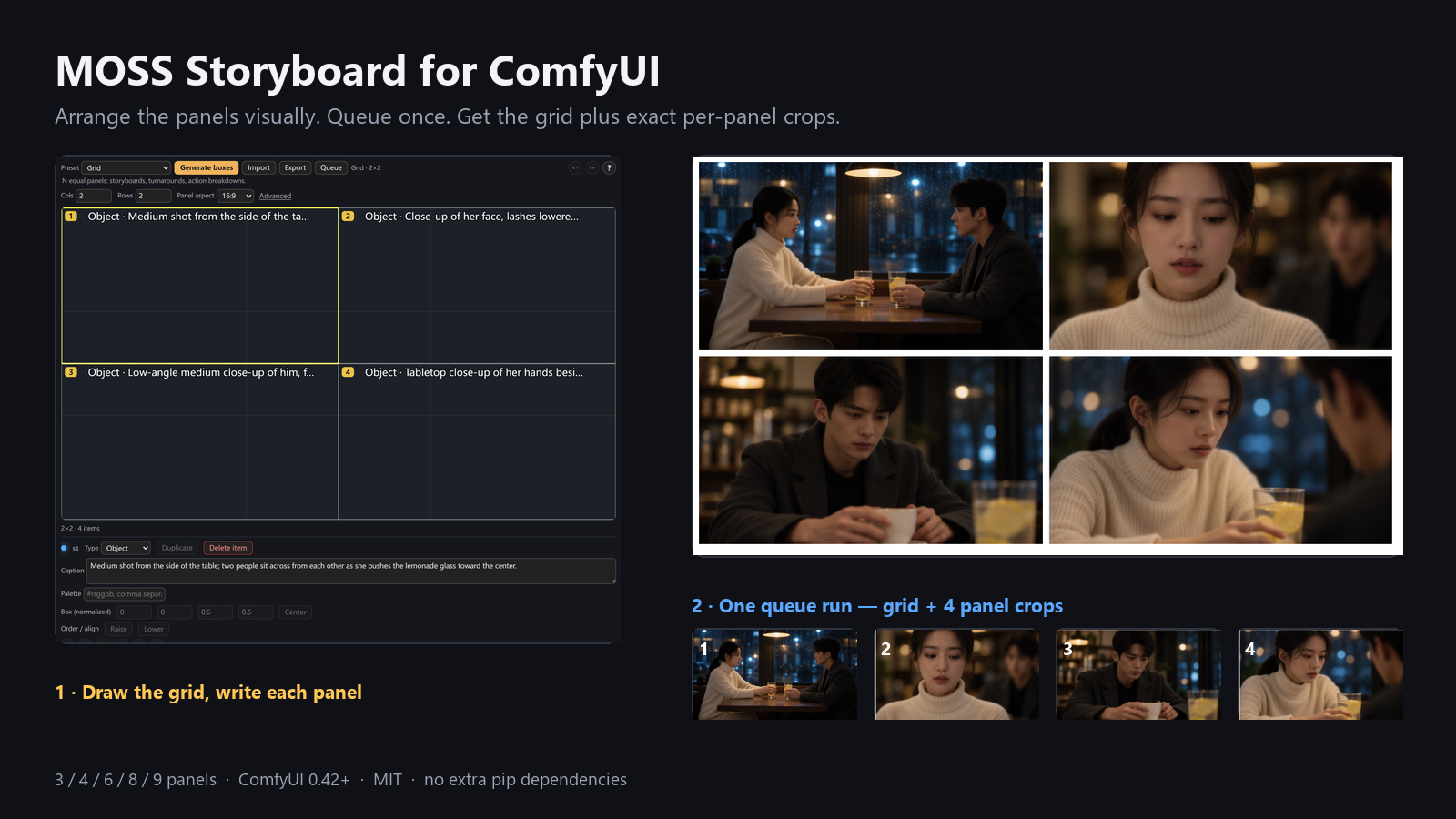
Storyboard, local edit and LLM prompt nodes for ComfyUI. Three uses:
- Storyboard — one canvas split into 3 / 4 / 6 / 8 / 9 panels, one caption per panel, exact crops.
- Local edit — fix one panel, or put a reference face into one panel, then paste it back. Other panels stay pixel-identical.
- Prompt — optional LLM node: caption / expand / edit / assemble. Not MOSS-only: also targets Flux, SDXL and Qwen-Image.
Up to 9 reference images (a new slot appears when the last one is connected); with
target=minimax-h3, caption and expand write the audio-video H3 format directly.
🔴 A box is a hint, not a coordinate. It becomes one line of text in the prompt; the model decides where to draw. It can overshoot, merge boxes, or ignore them. Details: manual §1.
| Item | Value |
|---|---|
| Version | 0.5.2 |
| License | MIT (credits: THIRD-PARTY-NOTICES.md) |
| Host | ComfyUI ≥ 0.42.0 (native MOSS-Image support) |
| Dependencies | Zero extra pip packages for the core nodes. Face Swap's auto mask is on by default and needs insightface + onnxruntime plus det_10g.onnx (~/.insightface/models/buffalo_l/, or MOSS_INSIGHTFACE_ROOT). Without them, wire a mask manually or turn auto_mask off; the node raises a clear error and never downloads weights |
What this pack guarantees: canvas size, panel coordinates, crop rectangles, grid-line position — arithmetic, pixel-aligned. What it does not guarantee: what is drawn inside panels, where elements land, or that the same face survives across panels.
1 · Quick start
1.1 Install
| Route | How |
|---|---|
| Manager (recommended) | search MOSS Storyboard → Install → restart ComfyUI |
| Registry | open https://registry.comfy.org/nodes/moss-storyboard → Install |
| Manual | cd <ComfyUI>/custom_nodes → git clone https://github.com/ZenHG/ComfyUI-MOSS-Storyboard → restart |
Success looks like this line in the startup log:
[MOSS SB] v<version> 已加载|节点 7 个(出口 v3)|3/4/6/8/9 宫格
No such line = the pack did not load. Do not nest the folder twice
(custom_nodes/ComfyUI-MOSS-Storyboard/ComfyUI-MOSS-Storyboard/ is one level too deep).
1.2 Weights (not bundled)
Download the three files from the official tutorial https://docs.comfy.org/tutorials/image/moss-image/moss-image and put them exactly here, then restart ComfyUI:
| File | Folder |
|---|---|
| moss_image_sft_bf16.safetensors | <ComfyUI>/models/diffusion_models/ (older hosts: models/unet/) |
| qwen3.5_9b_int8_convrot.safetensors | <ComfyUI>/models/text_encoders/ |
| flux2-vae.safetensors | <ComfyUI>/models/vae/ |
- Optional distilled LoRA: any
*.safetensors→<ComfyUI>/models/loras/. Without it use 50 steps / cfg 3 / euler / sgm_uniform; with a 4-step LoRA use 4 steps / cfg 1.0. - LLM node:
assembleneeds no model, and theapichannel needs no local weights. Forlocal, put GGUF files under<ComfyUI>/models/LLM/or<ComfyUI>/models/text_encoders/(both scanned recursively).caption/editneed a vision model plus itsmmprojin the same folder;expandneeds a text model only.
1.3 First run
- Fastest check (no weights): drag
examples/llm-compile-zero-model.jsoninto ComfyUI and press Run. It assembles an IR into a prompt in milliseconds and proves the install. For the H3 full-reference six-section manuscript, settarget=minimax-h3andprofile=six-section; leavingprofileempty keeps the default three-field skeleton. Both are deterministic and model-free. - Let the model expand an idea into H3 format: pick task
expandandtarget=minimax-h3to get the audio-video three-field timeline; addprofile=six-sectionfor the full-reference manuscript. The dialect list is unchanged on purpose. - Multiple reference images (up to 9): connect one image and a second slot appears; keep connecting to grow.
With
target=minimax-h3they are fused into one H3 manuscript (one<Subject N>per image); with any other target each image is captioned separately and the output is split by--- image N ---. Multi-image input is downscaled to fit the token budget; if the context ormax_tokensis too small, the node fails before loading the weights and tells you which value to change. - First storyboard: drag
examples/moss-storyboard-4panels-ui.json, press Run. Output goes tooutput/moss/storyboard/(grid_*.png+panel_*.png). - First prompt: drag
examples/llm-prompt-workbench.json. Only the caption group is on; other groups are bypassed (Ctrl+Bto enable). - The LLM panel (0.5.2): a status card on top says what the node is doing and what is still
missing; "What" and "Backend" are segmented buttons. 18 parameters up front, the rest under
Advanced — saved workflows keep their layout. 16 style presets in four classes: plain
description, 9 styles (photoreal / film still / vintage film / low-key / commercial / anime /
watercolour / cyberpunk / B&W documentary), a Custom entry with a one-line note, a tag list,
and two structured formats (storyboard grid, H3 six-section). Presets are nested — open
Presets, choose Connect (DeepSeek / OpenCode / CoRouter / Ollama / LM Studio) or Sampling
(Draft / Fine / Reset). Temperature is the only sampling knob: it sets
top_p/min_pfor you.
1.4 Where to go next
- All node inputs / outputs:
docs/19-node-manual.md. - LLM node details, styles and presets:
docs/20-llm-prompt-nodes.md. PE rewriter:docs/19-node-manual.md§9; how to run it: §1.6 below. - More examples: §3.1 below.
1.5 What to wire
| Loader | File | Port on Storyboard · Generate |
|---|---|---|
| UNETLoader | moss_image_sft_bf16.safetensors | model |
| CLIPLoader | qwen3.5_9b_int8_convrot.safetensors (type=moss_image) | clip |
| VAELoader | flux2-vae.safetensors | vae |
Face Swap is different. Its defaults (
8 steps / cfg 1.0 / simple) are the 8-step distilled recipe. Chain the 8-step DMD2 LoRA and the Moss-Image-Edit LoRA before the model. Wiring a bareUNETLoaderas above with default steps gives blurry, wrong-identity images; the node does not check for LoRAs. Wiring:examples/moss-faceswap-ui.json.
1.6 PE rewriter (Qwen-Image 2.1, non-commercial)
The optional LLM Prompt node can hand the prompt to Qwen-Image 2.1's native PE system prompt
instead of this pack's prompt. It is off unless the selected GGUF has a matching
system_prompt.txt beside it — there is no PE switch, no download, and no change to defaults.
License first. PE weights (official Qwen/Qwen-Image-2.1-PE-T2I / -PE-I2I, and community
GGUFs) are released under qwen-research: non-commercial, internal use only. This pack is MIT
and ships no weights and no system_prompt.txt; bring your own and check the upstream license
before any commercial use. Do not commit or redistribute them.
To run PE-I2I (image + edit instruction → precise edit prompt):
- Put the PE-I2I GGUF, its
mmprojvision tower, and its nativesystem_prompt.txt(must containratio_followorrewritten editing instruction) together in one folder under<ComfyUI>/models/LLM/. All three are your own files. - Drag
examples/llm-prompt-workbench.jsoninto ComfyUI, un-bypass group ④ (Ctrl+B), pick that GGUF in itsmodeldropdown, and leavemmprojon auto (or select the matching tower). Keep the other three groups bypassed. - Load your image into
LoadImage, write the edit instruction intext, keeptask=edit, press Run. - The second output
reportprintsPE 改写器模式(编辑)when PE is active;dialect,length,must_keep,panelsandstyle_lockare bypassed and named in the same report.
PE-T2I (task=expand) needs a separate T2I prompt file and weights — the code branch exists but this
pack neither ships nor installs any T2I weights. caption, assemble and the api channel never
enter PE. Reference: docs/19-node-manual.md §9.
2 · Troubleshooting
2.1 A weight is missing from a dropdown
The file is in the wrong folder, or ComfyUI was not restarted. Check the exact paths in §1.2, then restart.
2.2 “找不到 llama-server 可执行文件” (LLM node only)
The core storyboard nodes do not need it; the startup warning alone is harmless. Pick one route:
- One click: expand the node's Local engine group and press Install / update on the parameter bar.
The download and extraction show ComfyUI's own progress. It lands in
<custom_nodes>/ComfyUI-MOSS-Storyboard/moss_llm/runtime/; setMOSS_LLM_RUNTIME_DIRto relocate it. Test next to it runs--versiononly, so you can confirm the binary before loading a model. - Existing binary: set
runtimeto custom and fillserver_exe, or setMOSS_LLM_SERVER. With any otherruntimevalueserver_exeis ignored — one setting decides, not two. - Existing OpenAI-compatible service (LM Studio / Ollama / llama-swap / remote): set
channeltoapi, fillapi_base(with/v1) andapi_model.
Port is only a starting point: if it is occupied, the node automatically picks the next free port. Only the same model instance is reused; another model on that port is never borrowed.
The API key is not saved with the workflow: it is cleared on save, so a shared graph carries no secret.
Re-enter it after reopening, or set MOSS_LLM_API_KEY in the host environment.
2.3 VRAM and speed
VAE decode is the peak, not sampling. The figures in the memory notes are formula estimates, not measured peaks of this pack: on the old host (fused VAE norm not active) a 3120x896 / 8-panel board is estimated at 11.34 GB; the current host takes the fused path and the same board is about 2.84 GB. Do not read either number as “12 GB is enough”.
2.4 Known limits
- Boxes are hints; layout adherence is not a quantity we promise. MOSS calls its layout ability experimental.
- Identity is not guaranteed across panels. Face Swap is a tool, not a promise.
- The Generate node has no image input; it starts from an empty latent. To edit an existing image, use crop → edit → paste, or the Face Swap node (masked img2img).
- 8/9-panel boards give each panel few pixels; small text and fine texture blur first. That is resolution, not a bug.
2.5 Error table
Every row maps to one ValueError in the source. %d/%s are shown with example numbers; punctuation and quoting are normalised for the table. Ctrl+F a few words from your error.
| Error you see | Cause | Fix |
|---|---|---|
| 提示词有 4 段 [PANEL],但布局是 8 格 | script lines ≠ panel count | add lines / change panels / set init=plain |
| 全局段写「恰好 4 个面板」,但布局是 8 格 | global line disagrees with panel count | change the count or remove the line |
| 逐格模式需要 [PANEL n] 分段描述(现在只有全局描述)。 | per-panel mode with only a global paragraph | add one paragraph per panel |
| 逐格模式要求每格都有一句描述:提示词只有 4 段,布局有 8 格。 | fewer paragraphs than panels | add paragraphs, or use whole-board mode |
| 没接 spec 时必须填 columns 和 rows(都 >0),否则无法确定裁切框 | Crop/Paste without spec | wire spec, or fill columns × rows |
| 图像 1024x576 不能被 3x2 整除:会得到差 1px 的格子,下游拼接必崩。… | canvas not divisible | wire spec, or use a divisible canvas |
| index=5 越界:共 4 格(0 起) | Crop index out of range | use 0…3, or wire Crop's index output |
| index=5 越界:本布局共 4 格(0 起) | Paste: same, different wording | same; skip spec if you edit the whole image |
| 宫格尺寸 1024x1152 与布局 1024x576 不一致 | Paste received a different canvas | feed the image produced with the same spec |
| draft 为空:请粘贴官方 prompt-enhancer 的 caption/layout 草稿 JSON。 | empty compiler input | paste the draft, not the compiled result |
| 元素 3 没有描述(caption 不能为空) | a box has no caption | add a caption, or delete the box |
| label 只能是 object/character/text(收到 'xxx') | invalid state label | use one of the three values |
| 解码尺寸 1024x576 小于布局下限 2048x1152;无法重建裁切几何 | face swap input smaller than the target canvas | feed a larger image, or a smaller spec |
| init=source 需要 image(要换脸的那张图)。 | Face Swap init=source without an image | wire the source, or use init=empty |
2.6 No error but wrong result
| Symptom | Check first |
|---|---|
| all black | mixed recipe bands (50/3 vs 4-step LoRA) |
| right panel count, everything in one panel | boxes are hints; shorten each caption to one shot |
| canvas shape differs from preview | spec is wired; spec wins |
| can't find the nodes | category moss/storyboard; search storyboard / 宫格 |
| OOM at VAE decode, or faint seams | tiled decode / lower panel_edge |
| no 中 / EN button | hard-refresh (F5); check [MOSS SB] i18n: 就绪 |
2.7 Still stuck
Paste the [MOSS SB] startup line, the node report (geometry source, measured steps, mask coverage) and your
ComfyUI version. For setup or workflow bugs, open an issue with those three pieces; for security, use the private
channel in SECURITY.md.
3 · Examples and docs
3.1 Examples
Every example is UI format (drag into the canvas). The face-swap examples need your own moss_faceswap_src.png and
moss_faceswap_ref.png; the single-photo example ships two demo images under assets/; group ④ of
llm-prompt-workbench.json needs your own PE-I2I GGUF + mmproj + system_prompt.txt (§1.6, non-commercial);
the rest need nothing.
| File | Job |
|---|---|
| moss-storyboard-4panels-ui.json | 4-panel board, plainest wiring |
| moss-layout-editor-storyboard.json | 4-panel board with in-graph notes (best starting point) |
| moss-layout-editor-poster.json | single poster from the visual editor |
| moss-prompt-compiler.json | official draft → prompt + editor state (no model) |
| moss-faceswap-ui.json | 4-panel board → swap panel 0 |
| moss-faceswap-single-ui.json | one photo → face swap → image out |
| moss-pose-generate-ui.json | reference face + prompt → one posed image |
| moss-storyboard-4panels-edit.json | crop one panel → edit → paste back |
| llm-compile-zero-model.json | IR → prompt via assemble, no model (install check) |
| llm-prompt-workbench.json | caption / wash / generic expand / PE-I2I, four bypassable groups (PE group needs your own weights) |
| llm-idea-to-image.json | one line → single image or 4-panel board |
3.2 Docs
- Full parameters, glossary and measured limits:
docs/19-node-manual.md. - LLM node (18 parameters, 4 style classes / 16 presets):
docs/20-llm-prompt-nodes.md. PE rewriter:docs/19-node-manual.md§9; how to run it: §1.6 above. - Docs index:
docs/README.md.
Manuals live in the GitHub repository only; the published package does not ship
docs/. Links above point to the repository.
3.3 Contributing
- Checks, local CI and PR rules:
CONTRIBUTING.md. - Release history:
CHANGES.md. - Bug reports: include the
[MOSS SB]startup line, the nodereport, and your ComfyUI version.
4 · License
MIT. Third-party notices and upstream licenses: THIRD-PARTY-NOTICES.md.
The optional Qwen-Image 2.1 PE weights are not covered by this MIT license. They are released under
qwen-research— non-commercial / internal use only — and this pack ships neither the weights nor theirsystem_prompt.txt. Bring your own and check the upstream license before any commercial use (§1.6).