
ComfyUI-MiniMaxH3-MediaPrompt
MiniMax H3 reference media and rich prompt transport nodes for ComfyUI.
Nodes (3)
ComfyUI-MiniMaxH3-MediaPrompt
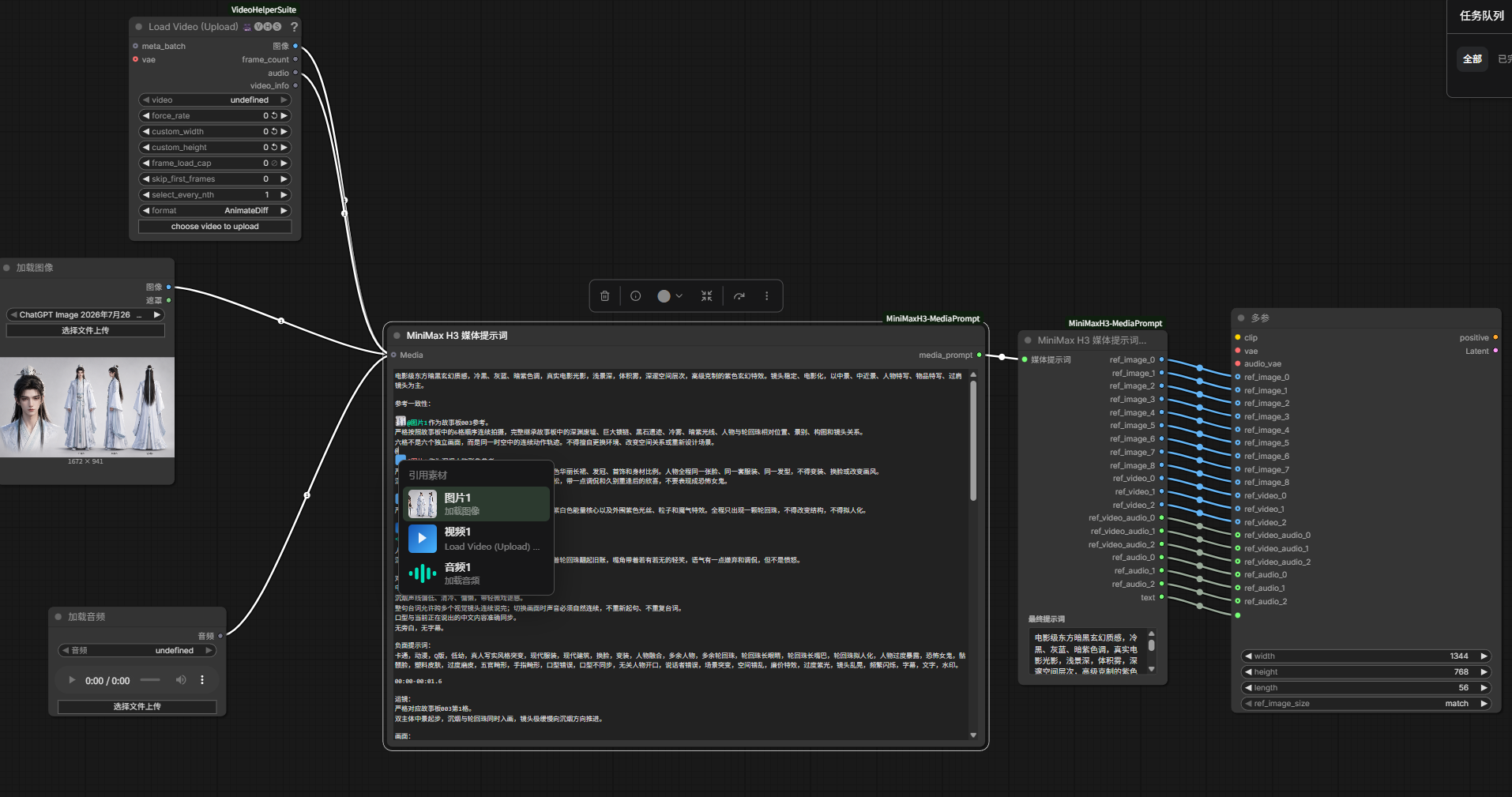
A ComfyUI plugin created for MiniMaxH3ReferenceToVideo. It makes MiniMax image, video, audio, and dialogue references faster to add and easier to manage in a prompt.
Features
- Dynamically add reference images, videos, and audio without manually managing numbered inputs.
- Type
@in the prompt editor to select any connected media. - Automatically convert media mentions into the MiniMax prompt syntax:
<Picture N>,<Video N>, and<Audio N>. - Type
#to create an editable dialogue block, which is converted into<d>...</d>for MiniMax. - Preview the final converted prompt after running the workflow.
Workflow
- Add or connect image, video, and audio loader nodes to the
Mediainput. - Type
@in the prompt editor and select the media you want to reference. - Type
#when you need a dialogue block, then enter the dialogue inside it. - Connect
MiniMax H3 Media Prompt OutputtoMiniMaxH3ReferenceToVideo. - Run the workflow. The plugin converts all media mentions and dialogue blocks into the syntax required by MiniMax.
Video Settings Node
The MiniMax H3 Video Settings node keeps the two-stage video generation parameters together:
- Video duration in seconds: defaults to
10. - Frame rate: integer input; defaults to
24. - Aspect ratio: supports
1:1,2:3,3:2,3:4,4:3,9:16,16:9, and21:9; defaults to16:9. - Base resolution: supports all 8 presets below; defaults to
0.5 (540P). - Total steps: defaults to
8. - Separate steps: defaults to
2. - Upscale factor: float input; defaults to
1.4. - LoRA strength: defaults to
1.00.
The node outputs the video frame length, base width and height, total steps, separate steps, the upscale factor, LoRA strength, and the frame rate as a FLOAT. Frame length is calculated as max(5, round(a * fps)) + (5 - (max(5, round(a * fps)) % 17)) % 17, where a is the input duration in seconds and fps is the integer frame-rate input. The defaults of 10 seconds and 24 FPS output 243 frames and a frame-rate value of 24.0. Dimensions are calculated from the selected aspect ratio and target pixel count, then aligned to multiples of 32. At the default 16:9 aspect and 0.5 (540P) base resolution, the output is 960 x 544.
| Resolution preset | 16:9 base output | |---|---| | 0.2 (360P) | 608 x 352 | | 0.3 (416P) | 736 x 416 | | 0.4 (480P) | 864 x 480 | | 0.5 (540P) | 960 x 544 | | 0.6 (608P) | 1056 x 608 | | 0.7 (640P) | 1152 x 640 | | 0.8 (672P) | 1216 x 672 | | 0.9 (720P) | 1280 x 736 |
Installation
Clone the repository into ComfyUI/custom_nodes, then restart ComfyUI:
cd ComfyUI/custom_nodes
git clone https://github.com/YingsenP/ComfyUI-MiniMaxH3-MediaPrompt.git
Video Dependency
Quickly adding a reference video uses the Load Video (Upload) node from ComfyUI-VideoHelperSuite. Install it before using video references.
Do not connect the optional VAE input on Load Video (Upload). MiniMax reference videos require IMAGE frame batches rather than LATENT values.