
Ultra LoRA Reference Images
Generate 24/30/40 reference images of one person with varied expressions, head angles, framings, outfits and backgrounds - for character sheets, pose references and LoRA datasets (PNG + TXT captions). Qwen Image Edit 2511 / Qwen Image 2.1.
Nodes (3)
🎴 Ultra LoRA Reference Images
인물 사진 한두 장만 넣으면, 같은 인물의 다양한 표정·얼굴 각도·구도·의상·배경을 담은 이미지 24 / 30 / 40장을 한 번에 만들어 주는 ComfyUI 노드입니다.
English: Generate 24, 30, or 40 consistent character reference images and matching TXT captions from one or two photos. Read the full English guide ↓
🖼️ 프로그램 화면 / Application preview
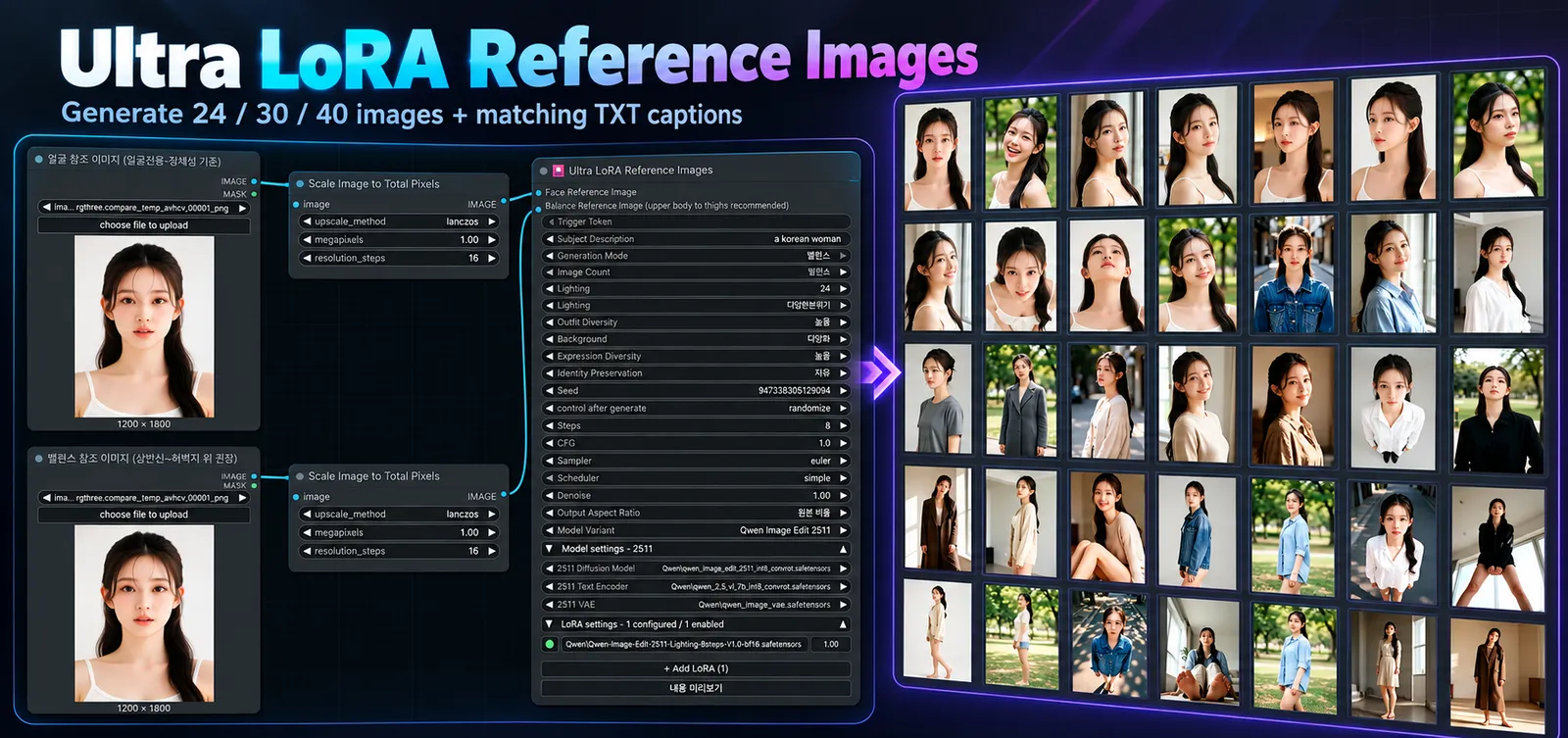
Ultra LoRA Reference Images — 얼굴·밸런스 모드에서 24 / 30 / 40장의 인물 참조 이미지와 각 이미지에 대응하는 TXT 캡션을 생성합니다.
이렇게 쓸 수 있습니다.
- 캐릭터 시트 / 표정 모음: 한 인물의 여러 표정과 각도를 한자리에 모읍니다.
- 포즈·구도 레퍼런스: 같은 인물의 얼굴 클로즈업부터 상반신, 허벅지 위, 전신까지 고루 만듭니다.
- 인물 LoRA 학습용 데이터셋: 이미지마다 같은 이름의 TXT 캡션이 자동으로 저장되어, 그대로 학습에 쓸 수 있습니다.
정한 장수만큼 이미지마다 표정, 얼굴 각도, 시선, 조명, 배경이 자동으로 바뀝니다. 밸런스 모드에서는 몸이 나오는 컷마다 의상도 자동으로 바뀝니다. 이 과정에서 얼굴은 같은 인물로 유지됩니다.
- ✅ 추가 pip 설치 없음
- ✅ 로더 연결 불필요: 모델, 텍스트 인코더, VAE, LoRA를 노드 안에서 고릅니다.
- ✅ 한국어 / 영어 UI 자동 전환
- ✅ 예제 워크플로우와 상세 메뉴얼 포함
📦 설치
ComfyUI Manager (권장)
Custom Nodes Manager에서 Ultra LoRA Reference Images 를 검색해 설치합니다.
수동 설치
cd ComfyUI/custom_nodes
git clone https://github.com/Yamoon-jjang/comfyui-Ultra-LoRA-Reference-Images
설치 후 ComfyUI를 재시작하세요.
필요한 모델: Qwen Image Edit 2511 또는 Qwen Image 2.1 (Diffusion Model / Text Encoder / VAE)
🚀 빠른 시작
예제/Ultra-LoRA-Reference-Images.json워크플로우를 불러옵니다.- 얼굴 참조 이미지를 넣습니다. 밸런스 모드라면 같은 인물의 두 번째 이미지도 넣습니다.
모델 계열(2511 또는 2.1)을 고르고,모델 설정을 펼쳐 내 모델 파일을 선택합니다.- 생성 모드와 장수(24 / 30 / 40)를 고른 뒤 실행합니다.
결과는 ComfyUI/output/lora_dataset/<실행 폴더>/에 PNG + 같은 이름의 TXT 캡션으로 저장됩니다.
🎭 두 가지 생성 모드
얼굴전용: 참조 이미지 1장
얼굴 중심 컷만 만듭니다. 이미지마다 표정, 얼굴 각도, 시선, 조명, 배경이 바뀝니다. 표정 모음이나 얼굴 LoRA에 적합합니다. 의상은 바꾸지 않습니다.
밸런스: 참조 이미지 2장 (같은 인물)
얼굴, 상반신, 허벅지 위, 전신 컷을 섞어 만듭니다. 몸이 나오는 컷마다 의상과 포즈가 바뀝니다.
| 장수 | 얼굴 | 상반신 | 허벅지 위 | 전신 | |---|---|---|---|---| | 24장 | 9 | 7 | 5 | 3 | | 30장 | 11 | 9 | 6 | 4 | | 40장 | 14 | 12 | 8 | 6 |
💡 두 번째 이미지는 상반신 사진이 가장 좋습니다. 없으면 같은 인물의 얼굴 사진 2장을 넣어도 정상적으로 동작합니다.
🎛️ 변화 정도 조절
| 옵션 | 선택지 | 하는 일 | |---|---|---| | 표정 변화 | 낮음 / 보통 / 높음 | 웃음, 슬픔, 놀람, 화남 등 표정 후보의 폭 | | 의상 다양성 | 낮음(4종) / 보통(8종) / 높음(12종) | 밸런스 모드 몸 컷에 쓰는 의상 후보 수 | | 배경 옵션 | 단순 / 실내실외혼합 / 다양화 | 스튜디오, 실내, 창가, 거리, 공원, 카페 등 배경 범위 | | 조명 옵션 | 사용안함 / 안정적분산 / 다양한분산 | 자연광, 창가광, 스튜디오, 측광 등 조명 변화 | | 정체성 보존 | 강함 / 균형 / 자유 | 원본 얼굴을 얼마나 엄격하게 유지할지 | | 출력 비율 | 원본 비율 / 자동 구도별 비율 | 구도에 맞춰 화면 비율 조정 |
트리거 토큰과 피사체 설명(예: a korean woman)을 넣으면 캡션에도 반영됩니다.
⚙️ 편의 기능
- 노드 안에서 모델 선택: 바깥에 Loader 노드를 연결할 필요가 없습니다.
- 모델 계열별 LoRA 목록: LoRA를 추가, 삭제, 순서 이동, ON/OFF, 강도 조절할 수 있습니다. 2511용과 2.1용 목록은 서로 섞이지 않습니다.
- 마지막 설정 자동 기억: 2511과 2.1 각각의 모델과 LoRA 설정을 따로 기억해서, 계열을 바꾸면 그 계열에서 쓰던 설정이 그대로 돌아옵니다.
- 실행 전 생성 계획 미리보기: 어떤 컷이 몇 장 만들어질지 먼저 확인할 수 있습니다.
- 모델별 최적 내부 처리: 2511은 CFGNorm과 멀티 레퍼런스 latent, 2.1은 전용 캐시와 인코더를 노드가 알아서 적용합니다.
✅ 학습에 쓰기 전에
자동 생성 결과는 한 번 훑어보시길 권장합니다. 얼굴이 같은 인물로 유지됐는지, 손이나 몸이 깨진 컷은 없는지 확인하세요. 문제 있는 PNG/TXT 쌍은 빼거나 캡션을 고치면 됩니다.
자세한 설명은 Ultra_LoRA_Reference_Images_메뉴얼.txt를 참고하세요.
📄 라이선스
GNU GPL v3.0 (LICENSE) · Copyright (C) 2026 Yamoon-jjang
🇺🇸 English Guide
Overview
Ultra LoRA Reference Images is a ComfyUI custom node for turning one or two reference photos of the same person into a structured collection of 24 / 30 / 40 reference images, each saved as a PNG with a matching TXT caption.
The node plans variations in facial expression, head angle, gaze, lighting, and background while aiming to preserve the subject's identity. In Balance mode, it also covers different framings, body poses, and outfits. The generated pairs can be used for:
- Character reference sheets: multiple views and expressions of a consistent character.
- Portrait and pose references: face close-ups, upper-body, thigh-up, and full-body compositions.
- Person LoRA training datasets: organized PNG/TXT pairs that you can review and use in a training workflow.
Key conveniences: Korean/English interface localization, an included example ComfyUI workflow, model selection and LoRA management inside the node, per-model-family settings memory, and no additional pip packages required by this custom node.
Supported model families: Qwen Image Edit 2511 and Qwen Image 2.1. You must have the corresponding diffusion model, text encoder, and VAE files available in ComfyUI; the models are not included in this repository.
Installation
Option A — ComfyUI Manager (recommended): Open Custom Nodes Manager, search for Ultra LoRA Reference Images, install it, and restart ComfyUI.
Option B — Manual Git installation:
cd ComfyUI/custom_nodes
git clone https://github.com/Yamoon-jjang/comfyui-Ultra-LoRA-Reference-Images
Restart ComfyUI after installation. For a packaged download, see the latest GitHub Release. If installing from a ZIP, ensure __init__.py, reference_images.py, web, locales, and 예제 are directly inside the installed custom-node folder, not inside an extra nested folder.
Quick Start
- Load the included example workflow:
예제/Ultra-LoRA-Reference-Images.json. - Connect a clear face reference image. To use Balance mode, also connect a second image of the same person (an upper-body reference is recommended).
- Select the Model Family: Qwen Image Edit 2511 or Qwen Image 2.1.
- Expand Model Settings and choose the installed Diffusion Model, Text Encoder, and VAE files for that family. The filenames saved in the example workflow may not match yours.
- Choose Face or Balance, the image count (24 / 30 / 40), and the desired variation options. Optionally enable compatible LoRAs in the node's LoRA section.
- Queue the workflow in ComfyUI and review the generated images and caption files.
Saved output location:
ComfyUI/output/lora_dataset/<run-folder>/
    <image-name>.png
    <image-name>.txt
Every generated image has a TXT caption with the same base filename. The optional Trigger Token and Subject Description (for example, a korean woman) are incorporated into the generated captions.
Generation Modes
Face mode — 1 reference image
- Creates face-centered compositions with varied expressions, head angles, gaze, lighting, and backgrounds.
- Suitable for portrait expression sheets and face-focused LoRA datasets.
- Does not intentionally diversify outfits; changing clothing is not the purpose of this mode.
Balance mode — 2 references of the same person
- Combines face close-ups, upper-body, thigh-up, and full-body images.
- Uses the face reference for identity and a second reference to help establish body proportions and framing.
- Varies outfits and poses on body-focused images. Face close-ups do not receive the same outfit-changing instructions.
- The second reference is ideally an upper-body image. Two face photos of the same person can also be used, but body-proportion and framing guidance may be weaker.
- Do not use photos of two different people as the two inputs; their identity and appearance cues may conflict.
Balance mode shot distribution:
| Total images | Face | Upper body | Thigh-up | Full body | |---:|---:|---:|---:|---:| | 24 | 9 | 7 | 5 | 3 | | 30 | 11 | 9 | 6 | 4 | | 40 | 14 | 12 | 8 | 6 |
Variation Controls
| Setting | Available choices | What it changes | |---|---|---| | Expression Diversity | Low / Medium / High | Range of planned expressions, such as smiling, surprise, sadness, and anger | | Outfit Diversity | Low (4) / Medium (8) / High (12) | Size of the outfit candidate pool for body-focused images in Balance mode | | Background | Simple / Mixed indoor-outdoor / Diverse | Range of locations such as studio, window light, street, park, and café | | Lighting | Off / Stable variation / Diverse variation | How widely lighting conditions vary across images | | Identity Preservation | Strong / Balanced / Free | How strongly prompts emphasize preserving the reference identity | | Output Aspect Ratio | Original ratio / Automatic by composition | Whether image proportions follow the input or the planned framing |
Suggested starting point: Face mode, 24 images, medium expression diversity, simple backgrounds, stable lighting variation, and balanced identity preservation. In Balance mode, medium outfit diversity offers a practical starting point.
Model and LoRA Management
- No separate model-loader wiring: select the diffusion model, text encoder, and VAE from the node itself.
- Two supported model paths: the node uses the appropriate internal processing for Qwen Image Edit 2511 or Qwen Image 2.1, rather than treating them as interchangeable model files.
- Built-in LoRA list: add or remove LoRAs, enable/disable entries, change strengths, and reorder the application sequence.
- Separate saved settings per model family: the selected model files and LoRA configuration for 2511 and 2.1 are remembered independently in the same browser profile.
- Persistence: model-related selections are saved as you change them using the browser's local storage; workflow files also store their settings. Clearing browser site storage may reset the remembered selections.
- Sampling parameters: Seed, Steps, CFG, Sampler, Scheduler, and Denoise are general generation settings; switching model families does not automatically change them.
Use LoRA files compatible with the selected model family. A LoRA intended for 2511 is not automatically compatible with Qwen Image 2.1.
Reviewing a Dataset Before Training
The node generates reference images and captions; it does not train a LoRA by itself. Before adding the results to a training dataset, inspect them for:
- Consistent facial identity and hairstyle across views.
- Distorted hands, arms, legs, anatomy, or cropping.
- Unexpected clothing repetition in Balance mode.
- Mismatches between the image content and its TXT caption.
Remove unsuitable PNG/TXT pairs, or revise individual captions where necessary. Reference-guided generation aims for consistency but does not guarantee perfect identity or anatomy in every output.
Troubleshooting
Node appears missing or with a red outline: Restart ComfyUI, avoid duplicate installations under different folder names, and check that the correct model files are selected under Model Settings.
Balance mode does not run: Verify that the second Balance Reference Image input is connected. Both references should show the same person.
Clothing seems unchanged: Outfit variation primarily affects body-focused outputs in Balance mode, not Face mode. Try medium or high outfit diversity.
Settings seem to reset after switching models: 2511 and 2.1 keep separate model/LoRA selections. Browser local-storage cleanup can also clear the remembered values.
Unexpected output or poor identity consistency: Check the input image quality, matching identity across references, model compatibility, and the generated plan. Inspect results before using them in training.
Documentation, Downloads, and License
License: GNU GPL v3.0 — see LICENSE. Copyright (C) 2026 Yamoon-jjang.