
ComfyUI Extension
ComfyUI PlyPreview
Gaussian Splat PLY loader + preview nodes (Load/Path/Process/Preview) with bundled gsplat viewer
XuanYu-github/comfyui-PlyPreview
Nodes4
On cloudLocal install
CategoryPlyPreview, PlyPreview/visualization
Stars6
Updated10 months ago
Nodes (4)
Load Gaussian PLY Enhance
The unglamorous node that finally gets your splat into ComfyUI
PlyPreview
Load Gaussian PLY (Path) Enhance
Load Gaussian PLY (Path) Enhance — for when the dropdown can't find your file
PlyPreview
Preview Gaussian Enhance
Preview Gaussian Enhance — the node that makes the whole pack worth installing
PlyPreview/visualization
Process Gaussian PLY Enhance
Process Gaussian PLY Enhance — the node for splats that don't exist on disk yet
PlyPreview
Readme
ComfyUI PlyPreview
Gaussian Splat PLY 加载与预览节点,独立于 GeometryPack,内置 gsplat.js 前端查看器。
节点
- Load Gaussian PLY:从
input/、input/3d、output/下拉选择,支持自动分辨率、FOV 10–180°、可选透明度过滤。 - Load Gaussian PLY (Path):手动输入路径,具备同样的相机/自动分辨率选项。
- Process Gaussian PLY:接收上游
ply_path(如 SHARP Predict),可覆盖相机或启用透明度过滤。 - Preview Gaussian:gsplat.js WebGL 预览,提供缩放、重置、截图和信息面板。
特性
- 自动分辨率:基于 FOV + target_scale,16 像素对齐,校准系数 0.8。
- 透明度过滤:sigmoid 后按阈值过滤,减少背景噪点。
- 输出相机内外参,预览一致性更好。
- 宽 FOV(10–180°)含鱼眼场景。
- 前端资源全部内置于
web/,无需外部依赖。
安装(Git clone)
cd ComfyUI/custom_nodes
git clone https://github.com/XuanYu-github/comfyui-PlyPreview.git
重启 ComfyUI。
安装(ComfyUI Manager)
在 Manager 中搜索 “comfyui-PlyPreview” 安装(内置 comfyui_extension.json 可被识别)。
使用方法
- 选择 Load 或 Process 节点,生成
ply_path、extrinsics、intrinsics。 - 连接 Preview Gaussian,执行后 iframe 显示控制条(Scale、Reset View、Screenshot)和信息面板。
- 若启用透明度过滤,会在源旁生成
_opacity{threshold}.ply。
示例:
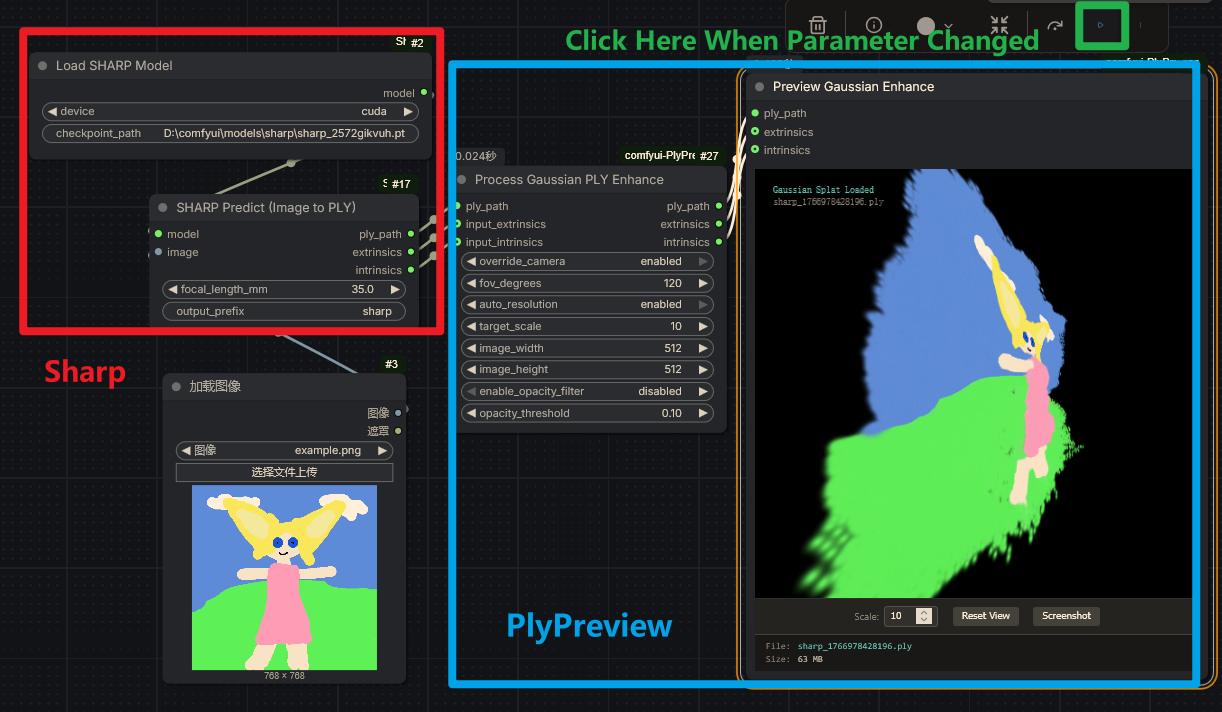
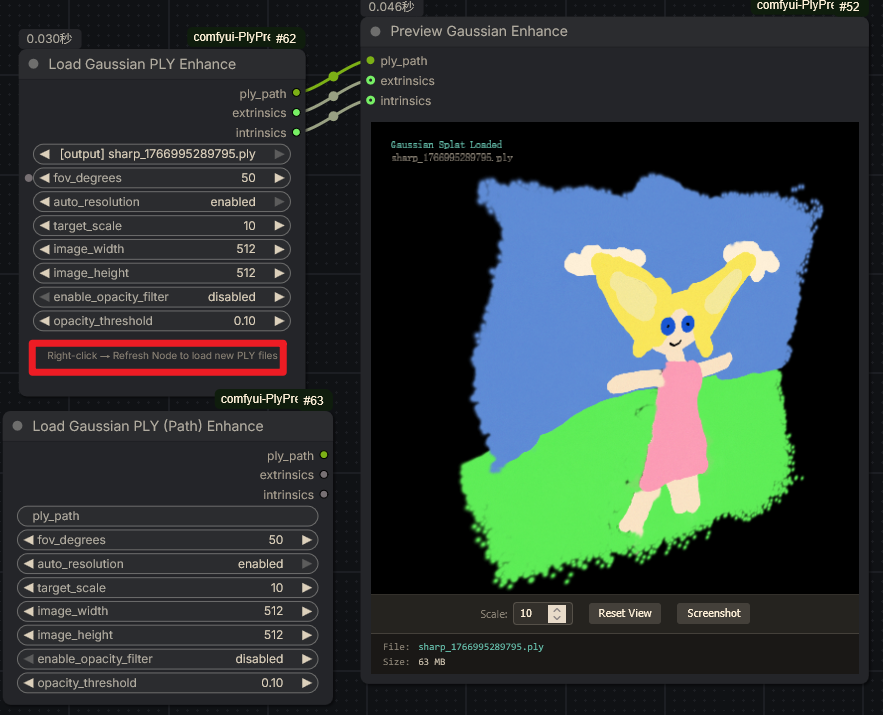
Preview Gaussian 节点键盘操作
- 点击预览区域以获取焦点后,W/S/A/D 平移视角(前/后/左/右)。
- Q/E 水平旋转(Q 左旋,E 右旋)。
- R/F 俯仰旋转(R 上仰,F 下俯)。
- 鼠标左键拖拽旋转,右键拖拽平移,滚轮缩放。
依赖
- ComfyUI(默认已启用 DOM widgets)。
- Python:
plyfile、numpy(缺失时pip install plyfile numpy)。
备注
WEB_DIRECTORY = "web",ComfyUI 会自动加载前端。- 节点前缀
PlyPreview*,避免与 GeometryPack 冲突。 - 继承原 GeometryPack 的 GPL-3.0 许可。
许可
GPL-3.0-or-later。详见 LICENSE。