
ComfyUI-AssetManager
ComfyUI asset manager: auto-archives generated images/videos with prompts, params, models and workflows; grid & calendar browsing, search, batch delete, one-click backup, output directory switching.
ComfyUI-AssetManager
An in-panel asset manager for ComfyUI that auto-archives every image/video you generate — browse, search, batch-delete, and one-click backup.
集成进 ComfyUI 网页的资产管理面板,自动归档你跑出的每一张图/视频,随取随用、可搜索、可批量删除、可一键备份。
✨ Features · 功能亮点
- Auto-archive — a background thread watches the output directory and archives every asset instantly (on first run it also imports the assets already in the output directory), extracting prompt / positive-negative / params (seed, steps, sampler…) / models & LoRA / full workflow metadata (reads PNG/WebP embedded metadata and MP4/WebM ffmpeg metadata).<br> 自动归档 — 后台线程自动监视输出目录,新产物即时入库(首次运行也会归档 output 目录里已有的产物),并提取提示词 / 正负词 / 参数(seed/steps/采样器…) / 模型与 LoRA / 完整工作流元数据(读 PNG/WebP 内嵌元数据、MP4/WebM 的 ffmpeg 元数据)。
- Dual views — grid view + calendar view (grouped by date, with daily image/video count badges; click a day to see that day's assets).<br> 双视图浏览 — 网格视图 + 日历视图(按日期归档,每天显示图/视频数量徽标,点某天看当天产物)。
- Search & filter — full-text search by prompt/model/filename/date; filter by image/video.<br> 搜索与过滤 — 按提示词/模型/文件名/日期全文搜索,按图片/视频过滤。
- Preview & reproduce — view full-size images / play videos, copy prompt, download
workflow.json(drag it back onto the canvas to restore the whole workflow).<br> 预览与复现 — 点开看大图/播视频、复制提示词、下载 workflow.json(拖回画布还原整套工作流)。 - Batch delete — multi-select and delete from disk in one click (archive copy + original output file); single delete too.<br> 批量删除 — 多选勾选后一键从硬盘删除(归档副本 + output 原始文件),单个删除也可。
- Live refresh — the panel auto-syncs every 8 seconds; files manually copied into the output directory get archived, and manual deletions disappear automatically.<br> 实时刷新 — 面板每 8 秒自动同步,手动复制进输出目录的文件也会被归档、手动删除也会自动消失。
- Output directory switching — change the output directory in settings; new assets save there instantly and it's restored automatically after ComfyUI restarts.<br> 输出目录切换 — 设置里改输出目录,新产物即时改存;重启 ComfyUI 后自动恢复。
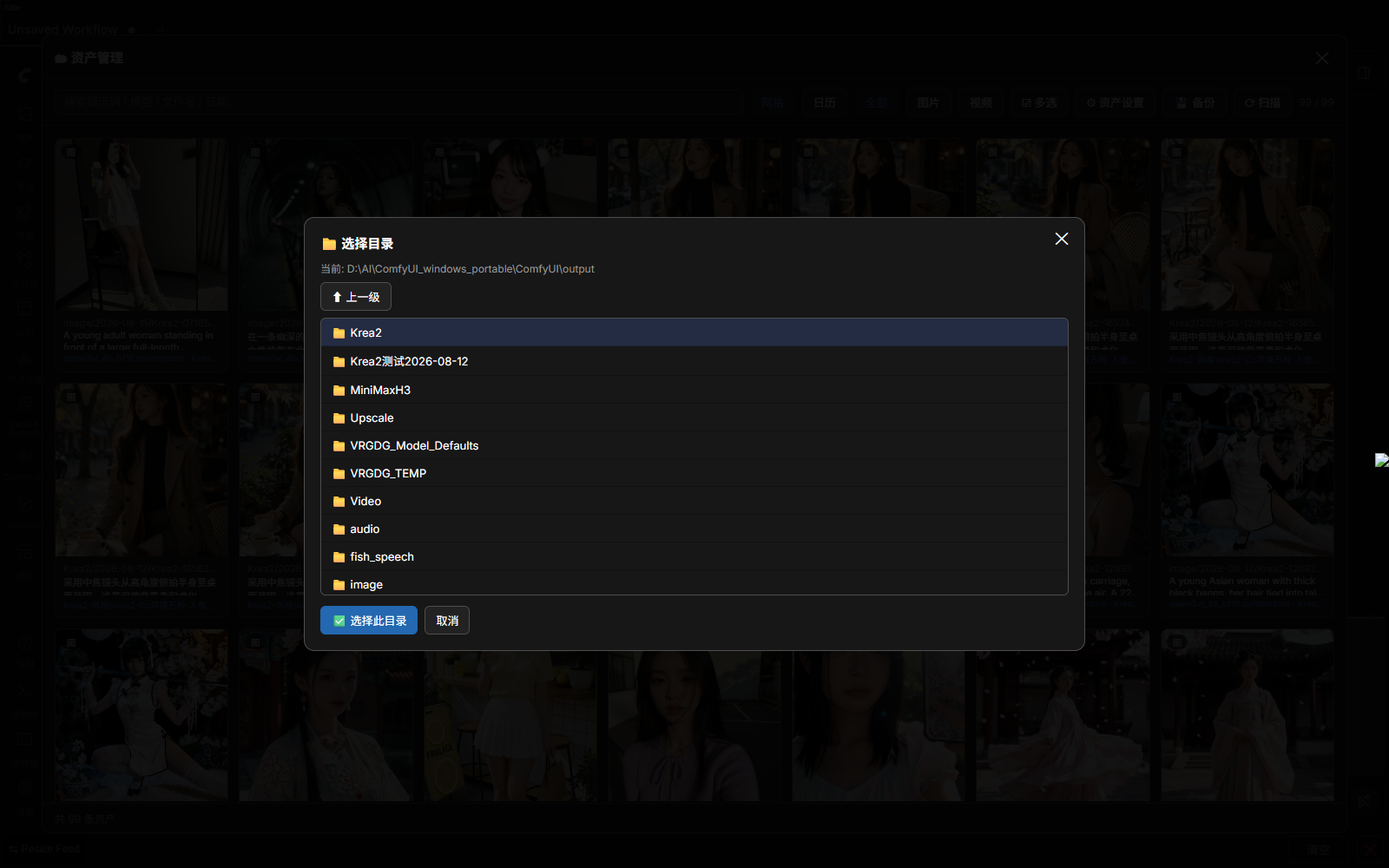
- Directory picker — the output/archive/backup fields each have a "Browse…" button; pick a folder with the mouse, no manual path typing.<br> 目录点选 — 输出/归档/备份三个目录都带「浏览…」按钮,鼠标点选目录,无需手输路径。
- One-click backup — package "asset library + workflows + plugin config" into a zip.<br> 一键备份 — 把「资产库 + 工作流 + 插件配置」打包成 zip。
Differentiators · 差异化
- Calendar browsing by date (most similar plugins only have a grid list)<br> 日历按日期归档浏览(多数同类插件只有网格列表)
- Batch delete + live scan refresh (manual drag-in/delete also syncs)<br> 批量删除 + 实时扫描刷新(手动拖入/删除文件也会同步)
- Output directory switching, auto-restored after restart<br> 输出目录切换且重启自动恢复
- Directory picker — no absolute path typing required<br> 目录浏览器点选,不依赖手输绝对路径
📸 Screenshots · 界面预览
| Grid · 网格视图 | Calendar · 日历视图 |
|---|---|
| 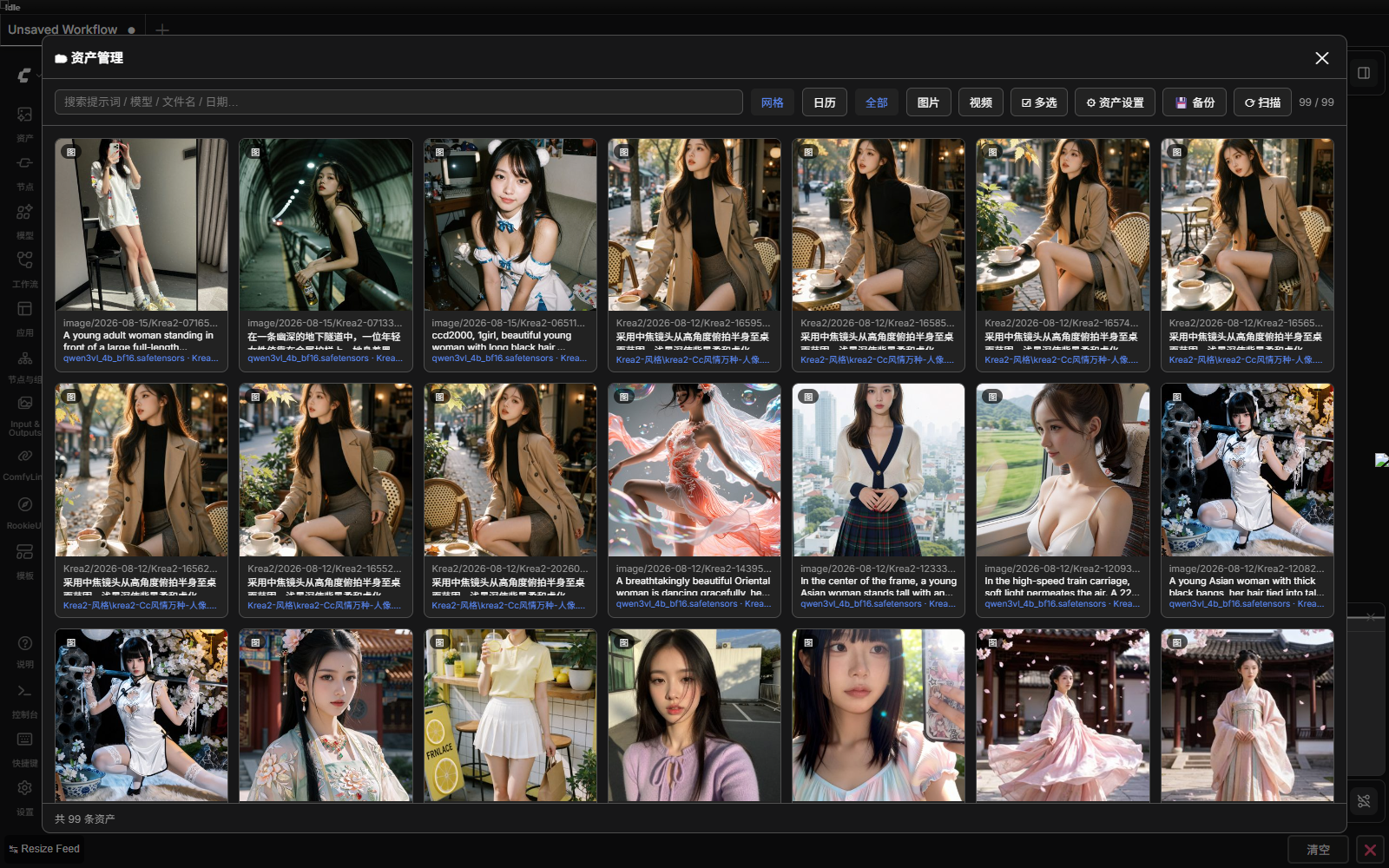 |
| 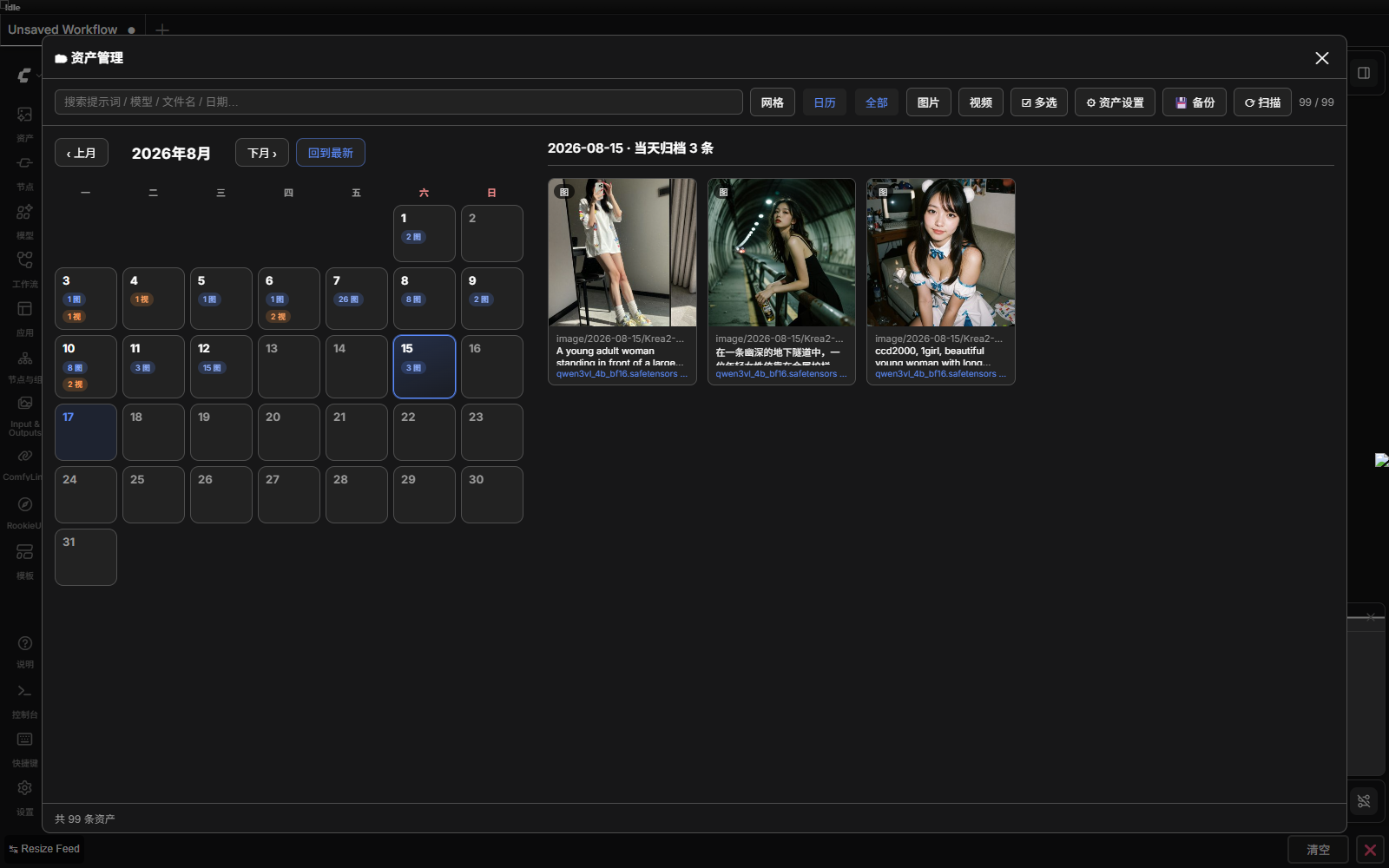 |
|
| Preview · 预览详情 | Settings · 资产设置 | Browse · 目录点选 |
|---|---|---|
| 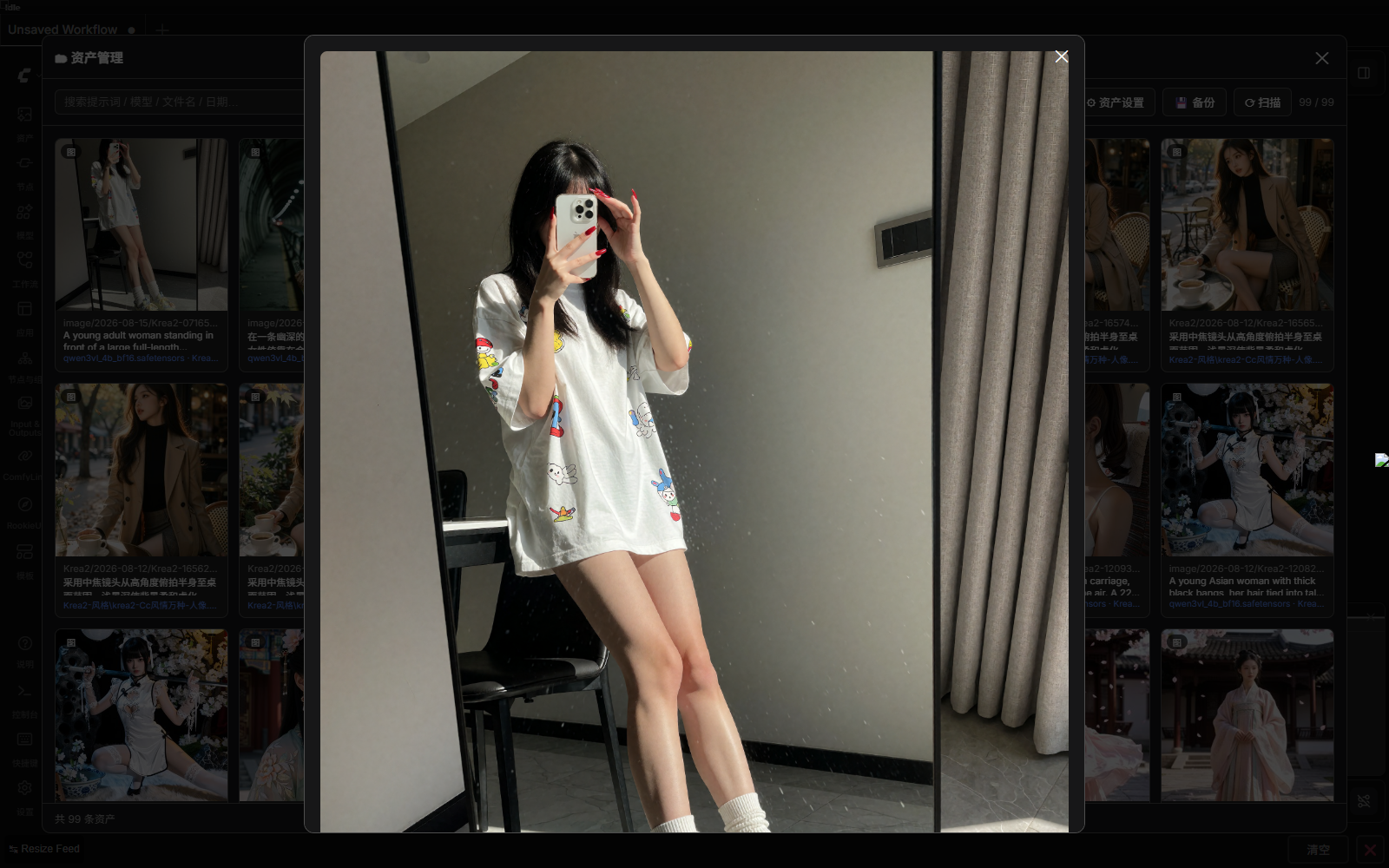 |
| 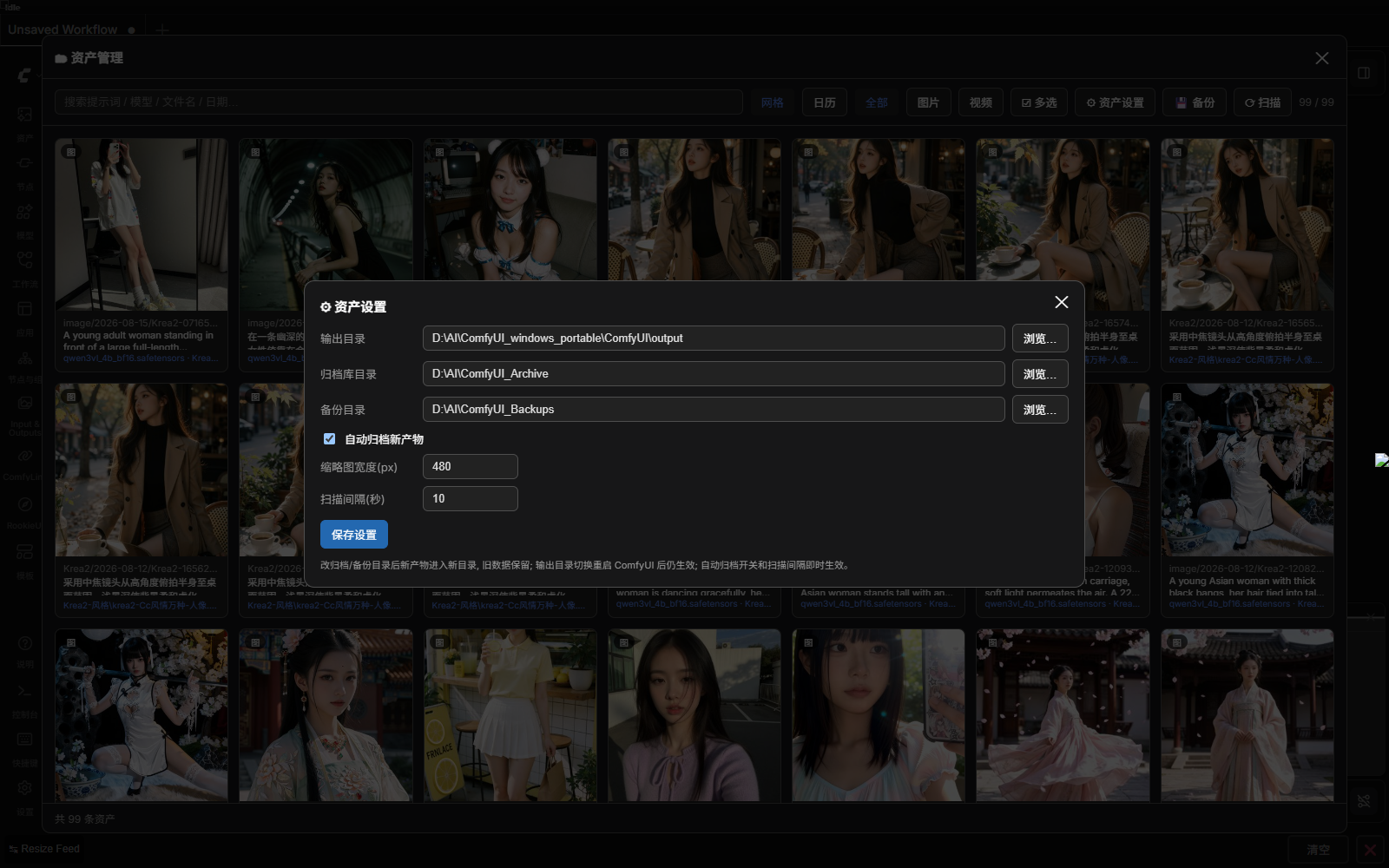 |
|  |
|
📦 Installation · 安装
Method 1: ComfyUI-Manager (recommended) · 方法一:ComfyUI-Manager(推荐)
Search for AssetManager in the Manager and install.<br>
在 Manager 里搜索 AssetManager 安装。
Method 2: git clone · 方法二:git clone
cd ComfyUI/custom_nodes
git clone https://github.com/Wumihaze/ComfyUI-AssetManager.git
Method 3: Manual download · 方法三:手动下载
Download the repo zip and extract it into ComfyUI/custom_nodes/, keeping the folder name ComfyUI-AssetManager.<br>
下载本仓库 zip,解压到 ComfyUI/custom_nodes/ 下,目录名保持 ComfyUI-AssetManager。
Dependencies: Python ≥ 3.9 and
Pillow(bundled with ComfyUI). Video metadata extraction and thumbnails requireffmpeg/ffprobe(bundled with the portable ComfyUI, or on system PATH, or specified inconfig.json).<br> 依赖:Python ≥ 3.9,Pillow(ComfyUI 已自带)。视频元数据提取与缩略图需要ffmpeg/ffprobe(ComfyUI 便携版自带;也可在系统 PATH 里,或在config.json里指定路径)。
🚀 Usage · 使用
- Start ComfyUI and click "Asset Manager" in the top menu bar to open the panel.<br> 启动 ComfyUI,顶部菜单栏点「资产管理」打开面板。
- Top toolbar: search box, grid/calendar toggle, all/image/video filter, multi-select, backup, scan, settings.<br> 顶部工具栏:搜索框、网格/日历切换、全部/图片/视频过滤、多选、备份、扫描、资产设置。
- Click an asset → preview dialog: copy prompt / download workflow.json (drag back to canvas to reproduce) / delete from disk.<br> 点产物 → 预览弹窗:复制提示词 / 下载 workflow.json(拖回画布复现)/ 从硬盘删除。
⚙️ Configuration · 配置
A config.json is generated on your first settings save (template at config.example.json). Everything can also be changed in the panel's "⚙ Settings".<br>
首次保存设置时自动生成 config.json(模板见 config.example.json)。所有配置也可在面板「⚙ 资产设置」里直接改:
| Key · 键 | Description · 说明 |
|---|---|
| output_dir | Custom output directory (empty = ComfyUI default output) / 自定义输出目录(空 = 用 ComfyUI 默认 output) |
| archive_dir | Asset archive directory (empty = <ComfyUI>/asset_archive) / 资产归档库目录(空 = <ComfyUI>/asset_archive) |
| backup_dir | Backup zip directory (empty = <ComfyUI>/asset_backups) / 备份 zip 存放目录(空 = <ComfyUI>/asset_backups) |
| auto_archive | Auto-archive new assets (true/false) / 是否自动归档新产物(true/false) |
| archive_existing | On first run, also archive assets already in the output directory (false = only new assets after install) / 首次运行时是否也归档 output 里已有的历史产物(false = 只归档安装后的新产物) |
| thumb_width | Thumbnail width (px) / 缩略图宽度(px) |
| interval_sec | Archive scan interval (seconds) / 归档扫描间隔(秒) |
ℹ️ 从 v1.0.4 起,视频元数据与缩略图改用 PyAV 在进程内完成,不再需要 ffmpeg/ffprobe, 因此配置里也不再有
ffprobe/ffmpeg两项。若你之前的config.json里还留着这两项, 可以直接删除(插件会忽略它们)。
📁 Directory structure · 归档目录结构
<archive dir>/
└─ 2026-08-12/
   └─ 110358_ComfyUI_00016/
      ├─ ComfyUI_00016_.png       # original asset / 原产物
      ├─ info.json                # full info (prompt/params/models/workflow) / 完整信息(提示词/参数/模型/工作流)
      ├─ prompt.txt               # human-readable prompt / 人类可读提示词
      ├─ workflow.json            # drag back into ComfyUI to rerun / 拖回 ComfyUI 复跑
      └─ thumb.jpg                # thumbnail (first frame for videos) / 缩略图(视频取首帧)
📝 Notes · 说明
- Archiving is a copy; it doesn't affect ComfyUI previews. Files are only touched on disk when you delete them.<br> 归档是复制,不影响 ComfyUI 预览;删除时才真正动硬盘。
- The archive directory can be migrated anytime — just change
archive_dirin settings (old data stays where it was).<br> 归档目录可随时迁移,只要在设置里改archive_dir即可(旧数据保留在原目录)。
🔍 为什么有的产物"未检测到提示词"? · Troubleshooting prompt extraction
提示词优先从文件内嵌元数据读取(PNG tEXt / WebP EXIF / MP4-MKV ffmpeg tag)。
文件里没有元数据时,插件会再从 ComfyUI 服务端执行记录里按文件名找回当时那次执行的
提示词与工作流,所以正常情况下跑出来的图都能带上提示词。<br>
Prompts are read from the file's embedded metadata first; if absent, the plugin falls back to
ComfyUI's server-side execution history (matched by output filename), so generated images normally
carry their prompt.
预览弹窗会说明具体原因,常见三种:
| 提示 | 含义 | 怎么办 |
|---|---|---|
| ⚠ 文件本身不带 ComfyUI 元数据 | 图片不是 ComfyUI 直接存的:浏览器另存、手机/微信转存后拖进 output 目录;或 ComfyUI 启动时带了 --disable-metadata(隐私模式) | 用「保存图像 / SaveImage」节点跑出来的图会自动归档并带上提示词;若用了 --disable-metadata,去掉该参数即可 |
| 这次运行没有文本提示词节点 | 工作流里确实没有 CLIPTextEncode 一类节点(纯图像处理、证件照、放大等工作流) | 正常现象,无需处理 |
| 提示词由 ComfyUI 执行记录找回 | 文件本身没写元数据,但已从服务端历史补回 | 正常现象(说明该文件不带元数据,但提示词已找回) |
注:归档是复制原始文件,不会给你的图片补写元数据;找回的提示词只写进归档目录的
info.json/prompt.txt/workflow.json。
🔒 Security · 安全说明
本插件从 v1.0.4 起按 Comfy Registry 的安全标准收紧了输入面(此前版本因
policy-v0.5 command-injection / policy-v0.2 ARBITRARY_FILE_LAUNCH 被标记,相关修复见下):
- 不启动任何外部进程:视频元数据读取与缩略图生成改用 PyAV 在进程内完成,
代码中已无
subprocess/os.system/eval/exec,从根上消除了命令注入面。 配置里也移除了ffprobe/ffmpeg两项。 - 配置写入白名单:
/asset/set_config只接受固定的可配置键,任何未知字段都会被拒绝 并在响应errors中说明,不会再被写进运行时配置。 - 数值与类型校验:数值项有上下限;布尔项必须是真正的布尔值。
- 路径沙箱:媒体文件读取、工作流下载、目录浏览都限制在 output / archive / backup 目录范围内; 删除等写操作会校验目标仍在归档目录内(防目录穿越)。
No external process is ever launched: video metadata and thumbnails are handled in-process with
PyAV, and the codebase contains no subprocess / os.system / eval / exec. Configuration keys
are written through a strict allowlist, numeric options are range-checked, and all file/directory
access is confined to the configured output / archive / backup roots.
📄 License
MIT © 2026 Wumihaze