
SHARP Gaussian Stereo Preview
SHARP Gaussian Splatting stereo preview nodes for ComfyUI
ComfyUI-SHARP-Gaussian-Stereo
A standalone ComfyUI custom-node package for turning a single photograph into a 3D Gaussian Splat and inspecting it in an interactive stereo viewer.
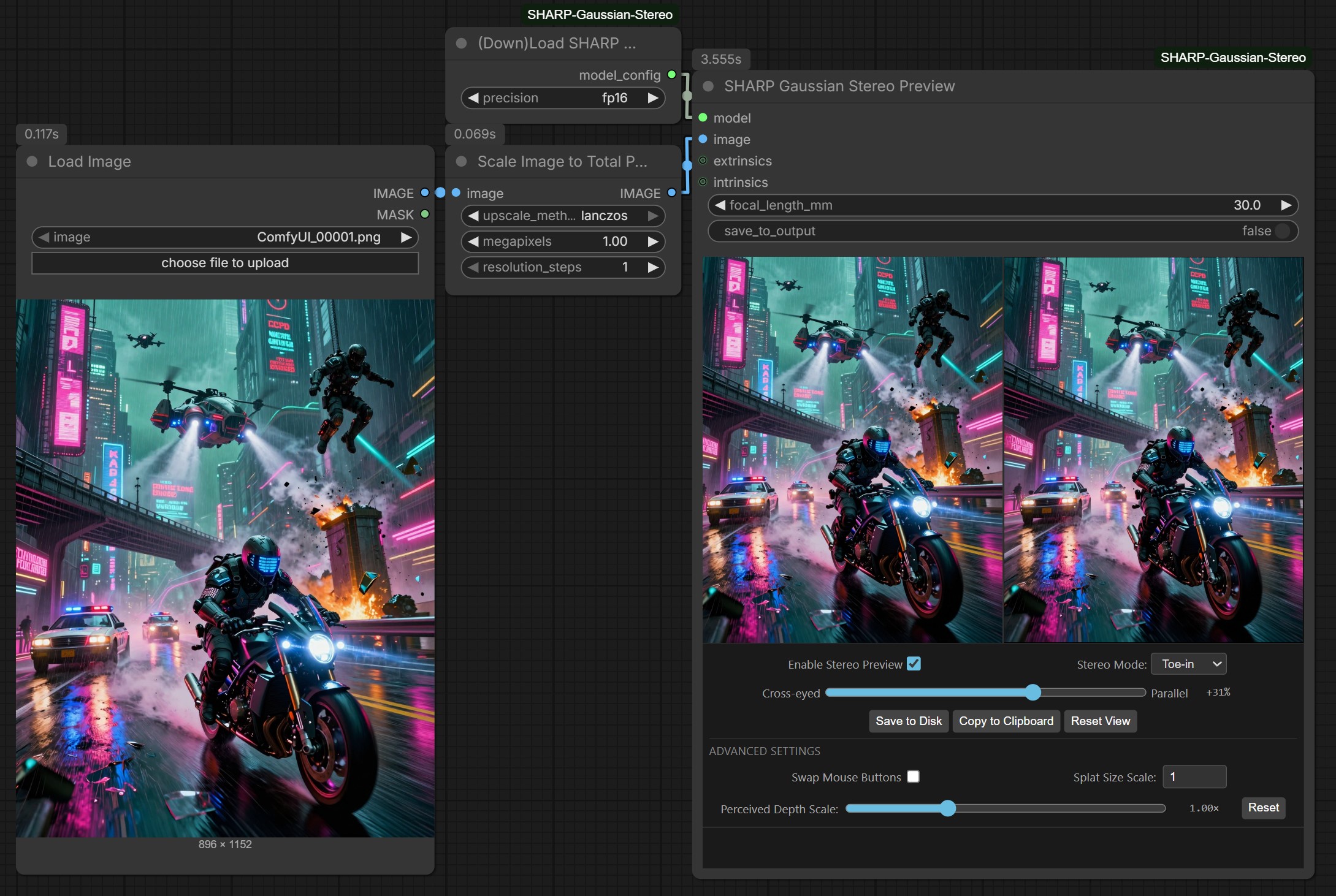
What it does
The package runs Apple's SHARP model on a ComfyUI image and exports the predicted scene as a .ply Gaussian Splat. The bundled viewer can display the result in stereo or mono, with controls for camera movement, splat size, and perceived depth.
SHARP is a single-image view-synthesis model, not a full scene-generation or multi-view reconstruction system. It infers a compact 3D representation from the information available in one photograph and is intended for small viewpoint changes around the source camera view.
Features
- Standalone implementation: no runtime dependency on
ComfyUI-Sharp,ComfyUI-GeometryPack,comfy-env, orcomfy-3d-viewers. - Automatic download of the official SHARP checkpoint from Apple's Hugging Face repository when it is not already installed.
- ComfyUI model management with FP16 as the default precision;
auto,bf16, andfp32are also available. - Interactive stereo viewer with Parallel and Toe-in camera modes, plus a centered mono view.
- Viewer-side controls for mouse mapping, Gaussian splat size, and perceived depth.
- Optional PLY saving to ComfyUI's output directory, or temporary preview output.
Installation
-
Clone or download this repository into
ComfyUI/custom_nodes/ComfyUI-SHARP-Gaussian-Stereo. -
Install the Python dependency if it is not already available in your ComfyUI environment:
.\python_embeded\python.exe -m pip install -r .\ComfyUI\custom_nodes\ComfyUI-SHARP-Gaussian-Stereo\requirements.txtRun the command from the ComfyUI portable root. If you use a different installation layout, use that installation's Python executable and repository path.
-
Restart ComfyUI.
-
Add (Down)Load SHARP Model and connect its
model_configoutput to SHARP Gaussian Stereo Preview. -
Connect a single
IMAGEinput to the preview node. On first use, the loader downloads the SHARP checkpoint fromapple/Sharpunless it is already present in a registeredmodels/sharpdirectory.
The checkpoint is approximately 2.7 GB. It is not included in this repository.
Requirements
- A working ComfyUI installation with a CUDA-capable GPU and its supported PyTorch build.
- NumPy (normally already present in ComfyUI).
huggingface_hubfor downloading the checkpoint; it is listed inrequirements.txt.
FP16 is the default precision and is recommended for a balance of visual quality, speed, and GPU memory use. The optional auto, bf16, and fp32 settings are available for comparison or hardware-specific needs; memory use and performance depend on the selected precision, ComfyUI configuration, and available GPU memory. The package does not bundle Python, PyTorch, CUDA, or model weights.
Example workflow
An example ComfyUI workflow is provided at workflow/gaussian-stereo-workflow.json. Load it into ComfyUI to see how the model loader, image input, and stereo preview node are connected.
The preview node currently processes one image per run (batch size 1).
Node inputs
(Down)Load SHARP Model
| Input | Description |
| --- | --- |
| Precision | auto, bf16, fp16 (default), or fp32. FP16 is the recommended default; auto delegates precision selection to ComfyUI. |
SHARP Gaussian Stereo Preview
| Input | Description |
| --- | --- |
| model | Connect the model_config output from (Down)Load SHARP Model. |
| image | One ComfyUI IMAGE input. Batch size must be 1. |
| Save to Output | When enabled (default), saves the generated PLY in ComfyUI/output. When disabled, uses ComfyUI/temp and applies the node-scoped cleanup described below. |
| focal_length_mm | SHARP camera focal length in millimeters. Default: 30.0. This is used during 3D reconstruction and changes the geometry predicted by SHARP; changing it requires running the preview node again. |
| extrinsics and intrinsics (optional) | Connect both to provide the source camera matrices. When supplied together, their camera parameters are used instead of the focal-length value above. |
Perceived Depth Scale is an additional, viewer-side alternative for changing the visible depth in real time without running SHARP again. It does not replace or restrict focal_length_mm: use the focal-length input when you want SHARP to perform the camera-based reconstruction with a different focal length, then run the node again to generate a new PLY. Use Perceived Depth Scale when you want a quick visual adjustment of the already-generated scene.
Viewer controls
Main controls
| Control | Description |
| --- | --- |
| Enable Stereo Preview | Switches between two-eye stereo and a single centered mono view. |
| Stereo Mode | Parallel keeps both camera directions parallel; Toe-in turns them inward toward a shared convergence point. |
| Cross-eyed / Parallel | Adjusts or reverses the stereo baseline. Default intensity: +30% toward Parallel. Negative values reverse the left-right order for cross-eyed viewing. |
| Save to Disk | Saves a screenshot of the current viewer image to ComfyUI output. |
| Copy to Clipboard | Copies the current viewer image to the clipboard. |
| Reset View | Smoothly returns the camera to its initial view. |
Advanced Settings
The advanced controls are arranged in two rows:
| Control | Description |
| --- | --- |
| Swap Mouse Buttons | Off by default: left mouse button rotates/orbits the view and right mouse button pans. Enable it to reverse those actions. |
| Splat Size Scale | Changes the rendered size of the Gaussian splats without changing their centers or the camera position. Default: 1.0. |
| Perceived Depth Scale | Applies a radial transform to Gaussian centers around the camera's initial position. Values below 1.00× reduce perceived depth; values above 1.00× increase it. 1.00× is neutral. |
| Reset (next to Perceived Depth Scale) | Restores Perceived Depth Scale to 1.00×. |
Perceived Depth Scale is a viewer-side geometric adjustment for real-time changes. It does not rerun SHARP or change the model's predicted depth. It preserves the angular direction of Gaussian centers from the initial camera position while scaling their distance from that point. For a camera-based change to the reconstructed geometry, use the preview node's focal_length_mm input and run inference again; both controls are available for their different purposes.
Preview output and temporary-file cleanup
The Save to Output option on the preview node controls where the generated PLY is written:
- Enabled: the PLY is saved in ComfyUI's
outputdirectory and its filename and file size are shown below the viewer. - Disabled: the PLY is written to ComfyUI's
tempdirectory; the metadata area remains blank.
When Save to Output is disabled, a successful new inference removes the previous temporary PLY created by that same preview node. PLY files can be large, so this prevents repeated previews from accumulating large temporary files and unnecessarily expanding the temp directory. Cleanup is deliberately limited to that node's own tracked file: it does not clear ComfyUI's shared temp directory or remove files created by other nodes. If a new inference fails, the previous temporary PLY is left in place.
Input guidance and model limitations
SHARP was designed for photorealistic view synthesis from a single photograph, with an emphasis on high-quality nearby views rather than unrestricted navigation.
For the most predictable results, start with a clear, photo-like image that contains useful perspective, texture, and visible boundaries between objects. This is practical guidance based on the model's stated target and architecture, not a guarantee for every image.
Keep the following limitations in mind:
- Nearby views only: the model is intended to support natural viewpoint shifts around the source camera. It is not designed for walking around a scene, full 360-degree exploration, or viewing the scene from far-away positions.
- Depth is inferred, not measured: a single image does not uniquely determine 3D structure. The predicted spatial relationships are estimates and should not be treated as ground-truth geometry or measurements.
- Reflective and transparent surfaces: Apple's paper specifically identifies these as difficult cases for monocular depth estimation and view synthesis.
- Complex boundaries and fine structures: the paper notes depth ambiguity around object boundaries and in complex structures such as foliage; these regions can produce visual artifacts when viewed from a new angle.
- Stylized artwork: the model's stated goal and training/evaluation focus are photorealistic images. The upstream paper does not establish equivalent performance on illustrations, anime, paintings, or heavily stylized images, so results on those inputs should be considered less predictable rather than a supported use case.
- Unseen content: SHARP estimates a 3D representation from the visible photograph. It should not be expected to reconstruct hidden surfaces or invent a complete environment beyond the source image.
- Single-image input: this integration accepts one image per run; batches larger than one are not supported.
For further detail on the method and its evaluation, see the SHARP paper (ICLR 2026) and Apple's project page.
Model download and license
The SHARP checkpoint is downloaded from the official apple/Sharp Hugging Face repository. Model weights are not redistributed here.
Important: the checkpoint is governed by Apple's Apple Machine Learning Research Model License Agreement. The license restricts use to the defined Research Purposes and excludes commercial exploitation, product development, and use in a commercial product or service. Read the full agreement before downloading or using the weights.
The SHARP architecture files retain Apple's copyright and license notices. The ComfyUI integration adapted from ComfyUI-Sharp is distributed under GPL-3.0. Third-party components and their licenses are listed in LICENSES/THIRD_PARTY_NOTICES.md and UPSTREAM_SOURCES.md.
Acknowledgements and upstream projects
- Apple SHARP — model architecture, weights, and research.
- ComfyUI-Sharp — ComfyUI integration source adapted for this standalone package.
- comfy-3d-viewers — viewer integration source.
- gsplat.js — Gaussian Splat rendering library.
This repository includes the required notices and license texts. It does not claim authorship of the upstream model or third-party viewer components.