
WanVideo Wakawave - Advanced LoRA & Prompt Tools
Advanced LoRA management and prompt building tools for WanVideo. Features: Wakawave LoRA Loader (unlimited LoRAs, save/load presets, drag-to-reorder, per-LoRA strength control), Wakawave Prompt Builder (dual positive/negative prompts, weight control, segment mode, visual preset browser with import/export).
Nodes (2)
🌊 WanVideo Wakawave - Advanced LoRA & Prompt Tools
Advanced LoRA management and prompt building tools for WanVideo in ComfyUI.
Two powerful nodes:
- 🌊 Wakawave LoRA Loader - Dynamic LoRA management with unlimited add/remove
- 🌊 Wakawave Prompt Builder - Advanced prompt creation with segment support
✨ Features
Wakawave LoRA Loader
- ✅ Unlimited LoRAs - Add/remove as many LoRAs as you need
- ✅ Save/Load Presets - Save your favorite LoRA combinations
- ✅ Drag-to-Reorder - Reorder LoRAs easily
- ✅ Per-LoRA Strength - Individual strength control for each LoRA
- ✅ Enable/Disable Toggle - Test different combinations quickly
- ✅ Chainable - Connect multiple loaders together
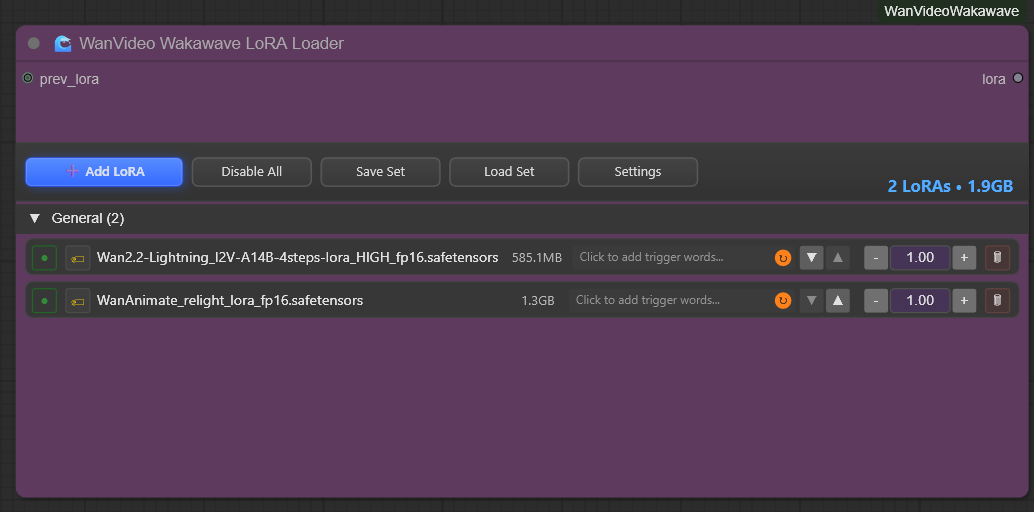
- ✅ File Size Display - Shows individual LoRA file sizes next to each name and total combined size in header
- Displays in node interface as a separate column
- Shows total in header (e.g., "8 LoRAs • 6.9GB")
- Displays in console output during execution
- Toggle on/off with "Show File Sizes" setting
- ✅ Smart Directory Scanning - Detects all LoRA paths from
extra_model_paths.yaml - ✅ Server-Side Caching - Caches all file sizes on startup for instant display
- ✅ Compatible with WanVideo - Outputs WANVIDLORA format
Wakawave Prompt Builder
- ✅ Dynamic Prompt Management - Add/remove prompt lines on the fly
- ✅ Weight Control - Adjust emphasis for each prompt (0.5-2.0)
- ✅ Save/Load Presets - Save and recall prompt collections
- ✅ Segment Mode - Different prompts for different video segments
- ✅ Multiple Separators - Comma, newline, space, pipe, double slash, or none
- ✅ Weighted Output - Automatic formatting like
(prompt:1.2) - ✅ Chainable - Combine multiple prompt builders
📦 Installation
Method 1: ComfyUI Manager
- Open ComfyUI Manager
- Search for "WanVideo Wakawave"
- Click Install
- Restart ComfyUI
Method 2: Manual Installation (Recommended until comfyui manager integration)
cd ComfyUI/custom_nodes
git clone https://github.com/Wakapedia/ComfyUI-WanVideoWakawave.git
# Restart ComfyUI
Method 3: Download ZIP
- Download the latest release
- Extract to
ComfyUI/custom_nodes/ComfyUI-WanVideoWakawave - Restart ComfyUI
🎯 Usage
Wakawave LoRA Loader
Basic Usage:
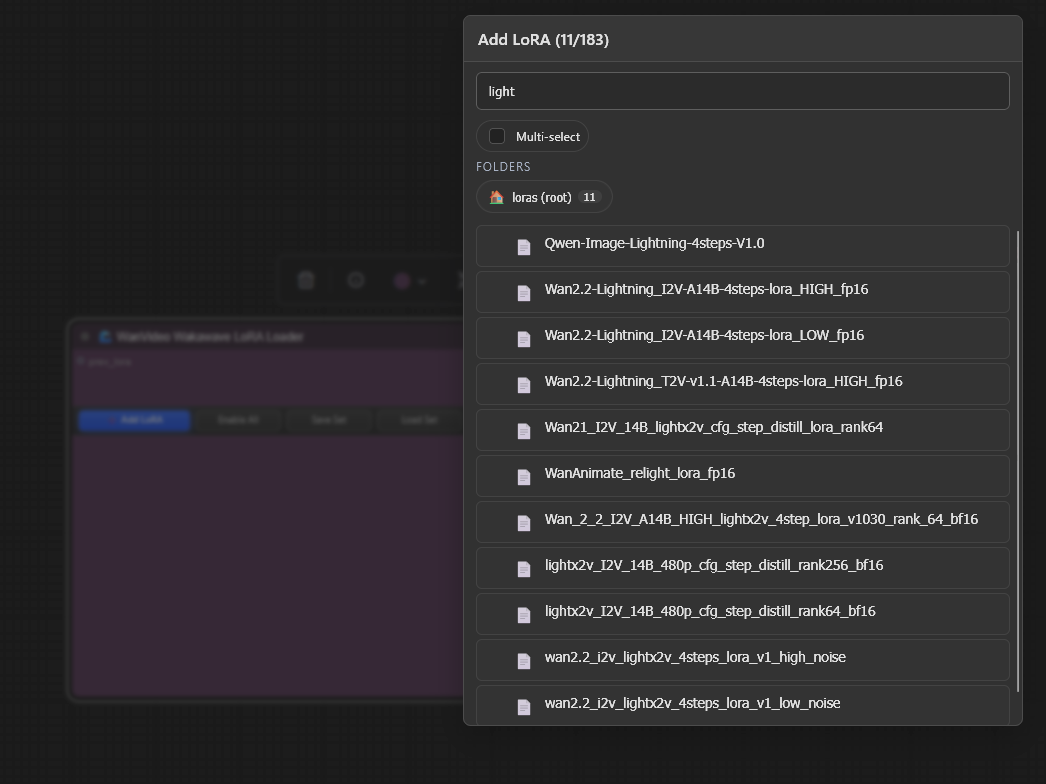
- Add the node: Right-click →
WanVideo→Loaders→Wakawave LoRA Loader - Click
+ Add LoRAto add LoRAs - Select LoRAs from the dropdown
- Adjust strength sliders (0-2.0)
- Enable/disable with checkboxes
- Connect output to
WanVideo Set LoRAsnode
Save/Load Presets:
- Click
💾 Saveto save current LoRA combination - Click
📂 Loadto load a saved preset - Click
🗑 Deleteto remove a preset
Chaining Multiple Loaders:
[LoRA Loader 1] → prev_lora → [LoRA Loader 2] → WanVideo Set LoRAs
File Size Display:
- Shows individual LoRA file sizes in a dedicated column (e.g., "1.3GB", "292.6MB")
- Column width dynamically adjusts based on text length
- Header displays total count and combined size (e.g., "8 LoRAs • 6.9GB")
- Toggle visibility with "Show File Sizes" in node settings
- Sizes are cached on server startup for instant display (no latency)
Example Console Output:
🌊 WanVideo Wakawave LoRA Loader
===============================================
  ✅ 1. WanAnimate_relight_lora_fp16.safetensors @ 1.00 (1.3GB)
  ✅ 2. lightx2v_I2V_14B_480p_cfg_step_distill_rank256_bf16 @ 1.00 (2.7GB)
  ✅ 3. boreal-v2.safetensors @ 0.70 (164.0MB)
===============================================
✅ Total enabled: 3 LoRAs | Combined size: 4.16GB
Wakawave Prompt Builder
Outputs:
positive- Positive prompt text (STRING)negative- Negative prompt text (STRING)
⚠️ Important: The Prompt Builder outputs text (STRING), not embeddings. You must use WanVideo TextEncode Cached to convert text to embeddings before connecting to the sampler.
Basic Usage:
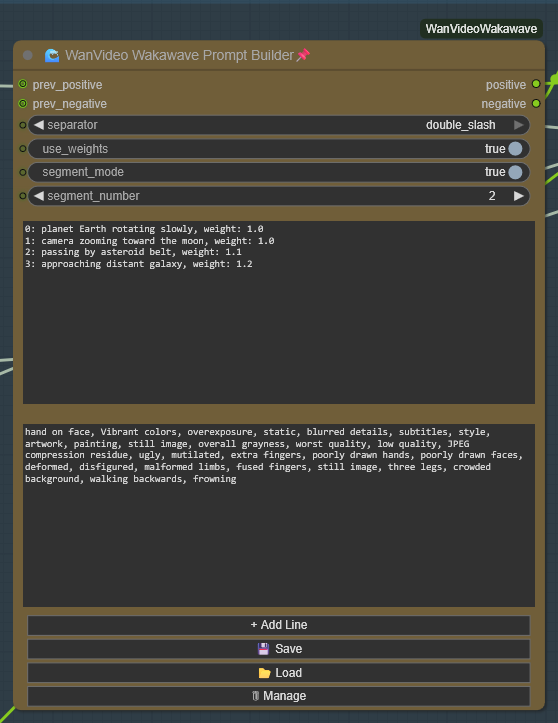
- Add the node: Right-click →
WanVideo→Prompts→Wakawave Prompt Builder - Type positive prompts in the top text box (one per line)
- Type negative prompts in the bottom text box (optional)
- Optional: Add weights like
prompt text, weight: 1.2 - Click
+ Add Linefor new prompt lines - Connect
positive→ WanVideo TextEncode Cached → sampler - Connect
negative→ WanVideo TextEncode Cached → sampler
Prompt Builder Node Interface:
Visual Preset Browser:
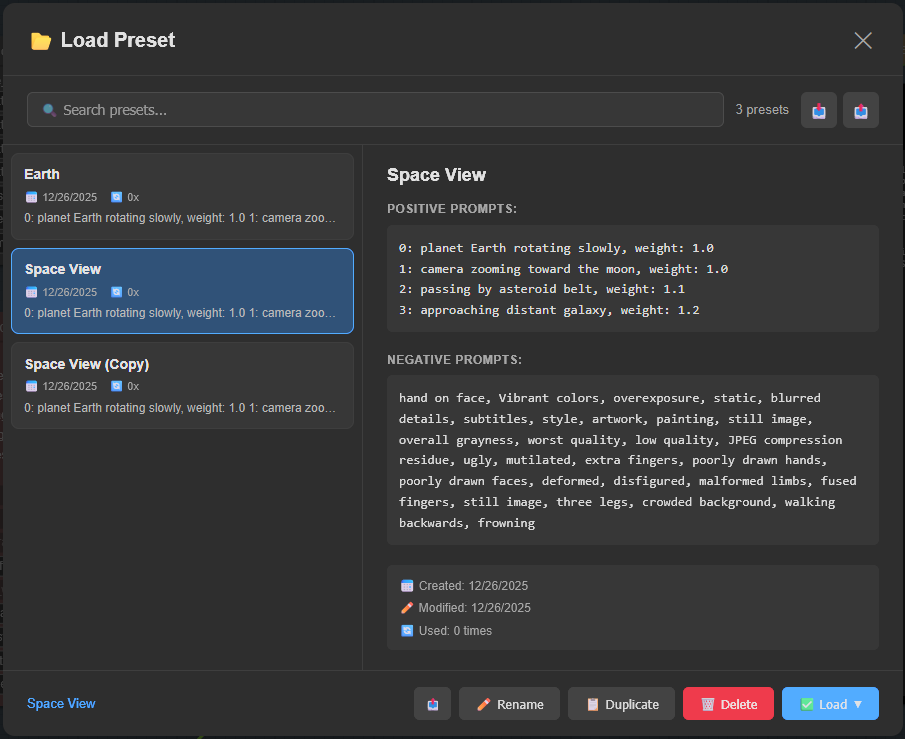
The visual preset browser features:
- Search & Filter - Find presets instantly
- Live Preview - See prompts before loading
- Load Modes - Load both, positive only, negative only, or append
- Import/Export - Share presets as JSON files
- Rename, Duplicate, Delete - Full preset management
- Usage Tracking - See which presets you use most
Prompt Format:
nebula in deep space, weight: 1.2
vibrant purple and blue colors, weight: 1.0
stars twinkling, weight: 0.8
Or simple format (defaults to weight 1.0):
nebula in deep space
vibrant purple and blue colors
stars twinkling
Segment Mode (for 500+ frame videos):
- Enable
segment_mode - Format prompts with segment numbers:
0: planet Earth rotating slowly, weight: 1.0
1: camera zooming toward the moon, weight: 1.0
2: passing by asteroid belt, weight: 1.1
3: approaching distant galaxy, weight: 1.2
- Connect a segment counter to
segment_numberinput - Each segment uses its corresponding prompts
Separator Options:
- comma →
prompt1, prompt2, prompt3(default) - newline → Prompts on separate lines
- space →
prompt1 prompt2 prompt3 - pipe →
prompt1 | prompt2 | prompt3 - double_slash →
prompt1 // prompt2 // prompt3 - none →
prompt1prompt2prompt3
🎬 Example Workflows
Basic LoRA + Prompt Setup
[Wakawave LoRA Loader] → lora → [WanVideo Set LoRAs] → [WanVideo Model]

[Wakawave Prompt Builder]
   ├─ positive → [WanVideo TextEncode Cached] → positive_embeds ──┐
   └─ negative → [WanVideo TextEncode Cached] → negative_embeds ──┤
                                                                    ├─→ [WanVideo Sampler]
                                                                    │
                                                 [WanVideo Model] ──┘
Multi-Segment Long Video (500+ frames)
[Segment Counter] → segment_number
                 ↓
[Wakawave Prompt Builder] (segment_mode: ON)
   ├─ positive → [WanVideo TextEncode Cached] → positive_embeds → [WanVideo Sampler]
   └─ negative → [WanVideo TextEncode Cached] → negative_embeds → [WanVideo Sampler]

Example segment prompts:
  Segment 0 (frames 0-76): "0: forest at dawn, mist rising"
  Segment 1 (frames 77-153): "1: sunlight breaking through trees"
  Segment 2 (frames 154-230): "2: birds flying through the canopy"
Multiple LoRA Combinations
[Wakawave LoRA Loader 1] (style LoRAs)
         ↓ prev_lora
[Wakawave LoRA Loader 2] (character LoRAs) → [WanVideo Set LoRAs]
⚙️ Settings
File Size Display & Caching
Node Setting:
- "Show File Sizes" - Toggle to show/hide file sizes in the node interface and header
Server-Side Caching:
- All LoRA file sizes are automatically scanned and cached when ComfyUI starts
- Scans all directories configured in
extra_model_paths.yaml(not just the defaultmodels/loras) - Provides instant file size display with zero latency
- Cache is stored in memory throughout the server session
Verbose Cache Output (Optional):
By default, the startup cache only shows a summary like:
[Wakawave] Scanning all configured LoRAs directories...
[Wakawave] Found LoRAs directory (from folder_names_and_paths): <your-comfyui-path>\models\loras
[Wakawave] Found LoRAs directory (from folder_names_and_paths): <extra-model-path>\loras
[Wakawave] Will scan 2 LoRAs director(ies)
[Wakawave] ✅ Cached 185 LoRA file sizes from 2 director(ies)
To see every cached file on startup, edit __init__.py:
# Set to True to show individual file caching during startup
WAKAWAVE_CACHE_VERBOSE = False  # Change to True for verbose output
When enabled, you'll see:
[Wakawave] Scanning: <your-comfyui-path>\models\loras
[Wakawave]   Cached: 'model1.safetensors' = 1326751208 bytes (1.24GB)
[Wakawave]   Cached: 'model2.safetensors' = 2929000000 bytes (2.73GB)
[Wakawave] Scanning: <extra-model-path>\loras
[Wakawave]   Cached: 'model3.safetensors' = 322519480 bytes (307.58MB)
...
[Wakawave] ✅ Cached 185 LoRA file sizes from 2 director(ies)
LoRA Loader Settings
- prev_lora (optional): Connect another LoRA loader to chain
- Hidden parameter:
lora_bundle(JSON, managed by UI)
Prompt Builder Settings
- prev_prompt (optional): Previous prompt to prepend
- separator: How to join prompts (comma/newline/space/pipe/double_slash/none)
- use_weights: Enable/disable weight syntax
(prompt:1.2) - segment_mode: Enable segment-based prompting
- segment_number: Current segment number (0-100)
📝 Tips & Best Practices
LoRA Tips:
- Start with lower strengths (0.6-0.8) and increase gradually
- Order matters - earlier LoRAs have more influence
- Use presets to save working combinations
- Disable LoRAs to A/B test their impact
- File Sizes: Check the file size display to monitor VRAM usage
- Larger LoRAs (500MB+) may require more VRAM
- Use the combined total to plan your system resource allocation
- File sizes are cached on startup for quick reference
Prompt Tips:
- Main subject: Weight 1.1-1.3
- Important details: Weight 1.0-1.2
- Background/ambient: Weight 0.7-0.9
- Stay between 0.5-1.5 for best results
- Save successful prompts as presets
Segment Mode Tips:
- Match segment frames to your context window (e.g., 77 frames)
- Plan your video story with segment markers
- Use consistent weighting within segments
- Test individual segments before full render
🙏 Credits
Inspired by:
- ND Super Nodes - UI framework and preset system
- WanVideo Wrapper team - Base LoRA implementation
Created by: Wakapedia
📄 License
MIT License - See LICENSE file for details
🐛 Issues & Support
Found a bug or have a feature request?
- Open an issue on GitHub
- Include your ComfyUI version and error logs
🔄 Changelog
v1.1.0 (Current)
- 🎉 File Size Display - Shows individual LoRA sizes in node interface as separate column
- 🎉 Smart Directory Scanning - Auto-detects all LoRA paths from
extra_model_paths.yaml - 🎉 Server-Side Caching - All file sizes cached on startup for instant display (zero latency)
- 🎉 Dynamic Column Width - File size column auto-sizes based on text length
- 🎉 Header Summary - Prominent display of total LoRAs and combined size (e.g., "8 LoRAs • 6.9GB")
- 🎉 Verbose Toggle - Optional
WAKAWAVE_CACHE_VERBOSEsetting to show per-file caching - 🎉 Console Output - File sizes now display in console during execution
- ✅ Toggle Setting - "Show File Sizes" option to hide/show in node interface
- ✅ UI Improvements - Reduced widget height and optimized layout
- ✅ API Endpoint - GET
/wanvideo/lora/sizesfor file size queries - ✅ Fallback Support - Automatically calculates sizes if not in cache
v1.0.5
- Previous stable release
v1.0.0 (Initial Release)
- 🌊 Wakawave LoRA Loader with unlimited LoRAs
- 🌊 Wakawave Prompt Builder with segment support
- ✅ Save/load presets for both nodes
- ✅ Drag-to-reorder functionality
- ✅ Weight control for prompts and LoRAs
- ✅ Multiple separator options
- ✅ Chainable nodes
Enjoy creating amazing videos with Wakawave! 🌊