
XB_ToolBox
A comprehensive ComfyUI extension suite encompassing both front-end interaction and low-level memory scheduling, designed to help beginners master workflows and simplify local deployment.
Nodes (148)
The switch with no switch that just grabs the first input that isn't empty
Slice audio to exact frames for video models — no manual math
The audio slicer with a waveform you can actually click on
Stitch two voice clips into one track, gap and all
The audio slicer for when two voices actually talk over each other
Erase AI gibberish in comic bubbles and typeset real dialogue
Load one image at a time from a folder, stepper built in
Merge loose images into one batch tensor, mute-proof
Feed source video and reference images into Bernini without OOMing
One dropdown replaces a 30-node Bernini prompt-switching subgraph
A sticky note for your ComfyUI graph that can't break anything
Push transformer blocks to RAM so big video models fit on your GPU
See your spatial and temporal chunks before you blow your VRAM budget
Turn a CLIP model name into a wire so other nodes can read it
Type the prompt once, get a positive and a kill-switch negative
Strip dialogue out of your comic prompt before the model sees it
Place comic text at exact coordinates — narration, SFX, anything
Trim a reference clip by wall-clock time, not samples
Clone a voice once, then make it speak any of ten languages
Two cloned voices, one script, one mixed conversation track
Tell the cloned voice how to sound, in plain words
The CosyVoice3 loader that actually gets the model into ComfyUI
Turn a voice clip into a reusable .pt speaker file, once
Synthesize in a saved voice, no reference audio required
Same cloned voice, but now tell it how to say the line
Respeak someone else's words in your own voice
Clone a voice from one audio clip, no training, no transcript required
Two voices, two audio tracks, one synchronized frame count
Frame math and audio slicing for a one-person talking head, in one node
One switch strip that turns a whole block of your workflow off
Mute, bypass and restore specific nodes without hunting for them
Stuff up to nine reference images into a Flux conditioning, in one node
Hailuo H3 resolution and frame math, without the mental arithmetic
Cut a person out of any image with a GPU-accelerated mask
Load the ONNX segmentation model that the segmenter needs
One hub for image size, batch, and strength — with dims that can't go invalid
One place to set the canvas — and it snaps to the grid for you
Prompt, Ratio and Empty Latent in XB-BOX
Prompt presets, a correct empty latent, and an optional LLM — in one node
Scale up to nine images at once with one shared setting
One dropdown instead of ten toggles for your K2 style switch
The stock KSampler, plus a before-sampling VRAM cleanup knob
KSamplerAdvanced, with a pre-run VRAM cleanup bolted on
Split one list of strings into N separate text wires
Pluck one box out of a list of LLM-detected boxes
Reset the LLM's memory so it stops 'remembering' old runs
Run your local GGUF model as a full instruct + vision node
A complete MiniMax H3 prompt builder in one dropdown
The multi-reference MiniMax H3 prompt preset
The GGUF model loader that powers the whole XB-llama stack
XB_ToolBox's GGUF loader doesn't load anything — and that's the feature
The sampling knobs for your local LLM, tuned for storyboards
Model-specific system prompts, one dropdown at a time
The prompt writer without the rest — local or API, text or image
Turn a story idea into a frame-by-frame storyboard prompt
Story idea in, frame prompts out
Draw cards from your storyboard, one shot at a time
Same storyboard gacha, plus it sniffs your characters for you
Kick the LLM off your GPU when you're done with it
Strip the ``` fences off your LLM's JSON
Unlimited-length LTX 2.3 lipsync, stitched from segments
One value box that snap-clamps itself to the mode you're in
The VRAM radar that parks itself in the corner of your screen
V1's loader, but the model dropdown speaks GGUF
High/low dual-model loader, GGUF edition
LTX 2.3's dual-CLIP, dual-VAE stack, quantized to fit
Four images in, one frame sequence out — MSR for short dramas
Mute or bypass whole nodes from a boolean — without right-clicking
The beep that tells you the queue is finally done
The text encoder you already loaded is a working LLM
One output, many optional upstreams — pick the live one by name
KSampler, with a memory-cleanup button welded to the front
KSamplerAdvanced with the pre-run memory sweep
Tiled, temporal VAE decode for video latents that won't fit
XB_ROCmSamplerCustom is just ComfyUI's SamplerCustom with a cleanup switch
The same old advanced sampler, now with a panic button for your VRAM
The 'ROCm' VAE decoder that secretly tiles everything
Tiling your way out of video-VAE OOM, frame by frame
Get your reference images into latent space without the OOM cliff
Turn one storyboard script into per-scene prompts plus matching characters
Free attention speedup, with a preset dropdown for your exact GPU
The 'golden duo' that runs big models on small cards
A sampler that does exactly what it says, plus a VRAM shovel
ComfyUI's most flexible sampler, gift-wrapped with a cleanup dropdown
The two-node video ending, welded into one
A drawing pad that lives inside your ComfyUI graph
One click from storyboard grid to individual scene frames
Join N strings without a tangle of text nodes
Tell a picture what to change, no mask required
Multi-image Qwen editing, with the vision-language plumbing done for you
A permanent three-slot LoRA rack for your graph
For the models that don't want the text encoder touched
Trading speed for VRAM, one transformer block at a time
One dropdown, one wire, every model name you need
The plainest node in the pack, and that's the point
The decoder you actually want on a 16GB card
Decode huge latents without OOM — this is ComfyUI's tiled decoder with a cleanup switch
Stock VAE encode, with a VRAM cleanup knob you can actually see
Inpainting encode with a cleanup knob — same masked latent, less OOM
Tiled VAE encode for big images and video — with the cleanup switch ComfyUI forgot
The VHS video saver that got ported into XB_ToolBox — with GIF/WebP shortcuts
Load any video into frames with VHS compatibility — and the preview bug is actually fixed
Stitch up to ten video segments into one long clip — on the CPU, so it won't OOM
One hub for width, height, frames and FPS — with the 1+8N and golden-bucket rules built in
Does your card actually fit that 22B model? This node does the math so you don't have to
Wan 2.2 reference + control-video conditioning, prebuilt so you don't hand-build concat latents
A start image in, a Wan 2.2 latent out — the I2V setup that doesn't fight the VAE
One node to configure a whole motion-transfer run — the Animate parameter bus
Chaining motion transfer past the 81-frame wall — the Animate relay node
The better relay — one node that loops as many Animate segments as you need
The engine under Wan Animate motion transfer — reference image + pose video in, sampled video out
Wan camera-control conditioning, with a start frame and tiled VAE encode
Torch.compile for Wan, as a settings bundle — and the reason AMD users should skip it
One node that turns a music file into dance prompts and audio features for Wan Dancer
Dance conditioning for Wan-Dancer — the official logic, tiled so it fits in VRAM
The Wan Dancer switcher
Wan first/last frame animation that stays on rails
One node for control-video conditioning
Bookend-pinned editing for Wan 2.2
Audio-driven human motion with Wan HuMo
The node that turns your start image into Wan's I2V conditioning
The relay node that chains Wan clips into a continuous video stream
Relay_count turns N nodes into one
One bus for the whole talking-head pipeline
A segment generator that knows where the audio ends
Three ways to pick a segment's first frame
Per-segment reference images from your input folder
Relay_count for talk-till-the-audio-ends
One node for InfiniteTalk audio-to-video segments, single or dual speaker
Dual-speaker InfiniteTalk chunks with per-person masks
The no-surprises InfiniteTalk engine
The Wan Param Bus that ends noodle-wire chaos
Multi-reference conditioning with Phantom Subject
Stitch a whole video from first-and-last frames
One control panel for a whole SCAIL relay chain
Turn SCAIL into a five-minute video
Plain SCAIL, one segment, no scaffolding
SCAIL-2 with the relay bookkeeping built in
Make Wan video follow the audio
Keep the audio going, extend the video
Region-aware Wan video editing
Decode long Wan latents without the OOM
YuE2 Cover Prep, explained
The eight section tags the model actually knows — and the lines it will sing at you
The YuE2 Score Workbench
The YuE2 style string, built for you — and the one thing it can't do
What Transcription Intake fixes, and what it refuses to
A wire you can attach to see what your data weighs
🧰 ComfyUI XB-BOX (XB_ToolBox)
🌟 Core Philosophy
The primary goal of XB_ToolBox is to help AI beginners new to ComfyUI quickly master workflows, making local deployment and execution simpler and more convenient. It is a comprehensive ComfyUI extension suite encompassing both front-end interaction and low-level memory scheduling.
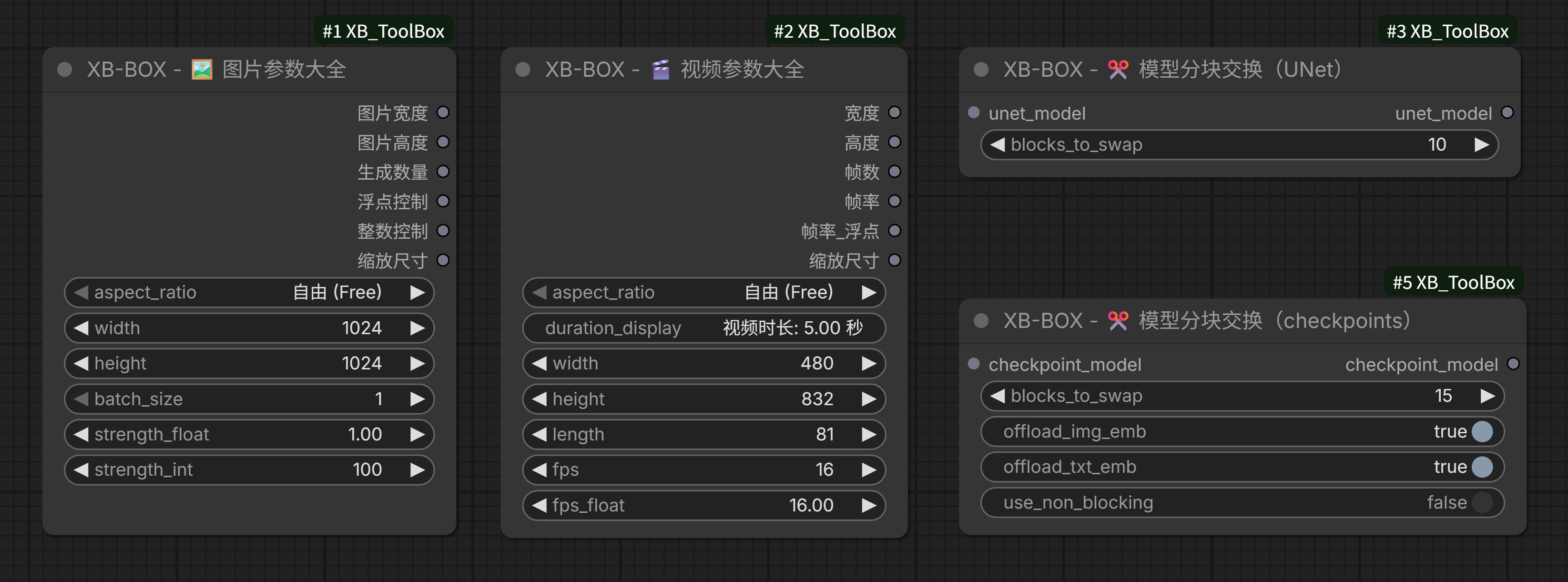
- Unified Parameters: Integrates frequently used but scattered parameter nodes, allowing you to set essential image and video parameters from a single hub.
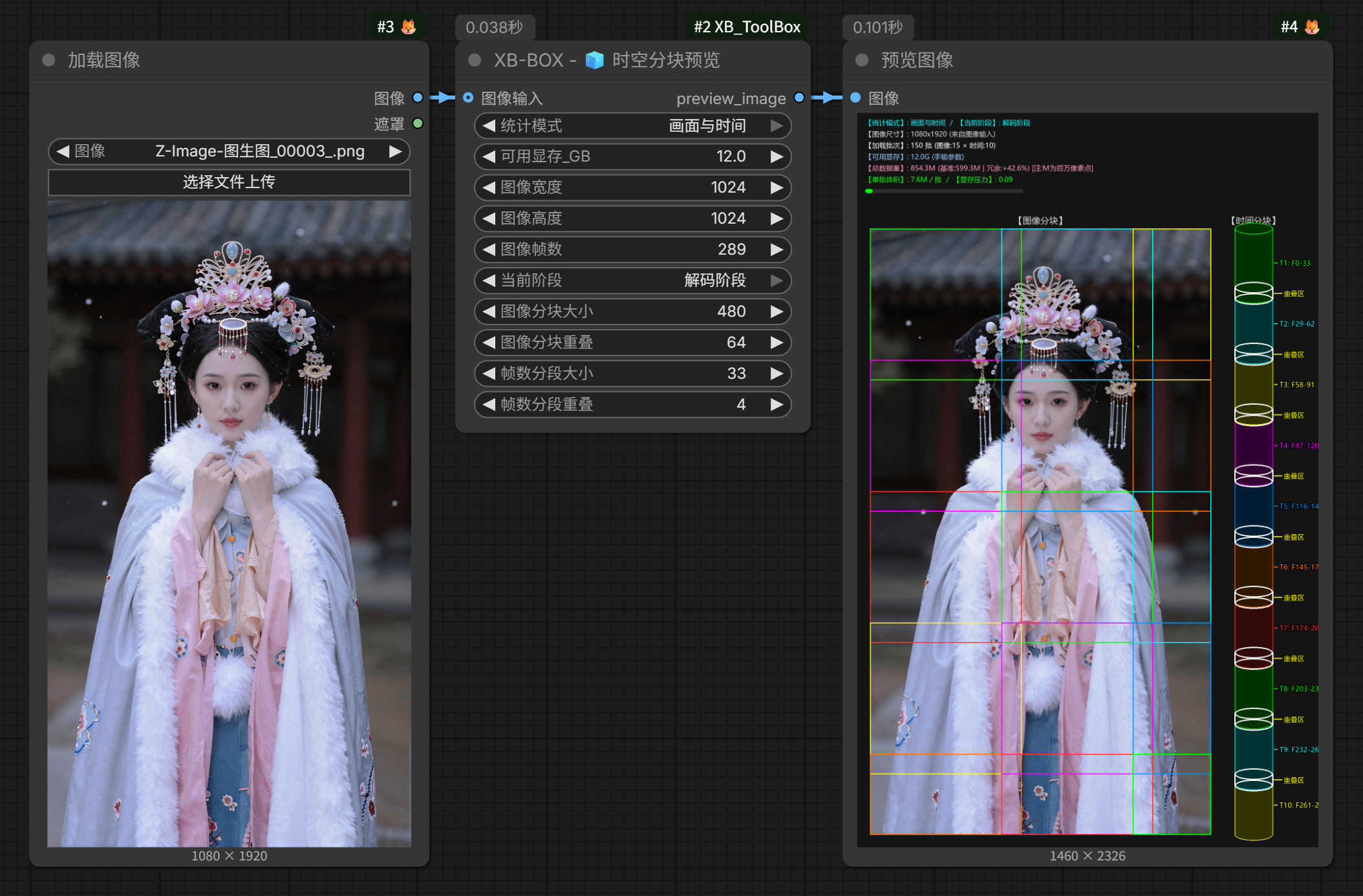
- Visual Learning: Provides visual chunking and parameter preview nodes, enabling beginners to intuitively understand the concepts of VAE/Encoder chunks, temporal slicing, and overlap effects.
- UX Enhancements: Introduces a user-friendly "Mirror Clone Console" (Dashboard) that clones major operation nodes from complex workflows into a unified, clean, and highly efficient control panel.
- Extreme VRAM Optimization: Through "Spatiotemporal Chunk Hijacking", "Dynamic VRAM Offloading for UNet/Checkpoints", and "Deep LiteGraph Customization", it allows consumer-grade GPUs to smoothly run massive 14B~22B 3D-DiT video models that would normally cause instant OOM (Out of Memory).
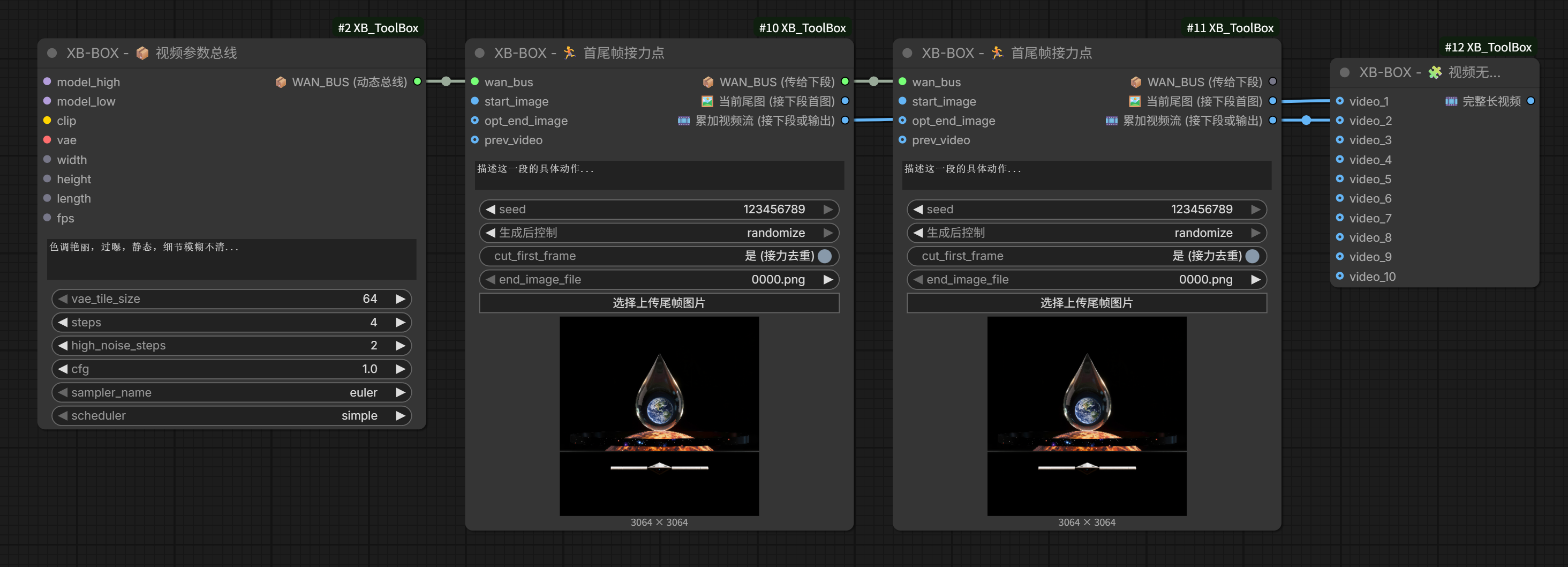
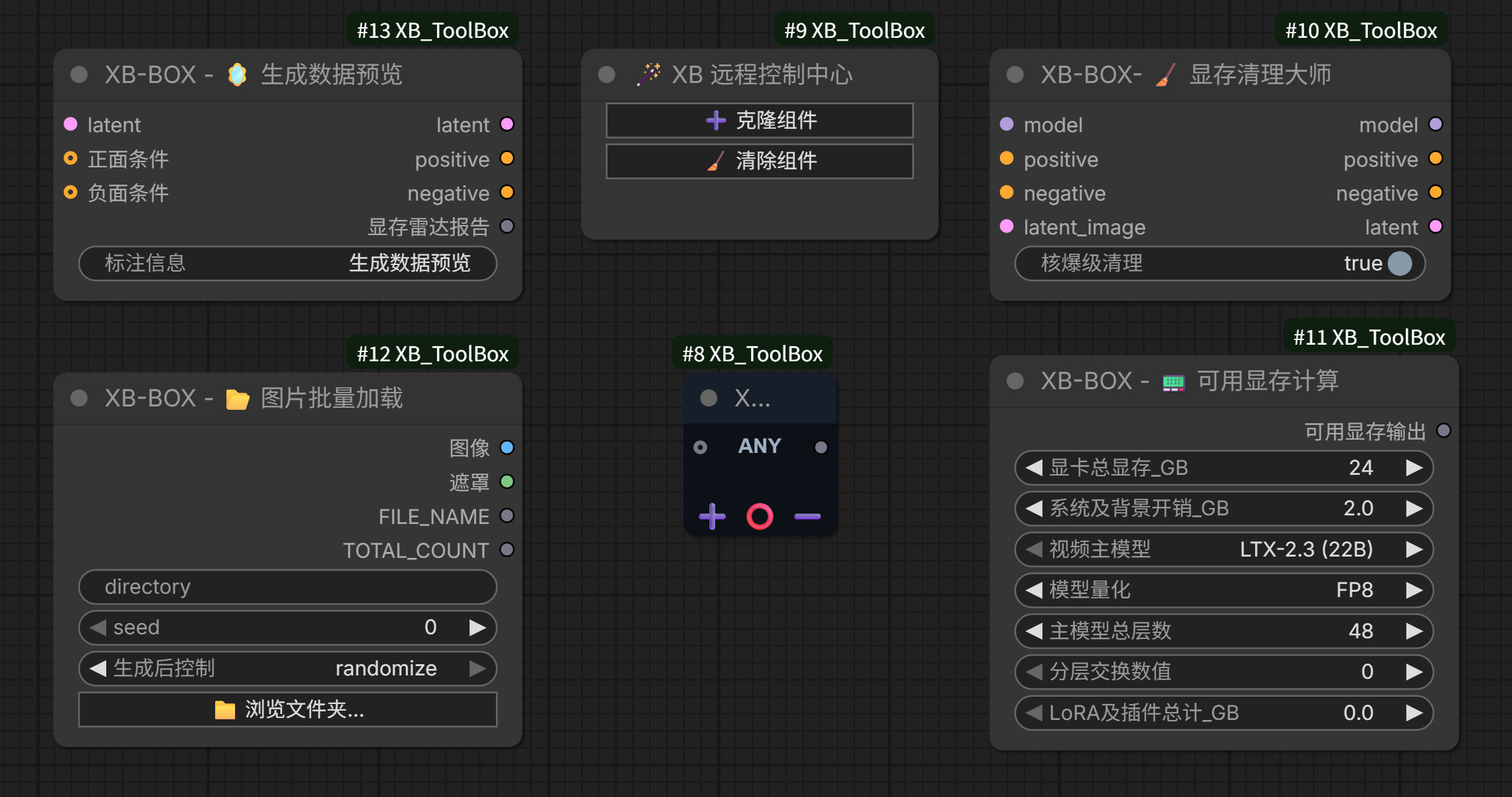
🗺️ What's inside — 141 nodes
| Area | Nodes | Highlights | |------|:---:|---| | 🎛️ Media parameters & I/O | 7 | Image / Video Params Master, Hailuo H3 params, Video Loader & Combine, Master Parameter | | 🧊 VRAM optimization | 25 | 17 official-node wrappers with tiered cleanup, Block Swap, SageAttention, GGUF loaders V1–V3 | | 🎬 Long-form video relays | 19 | InfiniteTalk / SCAIL / Wan Animate infinite relays, LTX-2.3 streamer, Video Merger, Storyboard Slicer, Digital-Human params | | 🎥 Wan node family | 24 | I2V, first/last frame, VACE, Fun, Camera, Phantom, HuMo, SCAIL, Dancer, Sound, InfiniteTalk — all with VAE tiling | | 🎵 Audio & speech | 15 | Audio Slicer ×4, CosyVoice3 ×10, Play Sound | | 🧠 Local LLM (XB-llama) | 17 | Loaders, instruct, parameters, prompt enhance / reverse, storyboard, MiniMax H3 presets | | 🖼️ Image presets | 4 | Image Prompt Preset / Pro, Qwen2.1 preset, ShenBi board | | 🖼️ Model-specific encoders | 3 | FLUX multi-image, Qwen image-edit (+ Plus) | | 🎨 Super routers | 2 | Bernini prompt router, K2 style router | | 🎵 YuE2 music | 5 | Style prompt, lyrics, score workbench, cover prep, transcription intake | | ✂️ Segmentation | 2 | ONNX human segmentation with a GPU (DirectML) path on AMD | | 💬 Comic | 3 | Dialogue parser, exact-coordinate text renderer, auto bubble renderer | | 🧰 Utilities & wiring | 11 | Batch loaders, image scale, list dispatcher, string merge, reference-any, status switch, label, MSR, name broadcasters | | 📊 Hardware dashboard | 1 | Live VRAM / RAM / CPU / GPU / disk panel |
Counts are read straight from
NODE_CLASS_MAPPINGSin__init__.py.
✨ Core Nodes
1. 🎬 Media Parameters & Spatiotemporal Visualization
- 🖼️ Image Parameters Master: Controls core image generation parameters (Width, Height, Batch Size, Strength) in one place. Enforces safe steps to prevent invalid inputs and automatically aligns dimensions when a fixed aspect ratio is selected.
- 🎬 Video Parameters Master: Manages Width, Height, Frames, and FPS (Integer/Float). Features a geek-level "Auto-Manual Transmission Engine" that smoothly snaps to official pre-trained "Golden Buckets" (e.g., 480x832, 544x960) and strictly locks the physical frame count to the safe
1+8Nrule. Dynamically displays video duration based on frame rate. - 🧊 Spatiotemporal Chunk Visualization: An exclusive dual-zone radar! The 2D left panel visualizes spatial image chunks and overlap values, while the 3D right panel uses a painter's algorithm to render temporal cylinder stacks. Saves beginners from the exhaustion of blind parameter tuning.
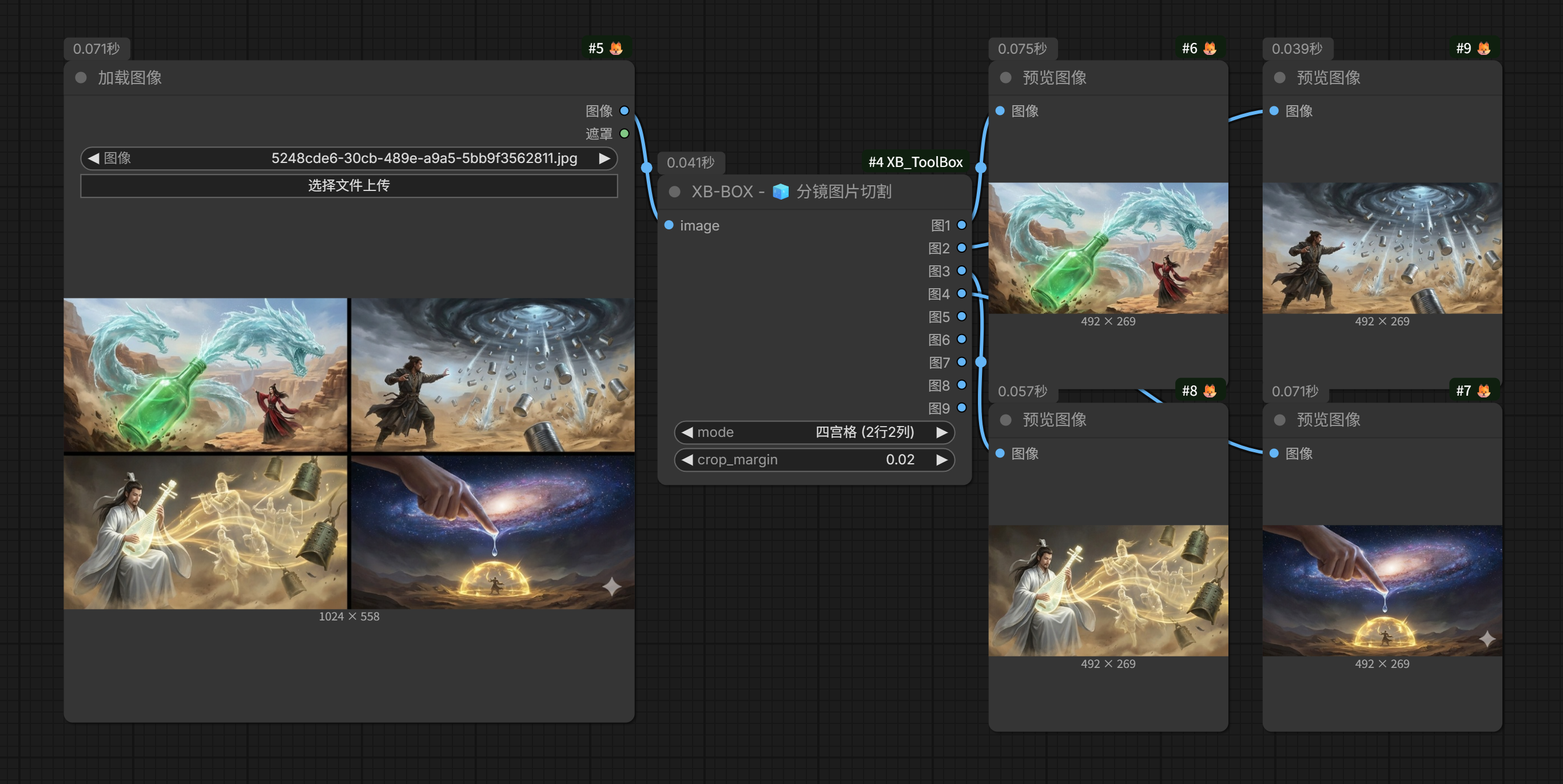
- 🧊 Storyboard Image Slicer: Offers multiple modes to slice common 4-grid, 6-grid, 9-grid... images all at once and output multiple individual images. This makes image-to-video or start/end frame video generation much more convenient, and is highly effective for creating short dramas.
- 📟 VRAM Calculator & Data Radar: Predicts VRAM footprint for WAN/LTX models under different quantizations (FP8/GGUF) and weighs tensor volumes with MB-level precision. Significantly reduces trial-and-error costs by helping users choose models fitting their VRAM capacity.
2. 🧊 VRAM Optimization
- 🧊 Official Sampler / VAE Wrappers (17): call the official ComfyUI nodes verbatim — dynamic
INPUT_TYPES,**kwargspassthrough, zero changes to the underlying algorithm — and inject a tiered cache cleanup (不做任何清理/单次缓存清理/双次缓存清理/卸载显存模型) before each run. CoversKSampler,KSamplerAdvanced,SamplerCustom(+Advanced),VAEDecode(+Tiled / TiledImage),VAEEncode(+Tiled / ForInpaint), plus legacyROCm-named aliases for old workflows. - ✂️ Block Swap (UNet / Checkpoint): forcibly parks the first N transformer blocks and the text/image embedding layers in system RAM, trading time for space.
- 🧠 SageAttention Accelerator / Sage + Block Swap Duo: mount the attention-acceleration patch alone (auto / PyTorch SDPA / comfy-kitchen), or combined with physical block swapping in one node.
- 📦 GGUF Model Loaders V1 / V2 / V3: all-in-one loaders stacking GGUF UNet + GGUF CLIP + LoRA (multi-slot) + VAE + Sage + Block Swap. V2 adds high/low-noise UNet pairs, V3 adds dual CLIP and dual VAE.
3. 🎛️ Workflow Deployment Assistants
- 🎛️ Param Bus & Relay Nodes: an ultra-compact
AnyTypebus that holds every shared parameter (model, VAE, prompt, size, FPS, cleanup tier) plus a matching relay node that executes one segment and passes the accumulated result on. One node replaces a 10-node subgraph and sets your workflow free from "noodle wire" chaos. - 🧰 Small tools that save a workflow: list dispatcher (split one list into N outputs), reference-any (single-select switch over dynamic slots), node status switch (mute/bypass a target node from a boolean), string merge, name broadcasters, canvas label, Play Sound.
- 📊 Mirror panel: the hardware dashboard clones the numbers you care about into one always-visible strip — see §13.
4. 🎬 Long-form Video Relays
A two-minute talking-head clip will OOM in a single pass on almost any GPU. These nodes split the job into reusable relay hops: a Param Bus holds every shared parameter (model, VAE, size, FPS, prompts, cleanup tier) and each Relay Node runs one segment (encode → sample → decode → trim → accumulate), then hands the accumulated result to the next hop.
- 🎵 InfiniteTalk Param Bus / Relay — single speaker, dual speaker, multi-reference, and an all-in-one variant; the bus encodes the audio once and slices it per segment automatically.
- 🏃 Wan Animate Param Bus / Relay — motion transfer from a driving video, same relay pattern.
- 🆕 SCAIL Param Bus / Relay — SCAIL pose-driven video relay.
- 🔄 LTX-2.3 Infinite Streamer — single-sample (8-step) long-form streamer with guide stitching.
- 🎬 Video Merger / Storyboard Slicer / Digital-Human params — merge clips, slice grid storyboards into panels, and one-stop parameter + audio preparation for digital-human workflows.
5. 🎥 Wan Node Family (24)
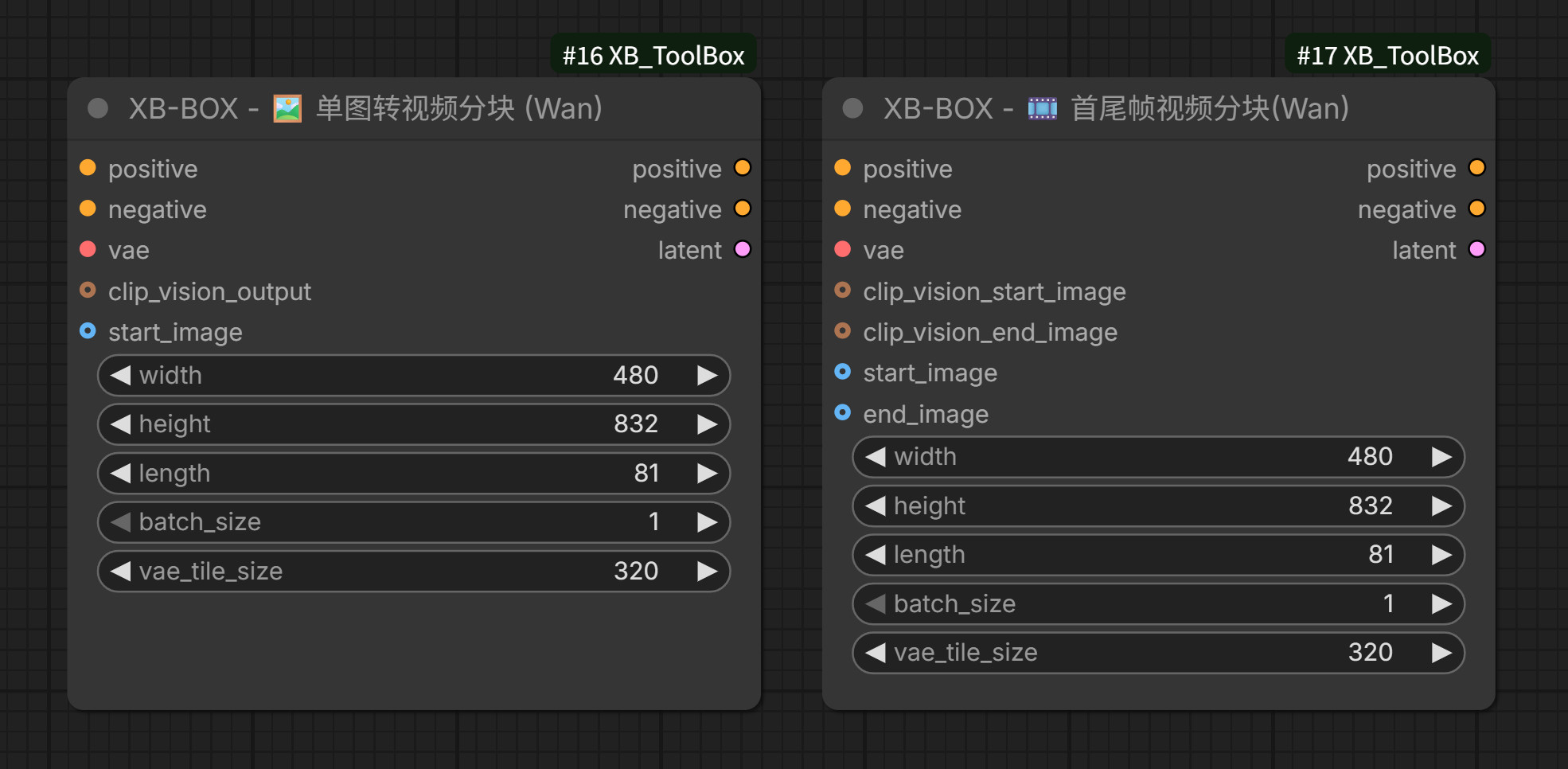
Re-implementations of the Wan video nodes with VAE tiling built in (spatial + temporal chunking to flatten the decode peak): ImageToVideo, FirstLastFrameToVideo, VaceToVideo, FunControl / FunInpaint, Camera, PhantomSubject, HuMo, SoundImageToVideo (+ Extend), SCAIL (+ Pro), Dancer (+ Dance Switcher and Dancer Combo), InfiniteTalkToVideo (single / dual / legacy mode switch), Wan22ImageToVideoLatent, WanVAEDecodeTiled.
These are graph members only — the Wan model / sampler / VAE / text-encode nodes come from ComfyUI-WanVideoWrapper.
XB_WanAnimateToVideoandXB_WanCompileSettingsare fully self-contained.
6. 🎵 Audio & Speech (15)
- 🎵 Audio Slicer ×4 — waveform display with draggable cut handles: basic, V1 (single speaker), V2 (two speakers + gap), V3 (advanced, dual-track mixing).
- 🔊 CosyVoice3 ×10 — model loader (auto-download + cache), zero-shot cloning, cross-lingual synthesis, instruct-style control, speaker-preset save / clone, voice conversion, multi-speaker dialog, audio crop. Presets are stored as CosyVoice-compatible
.ptfiles, so you never re-upload the reference clip. - 🔊 Play Sound — play a notification when a workflow finishes.
7. 🧠 Local LLM Prompt Suite (XB-llama, 17)
Local LLM/VLM inference for prompt work: model loader (+ Pro, which folds every inference parameter into one panel), instruct, reasoning parameters, unload / clean-state, bbox extraction, code-block unpacking, prompt enhancer, prompt reverse (a five-in-one node: loader + parameters + API settings + preset + instruct), storyboard enhancer / instruct / processor (+ Pro), MiniMax H3 prompt presets (fl2va, ref2va) and the role/scene dispatcher.
Both a local model and an online API backend are supported; API keys live in the ComfyUI user directory and are never written into the workflow.
8. 🖼️ Image Prompt Presets (4)
- 🖼️ Image Prompt Preset — one node replacing "prompt box + aspect-ratio node + official empty latent", with step-locked width/height and ratio linking.
- 🖼️ Image Prompt Preset Pro — the same, plus built-in LLM prompt enhancement / reverse.
- 🖼️ Qwen2.1 Prompt Preset — preset + element panel, wired to the official Load CLIP + Generate Text chain.
- 🖌️ ShenBi — an input-less paint board (create / edit modes) that outputs a strictly on-resolution image.
The preview window reads files from this server's
inputdir (boards live ininput/xb_shenbi/). A workflow only stores the file name, so after copying it to another machine (local ↔ cloud) the window falls back to a blank canvas and explains why in the badge / browser console. The window itself needs a recent ComfyUI frontend (DOM widgets).
9. 🖼️ Model-specific Encoders (3)
- FLUX Multi-Image Encode — resize → VAE encode → ReferenceLatent chained, with image slots auto-expanding up to 9.
- Qwen Image-Edit Encode (+ Plus) — ports of the official
TextEncodeQwenImageEdit/...Plus, dynamic image slots up to 9.
10. 🎨 Super Routers (2)
Bernini Prompt Router and K2 Style Router rewrite heavy multi-switch subgraphs (Fast Muter + Any Switch chains) as a single native node, so the front-end cost of refreshing and dragging drops from O(n) hidden nodes to O(1).
11. ✂️ Segmentation & Comic (5)
- ✂️ Human Segmentation — ONNX u2net (RMBG-1.4) model loader plus a mask / cutout node, running on the GPU through DirectML on AMD.
- 💬 Comic ×3 — parse dialogue out of a script, render text at exact coordinates, or auto-detect white speech bubbles and fill them in.
12. 🧰 Utilities & Wiring (11)
Batch folder / batch images (muted inputs are skipped), batch image scale (N-in / N-out), list dispatcher, string merge (with a per-segment newline option), reference-any, node status switch, canvas label, MSR multi-image → frame sequence, and UNet / CLIP name broadcasters.
13. 📊 Hardware Dashboard (1)
XB 📊 Memory Visualization — a live panel for VRAM / RAM / CPU / GPU / disk / pagefile, with a per-model VRAM breakdown, an aimdo page-residency heatmap, history graphs, themes, and a docked mini-bar that pins to the ComfyUI top bar. Full guide: docs/XB_MemoryVisualization_manual.md.
14. 🎵 YuE2 Music
YuE2 is a white-box song generator: it plans an editable ABC score from style + lyrics, then renders audio from that score. These nodes bring the official skill's symbolic-layer workflow into ComfyUI (the ABC parser is an in-node port of the official bounded-dialect implementation, standard library only, nothing leaves your machine).
- 🎵 YuE2 Style Prompt: Builds the official six-part
stylestring (Language / Genre / Vocal / Tempo / Instruments / Musical Characteristics) with 13 one-click recipes and a genre library. Also exposesmax_durationandseed, so the planner and the renderer share one seed for reproducible plans. Structure, key and meter stay out ofstyle— they belong to the lyrics tags and the score. - 🎵 YuE2 Lyrics: Section tags with a picker (the official eight-tag vocabulary + community spellings + your own
[custom]tags), a one-click instrumental skeleton, and singability checks (implementation notes leaking into lyrics, round-bracket role labels that get sung, empty sections, per-line syllable counts, and whether a tag is official). - 🎵 YuE2 Score Workbench: Inspect / strip chords / move the vocal melody to
Ins/ use an edited score, with the official rule set (grid,Z2–Z4compression, chord vocabulary, ties). Emits the processed score plus a readable report whose first line is the mode suggestion (fullvsmelody). Note the score carries no instruments — set those in the style node. Option names stay short; every explanation lives in the widget tooltip. - 🎵 YuE2 Transcription Intake: Reads SheetSage2 output (
score.abc/events.json) from a folder or file, applies the mechanical normalizations from the official repair table (Markdown fences, BOM, curly quotes,M:C,Q:81,K:B minor), validates against the native dialect and emits a usable score. Semantic repairs (unrolling repeats, quantizing tuplets, adding rests) are deliberately left to you, with the official validator's own message shown. - 🎵 YuE2 Cover Prep: Builds cover conditions — which voice to keep x how to handle the harmony — and the harmony choice literally sets the downstream mode (chord-free →
melody, a true cover; keep chords →full, closer to a re-record). The report carries the before/after event comparison and the official cover flow. A cover only supplies a symbolic melody; it does not preserve the source singer's identity or waveform.
Requires a ComfyUI build that ships the native YuE2GenerateABC / YuE2GenerateMusic nodes (bring them in with the official text-to-music workflow). The nodes here only emit STRING/FLOAT/INT, so they load on any build.
Where each official capability lives (so nothing is duplicated or missing):
| Official capability | Where it is |
|---|---|
| Planning/rendering parameters — mode, max_abc_tokens, temperature, top_p, top_k, repetition_penalty, penalty_window, cfg_scale | The official YuE2GenerateABC / YuE2GenerateMusic nodes. This package only feeds style / max_duration / seed into them. |
| Style, lyrics, section tags | 🎵 YuE2 Style Prompt / 🎵 YuE2 Lyrics (the official eight-tag vocabulary + community spellings + custom tags) |
| ABC inspect / strip chords / move voice / event compile / difference review | 🎵 YuE2 Score Workbench (a port of the official bounded-dialect implementation) |
| Cover conditions (chord-free → melody, keep chords → full, voice selection) | 🎵 YuE2 Cover Prep |
| Decoder choice (YuE2-Vae for listening, YuE2-Vae-legacy for benchmark reproduction) | Determined by the VAE you load; re-decoding cached latents needs no new generation. |
| Audio→score transcription (SheetSage2) itself | Not here — it needs a separate Python environment (Python 3.10/3.11 + torch 2.8/cu126). Use 🎵 YuE2 Transcription Intake to bring its score.abc / events.json back into the graph. |
| MERT2 features, yue2 batch, the listen.py HTML player, SongBench scoring | Not here — they are delivery/evaluation tooling rather than graph nodes. |
Handy official behaviours the nodes surface for you: off mode is automatic when the ABC input is empty, a truncated score fails structure validation, mode=melody rejects any chord symbol, and the planner and renderer can receive different lyrics (section-tags-only for planning, real words for singing).
Instrumental needs three things, not just a style setting. The official instrumental entry point (a) prefixes Instrumental, and (b) forces four suppression conditions — no vocals, no singing, no choir, no spoken words. The style node now does exactly that when you pick 纯音乐. But style alone cannot remove singing: the score's Vocal voice must have no sounding notes (Score Workbench → "Vocal to Ins"), and the lyrics must be empty or section tags only (Lyrics node → "纯音乐骨架"). The official docs still say a file check cannot prove the absence of vocal leakage — confirm by listening.
📦 Installation
Method 1: ComfyUI Manager (Recommended)
Search for XB_ToolBox in the ComfyUI Manager and click install.
Method 2: Manual Git Clone
Navigate to your ComfyUI custom_nodes directory and run:
git clone https://github.com/wjluoxiao/XB_ToolBox.git
(Note: the core architecture relies purely on the native ComfyUI ecosystem — elegant Python/JS, no patched libraries. Some node groups do import extra packages; see below.)
🔧 Dependencies
Most nodes are dependency-free, but a few groups import extra packages. Install them all with:
pip install -r requirements.txt
| Node group | Packages |
|---|---|
| Audio slicer, video I/O | av, imageio-ffmpeg |
| Comic text detection | easyocr, opencv-python |
| Human segmentation | onnxruntime (on AMD use onnxruntime-directml) |
| Hardware dashboard | psutil, pythonnet (bundles LibreHardwareMonitorLib.dll) |
| Local LLM (XB-llama) | diskcache, gguf, and llama-cpp-python — install that one manually to match your GPU |
| CosyVoice3 | modelscope, huggingface_hub, transformers, librosa, soundfile, HyperPyYAML, omegaconf, hydra-core, conformer, openai-whisper, tiktoken, scipy, einops, … |
| Audio waveform endpoint | aiohttp |
Optional companion extensions — a few groups expect these to be installed:
| Feature | Needs |
|---|---|
| Wan nodes & relay pipelines | ComfyUI-WanVideoWrapper — supplies the Wan model loader / sampler / VAE / text-encode nodes |
| GGUF model loaders | ComfyUI-GGUF |
| YuE2 preset nodes | A ComfyUI build that ships YuE2GenerateABC / YuE2GenerateMusic |
Nodes that are fully self-contained say so in their own docstring.
🙏 Credits
XB_ToolBox stands on the shoulders of the ComfyUI ecosystem. Several nodes are ports, wrappers or adaptations — thanks to their authors:
- VideoHelperSuite (VHS) — the video loader/combine and audio-slicing logic derive from VHS.
- rgthree-comfy —
XB_ReferenceAnyfuses Fast Muter + Any Switch. - ComfyUI-KJNodes —
XB_StringMergeis reworked fromJoinStringMulti; the SageAttention node keeps the original KJNodes design. - ComfyUI-Custom-Scripts (pysssss) —
XB_PlaySoundis an independent re-implementation. - ComfyUI-GGUF (city96) — the GGUF loaders wrap its official nodes.
- ComfyUI-WanVideoWrapper (kijai) — companion extension for the Wan family.
- ComfyUI-MemoryVisualization (kijai) — the hardware panel started from this project and has since grown its own themes, docking and metrics.
- ComfyUI-llama-cpp_vlm — the
XB-llamanodes are adapted from it. XB_KSamplerand friends call the official ComfyUI nodes verbatim and only add cache cleanup.
📝 License This project is open-sourced under the Apache-2.0 License. It guarantees the freedom to share while protecting the patent defense rights of the core architecture code.