
Open Manager
A manager for the whole ComfyUI workspace: custom nodes, themes, models, downloads, a resource monitor and a desktop.
Open Manager for ComfyUI 




<img src="https://raw.githubusercontent.com/WASasquatch/open-manager-comfyui/main/open-manager-banner.png" alt="Open Manager for ComfyUI">
| | | | --- | --- | | <a href="https://raw.githubusercontent.com/WASasquatch/open-manager-comfyui/main/docs/download-manager.png"><img src="https://raw.githubusercontent.com/WASasquatch/open-manager-comfyui/main/docs/download-manager.png" width="400" alt="Download Manager"></a><br>Download Manager | <a href="https://raw.githubusercontent.com/WASasquatch/open-manager-comfyui/main/docs/model-library.png"><img src="https://raw.githubusercontent.com/WASasquatch/open-manager-comfyui/main/docs/model-library.png" width="400" alt="Model Library"></a><br>Model Library | | <a href="https://raw.githubusercontent.com/WASasquatch/open-manager-comfyui/main/docs/monitor-panel.png"><img src="https://raw.githubusercontent.com/WASasquatch/open-manager-comfyui/main/docs/monitor-panel.png" width="400" alt="Resource Monitor"></a><br>Resource Monitor | <a href="https://raw.githubusercontent.com/WASasquatch/open-manager-comfyui/main/docs/desktop.png"><img src="https://raw.githubusercontent.com/WASasquatch/open-manager-comfyui/main/docs/desktop.png" width="400" alt="Desktop Mode"></a><br>Desktop Mode |
The whole workspace at once: one screenshot.
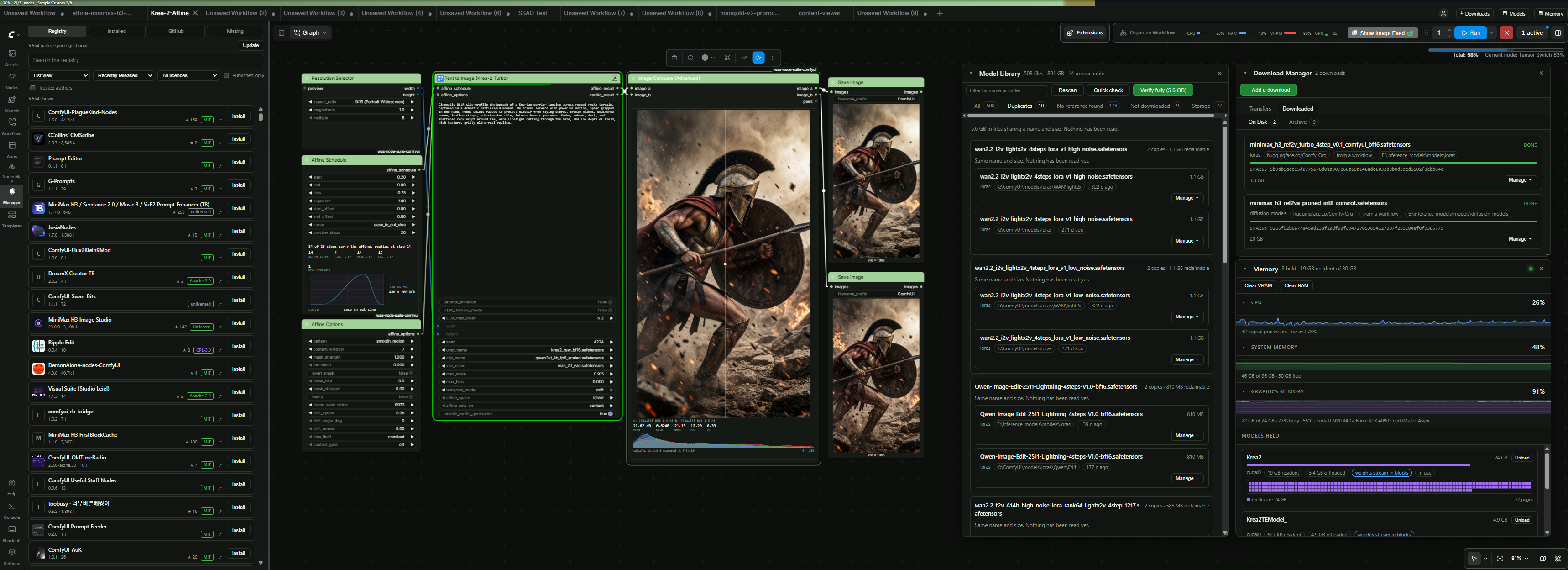
https://github.com/user-attachments/assets/5f264d2f-b11b-4ca9-9f69-73a553213e85
A manager for the whole ComfyUI workspace, not just its nodes.
| | | | --- | --- | | Packs | Browse the Comfy Registry, install from registry or GitHub, see what an install does before it runs | | Workspace | Models on disk, downloads, memory, outputs, and your own files | | For remote ComfyUI instances | A desktop on a tab of its own. No swapping between tools just to view outputs, or manage files | | Off by default | The monitor strip and Desktop Mode | | Never | A node in your graph. Nothing is installed or built at load time |
Open Manager is not affiliated with ComfyUI-Manager or the Comfy Registry.
Install
Two ways. Only the first gives you ComfyUI's Extensions button: ComfyUI draws it when it finds a manager package in its own Python at startup, before any custom node loads.
| | As the manager | As a custom node |
| --- | --- | --- |
| Installed with | pip, into the Python ComfyUI runs on | git clone into custom_nodes, or from ComfyUI-Manager or the Comfy Registry |
| Opens from | Extensions, and the Discovery sidebar tab | The Discovery sidebar tab |
| ComfyUI-Manager | Replaced. A ComfyUI-Manager folder in custom_nodes is skipped | Left as it is |
| Launch flag | --enable-manager | None |
As the manager
Windows portable build. In the ComfyUI_windows_portable folder, the one holding
python_embeded and run_nvidia_gpu.bat, run:
python_embeded\python.exe -m pip uninstall -y comfyui-manager
python_embeded\python.exe -m pip install comfyui-open-manager
Then open run_nvidia_gpu.bat (or run_cpu.bat) in a text editor and add --enable-manager to
the end of the line that starts .\python_embeded\python.exe -s ComfyUI\main.py, after the
flags already on it:
.\python_embeded\python.exe -s ComfyUI\main.py --windows-standalone-build --enable-manager
Save it, and start ComfyUI with that file. A whole launch file, with switches and keys, is under Launch files.
venv, conda or a manual install. With the environment ComfyUI runs in activated:
python -m pip uninstall -y comfyui-manager
python -m pip install comfyui-open-manager
python main.py --enable-manager
With uv, uv pip uninstall comfyui-manager and uv pip install comfyui-open-manager. Pack
requirements then install through uv too.
Check. At startup the console shows [Open Manager] enabled in place of ComfyUI-Manager, and
Extensions opens Open Manager.
| If | Then |
| --- | --- |
| The console says the comfyui-manager package must be installed first | The install went into a different Python. Run it again with the exact python.exe path that message prints. Do not run the manager_requirements.txt command it suggests: that installs the official ComfyUI-Manager instead |
| pip answers Requirement already satisfied and that message stays | Add --force-reinstall --no-deps to the install command |
| The official manager opens | Both packages own comfyui_manager, and it was installed again. On a portable build Open Manager still loads; elsewhere uninstall it and install Open Manager again |
| An Open Manager folder is still in custom_nodes from an earlier install | Delete it, so one copy runs |
As a custom node
cd ComfyUI/custom_nodes
git clone https://github.com/WASasquatch/open-manager-comfyui.git
Restart ComfyUI and open the Discovery tab in the sidebar. The console shows
routes registered below /open_manager/v1/api.
Updating and logs
| | |
| --- | --- |
| As the manager | python -m pip install --upgrade comfyui-open-manager, with python_embeded\python.exe in place of python on a portable build |
| As a custom node | git pull in its folder |
| From Open Manager | Open Manager Settings compares this copy with pyproject.toml on GitHub, then updates and restarts: pip as the manager, git pull as a clone, the GitHub archive as any other custom node, swapped in only once it is unpacked. Needs installs and GitHub left on |
| Log | --enable-manager writes user/comfyui.log, rotating to comfyui.prev.log and comfyui.prev2.log. OPEN_MANAGER_NO_LOG=1 leaves it alone |
Access keys (optional)
Keys come from environment variables only. Access keys in the Open Manager menu shows which are set and by which variable.
| For | Variables | Get one at |
|---|---|---|
| Gated and private models | HF_TOKEN, HUGGING_FACE_HUB_TOKEN, OPEN_MANAGER_HF_TOKEN | huggingface.co/settings/tokens |
| Starring, higher rate limit | GITHUB_TOKEN, GH_TOKEN, OPEN_MANAGER_GITHUB_TOKEN | github.com/settings/tokens |
| Scanning an install | VIRUS_TOTAL_KEY, VIRUSTOTAL_API_KEY, OPEN_MANAGER_VIRUSTOTAL_KEY | virustotal.com/gui/my-apikey |
The value is the key itself: set HF_TOKEN=hf_xxx on Windows, export HF_TOKEN=hf_xxx on Linux
and macOS, in the file that starts ComfyUI. See Launch files.
Packs
| | |
| --- | --- |
| Every version | Flagged, withheld and banned included |
| Before you install | Findings, dependency changes, new nodes, hardware fit |
| Contents named | Binaries, pickles, wheels, bytecode |
| Licences | Per pack, sortable |
| Your own repos | By URL or owner/repo, kept in user/ |
| Any ref | Branch, tag or commit |
| Workflow gaps | Missing nodes, and which pack won a duplicate name |
| Themes | Gradients, icons, backdrops |
| Fast sync | Whole registry in seconds |
Findings reword the confirmation. A registry ban blocks Install until Install versions the registry has banned is on.
Beyond packs
Five pieces. None of them adds a node to your graph.
| | | Default |
| --- | --- | --- |
| OM Nodes | Nodes 2.0 at classic node sizes and layout, switched from the ComfyUI menu | off |
| Download Manager | Fetches the models a workflow needs: resumes, verifies, picks the drive | on |
| Model Library | What is on disk across every registered folder: duplicates, unreferenced files, storage, and ComfyUI-Manager's model list to fetch from | on |
| Resource Monitor | CPU, RAM, VRAM and temperatures in ComfyUI's control bar, with a Memory panel behind it | strip off, Memory button on |
| Desktop Mode | Files, notes, outputs and programs on a tab of their own | off, and needs OPEN_MANAGER_ENABLE_DESKTOP=1 |
Every panel opens as a movable window, or centred on the page. One setting each.
Remote installs
Desktop Mode is served by ComfyUI's own server: no second port, no second login.
Server switches
Environment variables, read once when ComfyUI starts. 1 turns a switch on. 0, or leaving it
out, keeps the default. Set them in the file that starts ComfyUI, as in
Launch files, and restart after changing one.
What ships on is closed with a NO_ switch:
| Variable | =1 | =0 or not set |
|---|---|---|
| OPEN_MANAGER_NO_INSTALL | Packs cannot be installed or removed | Packs install and remove |
| OPEN_MANAGER_NO_GITHUB | GitHub repositories cannot be added or installed | They can |
| OPEN_MANAGER_NO_DOWNLOADS | Models cannot be fetched | They can |
| OPEN_MANAGER_NO_RESTART | Open Manager cannot restart ComfyUI | It can |
| OPEN_MANAGER_APPROVED_ONLY | Only versions the registry lists as active install. No GitHub repositories | Flagged versions and GitHub repositories install too |
What ships off is opened with its own:
| Variable | =1 | =0 or not set |
|---|---|---|
| OPEN_MANAGER_ENABLE_DESKTOP | Desktop Mode can be switched on in the settings | Desktop Mode is hidden |
| OPEN_MANAGER_ENABLE_FILES | The file browser can be switched on in the settings | The file browser is hidden |
| OPEN_MANAGER_FILE_WRITES | The file browser renames, moves, copies and deletes files, makes folders, and saves text files and pictures. Media Assets can delete output files | The file browser only reads |
| OPEN_MANAGER_ALLOW_BANNED | Versions the registry has banned install, whatever the setting says | The setting decides |
| OPEN_MANAGER_REPO_DOWNLOADS | Whole Hugging Face repositories in ComfyUI-Manager's model list download, configs included | Only single model files download |
The server refuses what a closed switch governs and names the variable. Desktop Mode and the file browser are hidden rather than refused, and their settings do nothing until the machine opens them.
Launch files
Each variable goes in the file that starts ComfyUI, above the line that runs it. These open
Desktop Mode and the file browser, give a Hugging Face key, and start ComfyUI with Open Manager
as its manager. As a custom node, leave out --enable-manager.
Windows portable. run_nvidia_gpu.bat, in the ComfyUI_windows_portable folder. No spaces
around =.
@echo off
cd /d "%~dp0"
set OPEN_MANAGER_ENABLE_DESKTOP=1
set OPEN_MANAGER_ENABLE_FILES=1
set HF_TOKEN=hf_xxx
.\python_embeded\python.exe -s ComfyUI\main.py --windows-standalone-build --enable-manager
pause
Linux and macOS. run.sh, in the ComfyUI folder. venv is the folder your environment is
in; drop that line if python already is ComfyUI's.
#!/usr/bin/env bash
cd "$(dirname "$0")"
source venv/bin/activate
export OPEN_MANAGER_ENABLE_DESKTOP=1
export OPEN_MANAGER_ENABLE_FILES=1
export HF_TOKEN=hf_xxx
python main.py --enable-manager
Run chmod +x run.sh once, then start ComfyUI with ./run.sh.
A list is one value, comma separated: set OPEN_MANAGER_MODEL_HOSTS=civitai.com,cdn.civitai.com.
The lists are in DOWNLOADS.md.
Reference
Where it appears
| Interface | Way in |
|---|---|
| Current | A sidebar tab |
| Legacy menu (Settings -> Comfy -> Use new menu -> Disabled) | An Open Manager button on that menu |
| Where it replaces the manager | The top menu's Extensions button as well |
Extensions follows ComfyUI: the panel on the modern interface, the classic menu of
destinations under --enable-manager-legacy-ui. Override it under What the Extensions button
opens. Both carry every destination, and the sidebar tab is unaffected.
ComfyUI's own manager links, such as the missing-nodes panel's, open the same place. Turn on Use ComfyUI's Nodes Manager to have them, and Extensions, open ComfyUI's Nodes Manager instead. Every install it starts is still run by Open Manager. So are the Install buttons ComfyUI shows for missing nodes, whichever is set.
Quality of Life Patches fixes faults in ComfyUI's own interface from Open Manager, each with its own switch and links to the issues it answers. A patch that finds ComfyUI changed, or already fixed, stands down and says so in the browser console.
| Patch | Default | Effect |
|---|---|---|
| Media Assets keep generation time | On | Runs write their generation time, node and subfolder onto their assets |
| Media Assets open workflows from files | On | A job no longer in history opens the workflow saved in its file |
| Media Assets show files found by scans | On | Files an asset scan adds appear in Media Assets |
| Media Assets delete files | Off | Deleting an output also deletes its file. Needs OPEN_MANAGER_FILE_WRITES=1 |
| Nodes Manager fits its contents | On | The Nodes Manager's frame fits its contents. On screens 3000px wide and over it otherwise cuts off the right side, close button and filters |
| Subgraph nodes show promoted previews | On | A subgraph node on the classic canvas draws the latest preview promoted to it |
| Subgraph nodes keep their saved values | On | A subgraph node whose promoted widgets ComfyUI migrated loads with its saved values instead of the values they had at migration |
| Custom widgets follow their node's width | On | Custom and DOM widgets keep following their node once it has been shown in the properties panel |
| Nodes 2.0 widgets on the classic canvas | On | Curves, image compare and crop, video trim and crop, bounding boxes, colour palettes, the resolution preview and LoRA stacks work on the classic canvas, also when promoted to a subgraph. The painter, the compositor and light info show ComfyUI's own editors there. Stands down when ComfyUI-Nodes2Classic is installed |
| Hide Partner nodes | Off | Paid Partner (API) nodes, their templates and the Login button are hidden |
| Looping animations hold still while a job runs | On | Running spinners and pulses stop redrawing until the queue is empty |
| Go to Node by ID | On | Opens and frames a node by ID, or by a path such as 12:5 for node 5 inside subgraph node 12. In the canvas menu, and bindable under ComfyUI's keybindings |
| Middle-click does not paste | On | On Linux, a middle click no longer pastes the last copied nodes |
| Hidden links as nubs | On | A hidden link shows a small nub in its type colour on each node's edge, in place of a type label. Hovering a nub shows the label; hovering the label shows the link |
| No frontend_only badge | On | Nodes with no Python side carry no source badge |
| Running and waiting jobs open as workflows | On | Open as workflow in new tab works on a job still running or waiting in the queue, and on that job once it finishes |
| API jobs open as workflows | On | Jobs queued with only an API prompt open as a laid-out workflow |
| Hide the workflow name box at the top level | Off | Up to frontend 1.36, the box naming the open workflow shows only inside a subgraph |
| Workflow tabs without a scrollbar | On | The tab strip drops its scrollbar. Faded edges show where more tabs are, and the mouse wheel scrolls to them |
| Workflow tabs look like tabs | On | Flat tabs side by side with a line between each, the open one marked along its top, in place of rounded buttons |
| Bottom panel docked to the edges | On | The Logs and Shortcuts panel meets the sidebar and the window's edges, with square corners, in place of floating over the canvas |
| Node search narrows every match | On | In the node search box, a category or the Comfy, Partner or Extensions filter lists every match it holds, not only those among the top 64 |
| Node search draws only the rows in view | On | Results build as they scroll into view |
| Node search waits for a pause in typing | On | Slow searches run once typing pauses |
Network
Open Manager reads the Comfy Registry live. What it contacts:
| Host | When |
|---|---|
| api.comfy.org | Browsing and installing |
| cdn.comfy.org | Downloading a registry version to install |
| codeload.github.com | Downloading a GitHub repository to install |
| raw.githubusercontent.com | Licences, READMEs, images |
| api.github.com | Pack stats and gallery, branches, tags and commits, starring, licence lookup |
| pypi.org | Checking for a newer Open Manager |
| www.virustotal.com | Scanning an install, with a key |
| huggingface.co, github.com and their download hosts | Model downloads. OPEN_MANAGER_MODEL_HOSTS adds others |
| Wherever a pack points | Pack icons. README and gallery images given as absolute URLs, unless Read pack README and repository metadata is off |
Settings
Under Settings -> Open Manager, and in Open Manager Settings from the Open Manager menu,
the Start menu or the Open Manager: settings command. That window holds every Open Manager
setting by section, and an overview: the version and updates, the system, the server switches,
each patch's state, and which access keys are set. Installed as the manager, it also offers to
uninstall the official ComfyUI-Manager where its package or a ComfyUI-Manager folder is still
there, keeping the file that loads Open Manager.
| | | |---|---| | Trust | Answer once per author, or every time |
A GitHub token, set as GITHUB_TOKEN, raises 60
anonymous calls an hour to 5,000. Without one, pack pages still show README, gallery and
versions.
The registry address is BASE_URL in open_manager/registry.py, and BASE in
open_manager/catalog.py for the offline copy. Both can point at a mirror or a private index.
Trust
| | |
|---|---|
| Asked | Before installing a pack from GitHub, loading a workflow from a pack, or downloading a model. Registry installs too, with Ask before installing a registry pack from an untrusted author on |
| Remembered in | user/open_manager/trusted_authors.json |
| Never | Hides a finding |
Requirements
torch, torchaudio, torchsde and torchvision are never installed from a pack's
requirements: they carry the build your ComfyUI was set up with. Anything held back is named
in the install output. To substitute a package, map it in
user/open_manager/pip_overrides.json:
{ "opencv-python": "opencv-python-headless>=4.9" }
Your GitHub list
| | |
|---|---|
| Add | By URL or as owner/repo |
| Behaves like | A registry pack: installs, updates, uninstalls |
| Written to | user/open_manager/github_sources.json, outside the pack, so it survives an uninstall |
| Remove from list | Delists and uninstalls in one step |
For pack authors
Declare a [tool.open_manager] table in pyproject.toml and every Open Manager user sees it.
Every field is optional. Packs without the table are unaffected.
| Field | Gives you |
| --- | --- |
| capabilities | What your pack does, as its own panel on your page |
| release_note | Your words above the version list, not a changelog guess |
| incompatible | Name a package and version; users are warned before installing |
| source | Say GitHub and the panel recommends it over the registry copy |
| themes | Ship colour palettes with gradients, icons, backdrops and rulers |
| example_workflows | Loadable from your page, with thumbnails |
| gallery | Screenshots from your repo or elsewhere |
| docs, funding | Buttons in your page header |
[tool.open_manager]
incompatible = ["numpy>=2.0"]                   # declare known conflicts with other packages
source = "github"                               # prefer installing from the repository
branch = "main"                                 # named in the GitHub recommendation
docs = "https://example.com/docs"               # documentation URL
funding = "https://ko-fi.com/you"               # funding URL
release_note = "1.4.0 needs config regen."      # shown above the version list, 600 chars
capabilities = [                                # what your pack does, its own page panel
  "filesystem", "network", "subprocess",        #   from a fixed list, see below
]
example_workflows = ["workflows/*.json"]        # a path, a glob, or a directory
themes = ["themes/my-theme.json"]               # list themes to offer
gallery = [                                     # shown off on the pack page, up to 24, `png`,
                                                # `jpg`, `jpeg`, `gif`, `webp`, `avif`, and
                                                # `mp4`, `webm`, `mov`, `m4v` for clips
  "docs/*.png",                                 #   a path or glob in your repository
  "https://cdn.example.com/after.webp",         #   or a file hosted anywhere
]
| Left out | Falls back to |
| --- | --- |
| example_workflows | workflows/, workflow/, examples/, example/, example_workflows/ |
| docs, funding | [project.urls] |
| An installed pack's fields | The copy on disk, then the repository |
Workflow thumbnails are not declared. An image beside a workflow and named for it is paired
with it automatically, following
ComfyUI's workflow templates convention:
workflows/hdr.json picks up workflows/hdr.webp, .png, .jpg, .jpeg or .gif, and a
numbered variant such as hdr-1.png counts too. Workflows without one show as a plain row.
Capabilities
Your own account of what your pack does, in fixed words so that two packs describe themselves the same way.
filesystem network subprocess binaries environment dynamic_code packages
models credentials telemetry compilation hardware
| | |
|---|---|
| Outside the list | Refused, and named on your page as unrecognised |
| Case and hyphens | Forgiven. Dynamic-Code resolves to dynamic_code |
| Declaring nothing | No panel |
| Not a substitute for | The archive inspection, which reads what is actually in the box |
Themes
A ComfyUI colour palette plus an optional extras block: gradient or flat headers per node
category or class, a title icon, an image behind node bodies, see-through bodies, a graph
backdrop, shadow colours and a selection glow. For OM Nodes, tokens, named parts and scoped CSS
restyle every part of a node. Packs ship them, users add them from the pack page.
[tool.open_manager]
themes = ["themes/my-theme/my-theme.json"]
Full reference in docs/THEMES.md. Examples in
open_manager/themes/.
Licence
MIT, see LICENSE.
The GitHub mark shown on links to github.com is mark-github from
Octicons, MIT licensed, Copyright (c) GitHub Inc. It is
used only for links that go to GitHub.