
comfyui-hybrid-sampler
Custom SamplerCustomAdvanced node with the same and new features as KSampler
ComfyUI Hybrid Sampler
Custom SamplerCustomAdvanced node with the same and new features as KSampler.
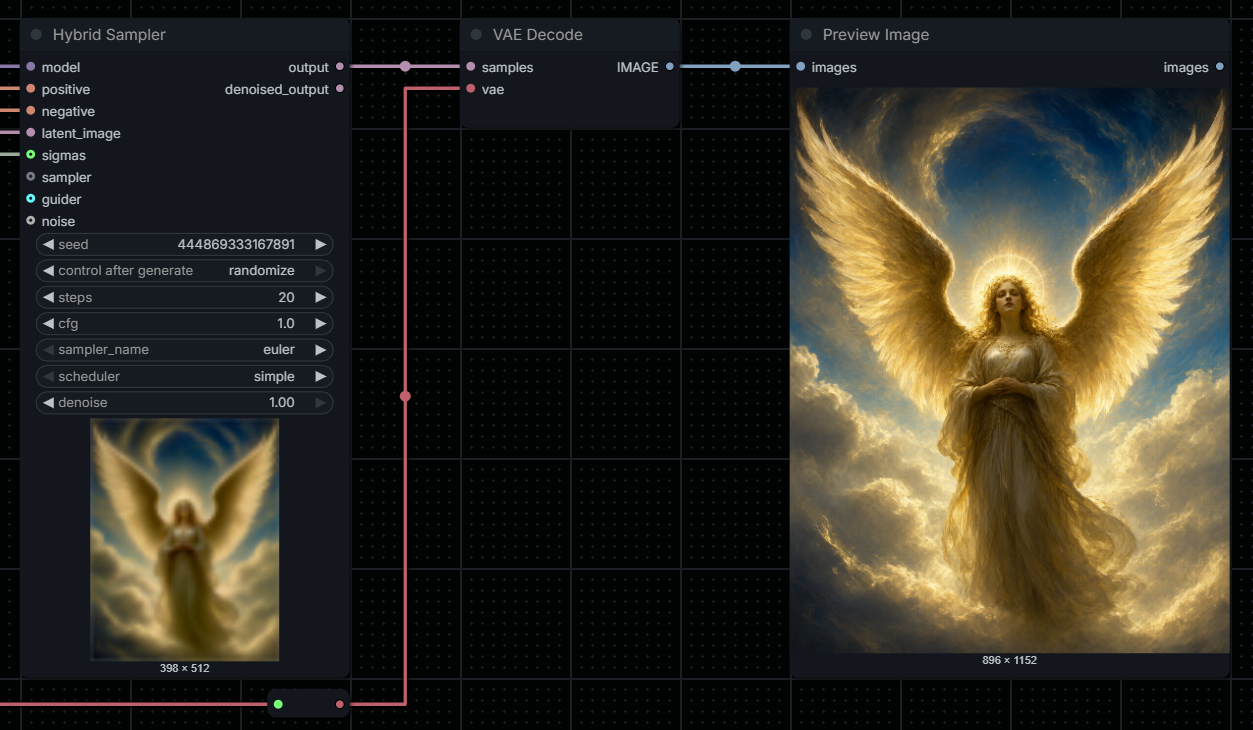
A compact KSampler-style alternative to SamplerCustomAdvanced, with optional component overrides.
Latest release
1.0
Added
- Initial commit
Installation
Git
Open a terminal inside the ComfyUI custom_nodes directory and clone the repository:
cd ComfyUI/custom_nodes
git clone https://github.com/VictorDmAlves/comfyui-hybrid-sampler.git
ZIP
- Download the repository as a ZIP file.
- Extract it into
ComfyUI/custom_nodes/. - Make sure the final structure is not nested twice.
Restart ComfyUI and add Hybrid Sampler from sampling/custom_sampling.
Inputs
| Standard inputs | Type | |---|---| | model | MODEL | | positive | CONDITIONING | | negative | CONDITIONING | | latent_image | LATENT |
Internal widgets: seed (native control-after-generate), steps, cfg, sampler_name, scheduler, denoise.
| Optional overrides | Type | Replaces | |---|---|---| | sigmas | SIGMAS | internal scheduler/steps/denoise sequence | | sampler | SAMPLER | internal sampler_name | | guider | GUIDER | internal model/positive/negative/cfg guidance | | noise | NOISE | internal seed-based noise generator |
Override precedence: an optional connected input is used instead of its corresponding internal setting. When guider is supplied, it owns its model and conditioning; the model input remains useful for computing internal sigmas unless sigmas is also externally connected. When using an external guider with a different model, supply compatible sigmas explicitly.
Outputs: output (LATENT), denoised_output (LATENT).
Native generation preview
The plugin calls latent_preview.prepare_callback and therefore uses the native ComfyUI preview mechanism. In ComfyUI settings, use Preview method: auto. Preview availability and quality depend on the active ComfyUI build, model architecture, and installed preview decoder. This displays the in-progress latent preview, not an extra IMAGE output or a guaranteed full-resolution image embedded at the bottom of the node. ComfyUI controls how/where the preview appears.
Sample use cases (examples)
- Standard: connect MODEL, positive/negative, and LATENT; all other settings stay inside the node.
- ManualSigmas: connect
ManualSigmas -> sigmas; internal steps/scheduler/denoise are ignored. - BasicScheduler: connect
BasicScheduler -> sigmas; the external scheduler provides the schedule. - Custom sampler: connect a SAMPLER-producing node to
sampler. - Advanced guidance: connect a GUIDER-producing node; its model/conditioning/CFG are used.
Notes
- This custom node does not implement new samplers. It uses ComfyUI's native
sampler_object,CFGGuider,calculate_sigmas, andguider.sample. - External SIGMAS determine actual sampling steps, even if the
stepswidget has another value. denoise=0produces a no-op only for the internal sigma path.noiseoverride must provideseedandgenerate_noise(latent)as in the native NOISE type.- Test on a current ComfyUI installation; the package has been statically validated but GPU sampling could not be run in the packaging environment.
License
See LICENSE.