
Motion Verdict
Motion Verdict: is an AI video really animated, or only a camera move over a still picture? Removes the camera's pan/tilt/zoom/roll, measures what still moves on its own, and returns a verdict (animated / partly_animated / camera_only / still), an 'animated' BOOLEAN for gating seed batches, a subject-motion score, stall times, a timeline IMAGE and a JSON report. CPU friendly, works in API runs. Optional in-memory preview on the node.
Motion Verdict
Is your AI video really animated, or is it only a camera move over a still picture?
Image-to-video models (Wan, LTX, Hunyuan, MiniMax, Kling, ...) often return a clip where nothing moves. You get a slow zoom or pan over the start image, a near-frozen clip, or a clip that moves for a second and then stalls. Frozen-frame checks miss the zoom-over-a-still case, because the pixels do change.
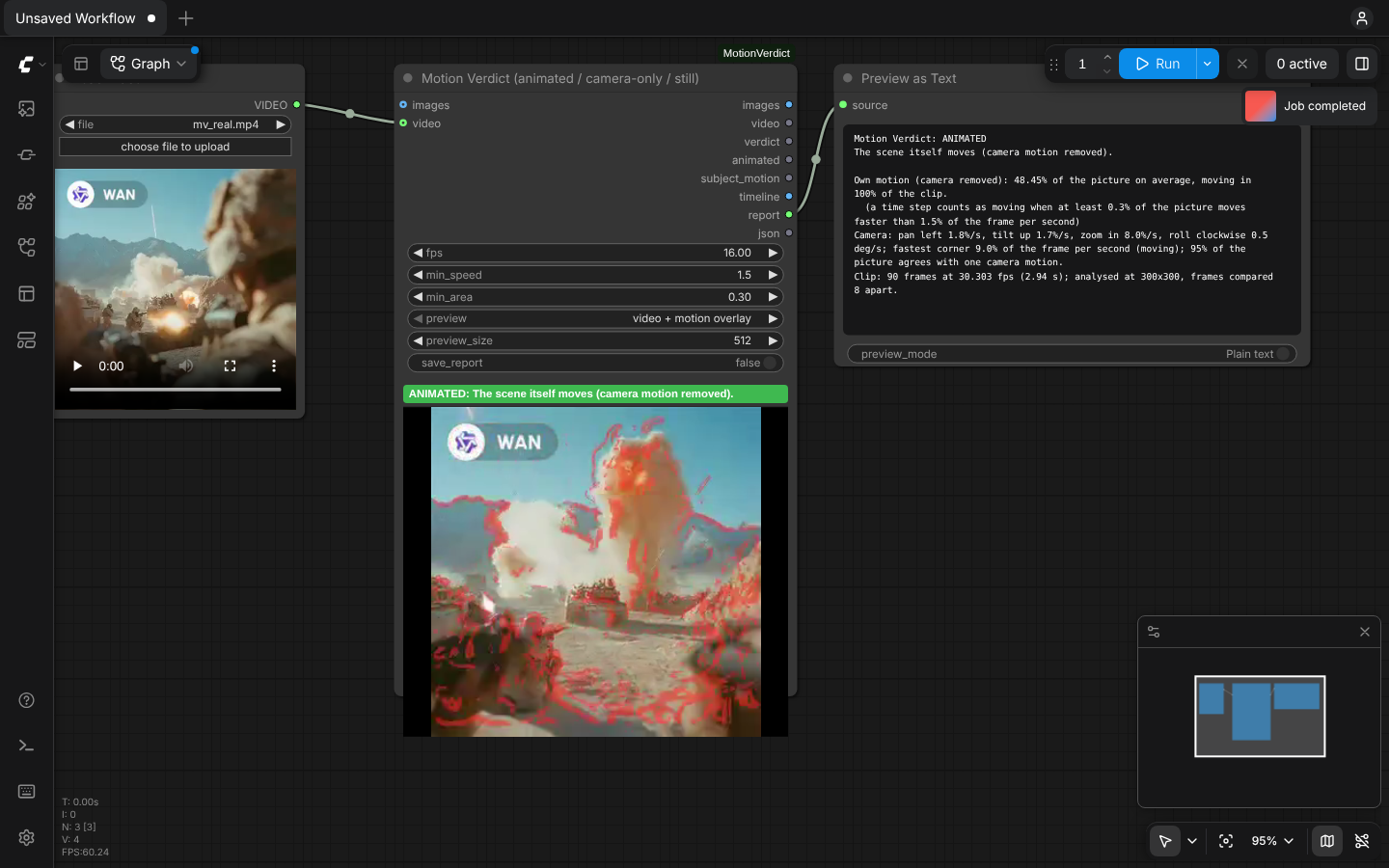
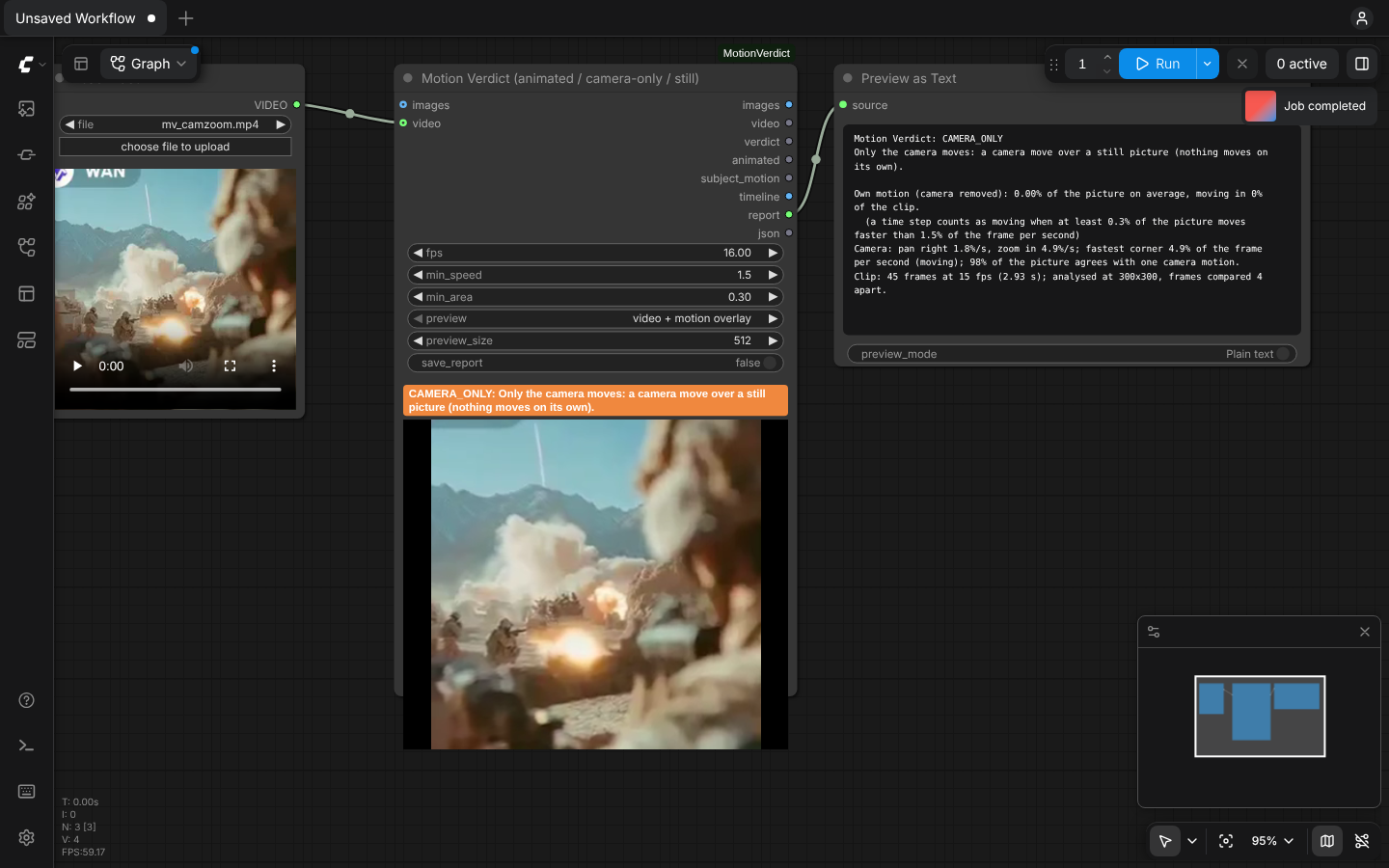
Motion Verdict removes the camera motion (pan, tilt, zoom, roll) first, then measures what still moves on its own.
| Real Wan clip → ANIMATED (what moves on its own is tinted red) | The same clip's first frame with only a zoom + pan → CAMERA_ONLY |
|---|---|
|  |
 |
| Verdict | Meaning |
|---|---|
| animated | the scene itself moves for at least half of the clip |
| partly_animated | it moves, but only for part of the time (the stalls are listed) |
| camera_only | only the camera moves: a camera move over a still picture |
| still | nothing moves |
| unknown | fewer than 2 frames |
What it does that other nodes don't
| | Frozen / duplicate-frame QC (VideoGate, frameaudit, ...) | Camera-move checkers (shotdrift, shotcheck) | Motion masks (optical flow, Motion Mask Tracker) | Motion Verdict |
|---|---|---|---|---|
| Catches "zoom over a still picture" | no (pixels change) | no (the camera did move) | no verdict | yes: camera_only |
| Measures motion with the camera removed | no | no | mask only | yes: subject_motion |
| Verdict + BOOLEAN for keeping or dropping a seed | frozen only | camera matches prompt | no | animated / partly / camera_only / still |
| Says when the motion stops | no | no | no | stalls, with frame numbers |
| Works in API / AI-App runs, without a player | yes | yes | yes | yes (STRING, BOOLEAN, FLOAT, IMAGE outputs) |
Nearest nodes already on RunningHub (checked with RunningHub's own node search):
| Node | What it does | |---|---| | RyanOnTheInside Motion Feature | motion amount from optical flow (its README documents no camera removal), as a signal that drives effects | | DepthAnythingV3 Parse Camera Pose | camera pose from a depth model | | WAS Camera Motion Trajectory from Images | makes a camera move over stills: the opposite of this node | | MiniMax H3 RAFT Motion Audit / Motion Quality Audit | raw optical-flow motion / frame-delta freeze risk; their panels describe no camera removal, so a camera move over a still picture would count as motion | | Video Stabilizer (Flow / Classic) | removes camera shake; its meta output records the camera motion that was removed, not how much the scene moves |
None of them removes the camera motion to judge whether the scene itself moves. Searches for Motion Mask Tracker, shotdrift, shotcheck, VideoGate and frameaudit returned no node (56 search terms in total, see the research).
The full research is in research/DUPLICATE_RESEARCH.md.
Use it
- Add Motion Verdict (category
video/Motion Verdict, node idMotionVerdict). - Connect one of:
videofrom Load Video. This is best for files, 4K and long clips: the video is streamed, each frame is shrunk while it is decoded, so the clip never sits in memory at full size. Its own frame rate is used.imagesfrom VAE Decode (or any IMAGE batch). Setfpsto the clip's frame rate.
- Run. The node shows the verdict and plays a preview of the clip. Set
previewtovideo + motion overlayto see in red what moves on its own.
Why video matters for big files: Load Video → Get Video Components turns a clip into a full-size IMAGE batch
before any node sees it. 285 frames of 4K portrait = 28 GB, which runs out of memory on most PCs. Through the
video input, the same kind of 4K clip was analysed with under 0.6 GB of extra memory, and streamed memory
does not grow with resolution (see Measured results).
Example workflows (exported from the ComfyUI UI; both use example_with_audio.mp4 from ComfyUI's input folder):
examples/motion_verdict_load_video.json: Load Video → Motion Verdict → Preview as Text.examples/motion_verdict_video_from_another_node.json: Load Video → Get Video Components → Create Video → Motion Verdict. This is the "VIDEO output of another node" case, e.g. the end of a Wan workflow.
Tested: Load Video, and Create Video with codec none or auto, all play the preview on the node. A full-disk scan
found no file created or changed during those runs.
Inputs
| Input | Default | Meaning |
|---|---|---|
| video | | the clip as a VIDEO (e.g. Load Video), streamed. Connect this or images |
| images | | the clip as an IMAGE batch (e.g. VAE Decode). Connect this or video |
| fps | 16 | frames per second of images (Wan 16, LTX 24/25, Hunyuan 24). A video uses its own frame rate |
| min_speed | 1.5 | % of the frame per second that a pixel must move, after the camera is removed, to count. Raise it for grainy footage. |
| min_area | 0.3 | % of the (textured) picture that must move for a moment to count as "moving" |
| preview | video | on-node preview: video (the clean clip), video + motion overlay (what moves on its own is tinted red) or off. Encoded in memory; nothing is saved, not even to temp/ |
| preview_size | 512 | longest side of the preview, 256-1440 px (never larger than the clip). Does not change the analysis |
| save_report | off | also save the JSON report to ComfyUI/output/motion_verdict/ |
Outputs
| Output | Type | Meaning |
|---|---|---|
| images | IMAGE | the images input, unchanged (passthrough); empty when video was used |
| video | VIDEO | the video input, unchanged (passthrough); empty when images was used |
| verdict | STRING | animated, partly_animated, camera_only, still or unknown |
| animated | BOOLEAN | true only for animated; use it to keep or drop a seed |
| subject_motion | FLOAT | mean % of the picture that moves on its own |
| timeline | IMAGE | chart: green bars = own motion, blue line = camera speed, yellow dashes = min_area; bottom strip green = moving, red = not moving |
| report | STRING | readable report: verdict, own motion, camera pan / tilt / zoom / roll, stalls |
| json | STRING | every number plus the per-time-step timeline |
In API runs the node's own result (verdict, headline, report) is also in ComfyUI's /history under
motion_verdict.
How it works
- Each frame is shrunk to a ≤ 320 px greyscale copy so memory stays small for long clips. A
videois shrunk by FFmpeg while decoding; an IMAGE batch is shrunk a few frames at a time. - Frames ¼ s apart are compared. The camera motion between them is estimated as an affine transform:
- phase correlation of the whole frame and of 45 tiles;
- a robust fit that ignores tiles on a moving subject;
- a robust polish on all pixels.
- The later frame is warped back onto the earlier one and global brightness changes are removed. What still
moves across edges faster than
min_speedis "own motion". - The verdict comes from how much of the time at least
min_area% of the picture moves on its own.
Formulas, thresholds and their reasons, edge cases and the memory plan are in
docs/DESIGN.md.
Measured results
Measured on 4 CPU cores, no GPU. Full output is in tests/RESULTS.md.
Speed and memory
- A Wan-size 5 s clip (81 frames at 832×480) takes 2.7 s.
- 1,496 frames take 8.8 s on 4 cores; 9.2 s with only 2 threads.
- A 4K portrait clip (75 frames, 2160×3840) through Load Video → Motion Verdict in ComfyUI takes 5.0 s. The server's memory peak stayed at 1.8 GB, i.e. under 0.6 GB above its idle use, while one full-size IMAGE batch of that clip would be 7.1 GB.
- Streamed
videomemory does not grow with resolution. 32 frames at 720p add 266 MB; at 1440p (4× the pixels), 289 MB. The same 1440p clip as an IMAGE batch adds 2,775 MB.
Unit tests: 33/33 pass on Linux. The earlier 28-test version also passed 28/28 on Windows 10 (ComfyUI Desktop 0.43.1, CPU). The tests cover:
- planted pans, tilts, zooms, rolls and moving subjects;
- noise / flicker / black false-positive tests;
- edge cases: 0, 1 and 2 frames, odd and tiny sizes, C=1 and C=4, NaN/Inf, 1,500 frames, 8-30 fps;
- the streamed
videoinput: same verdict asimages, trim window, crop fallback, memory bound; - the preview: 256-1440 px, no upscale.
Real AI video clips:
- 230 example outputs of Wan, LTX, Seedance, Kling, MiniMax, Vidu, Hunyuan, PixVerse and others came back
animated229/230. These are the animated thumbnails that ship with ComfyUI's templates, ≤ 512 px. - The one exception (
partly_animated) is a portrait that is motionless for its first 2.2 s.
Known-answer clips built from real AI frames, re-encoded with H.264: 194/195 correct with the current, faster
code (195/195 before the speed-up). The one miss is a knife-edge case: a clip with only ~0.3 s of motion whose
moving share is 0.146 against the 0.15 cut-off; see tests/RESULTS.md §9. 39 of each:
- held frame →
still; - zoom + pan over the frame →
camera_only; - pan + tilt + roll over the frame →
camera_only; - 0.8 s of motion, then frozen →
partly_animated; - the real clip →
animated.
Both inputs agree: through the streamed video reader the same 230 real clips gave 0 different verdicts, and
the 195 known-answer clips were again 195/195 (before the speed-up).
Thresholds are calibrated only on these clips. They were not calibrated on full-resolution generations or on real failed generations; none were available.
Known limits
- Parallax counts as motion. A real 3-D camera move over a static scene is
animated. Only a flat 2-D move over a still picture iscamera_only. - Boiling texture, heavy grain or strong compression can read as own motion. Raise
min_speed. - Very slow motion (under
min_speed) and motion along an edge are under-counted. - Camera numbers are 2-D. Pan vs truck and zoom vs dolly cannot be told apart.
- Calibration data: thresholds were tuned on synthetic clips and on small (≤ 512 px) thumbnails of real AI clips. They were not tuned on full-resolution user generations. Please report clips that get the wrong verdict.
- Cropped or rotated VIDEOs fall back to ComfyUI's own decoder, so the frames match what other nodes see. That path loads the clip at full size, like Get Video Components.
- Tested only in Chromium; Firefox and Safari were not tested. Not tested on RunningHub itself.
Requirements
- ComfyUI (tested with 0.43.0, frontend 1.57.6).
- Only
torch,numpyandav(PyAV), which ComfyUI already installs. No other pip packages. - Works on CPU-only machines. No network access.
- Writes nothing to disk unless
save_reportis on, and then only into ComfyUI's output folder. Tested: a run withsave_reportoff created or changed no file anywhere on the disk; the preview MP4 was served from memory. - The preview lives in RAM (the last 16 previews, up to 256 MB in total). After a ComfyUI restart, run the node again.
- The preview is H.264 at crf 20, close to visually lossless, so it works for reference and screenshots. The
player's download button saves that preview (≤
preview_size), not the original. Use Save Video for full-quality files.
Install
cd ComfyUI/custom_nodes and git clone this repository. Then restart ComfyUI.
Tests
python tests/test_motion_verdict.py: known-answer tests with planted camera moves and moving subjects, false-positive tests and edge cases. ComfyUI is not needed.python tests/eval_clips.py <folder>: the verdict for every video in a folder.python tests/derive_clips.py <real clips> <out>: builds known-answer variants from real clips (still / camera move over a still frame / motion then freeze / re-encoded).python tests/api_run.py <video>: runs a workflow through a running ComfyUI's HTTP API (no browser).node tests/ui_run.js <video> <png>: drives the real UI in headless Chromium.
Thanks
- kijai (ComfyUI-KJNodes): his Fast Preview showed that a preview does not need to be written to disk. That idea is behind this node's in-memory preview. The code here is my own and does not come from KJNodes.
- The ComfyUI team, for the extensible server and frontend, and for the template thumbnails that were used as real-content calibration clips (not included in this repository).
Licence
MIT. See LICENSE.