
3D generation (ROCm): TripoSG + Hunyuan3D-2.1 Paint
Image to textured 3D asset on AMD Radeon and Instinct GPUs (ROCm), Windows and Linux: TripoSG image-to-mesh and Hunyuan3D-2.1 PBR texturing as ComfyUI nodes, with no CUDA or C++ extensions to build. Also paints meshes from ComfyUI's own Hunyuan3D-2.1 nodes. Setup: install here and restart (Manager installs the Python packages from requirements.txt; nothing pins torch, so your ROCm PyTorch stays), then open Templates Extensions comfyui-3d-rocm. TripoSG and the painter download their models (18 GB) on the first run.
ComfyUI-3D-rocm
Image to textured 3D asset in ComfyUI on AMD GPUs: TripoSG image-to-mesh and the Hunyuan3D-2.1 PBR texture painter as ComfyUI nodes, on Radeon and Instinct GPUs, Linux and Windows. No CUDA or C++ extensions, no Blender, nothing to compile.
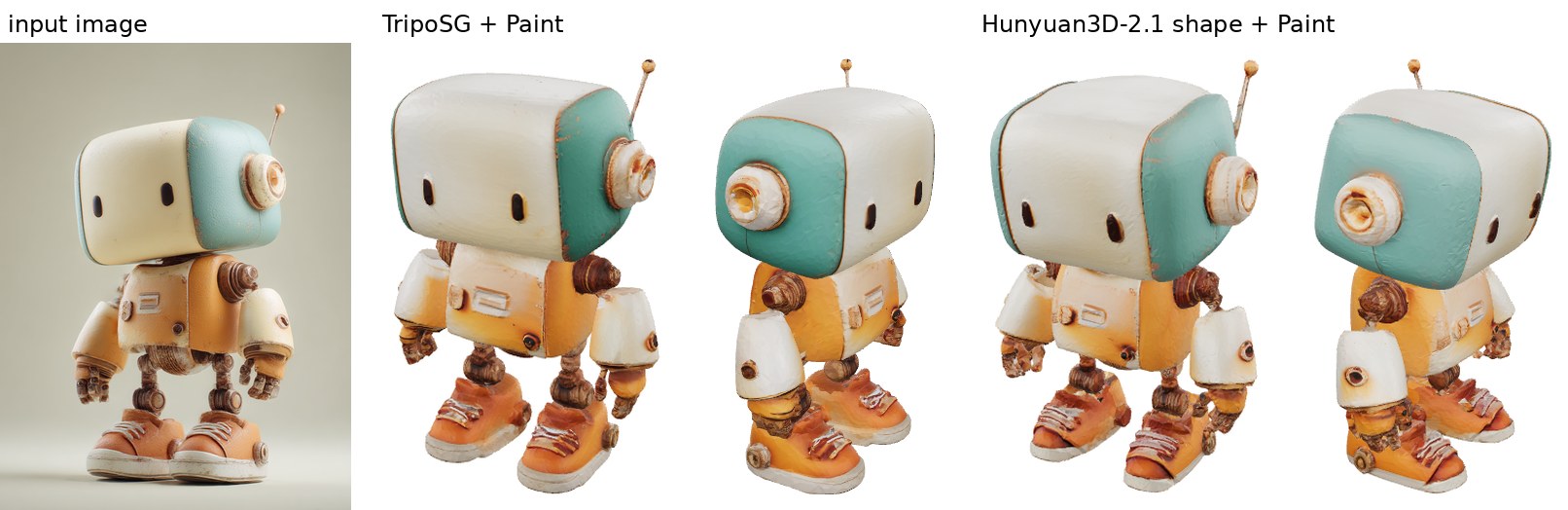
The painter textures any ComfyUI MESH: from TripoSG, from ComfyUI's native Hunyuan3D-2.1 shape nodes, or from
other generators. Output goes to ComfyUI's own Save 3D Model node as a GLB with base color, metallic and roughness
maps.
| Workflow, per image (warm) | RX 7800 XT 16 GB, Windows | RX 7800 XT + SageAttention | Radeon PRO W7900, Linux + SageAttention | | --- | --- | --- | --- | | TripoSG + Paint | 98 s (mesh 25 s, texture 69-74 s) | 69-70 s (mesh 20 s, texture 46-47 s) | 49-52 s (mesh 15 s, texture 32-34 s) | | Hunyuan3D-2.1 shape (ComfyUI native) + Paint | 162-167 s | 138-143 s | 100-111 s |
Peak GPU memory is about 10 GiB (13 GiB on the first run, while MIOpen picks its kernels), so 16 GB cards work.
RX 7800 XT: a fresh ComfyUI 0.45 Windows portable for AMD with this node pack installed through ComfyUI Manager;
the SageAttention column adds pip install sageattention-rocm and --use-sage-attention. Between runs the models
wait in CPU memory (keep_loaded off). The first run of a session takes longer: it loads the models from disk and
MIOpen picks its convolution kernels.
Getting started
You need ComfyUI 0.34 or newer running on a ROCm PyTorch: on Windows, ComfyUI's Windows portable for AMD GPUs; on Linux, ComfyUI with ROCm PyTorch. A 16 GB GPU is enough; the models take about 26 GB of disk. Tested on Windows 11 with ComfyUI 0.45's portable for AMD (RX 7800 XT) and on Linux with ROCm 7 PyTorch (W7900). Nothing in it is AMD-specific, but it has not been tested on NVIDIA.
-
Install the node pack. In ComfyUI Manager open Custom Nodes Manager, search for rocm, install 3D generation (ROCm) and restart ComfyUI when it asks. (No Manager button? Start ComfyUI with
--enable-manager.) Manager installs the Python packages inrequirements.txt(diffusers, transformers, trimesh, pymeshlab, xatlas, spandrel, ...); none of them asks for a particular torch, so your ROCm PyTorch stays as it is. Without Manager:cd ComfyUI/custom_nodes git clone https://github.com/TwelveNights/ComfyUI-3D-rocm.git python -m pip install -r ComfyUI-3D-rocm/requirements.txtOn the Windows portable, use
python_embeded\python.exefrom the portable folder aspython. -
Open an example workflow: Templates in the left sidebar, then Extensions > comfyui-3d-rocm at the bottom of the list (ComfyUI-3D-rocm if you cloned it).
- triposg-paint: image → TripoSG mesh → Hunyuan3D-2.1 Paint textures.
- hunyuan3d-2.1-paint: ComfyUI's own Hunyuan3D-2.1 shape template, with the painter added.
-
Get the models the workflow asks for. ComfyUI flags missing files when the workflow opens; View details lists each one with a download button and its folder (from the browser the file goes to your downloads folder; move it into that
modelsfolder): birefnet.safetensors (Remove Background,models/background_removal) and, for the second workflow, hunyuan_3d_v2.1.safetensors (models/checkpoints). TripoSG and the painter's models download by themselves on the first run (18 GB tomodels/triposg,models/hunyuan3dandmodels/upscale_models; progress shows in the console). -
Load an image and run. One object per image works best. The result is previewed in the Save 3D Model node and saved as a GLB in
output/3d, ready for Blender, Godot, Unity or a glTF viewer. -
Optional: SageAttention-rocm (8-bit attention):
python -m pip install sageattention-rocmwith ComfyUI's Python (on Windows it also needs the one-time ROCm SDK command it prints). The nodes use it automatically when it is installed (attention=auto;pytorchturns it off); start ComfyUI with--use-sage-attentionto use it in ComfyUI's own nodes too. On the RX 7800 XT it takes TripoSG + Paint from 98 s to 70 s.
The first run of a session is slower than the ones after it: models load from disk and MIOpen picks its kernels. On Windows, close other programs that use a lot of GPU memory: when VRAM runs out the driver moves memory to system RAM instead of failing, and everything slows down several times.
Nodes
- TripoSG Loader (ROCm) downloads VAST-AI/TripoSG to
models/triposgon first use (7.5 GB). - TripoSG Image to Mesh (ROCm): image (+ optional mask) to an untextured
MESH.octree_depth8 (256³, about 300K faces) is the default, 9 is upstream's 512³; 25 steps instead of upstream's 50. - Hunyuan3D-2.1 Paint Loader (ROCm): number of views (6-9), view resolution (512 or 768) and texture size. The
paint model, DINOv2 giant and RealESRGAN x4 download on first use to
models/hunyuan3d(11 GB) andmodels/upscale_models. - Hunyuan3D-2.1 Paint (ROCm):
MESH+ reference image (+ optional mask) to a PBR-texturedMESH. The mesh is remeshed to about 40K faces and UV-unwrapped, as upstream does.
Both generating nodes take attention (auto uses SageAttention when it is installed) and keep_loaded (keep the
models on the GPU between runs; otherwise they wait in CPU memory, which is what 16 GB cards need). Masks: connect
ComfyUI's Remove Background node, or use an image with alpha; without a mask the background is taken to be the
color of the image corners.
On ROCm the nodes turn MIOpen convolutions back on while they run (ComfyUI turns them off for AMD): the painter is
1.5x faster with them on Linux and 2.5x on Windows. They set MIOPEN_FIND_MODE=FAST unless you set it, so MIOpen
does not spend minutes tuning on the first run.
How it runs without CUDA extensions
The model code is vendored from two ports that replace the CUDA/C++ pieces with PyTorch and NumPy:
- TripoSG-rocm: marching cubes without
diso, PyTorch farthest point sampling, a hole-free fallback for the octree surface extraction. - Hunyuan3D-2.1-rocm: a PyTorch rasterizer (same face ids as the CUDA kernel), NumPy texture inpainting, trimesh instead of Blender, and an exact attention rewrite that brings the painter from 21 GiB to 10 GiB on ROCm 7 PyTorch.
Their ROCM.md files have the details and the checks against the original code.
License
This node pack's own code: Apache-2.0 (LICENSE). Vendored code: TripoSG under MIT (vendor/triposg_pkg/LICENSE); Hunyuan3D-2.1 under the Tencent Hunyuan 3D 2.1 community license (vendor/hy3dpaint/LICENSE), which does not apply in the EU, the UK and South Korea. The model weights carry their own licenses.
Related
- nunchaku-rocm and ComfyUI-nunchaku-rocm: 4-bit FLUX, Qwen-Image, Z-Image and SDXL on AMD
- SageAttention-rocm: 8-bit attention for AMD GPUs