
MI nodes
Pack of 5 ComfyUI nodes: MI Lora, MI Unet Rate, MI Embedding, MI Compare 3 Images and MI Save Image.
MI nodes
A pack of five ComfyUI custom nodes for everyday Stable Diffusion work: stack LoRAs with remembered trigger words, pick embeddings from a dropdown, rate your diffusion models, compare three images side by side and save only the results you like.
All nodes live under a single menu category: MI nodes.
| Node | What it does |
|------|--------------|
| MI Lora | Several LoRAs in one node, with per-LoRA on/off, strength and remembered trigger words |
| MI Unet Rate | UNET / diffusion-model loader where you rate (1-3 stars) and comment every model |
| MI Embedding | Embedding picker with strength, on/off switch and several rows |
| MI Compare 3 Images | Compare up to three images in the node: switch, wipe, save |
| MI Save Image | Preview in temp, copy to output only when you press SAVE |
Installation
Clone this repository into your ComfyUI custom_nodes folder and restart ComfyUI:
cd ComfyUI/custom_nodes
git clone https://github.com/ThinkingBells/MI_nodes.git
Keep the folder name MI_nodes (no spaces: ComfyUI cannot serve the interface files of a folder with a space in its name). The badge at the top right of every node reads MI nodes.
Then reload the browser tab (Ctrl+F5) so the new interface code is loaded. No extra dependencies are needed.
If you previously installed the standalone packages (
MI_lora,MI_embedding,MI_unet_rate,MiCompare_3_images,MIsave_image), remove them first: the nodes would appear twice. The internal node names are unchanged, so existing workflows keep working.
To find a node: double-click the canvas and type its name, or browse the MI nodes category.
MI Lora
Loads several LoRAs from one node and remembers the trigger words of each one. Write the trigger words once: they are saved per LoRA, filled in automatically the next time you pick it, and sent as text to your prompt.
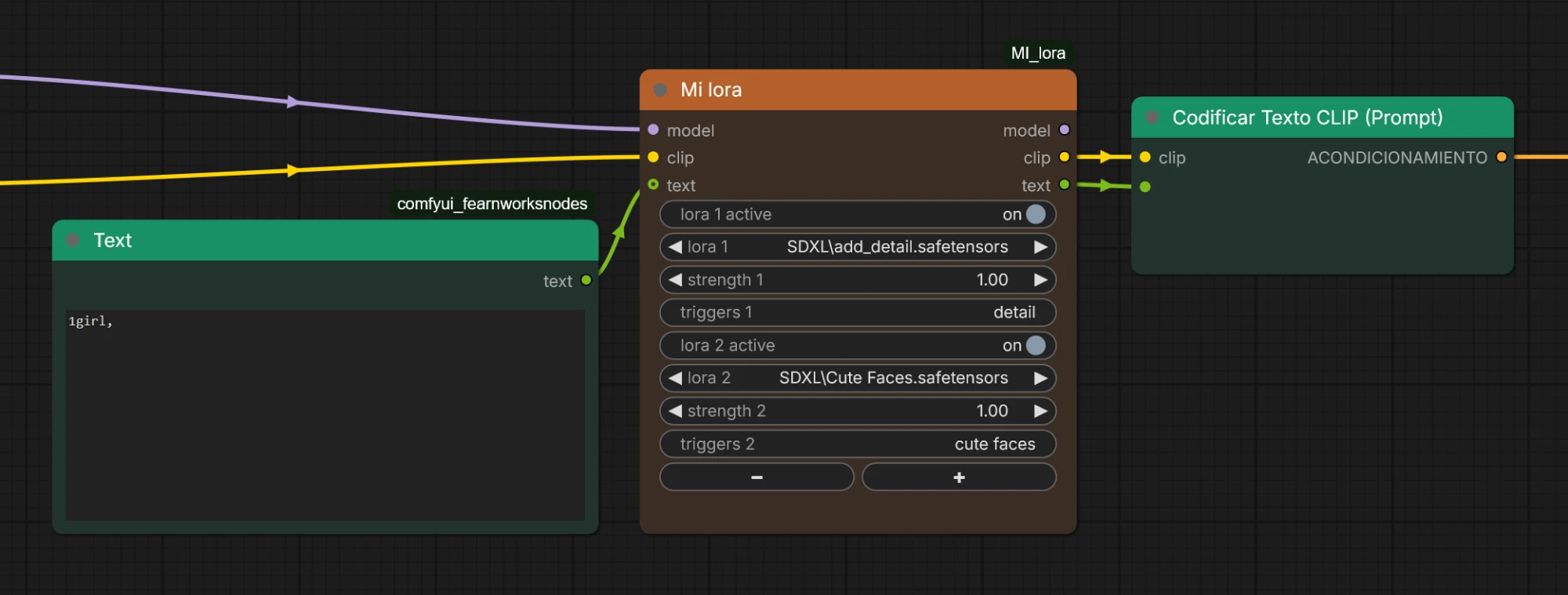
Why: stacking LoRAs usually means a chain of loader nodes plus a notes file to remember which words activate each one. MI Lora puts the LoRAs, their strengths, their trigger words and an on/off switch in one compact node.
Features
- Several LoRAs in one node:
+/-buttons add or remove rows (up to 8). - On / off per LoRA: a row that is off is skipped (the LoRA is not applied and its trigger words are not sent). Its fields are greyed out and the saved words are kept.
- One strength per LoRA: from -10 to 10, applied to both model and clip.
- Trigger words per LoRA: saved for that LoRA and filled in whenever you pick it again, in any node or workflow.
- Sent as text: the
textoutput is your incoming prompt followed by the trigger words of every active LoRA. - Subgraph friendly: every row uses standard widgets.
Usage
- Connect
modelandclip, and optionally aSTRINGprompt totext. - Pick a LoRA, set its strength and write its trigger words (comma separated).
- Connect
modelandclipto your sampler and text encoder, andtextto the text input of aCLIPTextEncode(convert the widget to an input first).
| Text in | LoRA rows | text output |
|---------|-----------|---------------|
| 1girl, | add_detail (on), Cute Faces (on) | 1girl, detail, cute faces |
| 1girl, | add_detail (on), Cute Faces (off) | 1girl, detail |
| nothing connected | add_detail (on) | detail |
Rows set to (none) are ignored.
Good to know: trigger words are tied to the LoRA path and file name inside the loras folder; renaming a file makes it a new LoRA. The LoRA list is read at startup, so restart ComfyUI after adding files.
MI Unet Rate
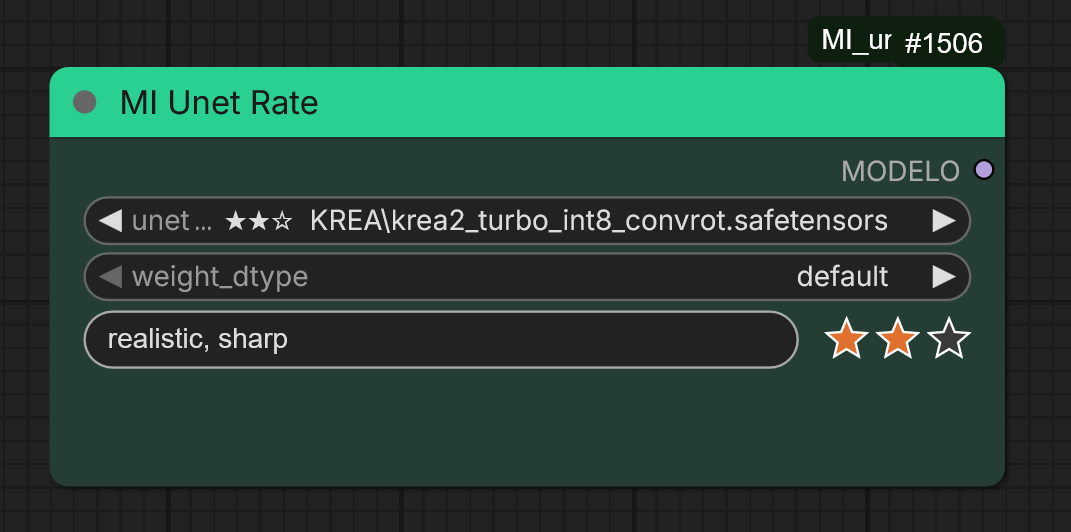
A UNET / diffusion-model loader that lets you rate and comment every model right where you pick it. File names alone are rarely enough to remember which of your dozens of checkpoints are worth using; this keeps your own judgement next to each model.
Features
- Rate each model from 1 to 3 stars with one click on the row under the selector.
- Comment each model: best sampler and scheduler, steps and CFG, resolution, known problems... (single line, up to 300 characters).
- Everything visible at a glance: stars are shown in front of the model name in the dropdown and in the selected value, so you can scan the list and spot your favourites.
- Drop-in replacement for the standard UNET loader: outputs
MODELand has the sameunet_nameandweight_dtypeinputs. - Your data stays local: plain JSON files, nothing is sent anywhere.
Usage
- Pick a model in
unet_name. - Click star 1, 2 or 3 to set the rating (clicking the last active star lowers it, down to none).
- Click the comment field on the left, type your note and confirm.
Ratings and comments belong to the model, so they are shared by every MI Unet Rate node and every workflow.
MI Embedding
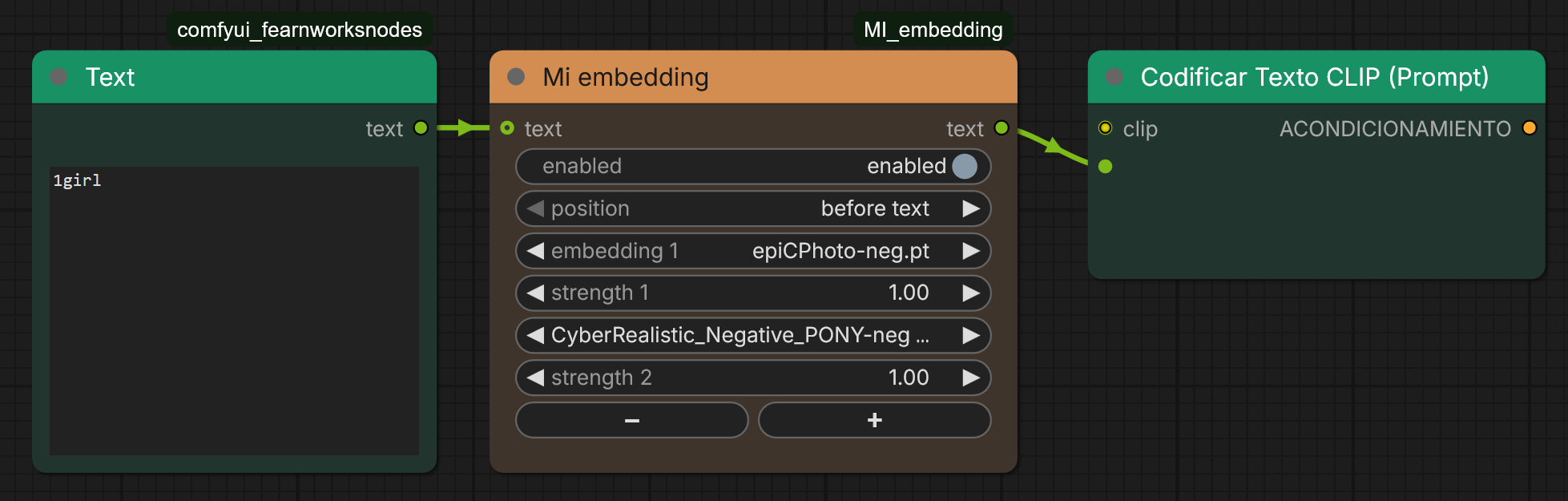
Pick textual-inversion embeddings from a dropdown, set the strength of each one and switch everything on or off, without typing embedding:name by hand.
Features
- Dropdown of your embeddings: every file ComfyUI sees in the
embeddingsfolder (including folders fromextra_model_paths.yaml). - Strength per embedding: from -10 to 10, default 1.0.
- Enable / disable toggle: when disabled, the incoming text passes through untouched, so you can compare with and without embeddings without rewiring.
- Several embeddings in one node:
+/-buttons (up to 8 rows). - Before / after text: choose where the embeddings go relative to the incoming prompt.
- Subgraph friendly.
Usage: optionally connect a STRING prompt to text, pick an embedding and set its strength, then connect the text output to a CLIPTextEncode.
| Rows | Text in | Position | Output |
|------|---------|----------|--------|
| epiCPhoto.pt, 1.0 | 1girl | before text | embedding:epiCPhoto, 1girl |
| epiCPhoto.pt, 1.3 | 1girl | after text | 1girl, (embedding:epiCPhoto:1.3) |
| epiCPhoto.pt, 0.8 | none | before text | (embedding:epiCPhoto:0.8) |
| epiCPhoto.pt, 1.3 | 1girl | disabled | 1girl |
Good to know: embeddings must match your model family (SD1.5, SDXL...). The list is read at startup.
MI Compare 3 Images
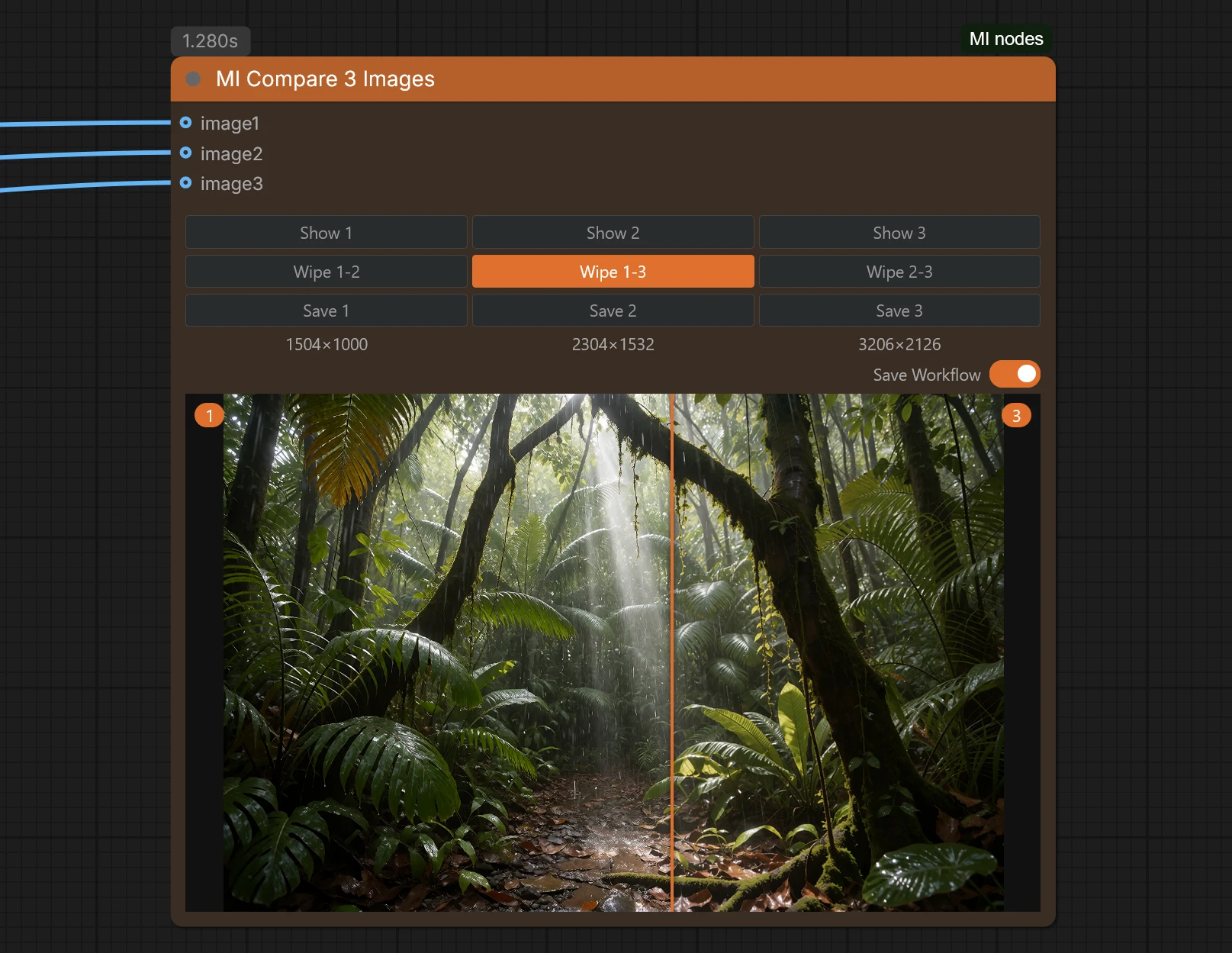
Compare up to three images inside the node itself.
Features
- Three optional
IMAGEinputs:image1,image2,image3(a muted or unconnected branch never raises an error). - Show 1 / Show 2 / Show 3 buttons switch the displayed image.
- Wipe 1-2 / Wipe 1-3 / Wipe 2-3 buttons compare a pair: hover the viewer and a bar follows the cursor, revealing one image or the other.
- Save 1 / Save 2 / Save 3 buttons save the matching image to the
outputfolder asMM-dd-HH-mm-ss-imageN.png. - The resolution of each image is shown under its Save button.
- The viewer fills the node and scales when you resize it.
- Images and the selected view are remembered when you switch workflow tabs or reload.
- Save Workflow switch (orange = on): embeds the workflow in the saved PNG so it can be dragged back into ComfyUI (skipped if ComfyUI runs with
--disable-metadata).
Usage: connect up to three images, run the workflow, pick with Show N, compare with Wipe A-B, save with Save N. Previews live in ComfyUI's temp folder, so they disappear after a restart until the workflow runs again.
Inspired by the Image Compare Pixaroma node from ComfyUI-Pixaroma (MIT). This is an independent, simplified reimplementation.
MI Save Image
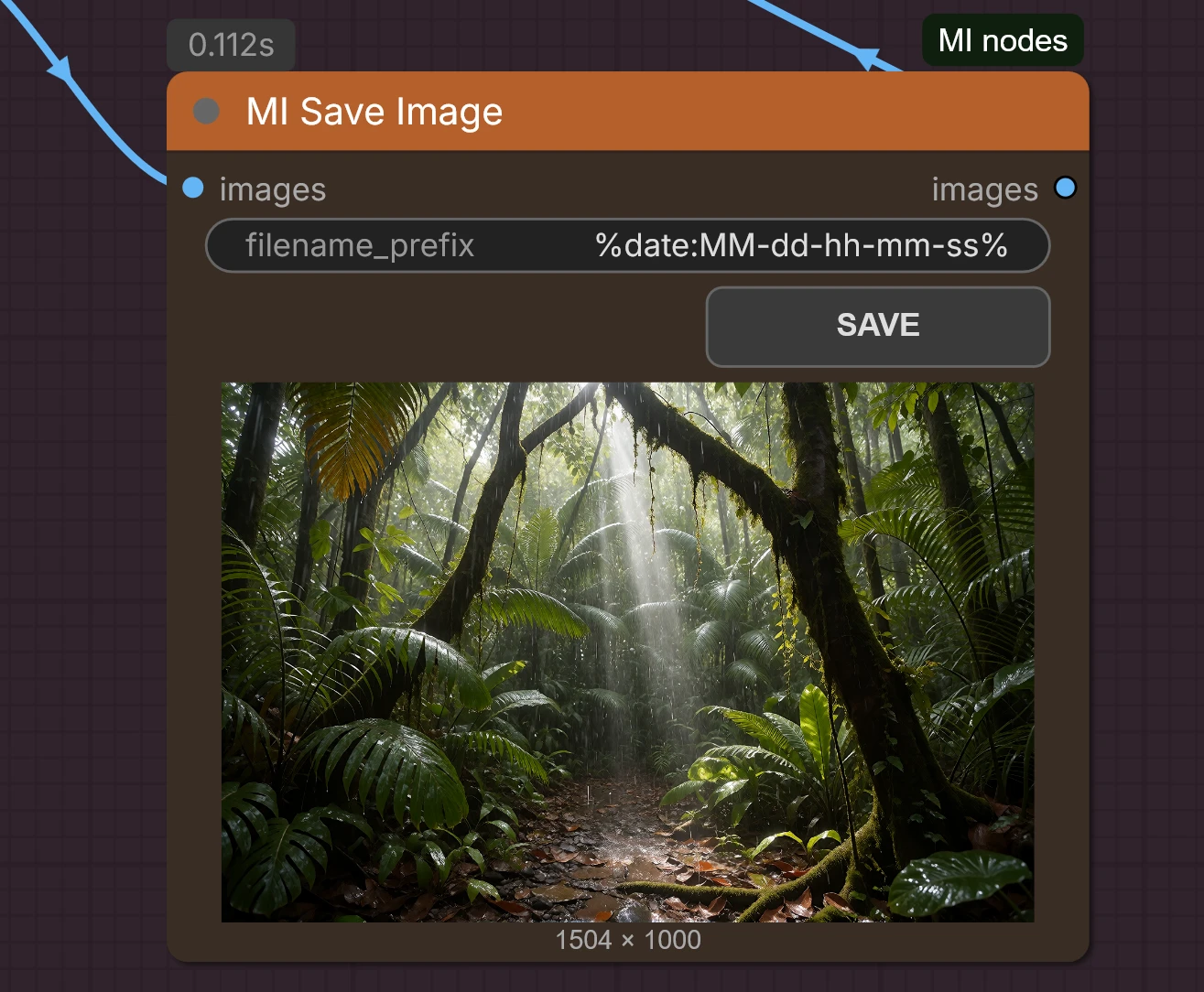
Receives one or several images and saves them to ComfyUI's temp folder with a preview. Nothing reaches your output folder until you decide: the SAVE button copies the visible image (or all images in grid view) there. It also passes the images through, so you can keep chaining nodes.
Features
- Preview first, save later: no more
outputfolder full of discarded results. - SAVE button on the node.
- Date-based file names:
filename_prefixdefaults to%date:MM-dd-hh-mm-ss%(tokensyyyy,yy,MM,dd,hh,mm,ss). A subfolder can be included, e.g.portraits/%date:yyyy-MM-dd%. - Never overwrites: if a name exists,
_1,_2... is appended. - Workflow embedded in the PNG, so saved images can be dragged back into ComfyUI.
Where the data is stored
Personal data is kept in the data/ folder of this package and is ignored by git:
| File | Content |
|------|---------|
| triggers.json | LoRA name to trigger words (MI Lora) |
| ratings.json | Model name to rating, 1-3 (MI Unet Rate) |
| notes.json | Model name to comment (MI Unet Rate) |
Back them up if you want to keep them. Nothing is sent anywhere.
Repository layout
MI_nodes/
├── __init__.py        # registers all nodes
├── nodes/             # one Python module per node
├── js/                # frontend extensions
├── images/            # screenshots
└── data/              # your ratings, notes and trigger words
License
MIT © 2026 Thinkingbells