
ComfyAngel
Parameter Overlay, Visual Widgets & Loop nodes for ComfyUI - Display generation parameters on images, true loop without Auto Queue
Nodes (28)
The hidden collector behind every Loop End
Pick a color, get a hex string, move on
The if-statement inside a ComfyAngel loop
Put words on images without leaving the graph
Unpacking what the flow wire actually carries
'how many things am I looping over?'
The loop node you'll forget to add and instantly regret
What is this image, as numbers
Pull values out of JSON without writing code
Every image in a folder, in one go
Pull the workflow out of any PNG you load
Ten result slots for heavyweight loop collection
Collect every pass of a loop into one output
The 10-slot loop that's hiding in plain sight
Iterate a batch in ComfyUI without touching Auto Queue
Integer arithmetic that lives inside your graph
Bake your generation settings into the image
Turn raw PNG metadata into real, typed values
Stop typing 1216x832, pick it instead
Place overlays by dragging, not by guessing coordinates
Crop by dragging, not by guessing pixel numbers
A flat-color canvas when you just need pixels to exist
Pull one frame out of a batch, one queue run at a time
Join anything into a string — no script required
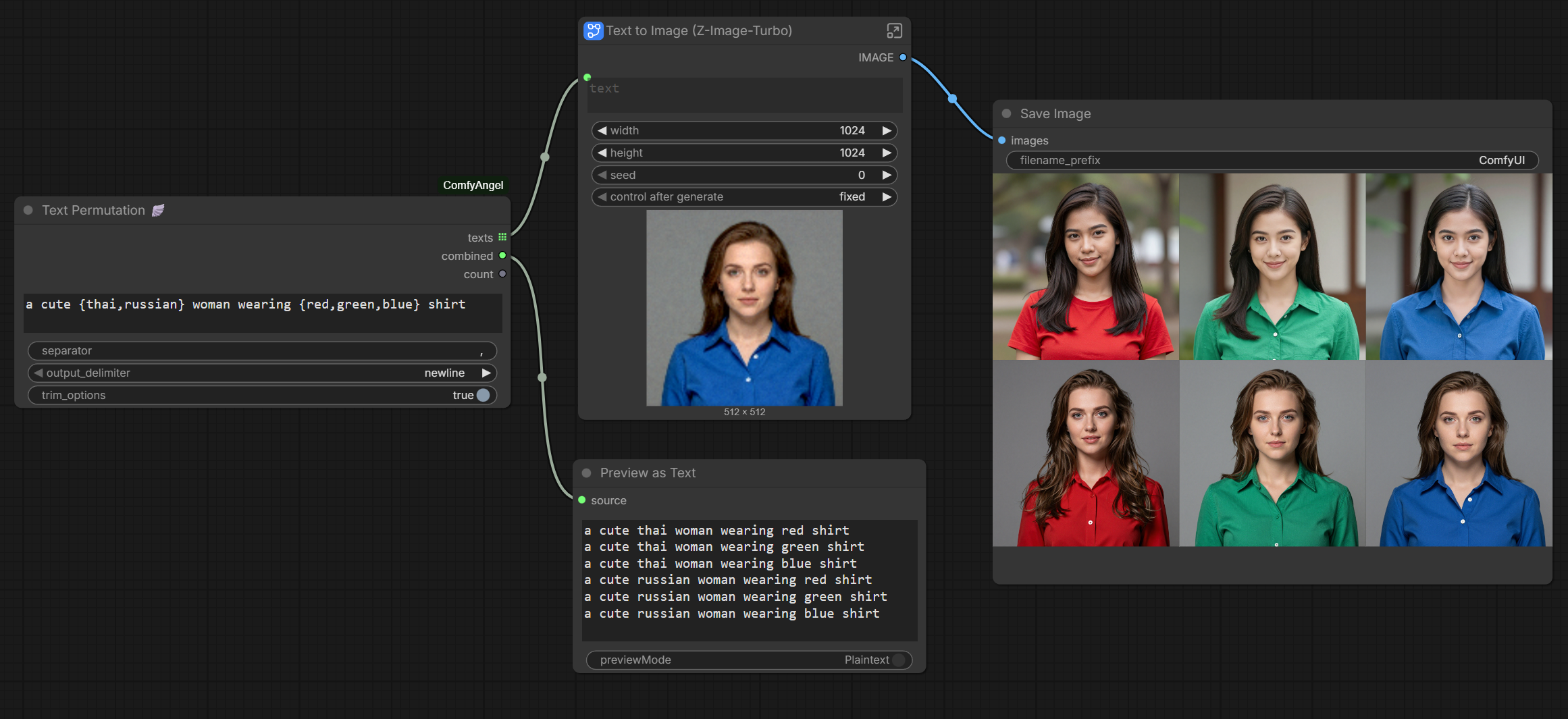
Turn {cat,dog} on {chair,sofa} into four prompts
The recursion engine behind ComfyAngel loops — you don't add this one
ComfyAngel's hidden loop controller — the two-slot version
Export the graph you just ran, as JSON, while it's still in memory
ComfyAngel
Custom nodes for ComfyUI that make batch workflows easy and visual editing intuitive.
- Text Permutation — Generate prompt combinations from
{cat,dog} on {chair,sofa}syntax - Loop Nodes — True loop without Auto Queue, process each item and collect results
- Parameter Overlay — Display generation metadata on images for sharing and comparison
- Visual Widgets — Position picker, crop editor, color picker with interactive UI
🎬 Video Tutorial:

Screenshots
Text Permutation — Easy to create text combo list to batch change prompt
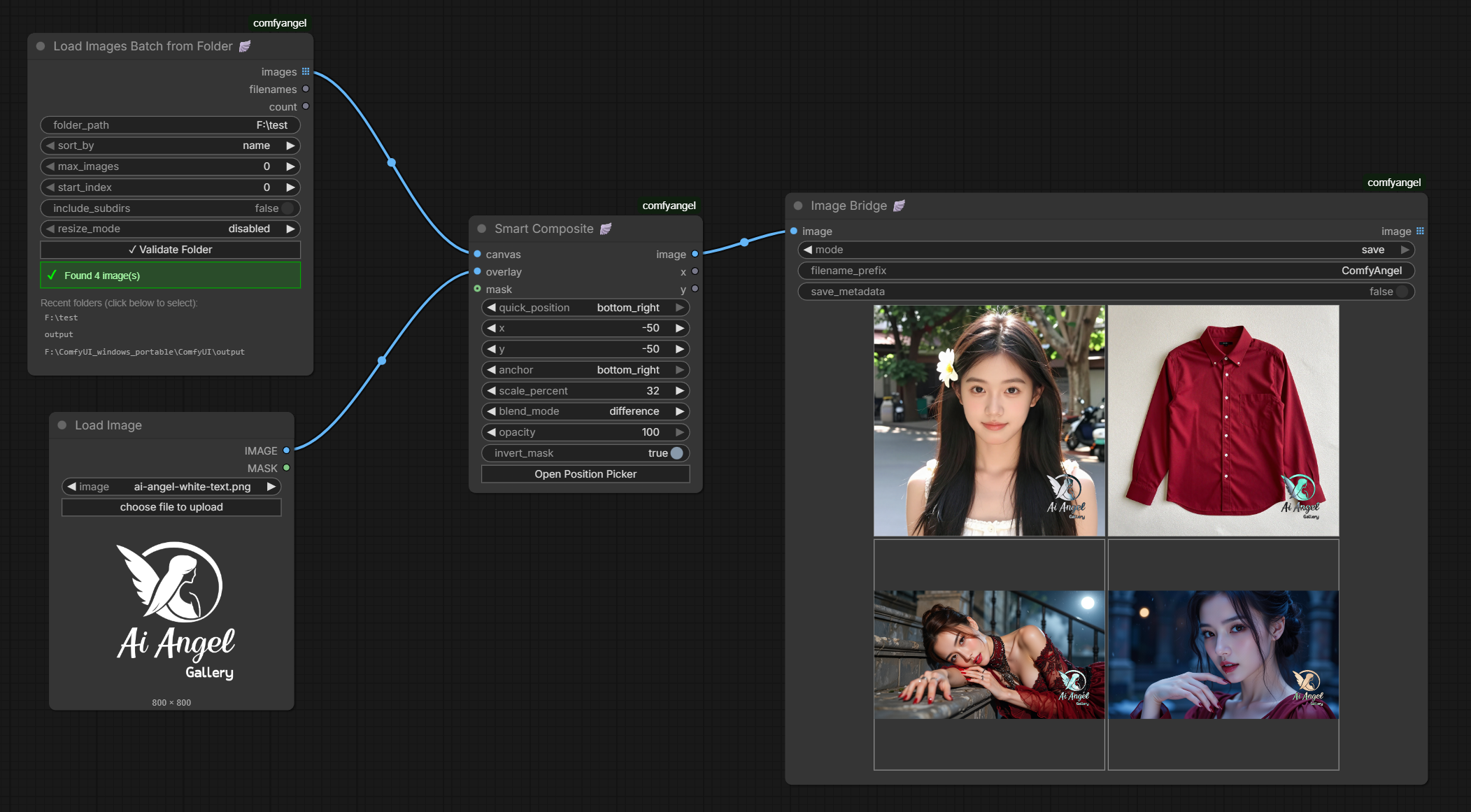
Load Images Batch from Folder — Load all images with validation and history
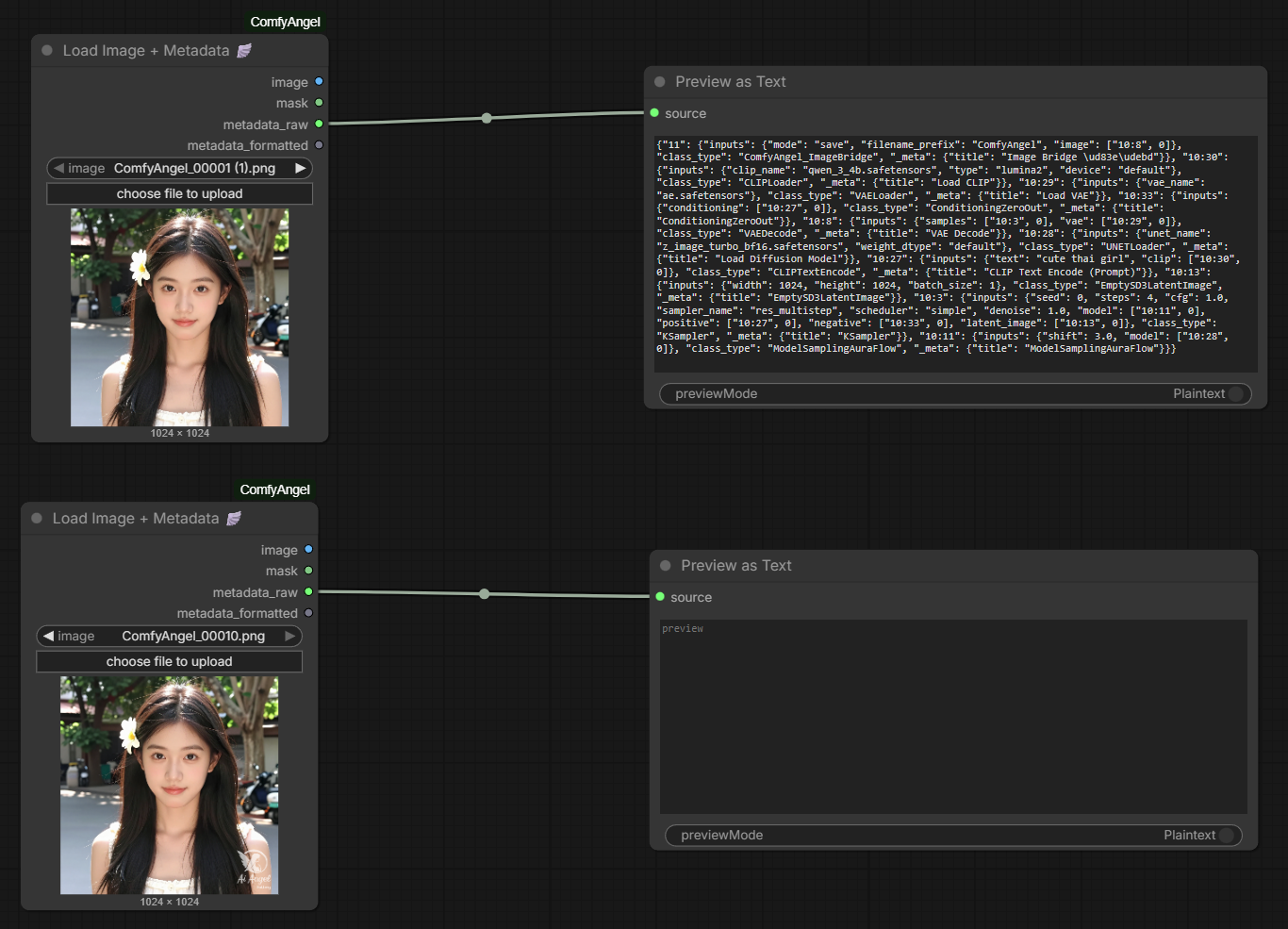
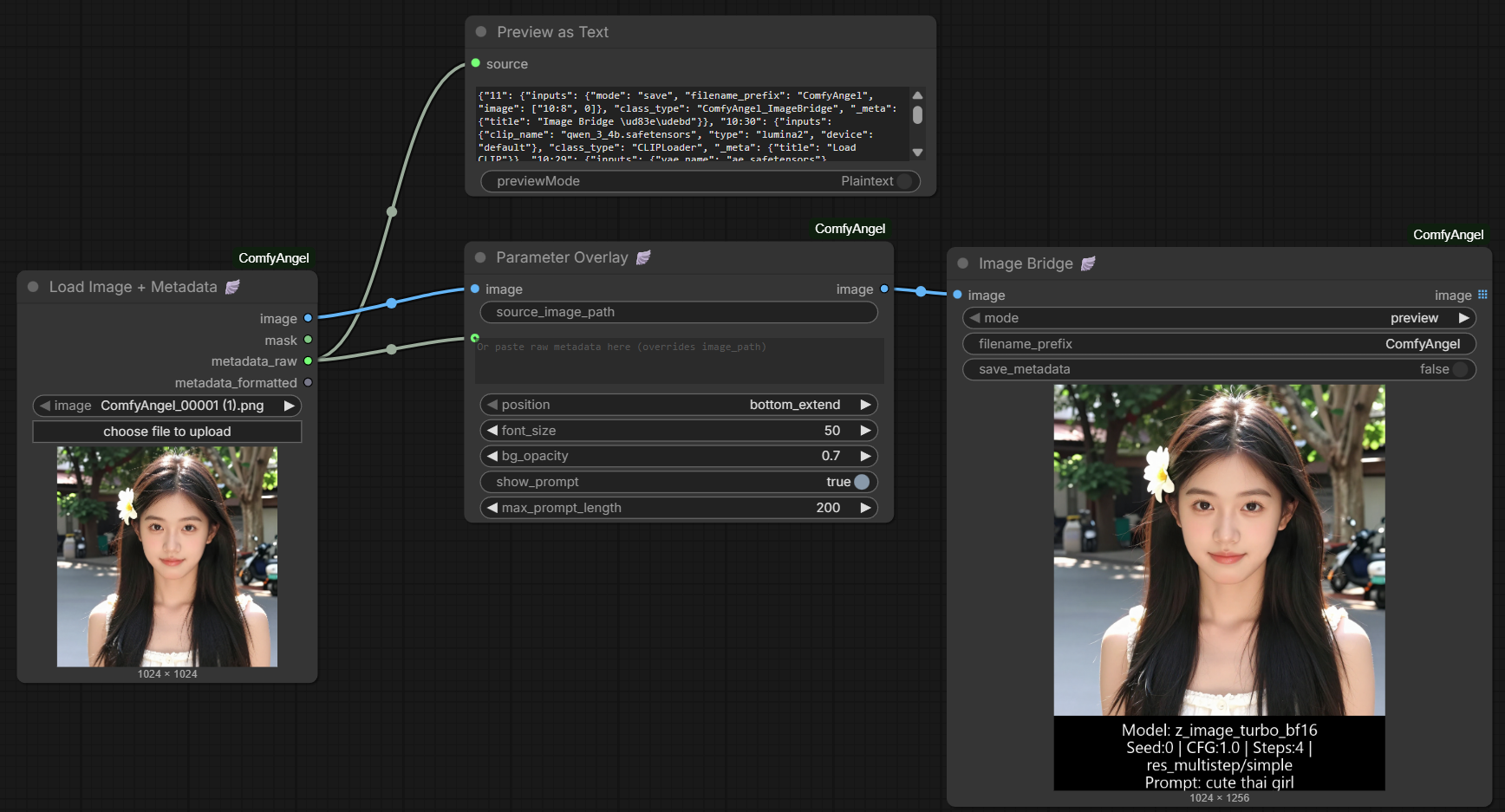
Load Image + Metadata | Parameter Overlay | Image Bridge — Easy to place watermark
Loop Start | Loop End — Easy batch processing each item from items list (supports text and image)
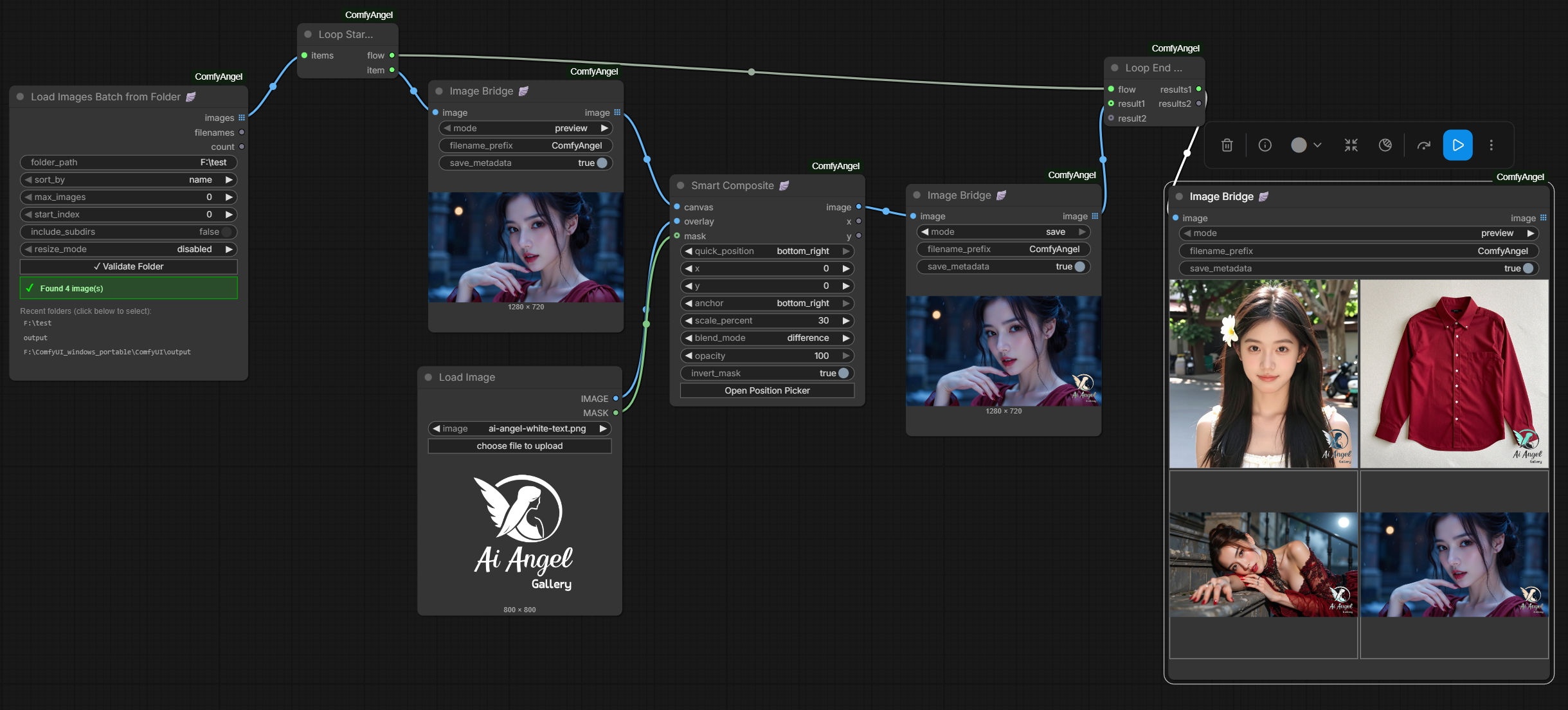
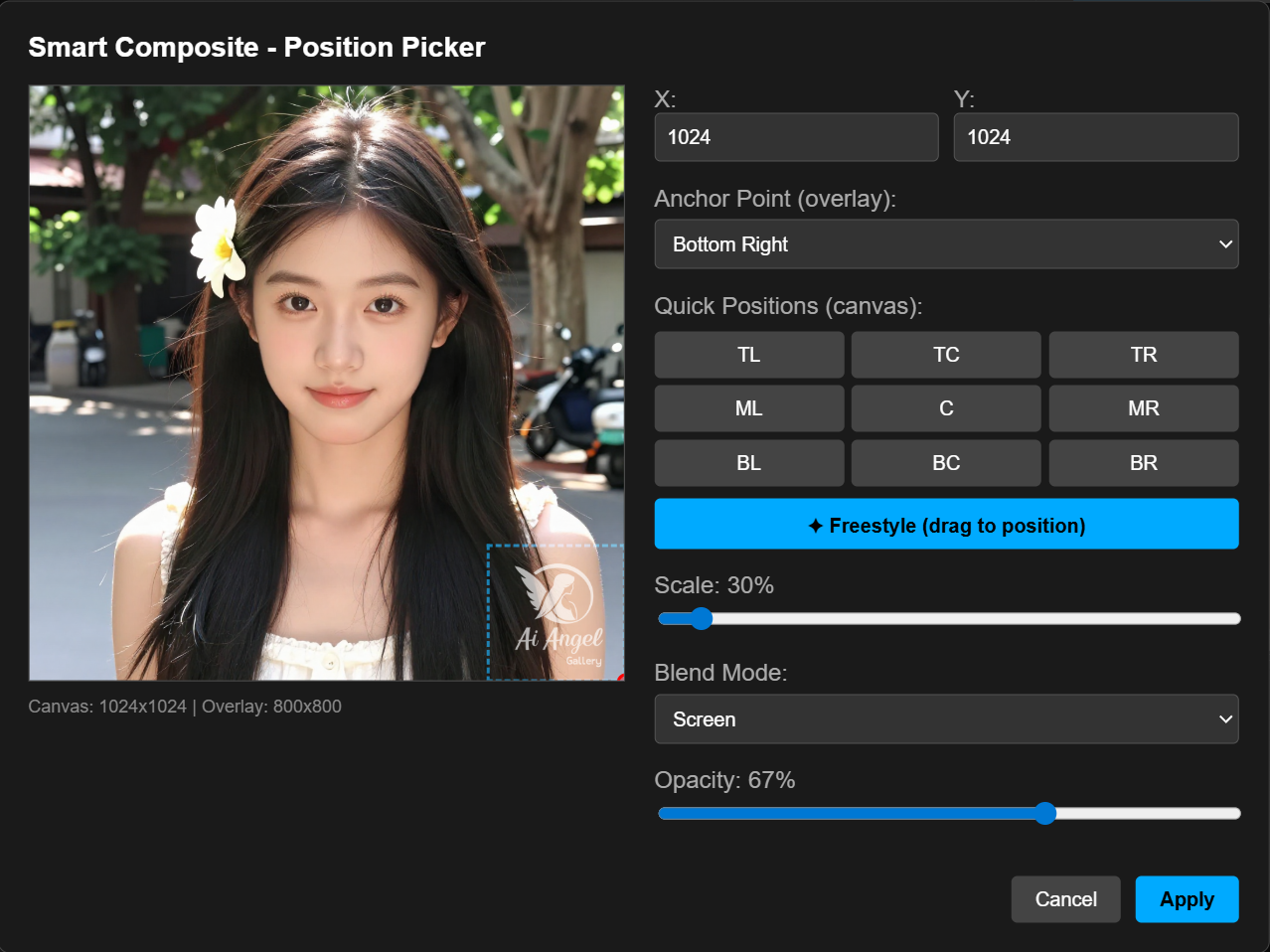
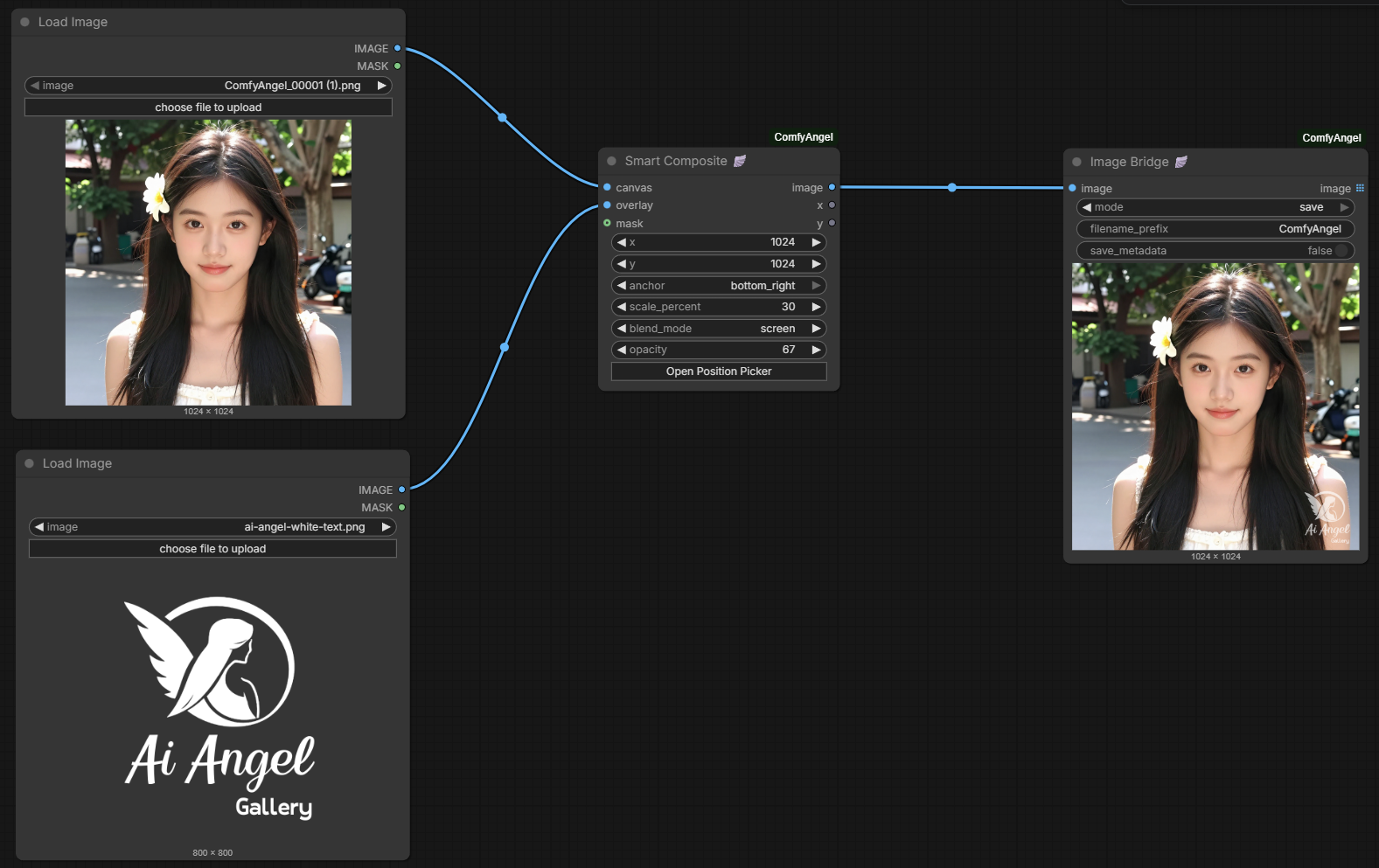
Smart Composite — Visual Position Picker
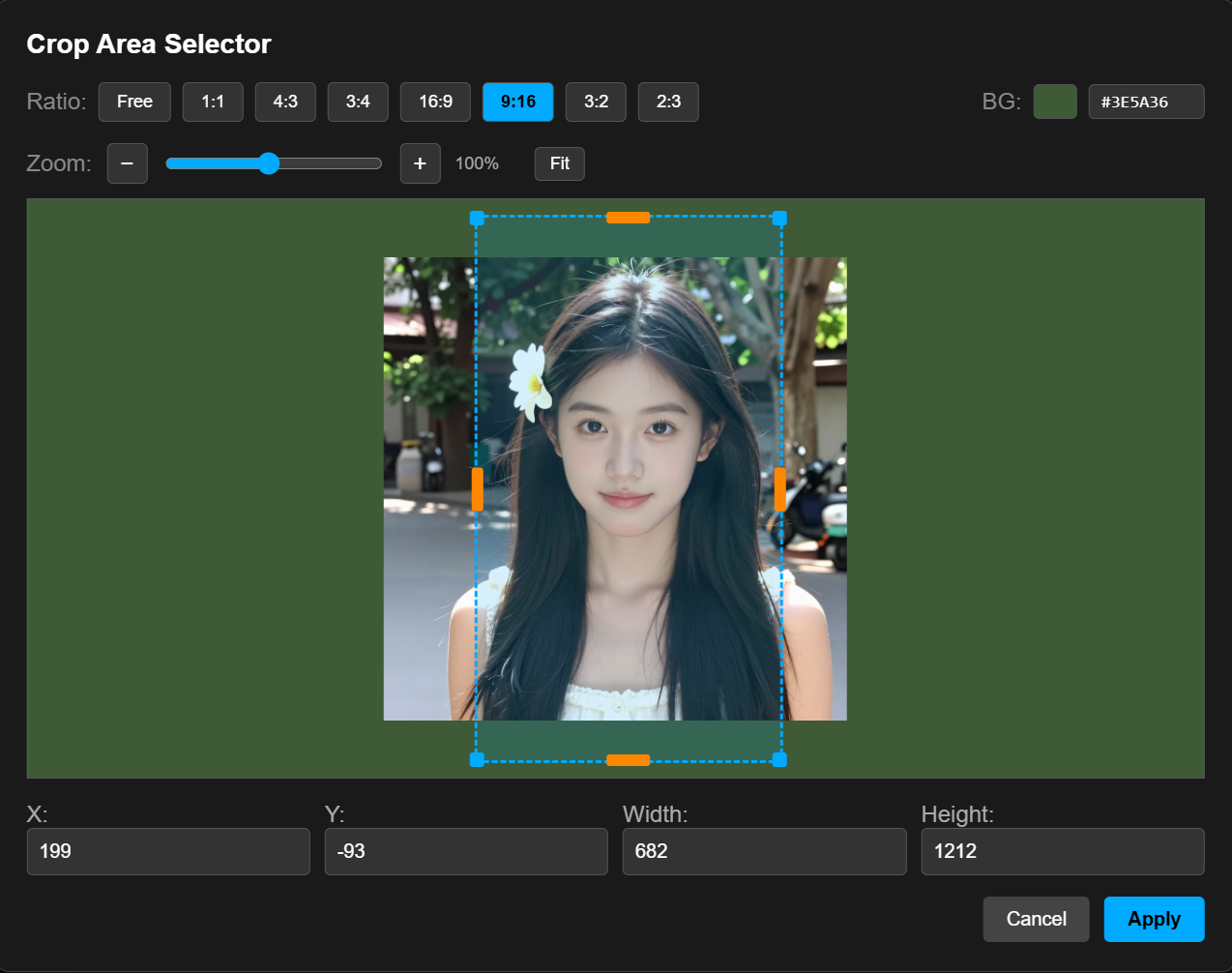
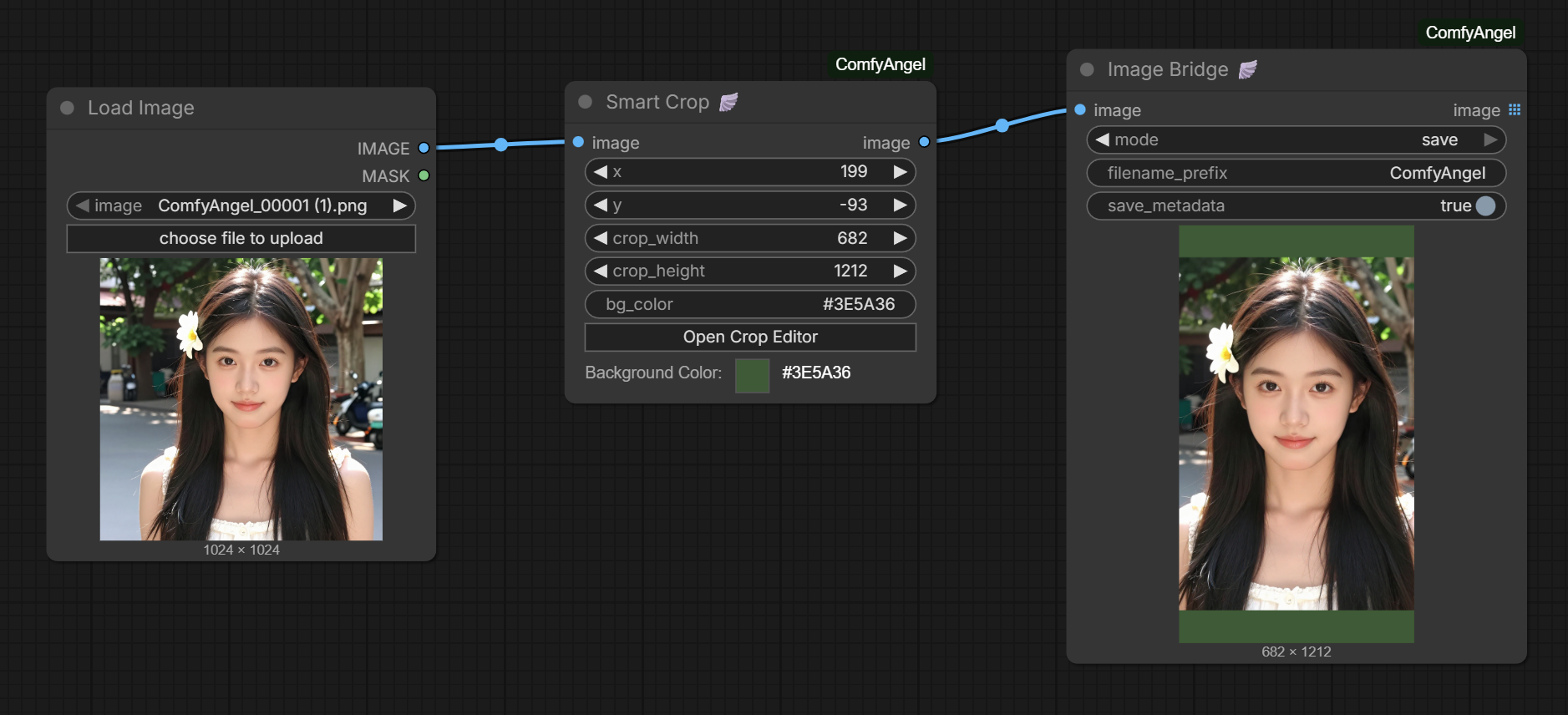
Smart Crop — Visual Crop Editor
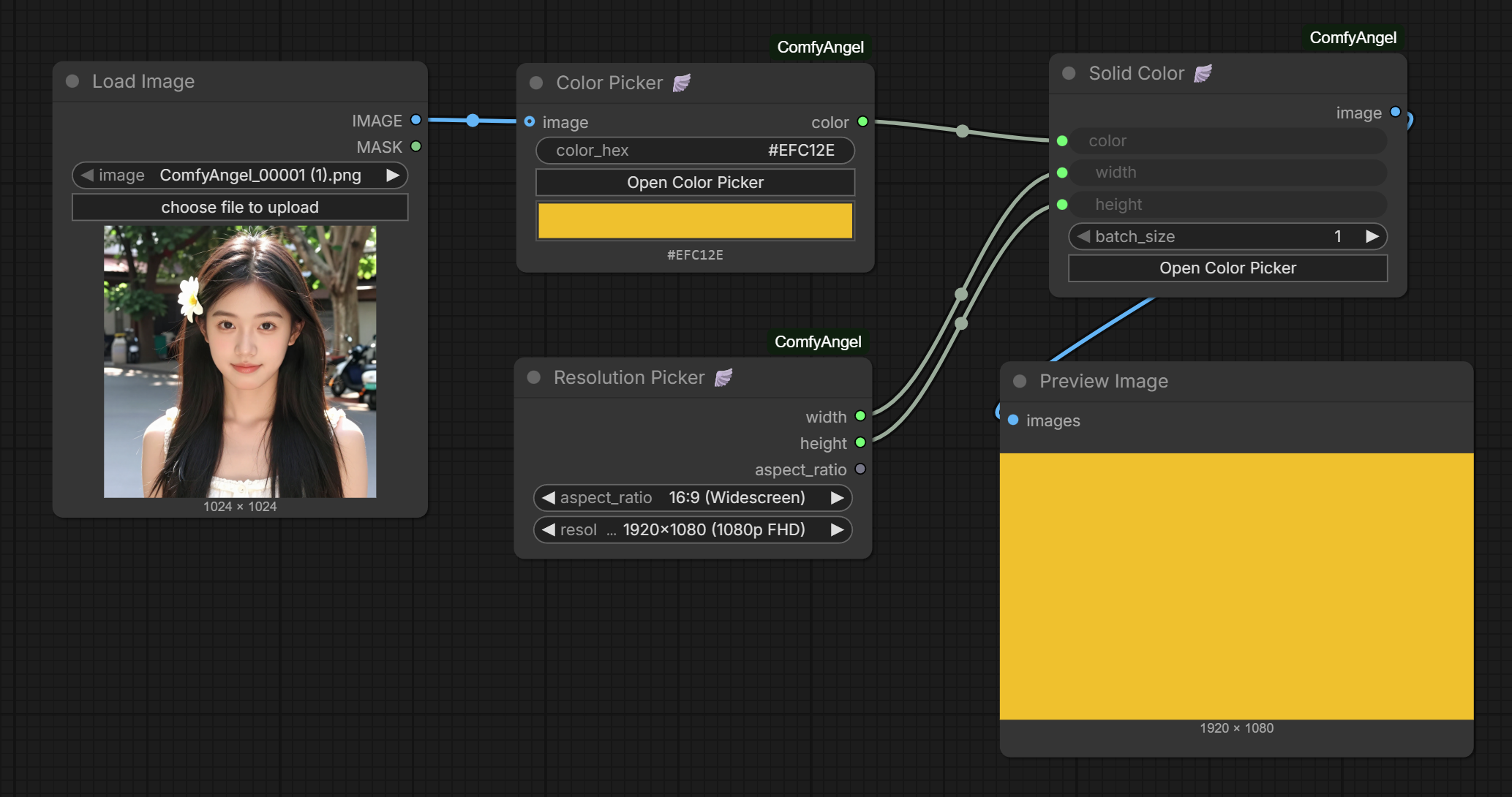
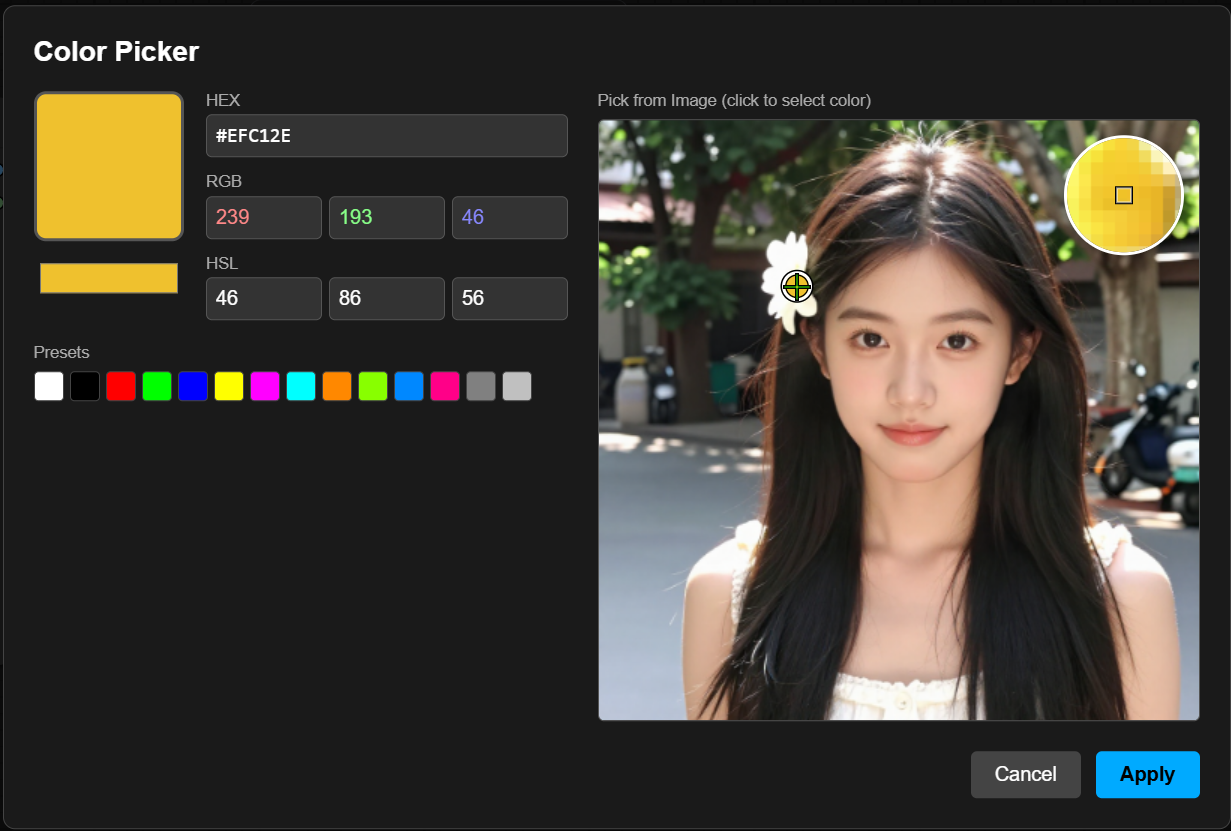
Widget Nodes — Color Picker, Resolution Picker, Solid Color
Node Index (A-Z)
| Node | Description | |------|-------------| | Color Picker | Interactive color picker with eyedropper | | Custom Text Overlay | Add custom text overlay with full styling | | Image Bridge | Preview/save images without breaking the chain | | Image Info | Get dimensions and batch info | | JSON Extract | Extract values from JSON using field paths | | Load Image + Metadata | Load image and extract generation metadata | | Load Images Batch from Folder | Load images from folder with validation | | Loop End | End loop and collect results | | Loop Start | Start loop over items | | Parameter Overlay | Add generation parameters as visual overlay | | Parameter Parser | Parse metadata and extract parameters | | Resolution Picker | Select from common resolutions by aspect ratio | | Smart Composite | Composite overlay with visual position picker | | Smart Crop | Crop image with visual editor | | Solid Color | Generate solid color image | | Split Image Batch | Extract single image from batch by index | | Text Combine | Combine multiple text strings | | Text Permutation | Generate all combinations from template | | Workflow Metadata | Output current workflow as JSON |
Installation
ComfyUI Registry (Recommended)
comfy node install comfyangel
ComfyUI Manager
Search for "ComfyAngel" in ComfyUI Manager and click Install.
Manual Installation
cd ComfyUI/custom_nodes
git clone https://github.com/ThepExcel/ComfyAngel.git
Then restart ComfyUI.
Nodes
Loop Nodes
True loop functionality without Auto Queue. Iterate through batches/lists and accumulate results in a single execution.
Loop Start 🪽
Start a loop over items.
| Input | Type | Description | |-------|------|-------------| | items | ANY | Batch/list to iterate over. Accepts IMAGE batch, lists of strings, or any iterable. |
| Output | Type | Description | |--------|------|-------------| | flow | FLOW_CONTROL | Must connect to Loop End. | | item | ANY | Current item from the batch for this iteration. |
Example - Loop through text prompts:
[Text Permutation] outputs: ["cat on chair", "cat on sofa", "dog on chair", "dog on sofa"]
         ↓
[Loop Start] iteration 0: item = "cat on chair"
[Loop Start] iteration 1: item = "cat on sofa"
[Loop Start] iteration 2: item = "dog on chair"
[Loop Start] iteration 3: item = "dog on sofa"
Loop End 🪽
End a loop and collect all results into a single output.
| Input | Type | Description | |-------|------|-------------| | flow | FLOW_CONTROL | Must connect from Loop Start. | | result1 | ANY | Value to collect from each iteration (optional). | | result2 | ANY | Second value to collect (optional). |
| Output | Type | Description | |--------|------|-------------| | results1 | ANY | All accumulated results from result1. | | results2 | ANY | All accumulated results from result2. |
v0.6.0: Loop End now executes even without downstream connections. You can run loops without connecting nodes to the results outputs.
Accumulation behavior:
- IMAGE/MASK tensors: Concatenated into a batch tensor. 4 images → tensor shape (4, H, W, C)
- Strings: Collected into a Python list.
- Other types: Collected into a Python list.
Loader Nodes
Load Images Batch from Folder 🪽
Load images from a folder with folder browser, validation, and history.
| Input | Type | Description |
|-------|------|-------------|
| folder_path | STRING | Path to folder. Use Validate Folder button to check. |
| sort_by | ENUM | name, modified_date, created_date |
| max_images | INT | Maximum images to load. 0 = unlimited. |
| start_index | INT | Skip first N images. |
| include_subdirs | BOOLEAN | Scan subfolders recursively. |
| resize_mode | ENUM | disabled, resize_to_first, resize_to_largest, resize_to_smallest |
| Output | Type | Description | |--------|------|-------------| | images | IMAGE[] | List of images (preserves RGBA when present). | | filenames | STRING | Newline-separated list of loaded filenames. | | count | INT | Number of images loaded. |
Features:
- Validate Folder button: Shows image count and validates path
- Folder history: Recent folders saved for quick access
- RGBA preservation: Images with alpha channels are preserved as 4-channel tensors
Split Image Batch 🪽
Extract a single image from a batch by index. Useful for Auto Queue workflows.
| Input | Type | Description | |-------|------|-------------| | images | IMAGE | Batch of images to split. | | index | INT | Which image to extract (0-based). Auto-increments with Auto Queue. | | loop | BOOLEAN | Wrap around when index exceeds batch size. Default: true |
| Output | Type | Description | |--------|------|-------------| | image | IMAGE | Single image at the specified index. | | index | INT | The actual index used. | | total_count | INT | Total images in the batch. |
Text Utility Nodes
Text Permutation 🪽
Generate all combinations from a template with inline options.
| Input | Type | Description |
|-------|------|-------------|
| template | STRING | Template with {option1,option2} syntax. |
| separator | STRING | Separator inside braces. Default: , |
| trim_options | BOOLEAN | Remove whitespace around options. Default: true |
| Output | Type | Description | |--------|------|-------------| | texts | STRING[] | List of all combinations. | | count | INT | Number of combinations. |
Example:
Template: "a {cat,dog} on a {chair,sofa}"

Output (4 combinations):
- "a cat on a chair"
- "a cat on a sofa"
- "a dog on a chair"
- "a dog on a sofa"
Text Combine 🪽
Combine multiple text strings into one.
| Input | Type | Description |
|-------|------|-------------|
| text1-4 | STRING | Texts to combine (text1 required, others optional). |
| separator | STRING | String between texts. Default: \n |
| Output | Type | Description | |--------|------|-------------| | combined | STRING | All non-empty texts joined. |
JSON Extract 🪽
Extract values from JSON using field paths.
| Input | Type | Description |
|-------|------|-------------|
| json_string | STRING | JSON text to parse. |
| fields | STRING | Field paths, one per line. |
| delimiter | ENUM | Field separator: newline, comma, pipe, semicolon |
| output_delimiter | ENUM | Output value separator. |
| default_value | STRING | Value when field not found. |
| Output | Type | Description | |--------|------|-------------| | values | STRING[] | List of extracted values. | | values_joined | STRING | All values joined. | | count | INT | Number of fields extracted. |
Field path syntax:
seed                    → json["seed"]
3.inputs.steps          → json["3"]["inputs"]["steps"]
nodes[0].type           → json["nodes"][0]["type"]
Browse JSON Fields button: Opens visual JSON tree viewer.
Overlay Nodes
Load Image + Metadata 🪽
Load an image and extract embedded generation metadata.
| Input | Type | Description | |-------|------|-------------| | image | IMAGE_UPLOAD | Select image file. |
| Output | Type | Description | |--------|------|-------------| | image | IMAGE | The loaded image. | | mask | MASK | Alpha channel as mask. | | metadata_raw | STRING | Raw metadata string. | | metadata_formatted | STRING | Human-readable formatted parameters. |
Supported formats: A1111/Civitai, ComfyUI workflow embedding
Parameter Parser 🪽
Parse metadata string and extract individual parameters.
| Input | Type | Description | |-------|------|-------------| | metadata | STRING | Raw metadata string. | | show_prompt | BOOLEAN | Include prompt in output. | | max_prompt_length | INT | Truncate prompt length. |
| Output | Type | Description | |--------|------|-------------| | formatted | STRING | Human-readable summary. | | model | STRING | Checkpoint/model name. | | sampler | STRING | Sampler name. | | seed | INT | Generation seed. | | steps | INT | Sampling steps. | | cfg | FLOAT | CFG scale. | | positive_prompt | STRING | Positive prompt. | | negative_prompt | STRING | Negative prompt. |
Parameter Overlay 🪽
Add generation parameters as a visual overlay on an image.
| Input | Type | Description |
|-------|------|-------------|
| image | IMAGE | Image to add overlay to. |
| image_path | STRING | Optional. Path to read metadata from. |
| metadata_text | STRING | Optional. Raw metadata text. |
| position | ENUM | bottom_extend, bottom_inside, top_inside |
| font_size | INT | Text size 8-100. Default: 25 |
| bg_opacity | FLOAT | Background opacity 0.0-1.0. Default: 0.7 |
| show_prompt | BOOLEAN | Include prompt text. Default: false |
| max_prompt_length | INT | Truncate prompt length. Default: 200 |
| Output | Type | Description | |--------|------|-------------| | image | IMAGE | Image with parameter overlay. |
Custom Text Overlay 🪽
Add custom text overlay with full styling control.
| Input | Type | Description |
|-------|------|-------------|
| image | IMAGE | Image to add overlay to. |
| text | STRING | Text to display (supports \n). |
| position | ENUM | bottom_extend, bottom_inside, top_inside |
| font_size | INT | Text size 8-100. |
| bg_opacity | FLOAT | Background opacity. |
| text_color | STRING | Text color hex. Default: #FFFFFF |
| bg_color | STRING | Background color hex. Default: #000000 |
| Output | Type | Description | |--------|------|-------------| | image | IMAGE | Image with text overlay. |
Composite Nodes
Smart Composite 🪽
Composite (layer) an overlay image onto a canvas with visual position picker.
| Input | Type | Description |
|-------|------|-------------|
| canvas | IMAGE | Background image (connect via Image Bridge for preview). |
| overlay | IMAGE | Image to place on top. |
| quick_position | ENUM | Reference point: free, top_left, top_center, top_right, middle_left, center, middle_right, bottom_left, bottom_center, bottom_right |
| x | INT | Horizontal offset from quick_position. |
| y | INT | Vertical offset from quick_position. |
| anchor | ENUM | Which point of overlay aligns to position. |
| scale_percent | FLOAT | Resize overlay 1-500%. Default: 100 |
| blend_mode | ENUM | normal, multiply, screen, overlay, soft_light, hard_light, difference, add, subtract |
| opacity | FLOAT | Overlay transparency 0-100%. |
| mask | MASK | Optional. External mask for overlay transparency. |
| invert_mask | BOOLEAN | Invert the mask (ComfyUI LoadImage masks are inverted). Default: true |
| Output | Type | Description | |--------|------|-------------| | image | IMAGE | Composited result. | | x | INT | Final X position. | | y | INT | Final Y position. |
v0.6.0 Updates:
- Quick Position as reference point: X,Y are now offsets from the quick position, not absolute coordinates
- Mask input: Connect MASK output from LoadImage for overlay transparency
- Invert mask option: ComfyUI's LoadImage MASK is inverted (0=opaque), enable invert_mask to correct this
Visual Editor Features:
- Drag overlay directly on preview
- Quick position buttons for corners/edges/center
- Scale slider with live preview
Utility Nodes
Image Bridge 🪽
Pass-through node that previews or saves images without breaking the chain.
| Input | Type | Description |
|-------|------|-------------|
| image | IMAGE | Image(s) to preview/save. Handles different sizes. |
| mode | ENUM | preview or save |
| filename_prefix | STRING | Prefix for saved files. |
| Output | Type | Description | |--------|------|-------------| | image | IMAGE | Same image passed through. |
Essential for loops: Place inside loop to see each iteration's result.
v0.6.0: Now handles batches with different-sized images correctly.
Workflow Metadata 🪽
Output current workflow as JSON strings.
| Output | Type | Description | |--------|------|-------------| | prompt_json | STRING | Current prompt as JSON. | | workflow_json | STRING | Full workflow as JSON. |
Image Info 🪽
Get dimensions and batch info from an image.
| Input | Type | Description | |-------|------|-------------| | image | IMAGE | Image tensor. |
| Output | Type | Description | |--------|------|-------------| | width | INT | Image width. | | height | INT | Image height. | | channels | INT | Number of channels. | | batch_size | INT | Number of images in batch. |
Widget Nodes
Resolution Picker 🪽
Select from common image resolutions by aspect ratio.
| Input | Type | Description |
|-------|------|-------------|
| aspect_ratio | ENUM | 1:1, 4:3, 3:4, 16:9, 9:16, 21:9, 3:2, 2:3 |
| resolution | ENUM | Specific resolution (options change based on ratio). |
| Output | Type | Description | |--------|------|-------------| | width | INT | Selected width. | | height | INT | Selected height. | | aspect_ratio | STRING | The ratio string. |
Presets: SD 1.5, SDXL, SD3/Flux, DALL-E 3, Midjourney, Standard (FHD, 4K)
Solid Color 🪽
Generate a solid color image.
| Input | Type | Description |
|-------|------|-------------|
| color | STRING | Hex color (e.g., #FF0000). |
| width | INT | Image width. |
| height | INT | Image height. |
| batch_size | INT | Number of images. |
| Output | Type | Description | |--------|------|-------------| | image | IMAGE | Solid color image. |
Color Picker 🪽
Interactive color picker with eyedropper.
| Input | Type | Description | |-------|------|-------------| | color_hex | STRING | Color in hex format. | | image | IMAGE | Optional. Connect for eyedropper. |
| Output | Type | Description | |--------|------|-------------| | color | STRING | Normalized hex color. |
Features: Visual picker, HEX/RGB/HSL input, color presets, eyedropper tool
Smart Crop 🪽
Crop image with visual editor.
| Input | Type | Description | |-------|------|-------------| | image | IMAGE | Image to crop. | | x | INT | Left edge of crop. | | y | INT | Top edge of crop. | | crop_width | INT | Width of crop. | | crop_height | INT | Height of crop. | | bg_color | STRING | Background color for out-of-bounds areas. |
| Output | Type | Description | |--------|------|-------------| | image | IMAGE | Cropped image. |
Visual editor: Click button to open drag-to-select crop area.
Tips & Best Practices
Loop Performance
- Image Bridge is essential - Without it, you won't see intermediate results
- No downstream required - Loop End now runs even without connected outputs (v0.6.0)
- Memory usage - Each iteration accumulates in memory. For large batches, use Split Image Batch with Auto Queue
Smart Composite Workflow
[Load Image] → [Image Bridge] → canvas [Smart Composite]
                                overlay ← [Load Logo]
                                mask ← [Load Logo].mask (with invert_mask: true)
Metadata Workflow
[Load Image + Metadata] → metadata_raw
         ↓
[Parameter Parser] → formatted, model, seed, etc.
         ↓
[Parameter Overlay] ← original image
         ↓
[Save Image]
Example Workflows
Download and drag into ComfyUI to try:
| Workflow | Description | |----------|-------------| | Text Permutation | Generate prompt combinations and batch process | | Load Images Batch from Folder | Load all images from a folder | | LoadImageBatch + Loop | Load folder of images and process each with Loop nodes | | Smart Crop | Visual crop editor demo | | Color & Resolution Picker | Widget nodes for color and resolution selection |
Changelog
v0.6.0
- Loop End: Now executes without downstream connections
- Smart Composite: Quick position is now a reference point (X,Y are offsets)
- Smart Composite: Added mask input with invert_mask option for transparency
- Image Bridge: Handles different-sized images in batches
- Load Images Batch: Preserves RGBA channels
v0.5.0
- Added JSON Extract node with visual field browser
- Image Bridge preview improvements
- Various bug fixes
Links
- GitHub: https://github.com/ThepExcel/ComfyAngel
- Registry: https://registry.comfy.org/thepexcel/comfyangel
License
MIT