
ComfyUI-SongLRC
Timed .lrc lyrics for generated songs, saved beside the audio, with a player that highlights each line as it is sung.
Nodes (10)
It's in your old workflow, it isn't in your menu
Same timestamps, old class name, hidden from the menu
The old key for the saver that pairs files up
The old name for a node that's still doing the work
Stop your songs landing in a pile of ComfyUI_00001_.flac
The five seconds of tidying that saves an hour of bad timing
The node that actually times your song
The fastest way to find out your lyrics are half a second late
The saver for when there's no audio file to match
Naming the lyrics file after the audio that already exists
ComfyUI-SongLRC
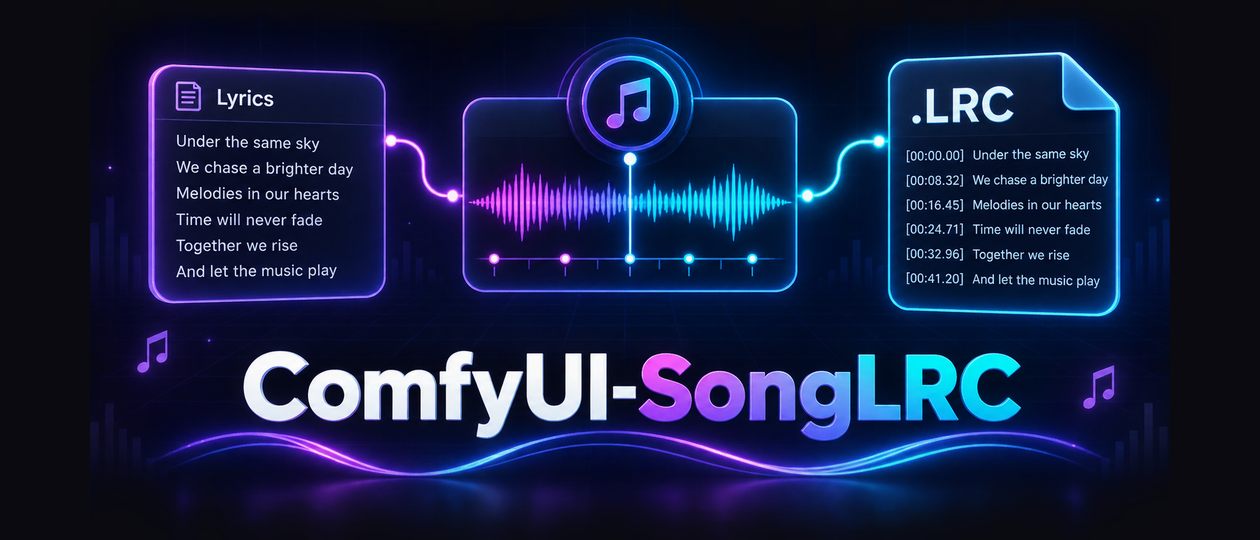
Turn generated song lyrics into a timed .lrc file that is saved beside the audio,
with a matching name and counter.
output/audio/songs/Hold The Line Tonight_00007.mp3
output/audio/songs/Hold The Line Tonight_00007.lrc
Built and tested against ComfyUI-FL-YuE2.
It also works with MiniMax Music 3 and, in principle, any node chain that produces
lyrics plus an AUDIO output.
This pack was previously called ComfyUI-MiniMaxLRC. See Migrating below.
What it gives you
- Real per-line timestamps from forced alignment when WhisperX is installed
- Score-aware timing from a YuE2 ABC score when it is not
- A song title taken from a
Title:line, or derived from the repeated hook - Audio and LRC written with the identical name and five digit counter
- A standalone LRC saver too, so the pack needs no other node packs
- Word-by-word karaoke timing (enhanced LRC) from the same alignment
- A player that scrolls the lyrics against the audio, so timing is checked by ear, and exports a lyric video in one click
- ComfyUI's own Save Audio (Advanced) keeps working, so FLAC, MP3 and Opus quality controls are untouched
Install
Through ComfyUI-Manager, search for ComfyUI-SongLRC.
Or clone it:
cd ComfyUI/custom_nodes
git clone https://github.com/TheAwaken1/ComfyUI-SongLRC
pip install -r ComfyUI-SongLRC/requirements.txt
Restart ComfyUI.
The nodes
| Node | Purpose |
|------|---------|
| Lyrics Clean | Strips titles, markdown and stray tags. Outputs clean lyrics and a title. |
| Song Filename | Turns a title into <folder>/<title> for Save Audio (Advanced). |
| Lyrics to LRC | Times the lyrics against the audio and writes the LRC text. |
| Save Matching LRC | Writes the LRC next to the audio file that was just saved. |
| Save LRC (auto) | Writes the LRC on its own, with its own counter. |
| Music Player (SongLRC) | Plays the song with its lyrics highlighted in time. |
Both savers show the finished lyrics on the node after a run: the song title, then the timed lines. The length and byline tags stay in the file, where players read them, rather than cluttering the node. The saved path goes to the console.
The player
Connect the final AUDIO and the LRC to Music Player (SongLRC) and run the
graph.
Lyrics ride a wheel rather than sitting in a list. The current line holds the centre, larger and lit; the lines before and after tilt away on an arc and fade toward the edges of the frame, which is masked top and bottom so nothing ends abruptly. Click any line to jump to it. A blank cue is an instrumental gap and shows as three dots rather than leaving a lyric stuck on screen.
Transport is a play button, the elapsed and total time either side of the progress bar, and a volume control. Drag the bar to scrub. Click the speaker to mute, drag the small bar to set the level, or scroll over it to nudge it.
Two tabs sit above the frame. Lyrics is the wheel. Visualizer swaps it for one of four styles, with the current line kept as a caption underneath. Click the style button beside the tabs to switch:
| Style | What it does | |-------|--------------| | Ring | A spectrum ring around a core that swells on the kick, a waveform traced inside the core, and sparks thrown off on hard beats. | | Bars | The classic spectrum: 72 bars with a reflection under the baseline and a floor glow that flares on the kick. | | Tunnel | Hexagons warped by the spectrum drift out of a moving vanishing point; every kick fires a bright ring, surges the speed and jolts the camera. | | Warp | A starfield that cruises between beats and punches into hyperspace on every kick, each star flickering with its own band of the mix. |
Every style listens the same way: each band is measured against its own recent level, so hits jump out even in a loud, compressed master, and a kick detector watches the lowest bands for sharp rises.
The node remembers the tab, style and volume when the workflow is saved.
When the LRC was timed by WhisperX, the current line fills word by word as it is
sung, karaoke style, in the wheel and in the Visualizer caption alike. Lyrics to LRC
writes those word times as enhanced LRC, a <mm:ss.xx> tag before each word:
[00:12.40]<00:12.40>Hold <00:12.86>the <00:13.10>line<00:14.02>
Players that understand enhanced LRC get the karaoke fill too. For one that shows
the tags as text, turn off word_timing. Lines timed without WhisperX stay plain
and light up whole.
Export renders a 720p lyric video in the selected style: the visualizer (Tunnel and Warp fill the whole frame), the song title, the current line with its karaoke fill and the next line under it, a progress bar with a playhead, and the elapsed and total time. It renders offline, faster than real time (a three minute song takes seconds, not three minutes), and never touches playback, so the song can keep playing. The button shows Rendering, Uploading and Encoding in turn; clicking it while it renders cancels.
The browser draws each frame and compresses it with WebCodecs. ComfyUI then adds
the song's own audio and writes an H.264 + AAC MP4 to
output/video/SongLRC/<title>_00001.mp4, which downloads when it is done.
Browsers without WebCodecs fall back to recording in real time: the song plays once from the top, and clicking Export again stops early and keeps what was recorded.
It is also the fastest way to judge timing, because a drift of half a second is
obvious by ear and invisible in a text file. If lines run consistently early or late,
adjust timing_scale on Lyrics to LRC, or shift everything with offset_seconds.
The two savers do different jobs, and you normally want one of them, not both. Save Matching LRC waits for Save Audio (Advanced) and reuses that file's exact name and number, so the pair always match. That is the one to use whenever you are saving the song. Save LRC (auto) waits for nothing, which is what you want when you are only after the lyrics, or when the audio is saved somewhere else. Running both writes the same lyrics twice under different names.
Every node in the pack shares one colour, a burnt-orange title over a deep crimson body, so a SongLRC chain is recognisable at a glance among other node packs.
Using it
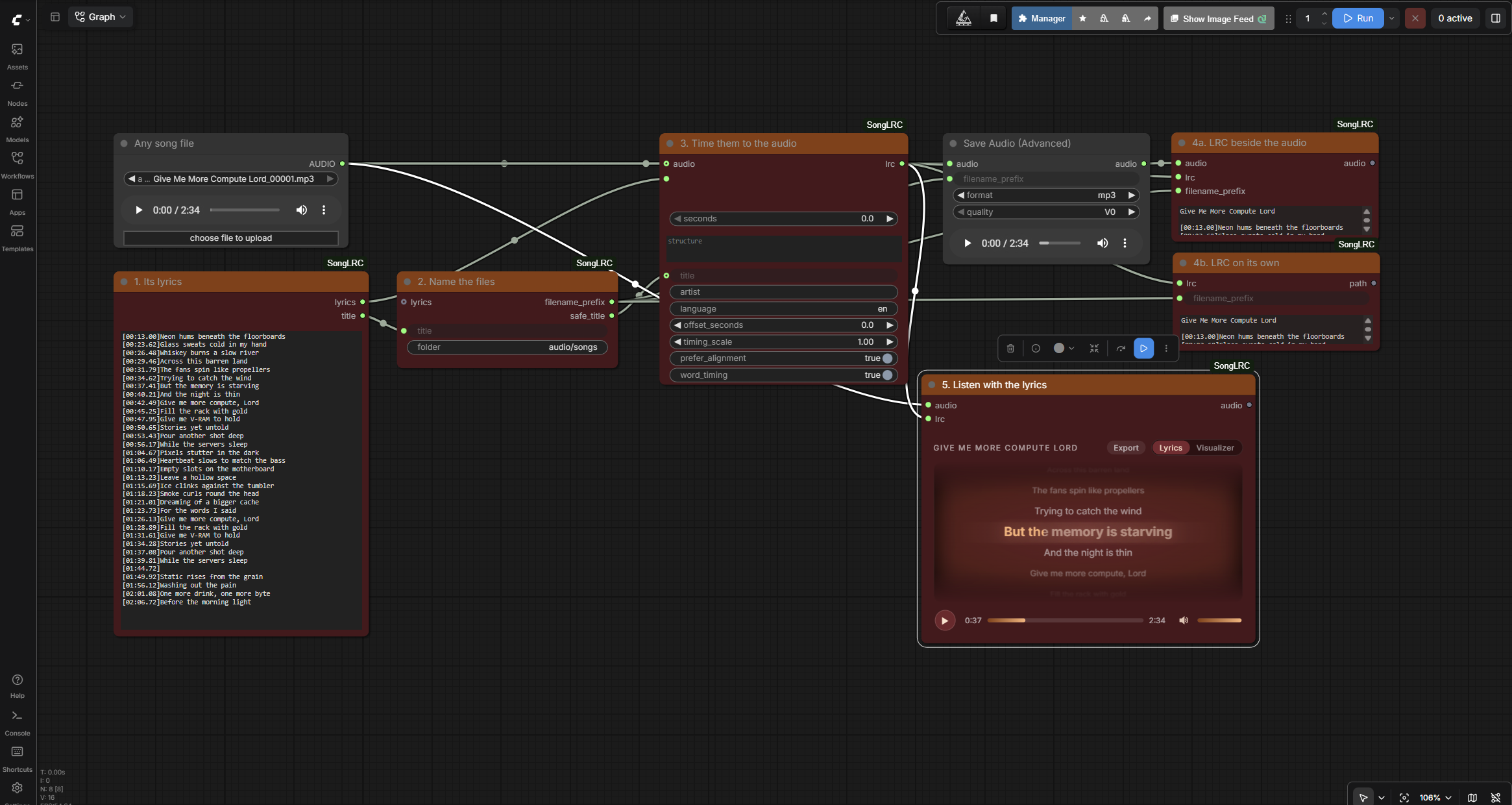
Six examples ship with the pack.
example_workflows/any_audio_to_lrc.json uses only this pack plus ComfyUI's own
audio nodes. Point it at any song file, paste that song's lyrics, and it times them,
saves the LRC and plays it back. Pasting a finished .lrc works too: Lyrics Clean
strips the old timestamps and header tags first, and takes the title from the file,
so nothing gets timed twice. Nothing else needs to be installed, which makes it
the quickest way to see how the six nodes connect.
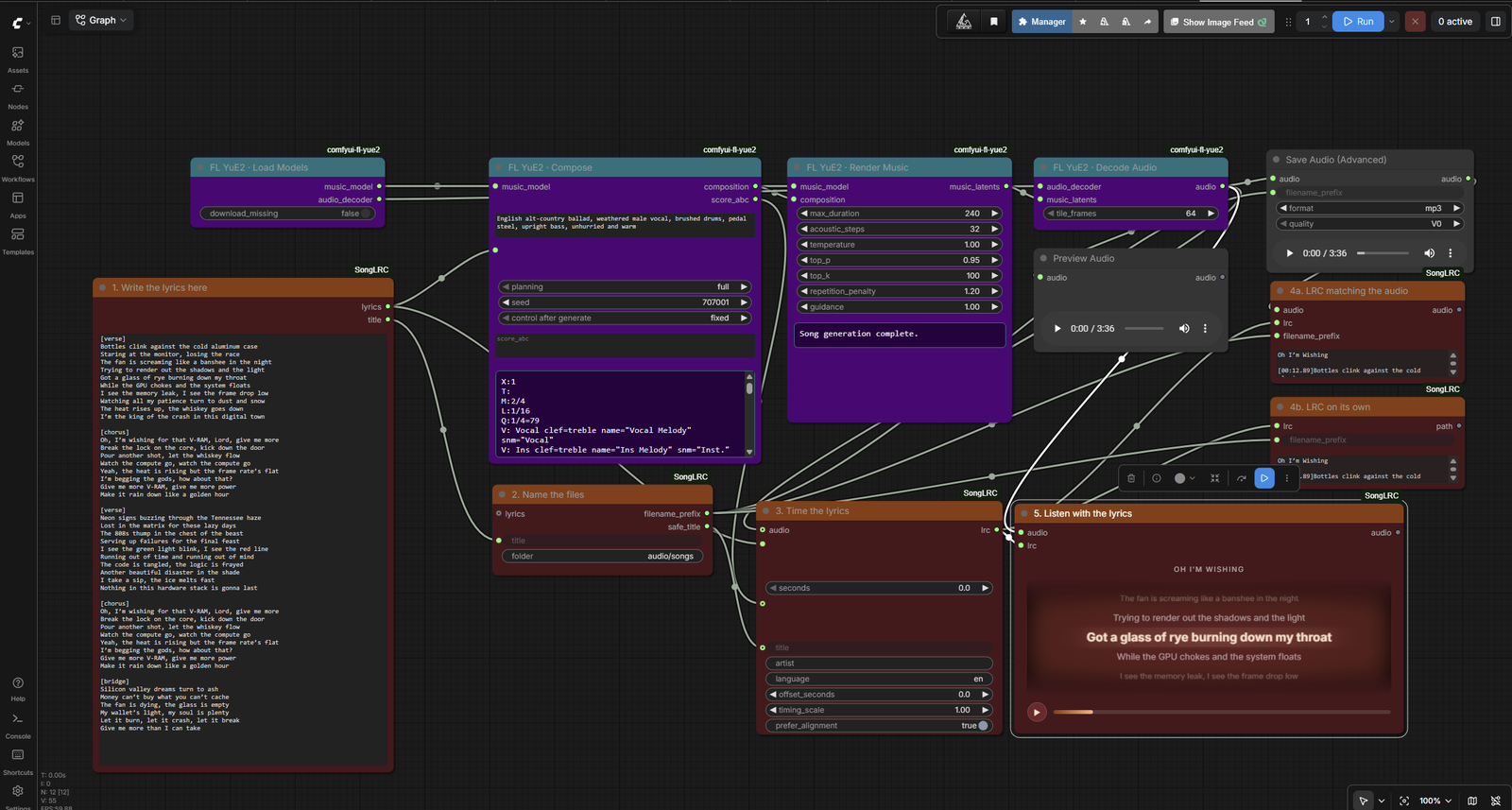
example_workflows/yue2_song_to_lrc.json is the full pipeline using
ComfyUI-FL-YuE2.
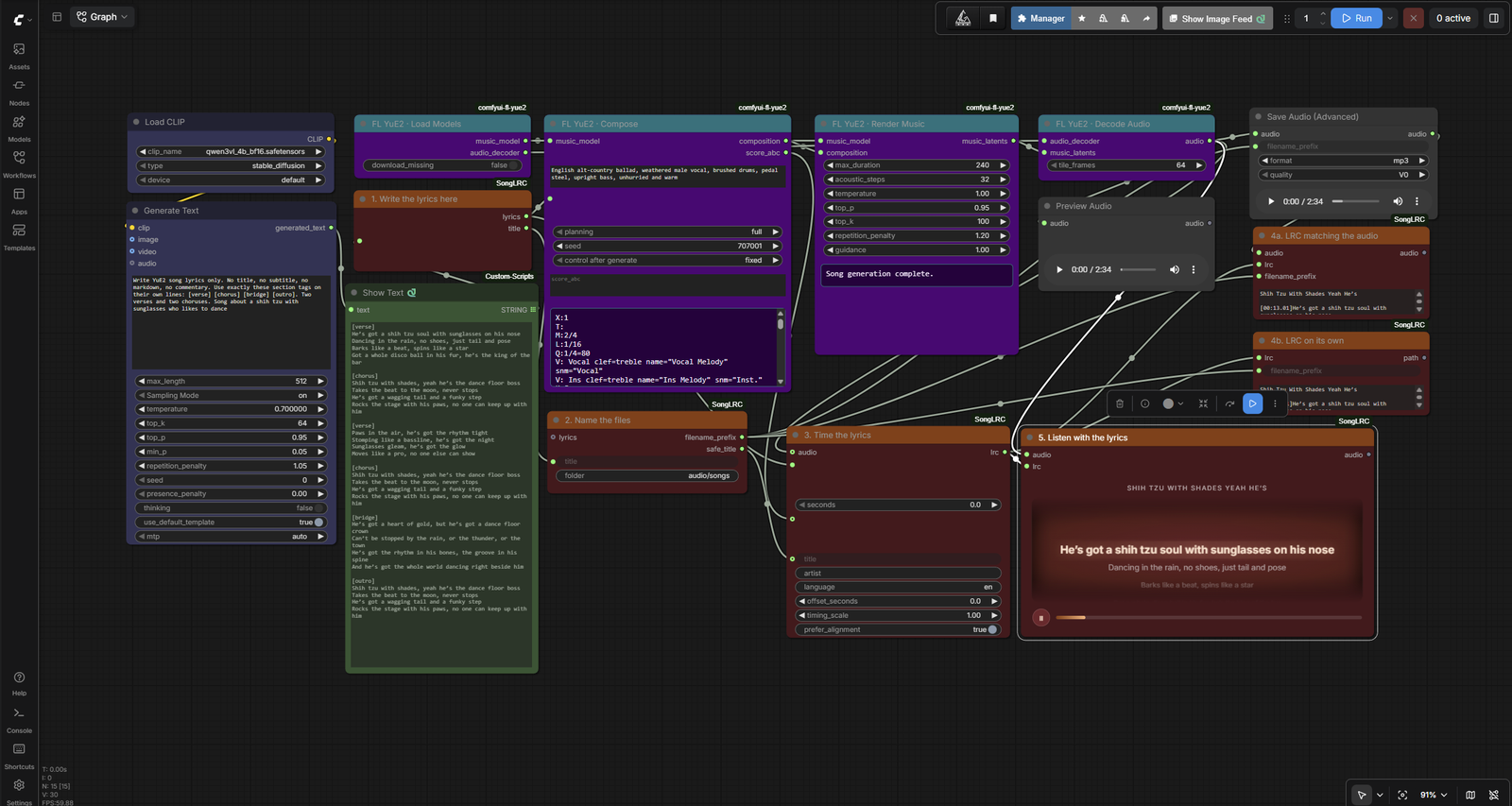
example_workflows/yue2_song_to_lrc_qwen3.json adds a local Qwen3-VL model that
writes the lyrics, so a song idea becomes a finished track with timed lyrics in one
run. The generated text goes into Lyrics Clean, which feeds both the song model and
the timing, so the sung words and the timed words cannot drift apart.
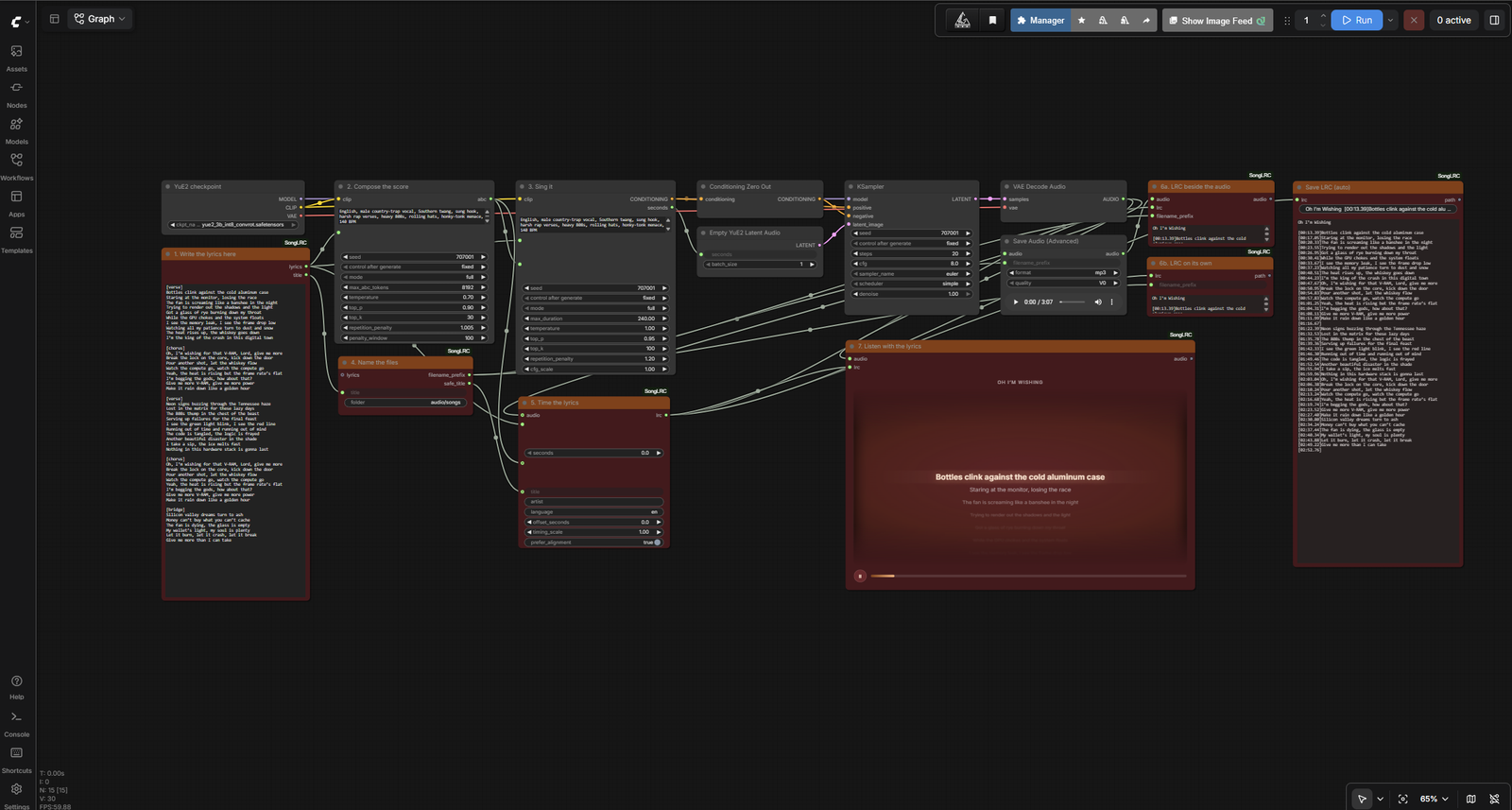
example_workflows/comfy_yue2_song_to_lrc.json is the same pipeline on ComfyUI's
own YuE2 nodes, so it needs no song node pack at all. The generated ABC score feeds
the LRC timing here too, so sections land where the music puts them. It is a straight line from lyrics to
a finished song with a matching LRC, using only this pack, FL-YuE2 and ComfyUI's own
audio nodes.
example_workflows/minimax_music3_song_to_lrc_qwen3.json does the same with
ComfyUI's own MiniMax Music 3 nodes and nothing else to install: Qwen3-VL writes the
lyrics, Lyrics Clean feeds them to both MiniMax Music 3 and Lyrics to LRC, and the
finished song is timed, saved with a matching LRC and played back. Put your song idea
in the Generate Text prompt and the style in the caption on the MiniMax Music 3 Text
Encode node. It is set to allow up to four minutes; the model ends the song when the
lyrics run out. The models it needs are listed in the note inside the workflow.
example_workflows/ace_step1_5_song_to_lrc_qwen3.json is the same idea on
ComfyUI's own ACE-Step 1.5 XL nodes. Qwen3-VL writes the lyrics, Lyrics Clean feeds
them to ACE-Step and to Lyrics to LRC, and the song is timed, saved with a matching
LRC and played back. Put the style in the tags on the ACE-Step text encoder. Unlike
MiniMax Music 3, ACE-Step always renders exactly the Song Duration you set, so keep it
long enough for the lyrics (it ships at 180 seconds for a verse, chorus and bridge
song). ComfyUI offers to download the ACE-Step models when they are missing.
Note that FL-YuE2 names the render length max_duration, which is what the example
uses. If you run a fork that renamed it, set the length on the Render node once after
loading.
You do not need a text generator. Type or paste your lyrics into Lyrics Clean. Its lyrics output feeds both the Compose node and Lyrics to LRC, so the words that get sung and the words that get timed can never drift apart. Its title output feeds Song Filename.
If you do use a generator, such as a Qwen or Spark Studio node, connect it to the Lyrics Clean text input instead of typing. Everything downstream is identical.
Leave the title field on Song Filename blank and it derives one from the repeated chorus line. Fill it in to name the song yourself.
Timing quality
Three methods, best first. The node picks the best one available automatically.
- Forced alignment. Connect the final
AUDIOto Lyrics to LRC and install WhisperX. This gives real timestamps. - Score timing. Connect the Compose node's
score_abcoutput to thestructureinput. Sections are placed using the score's tempo and bar counts rather than being spread evenly. The example workflow wires this for you. - Even timing. The fallback. Lyrics are spread across the song with an allowance for the intro and outro.
If timings drift, adjust timing_scale above 1 when lyrics run early and below 1
when they run late. Use offset_seconds to shift everything.
Installing WhisperX safely
A plain pip install whisperx often replaces your CUDA PyTorch with a CPU-only
build and breaks ComfyUI. Install it without touching torch:
pip install whisperx --no-deps
pip install faster-whisper ctranslate2 nltk pandas pyannote.audio omegaconf
Then confirm CUDA still works:
python -c "import torch; print(torch.cuda.is_available())"
If that prints False, reinstall the CUDA torch build you had before. Skipping
WhisperX is fine; the nodes fall back to score or even timing.
Migrating from ComfyUI-MiniMaxLRC
Old workflows keep loading. The four previous class names are registered as hidden aliases pointing at the renamed nodes, so nothing turns into a red missing node.
Two changes to know about:
- The default output folder is now
audio/songsrather thanaudio/YuE2. Song Filename has afolderwidget, so set it back if you want the old path. - The LRC
ar:tag is now blank by default and is left out when empty, instead of claiming every song was made by MiniMax Music 3.
Remove the old ComfyUI-MiniMaxLRC folder after installing this one, or the two
packs will fight over the same class names.
Running it from code
The nodes run inside ComfyUI, so drive them through ComfyUI's API. Export your graph with Workflow, Export (API) first, then post it.
curl -X POST http://127.0.0.1:8188/prompt -H "Content-Type: application/json" -d @workflow_api.json
import json, urllib.request

graph = json.load(open("workflow_api.json", encoding="utf-8"))
# Node 8 is Lyrics Clean in the bundled example.
graph["8"]["inputs"]["text"] = "[verse]\nNew words here\n[chorus]\nAnd a hook"
body = json.dumps({"prompt": graph}).encode()
req = urllib.request.Request("http://127.0.0.1:8188/prompt", data=body,
                             headers={"Content-Type": "application/json"})
print(json.load(urllib.request.urlopen(req))["prompt_id"])
const graph = await (await fetch("./workflow_api.json")).json();
graph["8"].inputs.text = "[verse]\nNew words here\n[chorus]\nAnd a hook";
const r = await fetch("http://127.0.0.1:8188/prompt", {
  method: "POST",
  headers: { "Content-Type": "application/json" },
  body: JSON.stringify({ prompt: graph }),
});
console.log((await r.json()).prompt_id);
Poll GET /history/<prompt_id> for completion. The LRC lands in your output folder
next to the audio; Save Matching LRC also reports the path it wrote.
Tests
python -m unittest discover -s tests
License
MIT