
comfyui_checkpoint_preset_manager
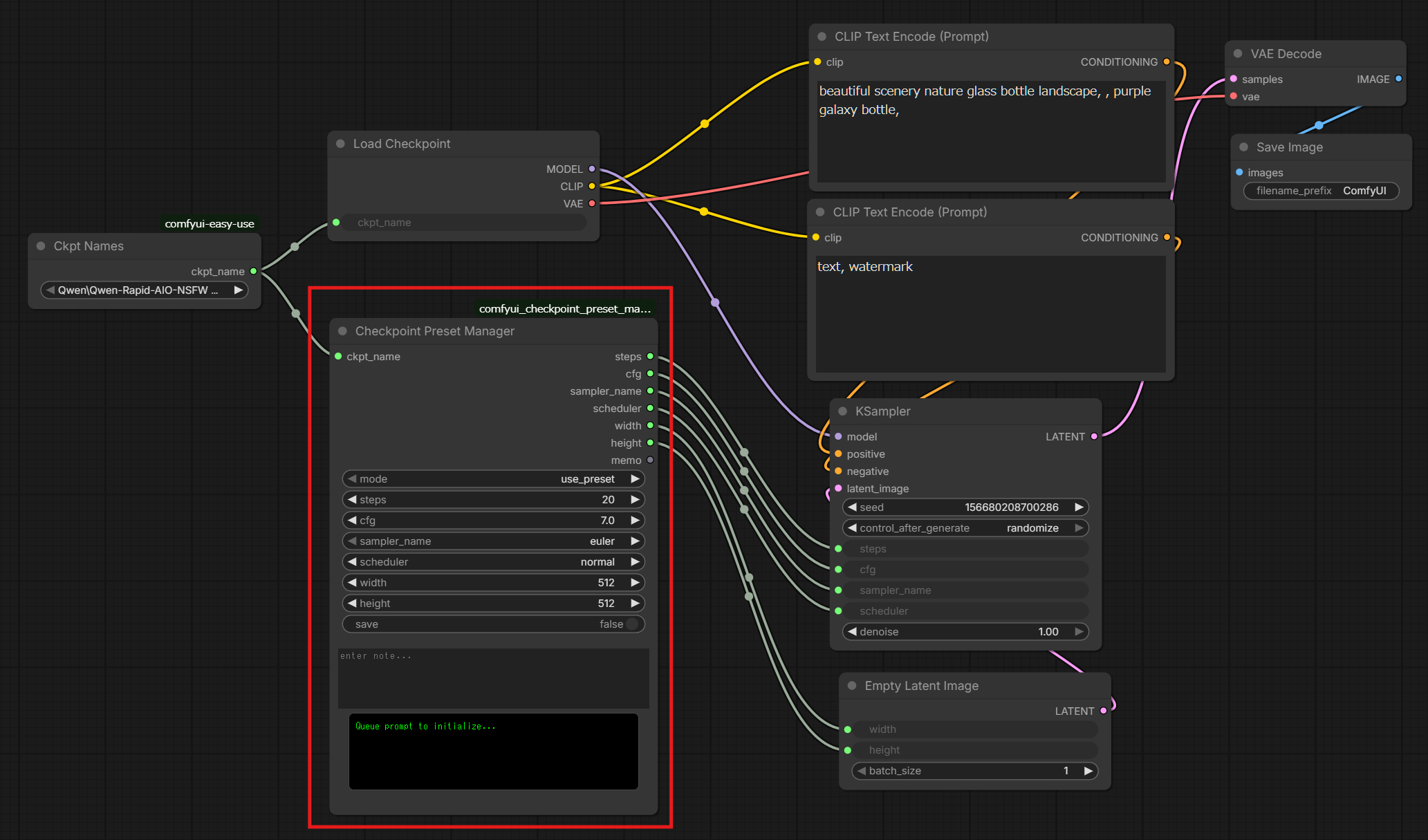
A custom node for ComfyUI designed to manage and automate optimal settings for different Checkpoints. It allows you to save and recall specific parameters—including steps, CFG, samplers, schedulers, and resolutions—linked directly to the model name.
ComfyUI Checkpoint Preset Manager
A custom node for ComfyUI designed to manage and automate optimal settings for different Checkpoints. It allows you to save and recall specific parameters—including steps, CFG, samplers, schedulers, and resolutions—linked directly to the model name.
Overview
Tired of re-entering the "sweet spot" settings every time you switch models? This node automates that process. It stores your preferred configurations in a local JSON file (in ComfyUI's user/checkpoint_preset_manager/ folder, so it survives node updates) and restores them instantly when the corresponding Checkpoint is loaded. It also features a dedicated "Memo" section to keep track of specific prompts or usage notes for each model.
Key Features
- Model-Specific Presets: Automatically saves and loads settings based on the
ckpt_name. - Resolution Management: Includes
widthandheightin the preset for seamless resolution switching. - Smart & Compact UI:
- Multi-line Memo Area: A spacious text area for jotting down notes or trigger words.
- Live Status Display: A dedicated "Status Board" (black console style) that provides real-time feedback on mode and save status.
- Refined Layout: Custom CSS integration to ensure the UI elements are tightly packed and visually organized.
- Persistent Storage: Settings are stored in a simple
presets.jsonfile atComfyUI/user/checkpoint_preset_manager/presets.json(UTF-8) for easy backup or manual editing. Presets from older versions (presets.jsoninside the node folder) are imported automatically. - Cross-OS Keys: Path separators (
\//) in checkpoint names are normalized, so presets keep working when moving between Windows and Linux/Mac.
Installation
- Navigate to your ComfyUI
custom_nodesdirectory. - Clone this repository:
git clone https://github.com/TakkunRed/comfyui_checkpoint_preset_manager.git - Restart ComfyUI.
How to Use
-
Saving a New Preset
- Set the mode to use_ui.
- Connect a node that outputs the checkpoint name (a string) to the
ckpt_nameinput. The sample workflow usesCheckpoint Names(easy ckptNames) from ComfyUI-Easy-Use, which is required to run the sample. - Adjust the parameters (
Steps,CFG, etc.) and type your notes in thememobox. - Set
saveto true and click Queue Prompt. - The status board will change color and display (SAVED!).
- Saving only happens in
use_uimode, or inuse_presetmode when the checkpoint has no preset yet. Inuse_presetmode an existing preset is never overwritten (the board showsSAVE SKIPPED). Saving with an emptyckpt_nameis ignored.
-
Loading an Existing Preset
- Set the mode to
use_preset. - Whenever you change the Checkpoint, the node will automatically look up the saved values.
- The status board will display the currently active preset values.
- Set the mode to
Node Input/Output
-
Inputs
ckpt_name: The name of the model (linked to the preset).steps,cfg,sampler_name,scheduler: Core generation parameters.width,height: Preferred resolution.memo: Notes or reminders for the model.
-
Outputs
steps,cfg,sampler_name,scheduler,width,height,memo: The active values to be passed to other nodes (like KSampler or Empty Latent Image).
File Structure
checkpoint_preset.py: Main node logic and backend processing.web/checkpoint_preset.js: UI customization and front-end layout control.ComfyUI/user/checkpoint_preset_manager/presets.json: The database where your settings are stored (auto-generated).
License
This project is licensed under the MIT License.