
ComfyUI-Metadata-Inspector
A specialized suite of custom nodes for ComfyUI designed to hunt down and visualize generation parameters (prompts, steps, samplers, etc.) embedded in AI-generated images. It works across different formats and platforms (ComfyUI, Automatic1111, Civitai, and more).
Nodes (3)
ComfyUI-Metadata-Inspector
A specialized suite of custom nodes for ComfyUI designed to hunt down and visualize generation parameters (prompts, steps, samplers, etc.) embedded in AI-generated images. It works across different formats and platforms (ComfyUI, Automatic1111, Civitai, and more).


Core Mission
The primary goal of this tool is to reveal hidden prompt strings and workflow structures from AI-generated content. Whether it's a PNG with a complex node graph or a JPEG with a text-based prompt hidden in EXIF data, this inspector brings it to light.
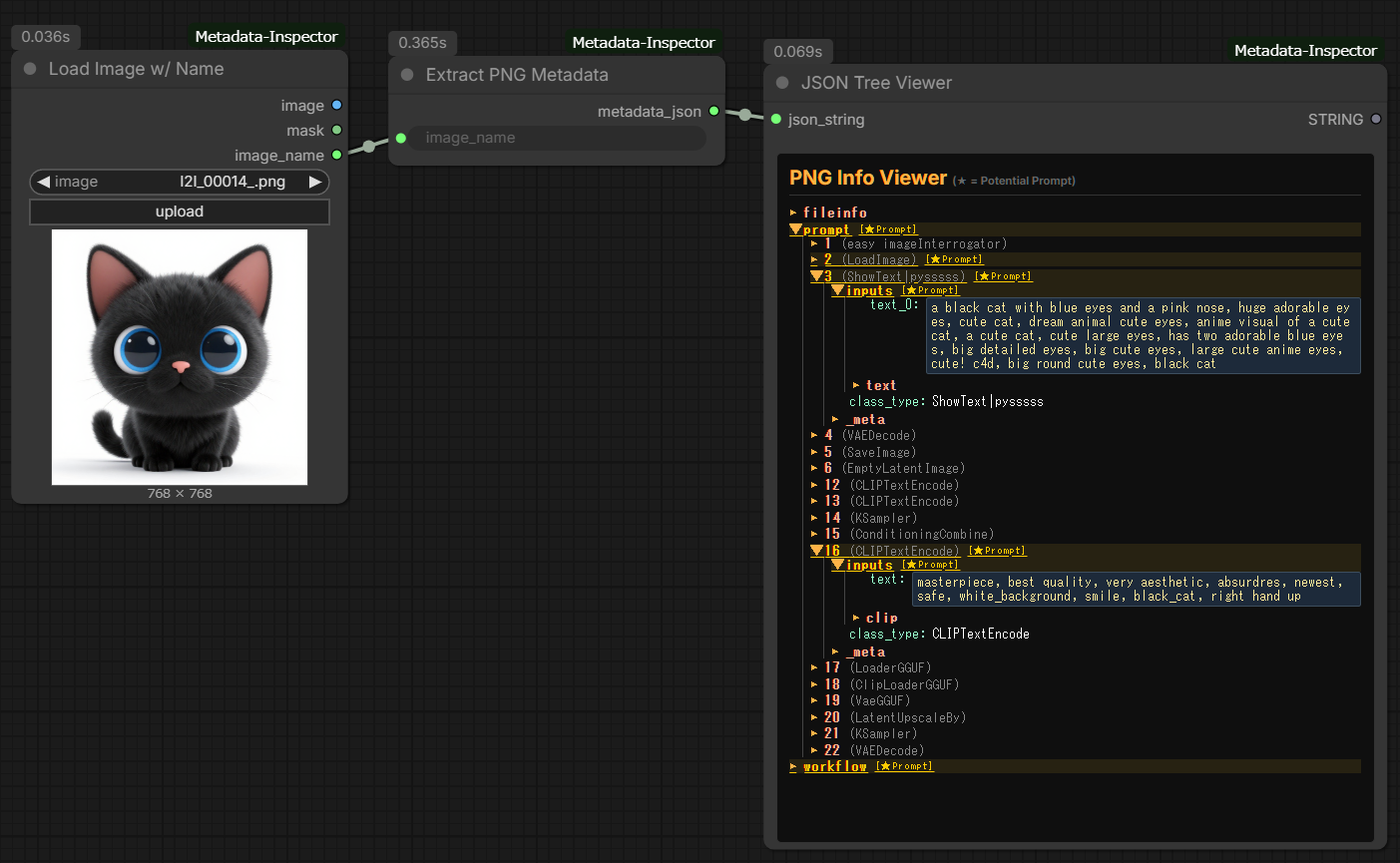
Node Descriptions
This extension includes three essential nodes to complete the inspection workflow:
1. Load Image w/ Name
- Purpose: Loads an image from the
inputfolder like the standard loader, and additionally outputs the file name. - Function: Outputs
image,maskandimage_name. Connectimage_nameto Extract PNG Metadata so the inspected file always follows the loaded image.
2. Extract PNG Metadata (The Core)
- Purpose: The "brain" that scans the image file for generation data.
- Function:
- PNG Deep Scan: Extracts full ComfyUI/A1111 prompt and workflow JSONs.
- JPEG/EXIF Recovery: Deep-scans EXIF sub-IFDs to find hidden
UserComment(ASCII / UTF-16UNICODE/ JIS, big- and little-endian),ImageDescriptionand WindowsXP*tags often used by Civitai and Tensor.art. - Smart JSON Parsing: Metadata values that are JSON (ComfyUI
prompt/workflow) are expanded into structures. Plain-text metadata such as A1111parametersis kept intact (JSON fragments inside the text, e.g.Hashes: {...}, never replace the prompt). - Robust: Binary blobs such as ICC profiles are skipped, and unreadable files / directories return an
errorfield instead of stopping the workflow. - Accepts: a file name in the
inputfolder, or an absolute path (surrounding double quotes are ignored). Because absolute paths are accepted, do not expose ComfyUI to untrusted networks.
3. JSON Tree Viewer (Web UI)
- Purpose: Provides a human-readable visualization of the raw data.
- Function: Transforms the raw metadata string into an interactive, foldable tree view directly on the ComfyUI canvas. It highlights potential prompt areas (long text) in yellow for quick identification. Click a value to copy it. All metadata is rendered as plain text, so untrusted images cannot inject HTML or scripts into the page.
Key Features
- Hidden Prompt Extraction: Recovers data from JPEGs where standard tools fail.
- Workflow Reconstruction Support: Outputs raw JSON strings that can be used to understand complex node setups.
- Multi-Platform Compatibility: Supports metadata formats from ComfyUI, Automatic1111, and various web-based generators.
Installation
Manual Install
cd ComfyUI/custom_nodes
git clone https://github.com/TakkunRed/ComfyUI-Metadata-Inspector.git
How to Use
- Place Load Image w/ Name.
- Connect it to Extract PNG Metadata.
- Connect the metadata_json output to JSON Tree Viewer.
- Input your image path and run the queue to see the hidden prompt data.
License
MIT