
Hi3D T8 — Geometry Refinement
Local Hi3D v1.0 workbench and ComfyUI integration
Hi3D T8
English | 简体中文
By T8star · v0.2.2 — Hi3D V1.0 geometry refinement for ComfyUI and a standalone local workbench.
Refine a reference image + coarse mesh of the same object into detailed geometry. This project uses the official Hi3D second-stage model. It does not generate the initial coarse mesh, textures or UVs, and includes no additional 3D generation models.
Models · Canvas workflow · Validation · Upstream Hi3D
ComfyUI
- Install Hi3D T8 (
hi3d-t8, publishert8star) through ComfyUI-Manager once the Registry version is available. Alternatively clone this repository intoComfyUI/custom_nodes/Comfyui-Hi3d-T8and installrequirements.txtwith ComfyUI's Python. - Start the separate local workbench backend and wait for models to be verified at
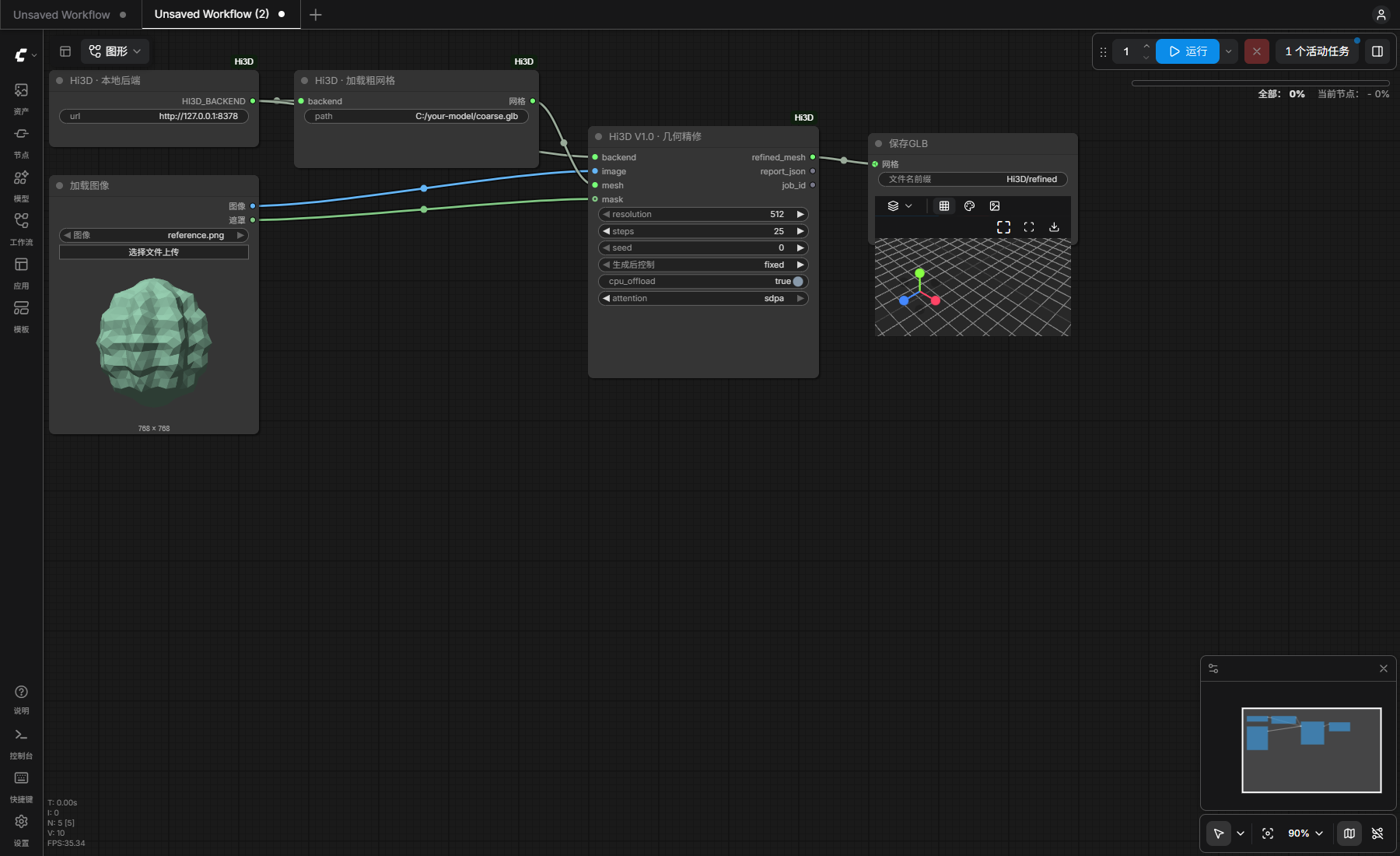
http://127.0.0.1:8378. See backend setup. - Drag Hi3D-Refine.json onto the ComfyUI canvas. This is a visual workflow, not an API prompt. Upload the reference image in Load Image and set the absolute coarse-mesh path in Hi3D Load Mesh.
- Start with 512 / 25 steps / CPU offload. Select
sdpafor Windows orflashfor the official Linux stack, then click Run. Native SaveGLB writes the output to ComfyUI's output directory.
The three custom nodes are Hi3D Backend, Hi3D Load Mesh and Hi3D Refine. They exchange native ComfyUI MESH values. The backend runs on the same computer; the node package does not install or replace ComfyUI's PyTorch/CUDA. See node instructions.
Models: identical in both editions
| Component | Purpose | Used by | |---|---|---| | Hi3D transformer 512 + VAE | 512 refinement | ComfyUI and workbench | | Hi3D transformer 1024 + the same VAE | 1024 and 1536 refinement; no separate 1536 checkpoint | ComfyUI and workbench | | DINOv2 Large + CLIP ViT-L/14 | Required image encoders, not extra 3D models | ComfyUI and workbench |
The Hugging Face repository contains the same unmodified weights and configurations as the offline workbench. There are no quantized or ComfyUI-specific checkpoints. The Registry/node download contains code and the canvas workflow only; the complete offline workbench additionally includes its own Python runtime and models. Downloading the models alone does not provide an inference environment.
Download into the workbench root, not ComfyUI/models:
hf download t8star/Hi3d-Comfy --local-dir models
Expected layout: models/manifest.json, models/hi3d/, models/dino/, models/clip/. The manifest records pinned upstream revisions and SHA256 hashes. The backend also supports downloading directly from the original upstream repositories.
Local workbench
The Windows offline edition starts with Start-Workbench.cmd and opens http://127.0.0.1:8378. It provides image/mesh previews, manual transparency masks, CPU offload, synchronized 3D comparison, job history, diagnostics and GLB/PLY/STL export with optional target height. It runs independently of ComfyUI.
For a Windows source installation, use Python 3.10 in a separate environment:
git clone https://github.com/T8mars/Comfyui-Hi3d-T8.git
cd Comfyui-Hi3d-T8
powershell -ExecutionPolicy Bypass -File scripts/Setup.ps1 -Python C:/Python310/python.exe -DownloadModels
For Linux, run bash scripts/setup-linux.sh, then .venv/bin/python -m hi3d_workbench.model_cli download and .venv/bin/python -m hi3d_workbench --open. Linux setup follows the official Ampere/Hopper stack and has not been tested on this machine. See detailed workbench guide (Chinese).
Validation and limits
Tested on Windows / RTX 5090 Laptop 24GB / 64GB RAM: real ComfyUI 512 refinement and standalone 512/1024/1536 runs. The post-release 20-round audit passed 102 tests plus browser regressions; evidence is in VALIDATION.md. Lower-VRAM GPUs have not been validated. PyTorch tensor peaks are not total GPU memory requirements.
Windows uses an explicitly identified SDPA compatibility adapter; it is not the official Linux FlashAttention environment. Hi3D normalizes scale and rebuilds topology. Outputs are geometry only and are not guaranteed watertight, printable or more accurate than the input; inspect both versions before export.
License and attribution
Original integration code: MIT. Hi3D weights and upstream code: Hi3D Open License v1.0, with their original notices; encoder and runtime licenses remain separate. This is a community integration. See NOTICE.md. Powered by Hi3D 1.0.
T8star
Bilibili · YouTube · API · Free Gallery · Online AI Apps · ComfyUI Distribution · Hugging Face