
ComfyUI Krea Palette Tools
Extract color palettes from reference images and package them as Krea 2 image_style_references.
Nodes (3)
ComfyUI Krea Palette Tools
Pick the palette. Hand Krea a reference, not a hex-code spreadsheet.
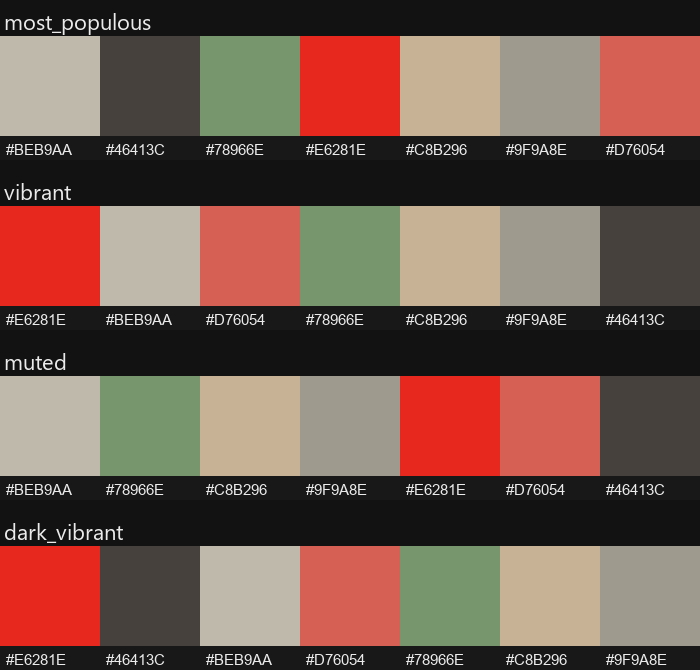
Same reference image. Only the ranking mode changed.





Problem: Krea 2 can't take a color palette directly — it wants text or an image. Solution: these nodes extract a palette from any reference image and hand it to Krea exactly the way it wants it.
Reference Image → Palette Extractor → Palette Preview → Krea
(Full diagram, including the optional cloud branch, in Workflow Diagram below.)
Table of Contents
- The Problem
- The Solution
- Features
- Workflow Diagram
- Quick Start
- Installation
- Nodes
- Examples
- Showcase
- Who This Is For
- Typical Use Cases
- Design Notes
- Testing
- FAQ
- Related Projects
- License
The Problem
Krea 2 has no structured color-palette field in its prompt schema — there's no JSON slot where you drop an ordered hex array the way you can with Ideogram 4. Picking colors by hand, naming them, and writing them into a prompt — or mocking up a swatch image for a style reference — is tedious busywork that has nothing to do with the creative decision you're actually trying to make.
The Solution
This toolkit extracts a palette from a reference image automatically and
turns it into whatever Krea actually needs: a plain-English color clause
for your prompt (free, fully local, no setup) or a swatch image for Krea
2's cloud-hosted image_style_references feature (optional, metered). You
pick the reference and the ranking mode; the nodes handle the color math
and the naming.
A quick note on "Krea 2." It runs two distinct ways, and this package touches both: as an open-weight checkpoint you load and run locally with standard ComfyUI model nodes (free, your own GPU), or via Krea's hosted cloud API, reached in ComfyUI through Comfy Partner Nodes like
Krea 2 ImageandKrea 2 Style Reference(metered). Nothing in this package depends on which one you use — see FAQ for specifics.
Features
- Automatic palette extraction from any reference image (k-means clustering, perceptually-aware deduplication).
- Seven ranking modes — raw frequency, or vibrancy-scored toward vibrant / muted / light / dark targets — so a small accent color isn't buried under a dull background when that's not what you want.
- Free local text path by default. Translates the extracted palette
into a natural-language color clause (
"vivid red, sage green, and warm tan") you can drop straight into any local prompt — no API, no account, no cost. - Optional Krea-native image path. Produces a swatch image shaped for
Krea 2's
image_style_references, for when you do want the cloud style-reference feature. - Composable nodes. Wires into any ComfyUI graph; no monolithic do-everything node.
Workflow Diagram
The default, always-free path:
Reference Image
       │
       ▼
Palette Extraction        KreaPaletteExtractor
       │                  (k-means + Delta-E dedup, mode-ranked)
       ▼
Palette Swatch             palette_preview (labeled IMAGE)
       │
       ▼
Color Clause               KreaPaletteToPromptText
       │                  (nearest-name lookup, no API calls)
       ▼
Your Local Prompt          paste the clause into your own
                           local Krea 2 / any local model
Every step above runs locally with zero cost. There's an optional branch if you want Krea's cloud style-reference feature instead of a text clause:
Palette Swatch
       │
       ▼
KreaPaletteStyleReference   (packages swatch + strength)
       │
       ▼
Krea 2 Style Reference      Comfy Partner Node — calls Krea's
   → Krea 2 Image           hosted API, metered per generation
       │
       ▼
Generated Image
See FAQ for when you'd want the optional cloud branch.
Quick Start
- Install the package (see Installation).
- Open
workflows/showcase_04_free_local_prompt_text.jsonvia ComfyUI's Workflow → Open menu. - Point the
LoadImagenode at your own reference image and hit Run. - Copy the generated text (e.g.
"color palette of vivid red, sage green, and warm tan") into the prompt of your own local Krea 2 (or any other local model) generation — done, no API key required.
That's the entire free path. If you want the swatch image for Krea's cloud style-reference feature instead, see Nodes and Examples.
Installation
Clone (or copy) this repository into your ComfyUI custom_nodes/ directory
and restart ComfyUI:
cd ComfyUI/custom_nodes
git clone https://github.com/SurrealByDesign/ComfyUI-Krea-Palette-Tools
The only extra dependency is scikit-learn (used for k-means clustering),
which is not part of a base ComfyUI install. ComfyUI-Manager installs it
automatically from requirements.txt; to install it by
hand into ComfyUI's Python:
pip install scikit-learn
The package also uses torch, numpy, and Pillow, but those ship with
ComfyUI and are deliberately not listed in requirements.txt —
reinstalling them (torch especially) can pull a build that doesn't match
your ComfyUI/CUDA setup and break the install. After restarting, the three
nodes appear in the node menu under Krea/Palette.
requires-python = ">=3.10" in pyproject.toml is the
floor, not a guarantee for every ComfyUI version — open an issue if
something doesn't load on yours.
Nodes
Krea Palette Extractor (KreaPaletteExtractor)
Takes a reference image, runs k-means clustering, removes near-duplicate
colors with Delta-E filtering, and returns colors ordered per the selected
mode. The starting point for both the free and optional paths.
Inputs
| Name | Type | Default | Notes |
| --- | --- | --- | --- |
| image | IMAGE | — | reference image |
| num_colors | INT | 8 | range 2–16 |
| min_delta_e | FLOAT | 10.0 | minimum perceptual distance to keep a color distinct |
| mode | COMBO | most_populous | most_populous / vibrant / light_vibrant / dark_vibrant / muted / light_muted / dark_muted |
Outputs
| Name | Type | Notes |
| --- | --- | --- |
| palette_json | STRING | hex array, ordered per mode |
| palette_preview | IMAGE | labeled swatch strip |
| color_count | INT | colors remaining after dedup |
Krea Palette To Prompt Text (KreaPaletteToPromptText) — free, local
Converts a palette_json hex array into a natural-language color clause
(nearest-name lookup against a curated table, pure local color math, no
network calls). This is the default way to put an extracted palette to
use.
Inputs
| Name | Type | Default | Notes |
| --- | --- | --- | --- |
| palette_json | STRING | — | from KreaPaletteExtractor |
| max_colors | INT | 4 | range 1–8; how many color names to include |
| template | STRING | {colors} | {colors} is replaced with the joined names |
Outputs
| Name | Type | Notes |
| --- | --- | --- |
| text | STRING | e.g. "vivid red, sage green, and warm tan" |
Krea Palette Style Reference (KreaPaletteStyleReference) — optional, cloud
Wraps a palette swatch image and a strength value into the payload shape
for one Krea 2 image_style_references entry. It does not upload the
image or call the Krea API itself — pair it with an HTTP/upload node (or
Krea's own Krea 2 Style Reference Comfy Partner Node) that hosts the
swatch image and merges in the resulting imageUrl. Only needed if you
want the cloud style-reference path instead of the free text path above.
Inputs
| Name | Type | Default | Notes |
| --- | --- | --- | --- |
| palette_preview | IMAGE | — | typically from KreaPaletteExtractor |
| strength | FLOAT | 1.0 | range -2.0–2.0; negative repels from the reference style |
Outputs
| Name | Type | Notes |
| --- | --- | --- |
| style_reference_image | IMAGE | pass-through, for an upload node |
| style_reference_json | STRING | {"strength": <float>}, merge with the hosted imageUrl |
Examples
workflows/showcase_04_free_local_prompt_text.json
is the fully free pipeline:
LoadImage -> KreaPaletteExtractor -> KreaPaletteToPromptText
The text output is a ready-to-paste color clause for your own local
model's prompt — no Krea API, no Comfy Partner Nodes anywhere in this
graph. Here's that exact workflow loaded in ComfyUI:
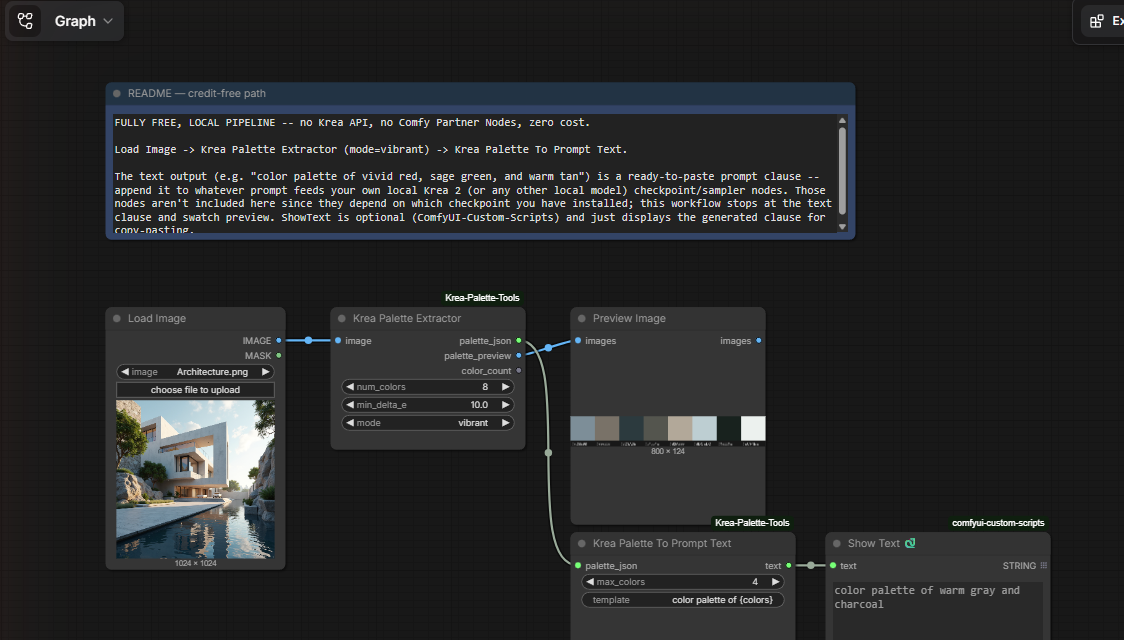
Real photo in, ready-to-paste prompt clause out — three nodes, zero cost.
If you want the optional cloud path instead,
workflows/palette_reference_workflow.json
shows the minimal extraction step, and palette_preview wires into
KreaPaletteStyleReference to package it for Krea 2's
image_style_references:
LoadImage -> KreaPaletteExtractor (mode=vibrant) -> KreaPaletteStyleReference (strength=1.0)
                                              \-> PreviewImage (swatch strip)
KreaPaletteStyleReference's style_reference_image output still needs to
reach Krea as a hosted URL — wire it into whatever upload/HTTP node your
Krea integration uses, merge the resulting imageUrl into
style_reference_json, and add that as one entry of the request's
image_style_references array.
A set of further ready-to-load workflows lives under
workflows/:
| Workflow | What it shows | Nodes wired together | Cost |
| --- | --- | --- | --- |
| showcase_04_free_local_prompt_text.json | The fully automated free path: reference image to a ready-to-paste color clause. | Extractor → To Prompt Text | Free |
| showcase_02_mode_comparison.json | Same image, four rankings side by side — most_populous / vibrant / muted / dark_vibrant — for picking a mode before committing to one. | 4× Extractor → 4× PreviewImage | Free |
| showcase_01_palette_to_style_reference.json | The cloud-path chain: a reference image becomes a Krea-ready style-reference payload (swatch image + strength JSON). | Extractor → Style Reference | Free to build; cloud generation costs credits |
| showcase_03_positive_vs_negative_strength.json | One extracted palette fed into two Style Reference nodes at strength=1.5 and strength=-1.5, to compare pulling toward vs. repelling from a palette. | Extractor → 2× Style Reference | Free to build; cloud generation costs credits |
Load any of them via ComfyUI's Workflow → Open menu and point the
LoadImage node(s) at your own reference. Where a workflow displays a raw
JSON string it uses the optional ShowText|pysssss node (from
ComfyUI-Custom-Scripts)
— swap it for any STRING-display node, or delete it; the core pipeline
doesn't depend on it. All swatch previews use the stock PreviewImage
node.
Showcase
The whole idea in one image — no reading required:

One reference photo, its extracted 7-color palette, and the generation it drove.
Broken down step by step:
Reference → Palette → Result
-
Reference — any image with the colors you want (a mood board, a product photo, concept art).
-
Palette —
KreaPaletteExtractorreduces it to a labeled swatch strip, ranked by the mode you choose: -
Result —
KreaPaletteToPromptTextturns that palette into a color clause, and the same prompt and seed produced two different rooms purely by swapping which extracted palette fed the clause (vibrant vs. muted) — entirely local, no API calls: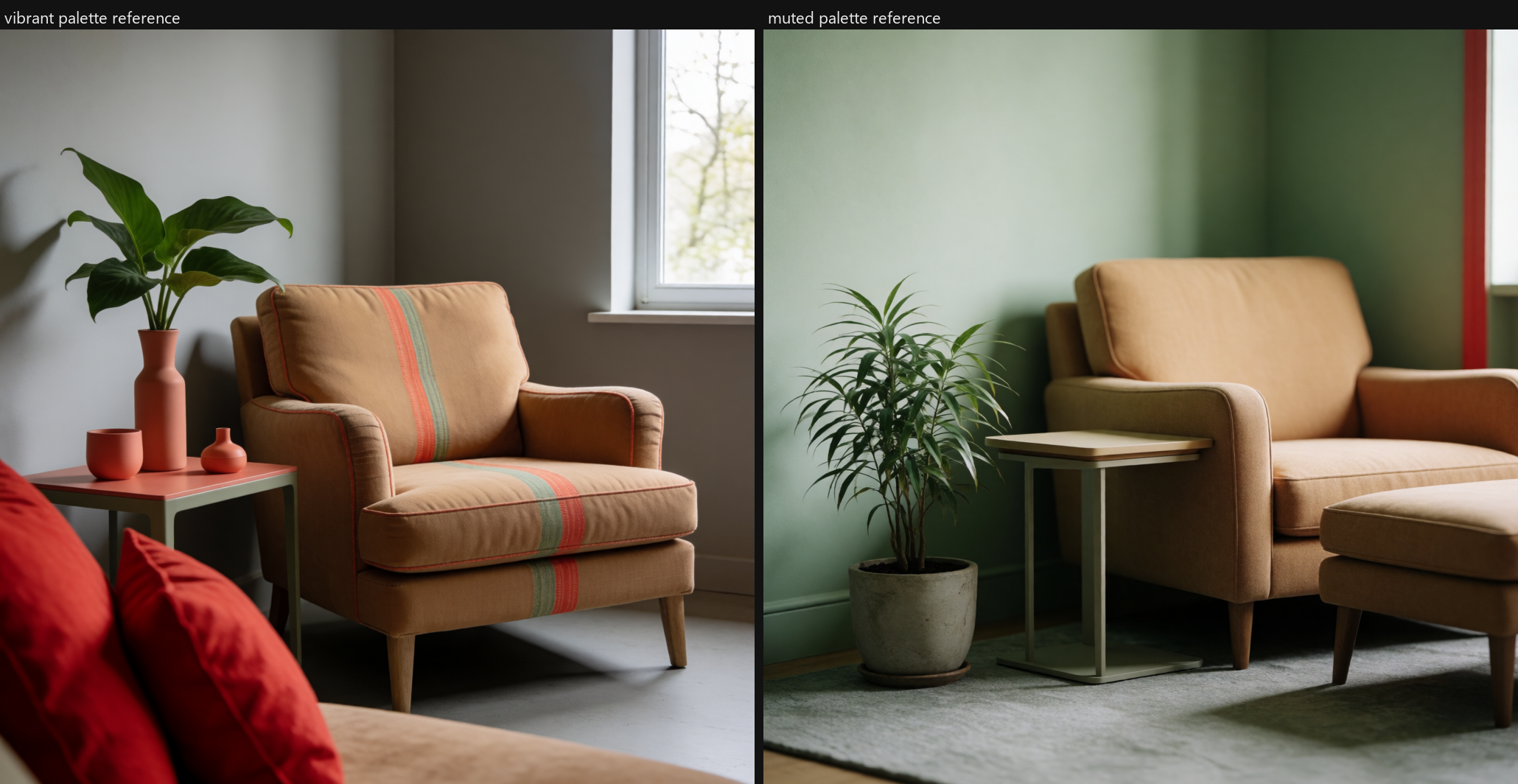
Same prompt. Same seed. Only the palette ranking changed.
Who This Is For
Designed for:
- ✓ Brand designers matching an established color identity
- ✓ Product visualization and colorway exploration
- ✓ Concept artists pulling a palette out of a mood board
- ✓ Anyone who wants visual style consistency across generations
Not intended for:
- ✗ Prompt engineering or prompt generation in general
- ✗ Image editing or compositing
- ✗ General-purpose palette design software (it extracts and formats — it doesn't let you paint or pick colors from scratch)
Typical Use Cases
- Match an existing brand palette — extract from a logo or style guide image instead of eyeballing hex codes.
- Generate alternate colorways — same composition, different palette, by swapping only the extracted swatch or its derived prompt clause.
- Extract palettes from concept art — pull a scene's mood into a reusable swatch or color clause for later generations.
- Maintain visual consistency across generations — reuse one extracted palette as a prompt clause or style reference across an entire shoot or series.
- Build reusable style references — save a
palette_previewswatch or atextclause once, reuse it across many Krea 2 generations.
Design Notes
- Delta-E, not RGB distance. Two colors that are mathematically close
in RGB can look wildly different to the eye (and vice versa). All
deduplication and color-naming uses CIE76 Delta-E in LAB space (see
utils/color_utils.py). - Fails gracefully. Extraction falls back to a flat gray (
#808080) swatch on a bad or degenerate image (single color, tiny image, parse errors) rather than crashing the workflow;KreaPaletteToPromptTextfalls back to"neutral gray"on invalid input. - Color naming is a fixed local table, not a model call.
nearest_color_name(inutils/color_names.py) matches each hex value against a small curated table of descriptive names by Delta-E distance — no LLM, no API, fully deterministic. - Image and text are both first-class outputs. Krea 2's
image_style_referencestakes a hosted image URL, not a hex list, so the optional cloud path needs the swatch image. The free local path needs text instead — this package produces both, rather than forcing one interchange format the way a JSON-only tool would have to.
Testing
Run the test suite from the package root:
pytest
or run any test file directly:
python tests/test_palette_extractor.py         # mode dropdown ranking, dedup, fallbacks
python tests/test_palette_to_prompt_text.py     # color-naming, grammar joining, template substitution
python tests/test_palette_style_reference.py    # strength payload shape, pass-through image
python tests/test_workflows.py                  # workflow JSONs match node signatures, no dangling links
FAQ
Can I use this locally, for free?
Yes — by default. KreaPaletteExtractor and KreaPaletteToPromptText are
both pure local image/color processing — no network calls, no cost, ever.
The Quick Start path produces a ready-to-use prompt clause
without touching any API.
Do I need the Krea API?
No, not for the default path. You only need it if you want the palette to
drive a generation via Krea's hosted image_style_references feature
instead of a text clause — that's the optional branch in the
Workflow Diagram, and it's metered per generation.
Do I need Comfy Partner Nodes?
No, not for this package's own nodes. Krea 2 Style Reference and
Krea 2 Image are Comfy Partner Nodes that call Krea's hosted service —
they're only needed for the optional cloud branch, and are unrelated to
KreaPaletteExtractor, KreaPaletteToPromptText, or
KreaPaletteStyleReference, all of which work with or without them
installed.
Can I use custom upload nodes?
Yes. KreaPaletteStyleReference deliberately doesn't upload anything
itself — it just produces the swatch image and the strength payload.
Wire its style_reference_image output into whatever HTTP/upload node
your own Krea integration already uses.
Related Projects
This package is one half of a two-repo Surreal By Design palette-tooling ecosystem — same color-math core, two different prompting philosophies:
Surreal By Design — Palette Tools
│
├── Ideogram Palette & Prompt Tools     (JSON-first)
│       Reference Image → Palette → Structured style_description JSON
│                                  → Prompt assembly
│
└── Krea Palette Tools (this repo)      (image-and-text-first)
        Reference Image → Palette → Prompt clause (free, local)
                                  → Style-reference image (optional, cloud)
- ComfyUI-Ideogram-Palette-and-Prompt-Tools
— extracts palettes and assembles them into Ideogram 4's structured
style_descriptionprompt schema. - ComfyUI Krea Palette Tools (this repo) — extracts palettes and
renders them as either a natural-language prompt clause (free, local,
default) or a swatch image for Krea 2's
image_style_referencesstyle-reference workflow (optional, cloud).
The k-means/Delta-E/LAB extraction core here was forked from the Ideogram
repo's utils/ and is currently maintained independently in each.
License
Released under the MIT License.