
ComfyUI Ideogram Palette and Prompt Tools
Extract color palettes from reference images and assemble/validate/embed Ideogram 4's structured prompt JSON.
Nodes (15)
One Bounding Box, One Palette, One Piece of the Scene
The Node That Turns a Cast List Into a Composition Block
A 5-Color Palette, Because Ideogram 4 Says So
The Safety Net Before Your Prompt Hits Ideogram 4
The Metadata Round-Trip That Actually Works From Disk
The Palette of Just the Subject, Not the Whole Frame
Make the Prompt Travel With the Image, Forever
Read the Prompt Back Out of an Image — With a Big Caveat
Mixing a Content Palette With a Style Palette, One Slider
The Node That Kills the Hex-Code Spreadsheet
Tweak the Extracted Palette Before It Becomes a Prompt
Turning Hex Codes Into a Style Description Ideogram Will Accept
Splice a Palette Into Your Prompt Without Touching Anything Else
When the Dominant Color Isn't the Color You Want
The Node That Wants to Be a Canvas (and Isn't Yet)
ComfyUI-Ideogram-Palette-and-Prompt-Tools
Pick the palette. Skip the hex-code spreadsheet.




A ComfyUI toolkit for Ideogram 4's structured prompt JSON, built around color palette extraction: pull palettes from reference images, assemble and validate the full Ideogram JSON, and embed/recover prompts from generated images — all as composable nodes that wire into a ComfyUI generation workflow.
Table of Contents
- Installation
- Why This Exists
- What it does
- Nodes
- Ideogram Visual Prompt Designer
- Example workflow
- Palette studies (same image, different palettes)
- Showcase workflows
- Design notes
- Testing
- License
Installation
Clone (or copy) this repository into your ComfyUI custom_nodes/ directory and
restart ComfyUI:
cd ComfyUI/custom_nodes
git clone https://github.com/SurrealByDesign/ComfyUI-Ideogram-Palette-and-Prompt-Tools
The only extra dependency is scikit-learn (used for k-means clustering),
which is not part of a base ComfyUI install. ComfyUI-Manager installs it
automatically from requirements.txt; to install it by
hand into ComfyUI's Python:
pip install scikit-learn
The package also uses torch, numpy, and Pillow, but those ship with
ComfyUI and are deliberately not listed in requirements.txt — reinstalling
them (torch especially) can pull a build that doesn't match your ComfyUI/CUDA
setup and break the install. After restarting, the fourteen nodes appear in the
node menu under Ideogram/Palette.
Tested against ComfyUI 0.24.0 on Python 3.12. requires-python = ">=3.10" in
pyproject.toml is the floor, not a guarantee for every
ComfyUI version — open an issue if something doesn't load on yours.
Why This Exists
Ideogram 4's most powerful prompting feature — structured JSON prompts with explicit, ordered color palettes — is also the most tedious to use by hand: picking a dozen consistent hex codes, getting the nested JSON key order right, and keeping per-element palettes within Ideogram's limits is easy to get wrong. This toolkit automates that part of the process — extract a palette directly from a reference image, validate and assemble it into the exact JSON shape Ideogram expects, and round-trip the prompt through your saved images — so the creative decision stays in ComfyUI's node graph instead of a text editor.
What it does
Ideogram 4 accepts color palettes as ordered hex arrays inside its
style_description (global) and compositional_deconstruction (per-element)
prompt schema. Picking those colors by hand is tedious and easy to get wrong —
this package extracts them automatically from a reference image using k-means
clustering, filters out near-duplicate colors using perceptual (Delta-E / LAB)
distance rather than raw RGB distance, and emits JSON in the exact key order
Ideogram 4 expects.
Each extracted color is shown on a labeled swatch strip (exact hex code below each block — the same value Ideogram consumes):

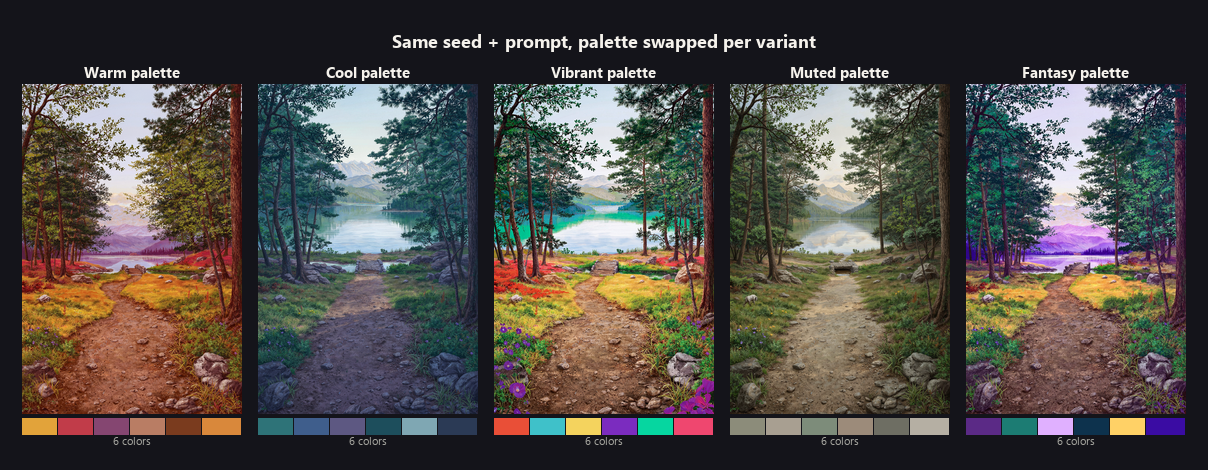
Because the palette is injected into the prompt conditioning, swapping it while
holding the seed and prompt fixed recolors the same scene — useful for colorway
studies. The same forest path, trees, and lake render five distinct moods below,
with only style_description.color_palette changing between renders:
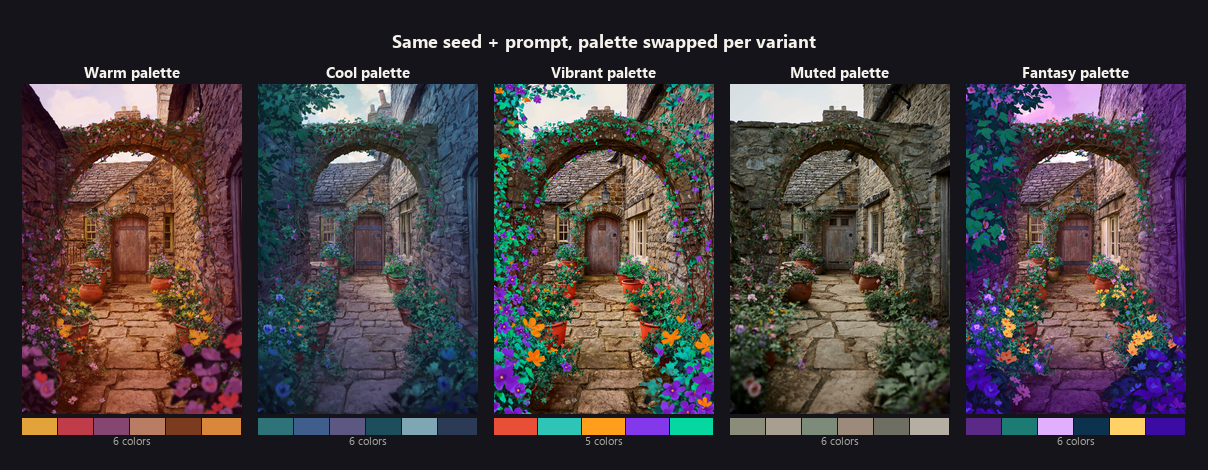
The same technique applies to any composition — a second scene (a cottage courtyard) shows the same five-palette swap holding an entirely different subject fixed instead:
Nodes
Ideogram Palette Extractor (IdeogramPaletteExtractor)
Takes a reference image, runs k-means clustering, removes near-duplicate colors with Delta-E filtering, and returns colors ordered by prominence.
- Inputs:
image,num_colors(2-16, default 8),min_delta_e(default 10.0) - Outputs:
palette_json(hex array string),palette_preview(swatch strip image),color_count
Ideogram Palette -> Global JSON (IdeogramPaletteToGlobalJSON)
Wraps a palette JSON string into a partial Ideogram 4 style_description
fragment with correct key ordering (aesthetics -> lighting -> color_palette).
- Inputs:
palette_json, optionalaesthetics, optionallighting - Outputs:
style_json
Ideogram Palette Override (IdeogramPaletteOverride)
Manually tweak an extracted palette before finalizing it — add hex colors, remove specific indices, and clamp the total count.
- Inputs:
palette_json,max_colors(default 16), optionaladd_colors(comma-separated hex), optionalremove_index(comma-separated indices) - Outputs:
palette_json,palette_preview
Ideogram Element Palette (IdeogramElementPalette)
Same extraction pipeline as the extractor, clamped to a maximum of 5 colors for
Ideogram 4's per-element compositional_deconstruction color palettes.
- Inputs:
image,num_colors(1-5, default 5),min_delta_e(default 10.0) - Outputs:
element_palette_json(max 5 hex strings),palette_preview
Ideogram Masked Palette Extractor (IdeogramMaskedPaletteExtractor)
Extracts a palette from only the masked region of an image — the palette of a
specific subject or area rather than the whole frame. Pairs with
IdeogramElementPalette to build region-accurate per-element palettes (mask the
subject → its true colors). Same k-means + Delta-E pipeline, restricted to the
selected pixels.
- Inputs:
image,mask(MASK),num_colors(2-16, default 8),min_delta_e(default 10.0),mask_threshold(0.0-1.0, default 0.5) - Outputs:
palette_json,palette_preview,color_count - An empty / below-threshold mask falls back gracefully to a single gray swatch.
Ideogram Vibrant Palette Extractor (IdeogramVibrantPaletteExtractor)
Ranks colors by vibrancy instead of frequency, so a small but striking accent
color isn't buried under a dull dominant background (which the frequency-based
extractor would rank first). Inspired by Android's Palette API / Vibrant.js: each
clustered color is scored against a target saturation + lightness (weighted with
population), and mode selects which target to emphasize.
- Inputs:
image,num_colors(2-16, default 8),min_delta_e(default 10.0),mode(vibrant/light_vibrant/dark_vibrant/muted/light_muted/dark_muted, defaultvibrant) - Outputs:
palette_json(most-vibrant-for-the-mode first),palette_preview,color_count
Ideogram Metadata Embedder (IdeogramMetadataEmbedder)
A terminal save node: writes the generated image to the ComfyUI output
directory with the Ideogram 4 JSON prompt embedded in a PNG tEXt metadata
chunk, so the prompt travels with the file. It also preserves ComfyUI's normal
prompt/workflow metadata, so the saved PNG stays reproducible in ComfyUI.
Wire it where you'd normally put a SaveImage node (e.g. after your sampler's
VAEDecode). Because ComfyUI's IMAGE type is a bare tensor that carries no
metadata, embedding can only happen at save time — so this node owns the save
rather than passing the image through.
- Inputs:
image,prompt_json,filename_prefix(default"ideogram"),embed_key(default"ideogram_prompt") - Output:
metadata_preview(confirmation string; the node also previews the saved image) - Note:
tEXtmetadata is a PNG feature — re-saving the file as JPEG elsewhere destroys the embedded prompt.
Ideogram Palette Blend (IdeogramPaletteBlend)
Blends two palettes into one — e.g. mixing a content-reference palette with a
style-reference palette. blend_ratio controls the proportion (0.0 = all A,
1.0 = all B); colors are drawn from each in dominance order, interleaved, with
exact-duplicate hexes removed and the result clamped to max_colors.
- Inputs:
palette_a,palette_b,blend_ratio(0.0-1.0, default 0.5),max_colors(default 8) - Outputs:
palette_json,palette_preview
Ideogram JSON Validator (IdeogramJSONValidator)
Validates an Ideogram 4 prompt JSON string against the schema's structural rules and optionally corrects key ordering. Checks: valid JSON, presence of the three top-level keys, hex-color validity, global palette ≤ 16 colors, per-element palettes ≤ 5 colors, and bounding-box coordinates within 0–1000. It reorders keys only — it never edits content values.
- Inputs:
prompt_json,fix_key_order(BOOLEAN, default True),strict_mode(BOOLEAN, default False — when on, warnings also fail validation) - Outputs:
prompt_json(optionally key-reordered),is_valid(BOOLEAN),report(human-readable summary),errors_json(JSON array of error message strings),warnings_json(JSON array of warning message strings) — the latter two added afterv1.1.1for consumers that need structured data instead of re-parsingreport's prose; existing connections to the first three outputs are unaffected.
Ideogram Metadata Reader (IdeogramMetadataReader)
Reads an embedded Ideogram JSON prompt back out of a PNG tEXt chunk by key.
- Inputs:
image,embed_key(default"ideogram_prompt") - Outputs:
prompt_json(recovered string, or""),status - Note: a ComfyUI
IMAGEtensor carries no metadata, so this only recovers a prompt when the image still carries its.info. A standardLoadImage → IMAGEpath stripstEXtchunks. For reading prompts from saved files, use the file-based loader below instead.
Ideogram Load Image With Prompt (IdeogramLoadImageWithPrompt)
The working counterpart to the metadata reader: loads a PNG from disk by path
and recovers its embedded Ideogram prompt — closing the loop with
IdeogramMetadataEmbedder (embed on save, recover on load). Because the metadata
lives in the file (not the tensor), reading from the path is what actually works.
- Inputs:
image_path(absolute, or relative to ComfyUI's output/input dirs),embed_key(default"ideogram_prompt") - Outputs:
image(IMAGE),prompt_json(recovered, or""),status - Always returns a valid IMAGE (a small black tensor on failure), so the graph never breaks.
Ideogram Prompt Assembler (IdeogramPromptAssembler)
The link between palette extraction and a full generation prompt: deep-merges a
JSON fragment into a base prompt JSON. Wire the style_description fragment from
IdeogramPaletteToGlobalJSON in as merge_json and your complete prompt JSON as
base_json, and it injects the palette field-by-field — replacing only
style_description.color_palette while leaving sibling fields (aesthetics,
lighting, photo, medium) and the rest of the prompt untouched. A base_json
of "{}" lets it assemble a prompt from scratch.
- Inputs:
base_json(default"{}"),merge_json,fix_key_order(BOOLEAN, default True) - Outputs:
prompt_json(merged, key-ordered),report(what was merged)
Ideogram Element Builder (IdeogramElementBuilder)
Builds a single Ideogram 4 compositional_deconstruction element from individual
inputs — a bounding box, a description, an element type, and an optional
per-element palette (e.g. from IdeogramElementPalette, wired into
color_palette). Wire several builders in parallel into IdeogramElementCollector
so each region of a generation can carry its own spatial placement and its own
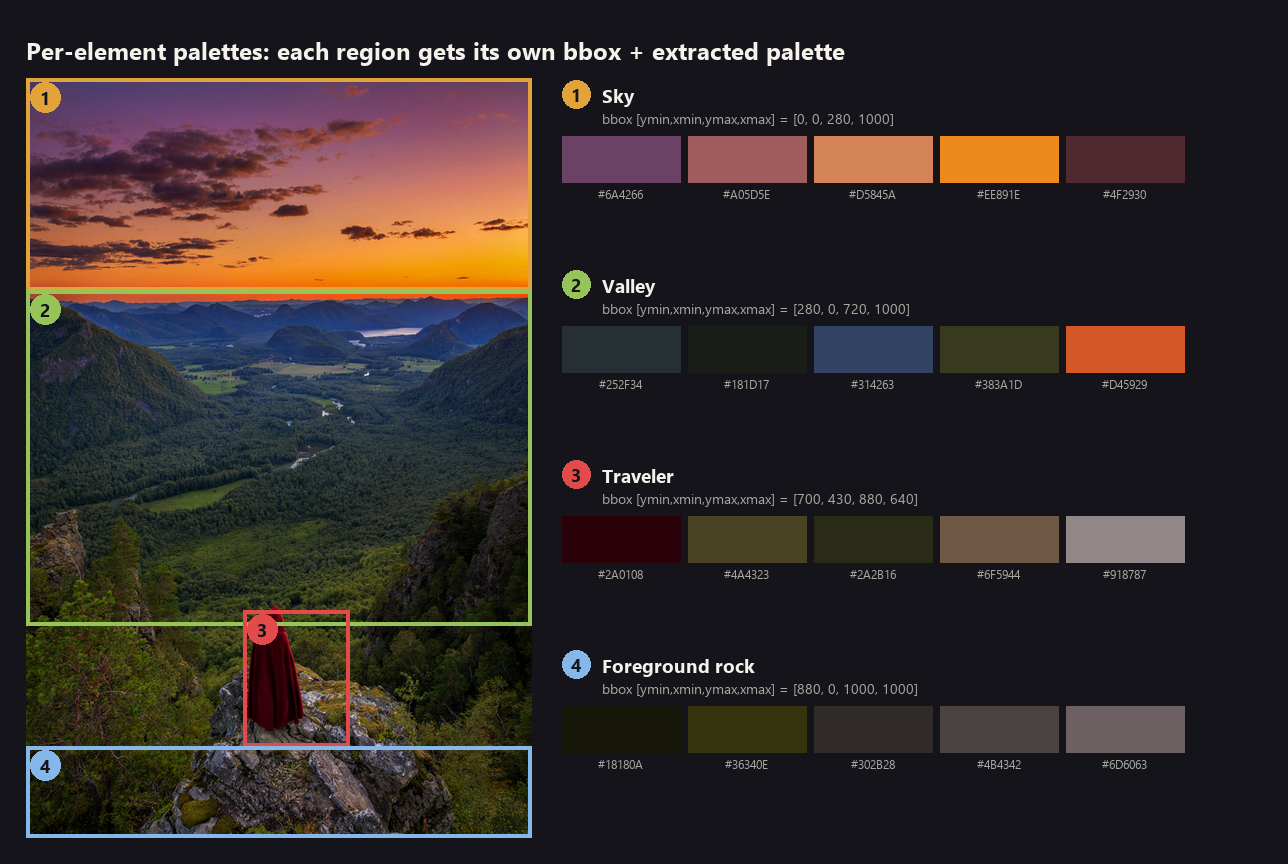
reference palette. Boxes are emitted as [ymin, xmin, ymax, xmax] (the official
element schema order); out-of-range values are clamped, inverted edges are
swapped, and malformed palettes are omitted rather than crashing.
- Inputs:
element_type(obj/text, defaultobj),description,bbox_ymin/bbox_xmin/bbox_ymax/bbox_xmax(INT 0-1000), optionalcolor_palette(JSON hex array string, max 5), optionaltext_content(used only whenelement_typeistext) - Outputs:
element_json(one element JSON object),bbox_preview(summary + any warnings)
Each region of a scene becomes its own element — a bounding box plus a palette extracted from that region's pixels:
Ideogram Element Collector (IdeogramElementCollector)
Collects between 1 and 8 element JSON strings from IdeogramElementBuilder
instances into a complete compositional_deconstruction block with a background
description. Empty inputs are skipped, malformed elements are dropped with a
console warning, and overlapping text element boxes are reported (overlapping
text renders poorly in Ideogram 4). Solves ComfyUI's lack of a native way to
collect a variable number of string outputs into a list.
- Inputs:
background,element_1(required) throughelement_8(optional) - Outputs:
compositional_json(complete block),element_count(INT),overlap_warning(empty if none)
Ideogram Visual Prompt Designer (IdeogramVisualPromptDesigner)
Phase 1 of the planned Visual Prompt Designer (see
Ideogram Visual Prompt Designer below for
the full picture): builds a prompt from scratch or loads an existing one,
reconstructs an editable internal "designer state," restores designer-only
fields from a previously saved state, applies an optional palette override,
and re-validates the result with IdeogramJSONValidator — all through
standard widgets, no canvas required yet.
- Inputs:
high_level_description,strict_mode; optionalprompt_json,designer_state_json,palette_json - Outputs:
ideogram_prompt,json_string(same content asideogram_promptin this phase),designer_state(for round-tripping),is_valid,report
Ideogram Visual Prompt Designer
Why it exists
Ideogram 4's structured prompt JSON is powerful but tedious to hand-author:
nested objects, strict key ordering, bounding boxes in a non-obvious
[ymin, xmin, ymax, xmax] order, palette size limits. The other nodes in this
repo (Element Builder/Collector, Prompt Assembler, JSON Validator) make that
tedium manageable, but a user still has to think in JSON shapes to use them.
The Visual Prompt Designer's goal is to let a user think in subjects,
composition, style, and palettes instead — the software handles the JSON.
Visual authoring philosophy
The full vision (closer to a Figma/Blender-scene-graph editing experience than a JSON form) needs a custom ComfyUI frontend extension — a drag/resize canvas, scene-graph tree, relationship graph, undo/redo history. That's a separate, larger effort from the Python node layer this repo is built from so far, and is not implemented yet.
What's implemented now (Phase 1) vs. deferred
| Capability | Status |
| --- | --- |
| Build a prompt from scratch | Done |
| Load an existing prompt and reconstruct an editable model | Done |
| Round-trip designer-only data (notes, subjects, per-element depth/weight/lock/hide/group) via saved metadata | Done, with a known limitation (see below) |
| Validation on every run, reusing the existing validator (not live-as-you-type — that needs the canvas) | Done — designer_state's validation field carries structured errors/warnings lists, not just prose |
| Palette override | Done |
| Drag/resize composition canvas, scene hierarchy tree, relationship graph, presets, undo/redo, multi-view live preview | Deferred — needs a custom JS frontend extension |
| Auto element detection, prompt diff viewer, template library | Deferred (stretch goals) |
Architecture
Layered, per the spec, so the (future) UI never touches JSON directly:
Layer 1  Visual Model        utils/designer_model.py  -- the "designer state" dict
Layer 2  Prompt Model         (existing Ideogram 4 schema, unchanged)
Layer 3  Serialization       utils/designer_model.py  -- serialize/deserialize, both translation directions
Layer 4  Metadata            IdeogramMetadataEmbedder / IdeogramMetadataReader (existing nodes, reused)
A "designer state" carries both the fields the Ideogram schema knows about
(description, style, palette, composition elements) and designer-only
fields the schema has no place for (subjects, hierarchy, relationships,
notes, and per-element depth layer/visual weight/lock/hide/group). The
schema-visible fields always reflect the most recently loaded prompt_json;
the designer-only fields only exist if restored from a previously saved
designer_state_json.
Why all three outputs are typed STRING, not the spec's distinct
IDEOGRAM_PROMPT/COLOR_PALETTE socket types: every existing node in this
package (Validator, Assembler, Element Builder/Collector, palette nodes)
reads and writes plain STRING JSON. Introducing a genuinely distinct
ComfyUI socket type for this node alone would make it unable to plug directly
into any of them without an adapter node in between — the opposite of the
"integrate with existing infrastructure" goal. ideogram_prompt and
json_string are therefore intentionally identical values today; the
distinction is reserved for if/when a future, genuinely structured runtime
type would benefit other Designer-aware nodes enough to justify breaking that
interop.
Round-trip workflow (today)
IdeogramVisualPromptDesigner (build/edit)
  -> ideogram_prompt -> generation -> IdeogramMetadataEmbedder (embed under e.g. "ideogram_prompt")
  -> designer_state  -> IdeogramMetadataEmbedder (embed under a second key, e.g. "ideogram_designer_state")
       ... later ...
  -> IdeogramMetadataReader x2 (read both keys back from the saved PNG)
  -> IdeogramVisualPromptDesigner (prompt_json + designer_state_json) -> continue editing
Known limitation: composition elements are matched between the freshly loaded prompt and the saved designer state by position (1st element ↔ 1st saved element, and so on) — there's no persistent per-element ID yet, since that's naturally a canvas-phase concept. Reordering, inserting, or removing elements between saves can misalign which saved depth/weight/notes/lock/hide/ group values land on which element. Safe today: editing the same elements in place. Not yet safe: restructuring the element list and expecting designer-only metadata to follow the right element.
Reference image / composition-assisted workflow
Not implemented, and there is deliberately no reference_image input yet.
The original spec's stretch goals call for a "visual reference mode" where a
loaded image becomes editable overlay regions — that needs the canvas to
exist first. An earlier draft of this node had a reference_image input that
accepted an image and did nothing with it; that was removed rather than kept
as a placeholder, since an input with no effect creates the same false
impression of capability as a decorative ID field would. It will be added
back when there's an actual canvas to consume it.
Troubleshooting / FAQ
- "My loaded prompt's description disappeared." It shouldn't — leaving
high_level_descriptionblank whenprompt_jsonis wired in preserves the loaded description. Only a non-emptyhigh_level_descriptionoverrides it. - "My palette didn't change even though I wired
palette_jsonin." Check thereportoutput — a malformedpalette_json(not valid JSON, not an array of hex strings) is skipped with a warning rather than clearing your existing palette. - "Designer-only fields didn't come back after reloading." See the position-based matching limitation above — if the element list was restructured between saves, that's expected in this phase.
- "Where's the visual canvas?" Not built yet — see the status table above. This node is the backend foundation it will sit on.
Example workflow
workflows/palette_reference_workflow.json
demonstrates the core pipeline:
LoadImage -> IdeogramPaletteExtractor -> IdeogramPaletteOverride -> IdeogramPaletteToGlobalJSON
                                    \-> PreviewImage (swatch strip)
Load it via ComfyUI's Workflow → Open menu. It wires a reference image
through extraction, manual override, and final JSON wrapping, with the swatch
preview displayed alongside. The style_json output can be merged into a
full Ideogram 4 prompt payload (e.g. with a JSON-merge node, or pasted
directly if building the prompt by hand).
Palette studies (same image, different palettes)
To generate the same composition recolored by several reference palettes, the palette must vary while the seed and prompt stay fixed. Because each palette lives inside the prompt JSON (a separate conditioning), and ComfyUI draws different noise per batch item, this requires separate generations sharing one seed — not a single batched run. Two ways to do it:
-
Batch CLI (
tools/palette_batch.py) — scales to any number of references. Point it at a base workflow (API format) and a folder of images; it extracts each palette, injects it, locks the seed, and queues one generation per reference, saving outputs plus amanifest.json:python tools/palette_batch.py --workflow my_workflow_api.json \ --images refs/ --seed 1078 --out out/studyIt auto-detects the seed and prompt nodes (override with
--seed-node-id/--prompt-node-id).--inject-modeisautoby default: it setsstyle_description.color_palettewhen the prompt is Ideogram JSON, or appends a textual palette hint when it's plain text. Run it with a Python that can reach your ComfyUI server (e.g. the embeddedpython_embeded\python.exe).A real run against the four images under
tests/test_images/— chosen for genuinely different palette characteristics (a flat-color logo, a near-monochrome scene, a multi-color painting, and a photograph-like gradient) — with the prompt and seed both held fixed: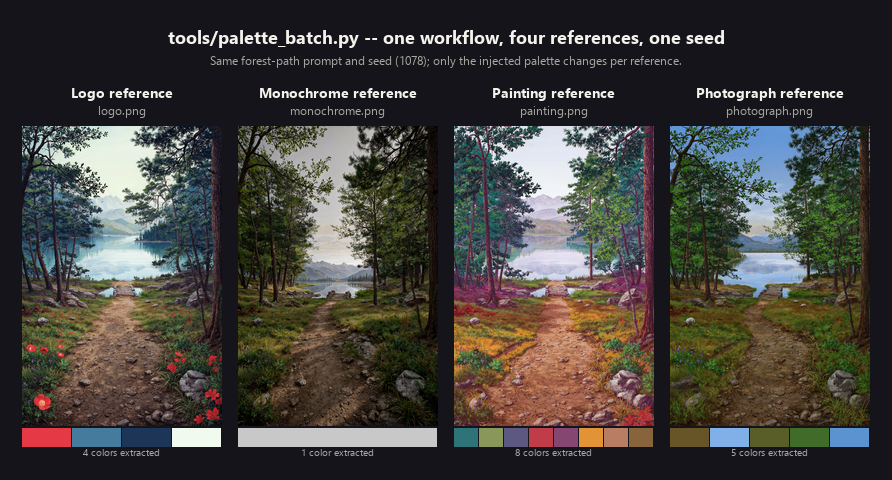
The single-color monochrome reference is the interesting case: a degenerate one-color extraction doesn't crash the batch, it just produces a correspondingly desaturated result — the same graceful-degradation behavior documented under Design notes.
-
In-graph 3-way (
workflows/palette_study_3way_workflow.json) — good for eyeballing 2–3 colorways live on the canvas. Three reference images each produce astyle_json; wire each into its own copy of your CLIPTextEncode → KSampler → VAEDecode chain with the same seed andbatch_size=1on every sampler.
Showcase workflows
A set of six ready-to-load workflows under workflows/ that
demonstrate the nodes working together, from a single extraction up to a full
extract → assemble → validate → embed pipeline. Load any of them via ComfyUI's
Workflow → Open menu and point the LoadImage node(s) at your own reference.
| Workflow | What it shows | Nodes wired together |
| --- | --- | --- |
| showcase_01_palette_to_prompt_pipeline.json | The flagship chain: a reference image becomes a complete, validated Ideogram 4 prompt with the embedded palette, saved to disk. | Extractor → Override → Palette→Global JSON → Prompt Assembler → JSON Validator → Metadata Embedder |
| showcase_02_blend_content_and_style.json | Mix a content reference palette with a style reference palette (tune blend_ratio), then build and save a prompt from the blend. | 2× Extractor → Palette Blend → Palette→Global JSON → Prompt Assembler → JSON Validator → Metadata Embedder |
| showcase_03_vibrant_vs_frequency.json | Same image, four rankings side by side — the default frequency extractor vs. the Vibrant Extractor in vibrant / muted / dark_vibrant modes. | Extractor + 3× Vibrant Extractor → Palette→Global JSON |
| showcase_04_masked_subject_and_global.json | Build a structured prompt with two palettes: a region-accurate per-element palette from a masked subject, plus the global palette from the whole frame. | Masked Extractor → Override (≤5) ‖ Element Palette ‖ Extractor → Palette→Global JSON |
| showcase_05_embed_recover_roundtrip.json | The metadata loop closing: embed a prompt on save, then recover it from the saved PNG by path (and why the tensor-based reader can't). | Extractor → Palette→Global JSON → Prompt Assembler → Metadata Embedder … Load Image With Prompt → JSON Validator (+ Metadata Reader caveat) |
| showcase_06_per_element_palettes.json | Give each region of one generation its own reference palette and placement, assembled into a compositional_deconstruction block. | 2× Element Palette → 2× Element Builder ‖ Element Builder (text) → Element Collector |
A few notes that apply across the set:
- Text-display nodes are optional. Where a workflow shows a raw JSON string it
uses
ShowText|pysssss(from ComfyUI-Custom-Scripts). These are clearly marked and can be deleted or swapped for any STRING-display node — the core pipeline runs without them. All swatch previews use the stockPreviewImagenode, and the Metadata Embedder previews its own saved image. - Generation is left to you. These workflows produce a finished
prompt_json; feed that into whatever Ideogram generation node you use (an API node, or a text encoder for a local model). This mirrors the colorway-study workflows, which deliberately stop atstyle_jsonso they stay backend-agnostic. - Workflow 05 has two halves — run Part A first so it writes the PNG that Part B then loads back by path.
Design notes
- Delta-E, not RGB distance. Two colors that are mathematically close in
RGB can look wildly different to the eye (and vice versa). All
deduplication uses CIE76 Delta-E in LAB space (see
utils/color_utils.py). - Fails gracefully. Every node has a fallback (e.g. flat gray
#808080) so a bad or degenerate image (single color, tiny image, parse errors) never crashes the workflow — it just produces a less interesting palette. - Strict key ordering. This package always emits
aesthetics->lighting->color_paletteinsidestyle_description(see the field order documented for each node in Nodes), since Ideogram 4 is sensitive to JSON key order in structured prompts.
Testing
Run the test suite from the package root:
python tests/test_color_utils.py        # RGB<->LAB, Delta-E, hex helpers
python tests/test_extractor.py           # extractor + element palette on 4 image types
python tests/test_palette_override.py    # add/remove/clamp + fallbacks
python tests/test_palette_to_json.py     # key ordering + schema fallbacks
python tests/test_metadata_embedder.py   # PNG tEXt metadata persistence + fallbacks
python tests/test_palette_blend.py       # ratio weighting, dedup, clamp + fallbacks
python tests/test_metadata_reader.py     # tEXt recovery + missing-key handling
python tests/test_json_validator.py      # schema validation, key-order fix, limits
python tests/test_prompt_assembler.py    # deep merge, palette injection, key order
python tests/test_metadata_file_reader.py # load PNG by path + recover prompt
python tests/test_masked_palette_extractor.py # region-restricted extraction
python tests/test_vibrant_palette_extractor.py # vibrancy ranking vs frequency
python tests/test_element_builder.py           # element builder/collector: build, clamp, overlap
python tests/test_workflows.py                 # workflow JSONs match node signatures, no dangling links
test_extractor.py exercises the extraction core against four synthetic
stand-ins for the required test cases (photograph-like gradient, flat-color
logo, multi-color painting blend, near-monochrome fog/snow) under
tests/test_images/. The four palette extraction/format
nodes have also been validated against real Ideogram 4 generations in a live
ComfyUI install; the metadata embedder, palette blend, metadata reader, JSON
validator, prompt assembler, file-based image/prompt loader, masked palette
extractor, vibrant palette extractor, element builder, and element collector
have full unit-test coverage and are pending live verification.
License
Released under the MIT License.