
Advanced Image Saver
Advanced Image Saver for ComfyUI: PNG/JPG/WebP/AVIF/TIFF via pyvips, quality controls, metadata toggle, {seed}-style filename patterns, and iterate_mode (overwrite scratch + Save to Assets).
Advanced Image Saver
ComfyUI custom node for saving images as PNG / JPG / WebP / AVIF / TIFF with quality controls, optional workflow metadata, {seed}-style filename patterns, iterate_mode, and re-encode-without-regen (Save New / Save to Assets).
Encoding prefers pyvips (same engine as Sharp), with Pillow fallback.
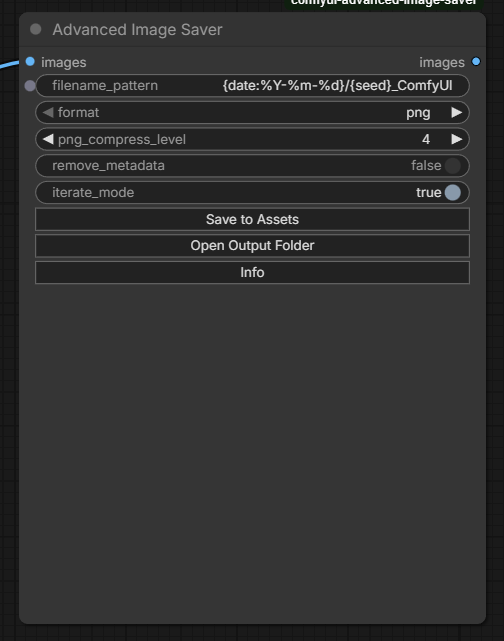
Features
- Formats —
png,jpg,webp,avif,tiff(format-specific widgets hide automatically) - Quality / compression / effort — explained in the in-node Info modal (min ↔ max, what actually changes quality vs only size/speed)
- Metadata — keep or strip Comfy prompt/workflow. DnD restore works for PNG / WebP / AVIF. JPG: EXIF may still be written, but ComfyUI opens Load Image on drop (frontend does not parse JPEG workflow meta). TIFF: no workflow meta.
- Filename pattern —
{seed},{date:%Y-%m-%d},{cfg}, … plus Open Output Folder - iterate_mode OFF — unique files in
output/(native Assets); Save New re-encodes the last frame with new format/meta (no re-gen) - iterate_mode ON — one scratch file in
temp/(no output clutter); Save to Assets promotes a keeper the same way - Batching — queue still saves all frames when iterate is OFF; Save New / Save to Assets only work on the last image. For full-batch re-save use native Save Image.
Install
cd ComfyUI/custom_nodes
git clone https://github.com/StoneZol/comfyui-advanced-image-saver.git
cd comfyui-advanced-image-saver
# into the same Python env ComfyUI uses:
pip install -r requirements.txt
Restart ComfyUI. Node menu: image → Advanced Image Saver.
If
pyvipsfails to load, the node still runs via Pillow (AVIF may need an extra plugin or a working pyvips build).
Quick use
- Connect
images, setfilename_pattern/format/ metadata as you like. - Queue as usual.
- Want another format or strip meta without regenerating?
iterate_modeOFF → change widgets → Save Newiterate_modeON → change widgets → Save to Assets
- Open Output Folder opens Explorer/Finder at the folder your pattern would write to (creates date subfolders if needed).
- Info — tokens, format limits (e.g. WebP max side 16383), quality/compression/effort cheat sheet.
iterate_mode
| Mode | On queue | Manual button |
| --- | --- | --- |
| OFF | Unique file(s) under output/ (full batch) | Save New — another unique file from last frame only |
| ON | Overwrites temp/AIS_iterate_<nodeId>.<ext> (last frame; no Assets spam) | Save to Assets — unique output/ + Assets from last frame |
Batch note: this node is for single-image iterate/re-encode. On queue with iterate OFF every batch frame is written; Save New / Save to Assets only re-encode the last picture. Cleared on Comfy restart — run once again after restart.
Filename pattern (short)
Tokens: {seed} {steps} {cfg} {sampler} {scheduler} {denoise} {model} {checkpoint} {width} {height} {date} {time} {datetime} {counter} {batch} {format} ({fmt} / {ext}).
Optional format: {date:%Y-%m-%d}, {seed:05d}. Use / for subfolders. Missing tokens → unknown.
Example: {date:%Y-%m-%d}/{seed}_{format}_shot
Full list + encode settings: click Info on the node.
License
MIT — see LICENSE.