
ComfyUI-VDN-H3-24GB
24GB-optimized VDN-H3 hybrid attention for MiniMax-H3 in ComfyUI
Nodes (2)
ComfyUI-VDN-H3-24GB
24 GB-oriented MiniMax-H3 VDN runtime for ComfyUI. Version 1.1.0 keeps the validated v49 AutoMemory/AutoLongCache policy and adds three narrowly scoped correctness and memory-safety fixes tested on an RTX 3090 24 GB.
Version 1.1.0
- Restores the released token-refiner attention adapter mapping for ComfyUI's
fused QKV layout. The complete released adapter is now applied (
default=104,turbo=208, previously100/204). - Bounds temporary frame-statistics preparation to approximately 1 GiB by batching complete frames. Token reductions, compute dtypes and output tensors are unchanged.
- Records prefetched INT8/plain storages on the consumer CUDA stream, including
with
cudaMallocAsync, to prevent premature allocator reuse. - Preserves the established v49 solver, AutoMemory, AutoLongCache and Ampere launch presets.
Validated under Windows at 0.4 MP for continuous 5, 10, 15 and 20 second clips, and at 0.8 MP for a 10 second clip. Character/style LoRA composition also completed successfully. See VALIDATION_RESULTS.md for the measured runs and A/B notes.
Visual A/B comparison — 1.0.0 vs 1.1.0
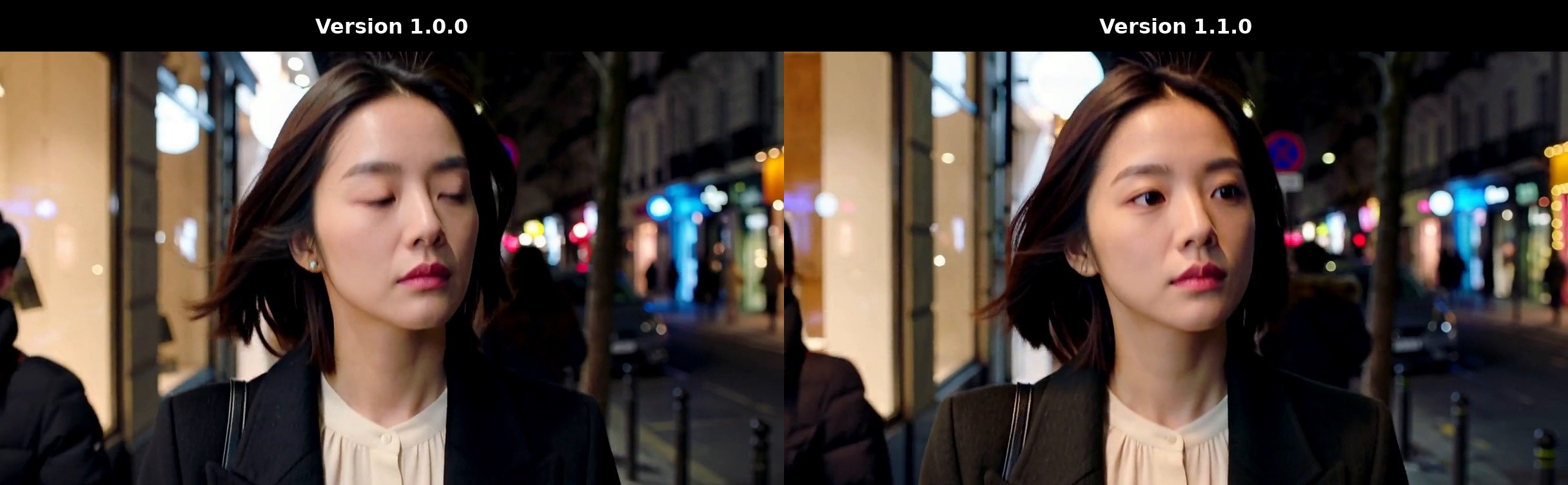
Version 1.0.0 is shown on the left; Version 1.1.0 is shown on the right.
Click the comparison image to open the synchronized video.
Open the comparison video directly
What this release contains
- Unique ComfyUI node IDs:
ApplyVDNH3_24GBandApplyVDNH3Advanced_24GB. - Duration-aware AutoMemory and SHORT/LONG/VERY_LONG residency transitions.
- AutoLongCache for long H3 sequences.
- Selective VDN branch loading and the tested Ampere 24 GB launch profile.
- A reversible MiniMax-H3 block-loop hook installer required by LongCache.
Installation
Extract or clone the repository so the final path is exactly:
<ComfyUI>/custom_nodes/ComfyUI-VDN-H3-24GB/
Inside that folder you should directly see:
__init__.py
vdn_h3_24gb/
tools/
Start_VDN_H3_24GB.bat
Do not leave an extra nested directory such as:
custom_nodes/ComfyUI-VDN-H3-24GB-main/ComfyUI-VDN-H3-24GB/
Check_Installation_24GB.bat can verify the basic layout.
VDN checkpoint
The VDN stage checkpoint is distributed separately on Hugging Face:
speach1sdef178/VDN-H3-INT8-ConvRot-ComfyUI
Download the complete stage directory and place it at:
<ComfyUI>/models/vdn/stage-dmd-step-250-int8_convrot_comfyui/
├─ model_spec.json
├─ linear_branch/
│  └─ model_int8_convrot_comfyui.safetensors
└─ adapters/
   ├─ default/
   │  ├─ adapter_config.json
   │  └─ adapter_model.safetensors
   └─ turbo/
      ├─ adapter_config.json
      └─ adapter_model.safetensors
Do not download only the linear-branch .safetensors. The complete stage needs
model_spec.json and both adapter directories. The VDN stage does not replace
the MiniMax-H3 base diffusion model.
Starting ComfyUI
The included Start_VDN_H3_24GB.bat resolves the ComfyUI root from its own
location and can be run directly from the node folder.
If your ComfyUI uses Conda, either activate the environment first or edit this line near the top of the BAT:
set "VDN_CONDA_ENV="
For example:
set "VDN_CONDA_ENV=ComfyUI_Krea2"
The BAT verifies Python, resolves the hook path, patches/checks the MiniMax block loop, and then starts ComfyUI. If SageAttention is installed, it enables it automatically; otherwise it launches without that flag and warns that performance may differ.
Start_VDN_H3_24GB_CONDA_TEMPLATE.bat is also included as an editable template.
Tested node preset
Use the Apply VDN-H3 24GB Optimized node with:
vdn_checkpoint      = stage-dmd-step-250-int8_convrot_comfyui
apply_turbo_adapter = true
strength            = 1.0
lora_mode           = merge
branch_weights      = stream
retain_buffers      = auto
attention_backend   = grouped
auto_memory_latent  = the SAME H3 latent used by the sampler
Connecting the same latent to auto_memory_latent is required for the tested
duration-aware 24 GB policy. The included example workflow is configured this
way. branch_weights=stream is the validated 24 GB default; auto remains
available for experimentation.
Core hook
LongCache needs a small hook in:
comfy/ldm/minimax/model.py
tools/install_minimax_block_loop_hook.py only patches a recognized
MiniMax-H3 block-loop layout, validates the result with Python AST parsing,
creates model.py.vdn_longcache.bak before the first modification, and is safe
to run repeatedly.
To restore the backup manually:
python custom_nodes\ComfyUI-VDN-H3-24GB\tools\install_minimax_block_loop_hook.py --comfy-ui . --revert
Tested profile
RTX 3090 24 GB, Windows, ComfyUI 0.33.x-era MiniMax-H3 implementation, 0.4 MP, 8-step DMD and H3 FL2VA INT8 ConvRot. Successful version 1.1.0 runs covered 5, 10, 15 and 20 seconds at 0.4 MP, plus 10 seconds at 0.8 MP. This is a tested profile, not a guarantee for every 24 GB GPU or future ComfyUI build.
Compatibility note
The public node IDs and Python package namespace are distinct from other VDN-H3 ports, so both packages can be installed without sharing ComfyUI node IDs. The MiniMax core hook is a shared ComfyUI runtime modification; the installer is idempotent and creates a backup.
License / attribution
This project is derived from the released VideoDeltaNet/OpenVDN work and an
existing ComfyUI VDN-H3 port. Preserve the included LICENSE notices. MiniMax-H3
model weights and VDN checkpoints may have separate licenses; review them before
redistribution or commercial use.