
ComfyUI-MakeSeamlessTexture
Turn images into seamless textures and build tiled previews. Unique radial mask method available.
Nodes (5)
The Photoshop offset filter, done properly — no inpainting required
Seamless by construction — the mirror trick, at the cost of symmetry
Fix the lighting before you even try to make it seamless
The one you'll actually reach for — offset-and-blend that keeps the center
See if your texture actually tiles — a preview that shows you the seams
ComfyUI-MakeSeamlessTexture
A set of nodes for ComfyUI that turn images into seamless textures and build tiled previews.
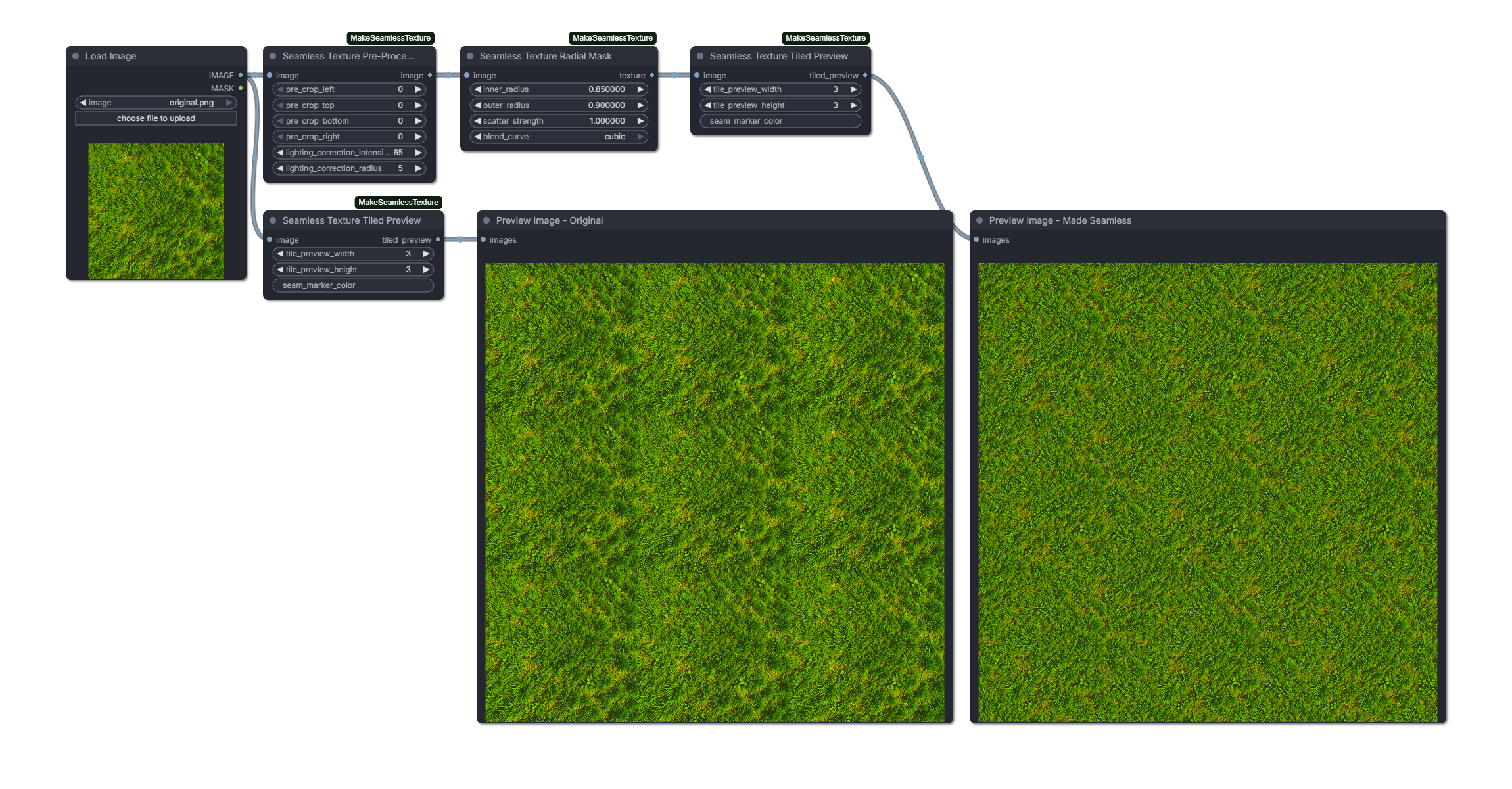
The "radial mask" mode is particularly useful for e.g. preparing game assets. It is inspired by the closed-source technique of the following free web tool:
- https://www.imgonline.com.ua/eng/make-seamless-texture.php
To my knowledge, this extension is the only offline, open-source variation of that technique and it does produce very similar results.
[!TIP] If you're looking to generate textures from scratch: I recommend using a modern architecture like Flux Klein 4b or Z-Image Turbo with ComfyUI-seamless-tiling's circular VAE decoding. However, this may still produce seams and uneven lighting - so you'll want to correct the results with the Seamless Texture Pre-Processor + Radial Mask.
Installation
- Use ComfyUI Manager or clone this repo into
custom_nodes. - Restart ComfyUI after installing.
Seamless Texture Pre-Processor
Pre-crop and optional lighting correction to reduce large-scale brightness gradients before making a texture seamless.
Inputs
image: Image to pre-process.pre_crop_left: Pixels to crop from the left edge.pre_crop_top: Pixels to crop from the top edge.pre_crop_bottom: Pixels to crop from the bottom edge.pre_crop_right: Pixels to crop from the right edge.lighting_correction_intensity: Strength of lighting correction (0 disables).lighting_correction_radius: Blur radius used for lighting correction.
Outputs
IMAGE: The pre-processed image.
Seamless Texture Radial Mask
Offset-and-blend method with a radial mask that preserves the center and blends the edges.
Inputs
image: Image to make seamless.inner_radius: Normalized radius where blending starts. 0 = center, 1 = edge.outer_radius: Normalized radius where blending ends (values > 1 blend past the edge).scatter_strength: Adds organic waviness to the blend boundary.blend_curve: Blend curve for the transition. Options: "cosine", "linear", "smoothstep", "smootherstep", "quadratic", "cubic".
Outputs
IMAGE: The seamless texture.
Seamless Texture Half Shift
Half-shifted blend with simpler seam transitions and optional axis control.
Inputs
image: Image to make seamless.inner_radius: Normalized distance where blending starts.outer_radius: Normalized distance where blending ends.blend_curve: Blend curve for the transition.orientation: Shift direction: "both", "horizontal", or "vertical".
Outputs
IMAGE: The seamless texture.
Seamless Texture Mirrored Collage
Mirrored quadrant collage that produces seamless results with visible symmetry.
Inputs
image: Image to make seamless.blend_curve: Blend curve for smoothing the center cross seam.
Outputs
IMAGE: The seamless texture.
Seamless Texture Tiled Preview
Tiles any image into a preview grid and optionally draws seam markers.
Inputs
image: Image to preview.tile_preview_width: Number of horizontal tiles.tile_preview_height: Number of vertical tiles.seam_marker_color: Seam marker color. Supports hex ("#FF0000"), rgb("rgb(255,0,0)"), rgba("rgba(255,0,0,0.5)"), or color names ("red", "blue"). Leave empty to disable.
Outputs
IMAGE: The tiled preview image.
Dependencies: torch (as provided by ComfyUI).