
ComfyUI-EnumCombo
Workflow-local enumerated values for ComfyUI.
Nodes (2)
ComfyUI-EnumCombo
Workflow-local enum values for ComfyUI.
Purpose
ComfyUI-EnumCombo adds small enum selector nodes for workflows that use named modes but need integer values at runtime.
This is useful for dynamic workflows built around lazy index switches, Set/Get variables, or shared control values. For example, you can define:
TXT2IMG
IMG2IMG
INPAINT
Then select IMG2IMG from a dropdown and pass its integer value to a Set node, a lazy switch index, or any other node that expects an INT.
The goal for me was to replace note-based integer conventions like 0 = TXT2IMG with a readable dropdown while keeping the runtime graph simple and strongly typed.
Versus Other Alternatives
ComfyUI has a Beta node called CustomCombo that allows for the creation of a custom dropdown list. EnumCombo has some advantages over it:
- CustomCombo takes up a lot of space vertically, as each option you add increases the height of the node. With EnumCombo, you can link to your options from a separate node that can be independently collapsed.
- You cannot rearrange the order of CustomCombo options.
- At the time of writing, CustomCombo has a bug where it fails to delete an option after clearing its value. e.g.
value_one / [blank] / value_threewill incorrectly allow the blank option to persist. - CustomCombo seems to break when adding entries with special characters.
- CustomCombo lacks the flexibility of an enum definition, e.g. you cannot re-index entries nor add comments.
There's another alternative called CRZnodes that has a flexible custom dropdown and mapper system, and it can solve a similar problem. ComfyUI-EnumCombo is intentionally narrower:
- No third-party Python dependencies.
- No wildcard output type for the basic enum value.
- No dynamic input sockets or broad graph monkey-patching.
- Strict
INTandSTRINGoutputs where appropriate. - A compact node for common workflows and an advanced node when extra metadata is useful.
Use CRZnodes if you want its broader dashboard-style node set or arbitrary data mapping. Use ComfyUI-EnumCombo when you only need lightweight enum-to-integer workflow controls.
Syntax
Each non-empty line defines one enum member:
OPTION_A
OPTION_B
Values are zero-based by default. Explicit integer assignments reset the next automatic value:
TXT2IMG = 3
IMG2IMG
INPAINT
This produces TXT2IMG = 3, IMG2IMG = 4, and INPAINT = 5.
Quote labels that need spaces:
"Text to Image" = 0
"Image to Image"
"Inpaint Masked Area"
Supported comments:
# line comment
// line comment
/*
block comment
*/
Outputs
Enum Combo outputs:
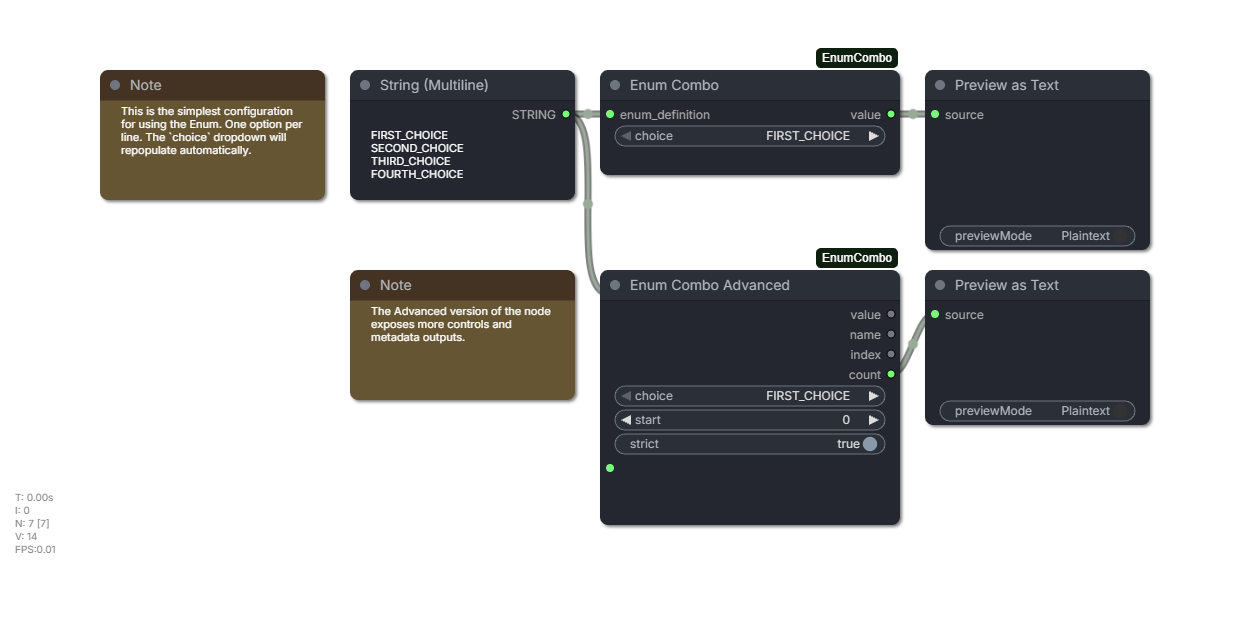
value: selected enum integer value.
Enum Combo Advanced outputs:
value: selected enum integer value.name: selected enum name.index: selected zero-based list position.count: number of enum members.
Nodes
Enum Combo: compact node with a socket-onlyenum_definitioninput and oneINToutput. Its choice dropdown refreshes when the definition link changes, when the linked source widget changes, and before the choice widget opens.Enum Combo Advanced: editable multilineenum_definition,start,strict, and extra metadata outputs.
Subgraphs
An Enum Combo works inside a subgraph definition, including when its
enum_definition comes from a multiline string node in the same definition. The
promoted choice widget on the subgraph node lists the definition's members, and
keeps them in sync if the definition changes.
This is worth knowing if you build similar nodes: ComfyUI stores a deep clone
of the interior widget's options when an input is promoted, so a promoted widget
does not follow later changes to its source, and its options is a getter-only
facade onto the widget value store. This pack re-applies the resolved member list
to promoted widgets directly for that reason.