
ComfyUI Extension
comfyui-ap-wildcards
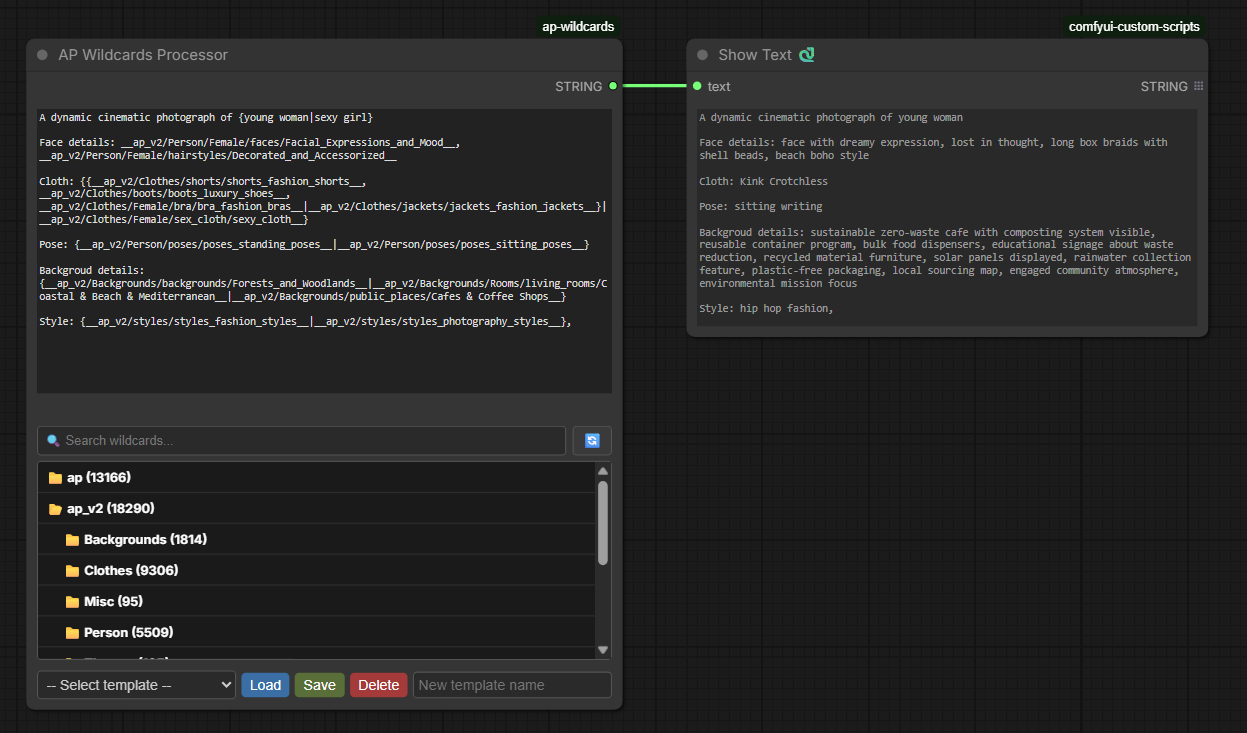
AP-Wildcards is a powerful node for ComfyUI that allows using wildcards (random value substitution) in prompts. Supports hierarchical category organization, search, templates, and complex logical constructs.
Snoopick/comfyui-ap-wildcards
Nodes1
On cloudLocal install
Categoryap/utils
Stars2
Updated6 months ago
Nodes (1)
Readme

🚀 Features
- Nested folders support – JSON files can be organized in any folder depth.
- Hierarchical category picker – tree view with icons 📁/📂 and search.
- Instant insertion – selected category added as
__path/to/category__. - Curly braces handling –
{option1|option2|...}picks a random option. - Nested braces and common suffix – correct handling of deep nesting and suffixes after
|. - Templates – save, load, and delete prompts (stored in
templates.json). - Dynamic height – category block adjusts to node size (60–300px).
- Auto‑created example –
wildcards/example.jsoncreated on first run. - Item counts – displays the number of items in each category.
- Search functionality – search by category name or file path.
- Auto-refresh – automatically updates category list when JSON files change.
- Visual feedback – spinning refresh button with disabled state during update.
- Responsive design – dynamically adjusts to node size changes.
📥 Installation
- Go to
custom_nodesfolder of your ComfyUI. - Clone the repository:
(or download ZIP and extract togit clone https://github.com/yourusername/comfyui-ap-wildcards.gitcustom_nodes/comfyui-ap-wildcards) - Restart ComfyUI.
🗂 Structure
comfyui-ap-wildcards/
├── __init__.py
├── nodes/
│   └── ap_wildcards.py
├── web/
│   └── js/
│       └── ap-wildcards.js
├── wildcards/                (auto‑created)
│   ├── example.json
│   └── your_files.json
└── templates.json            (created when saving a template)
📝 Wildcard file format
{
    "animals": ["cat", "dog", "elephant", "tiger"],
    "colors": ["red", "green", "blue", "yellow"]
}
If the file is inside ap/person/face_types.json, the category will be ap/person/face_types/face_shapes.
🔧 Usage
- Add AP Wildcards Processor node to your workflow.
- Enter text or load a template.
- Find category via search or expand folders.
- Click on category – it will be added as
__category__. - Click Queue Prompt – all
__...__will be replaced with random values.
Curly braces constructs
{cat|dog}→ random choice.{A|B, common suffix}→A, suffixorB, suffix.- Nested braces:
{A|B, {C|D}}processed from innermost outward.
Templates
- Save – enter name in "New template name" field → Save.
- Load – select template → Load.
- Delete – select template → Delete (confirmation).
⚙️ Configuration
- Minimum node height – 400px (set automatically).
- Category block height – 60 to 300px, dynamic.
- Auto‑refresh on JSON file changes.
🐛 Troubleshooting
- Category list not showing – ensure there are JSON files in
wildcards. - Loading error – check browser console (F12) and ComfyUI console.
- Templates not saving – check write permissions in node folder.