
comfyui-ap-tools
A set of useful custom nodes for ComfyUI that improve convenience when working with images, file paths, and execution time.
Nodes (4)

ComfyUI AP Tools
A set of useful custom nodes for ComfyUI that improve convenience when working with images, file paths, and execution time.
📦 Installation
- Navigate to the
custom_nodesfolder of your ComfyUI installation - Clone the repository:
git clone https://github.com/your-username/comfyui-ap-tools.git
- Restart ComfyUI
- Use Manager for installation
✨ Features
The module contains 4 nodes with rich user interface:
🔧 AP Image File Path
Category: ap-tools
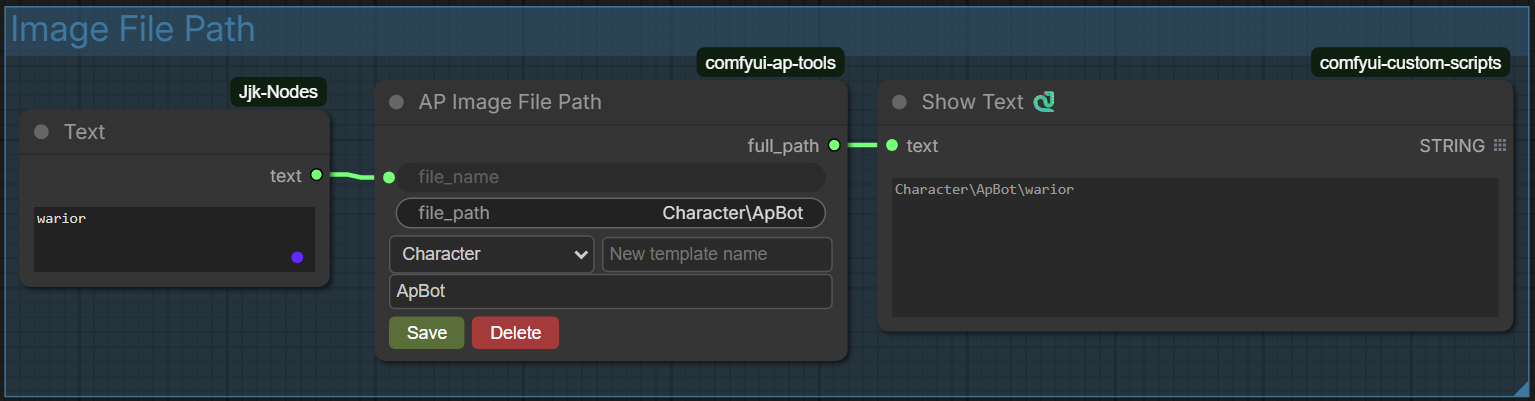
Convenient file path constructor with template support. Allows saving frequently used paths and quickly switching between them.
Inputs:
file_name(STRING): File name without extensionfile_path(STRING): Base path (hidden field, controlled by UI)
Outputs:
full_path(STRING): Full assembled path in Windows format (with backslashes)
Features:
- ✅ Path template manager (save/delete)
- ✅ Automatic combination of base path and file name
- ✅ Relative paths support
- ✅ Settings are saved in node properties
- ✅ Minimum node size: 350x170 pixels
Usage:
- Enter the output file name in the
file_namefield - In the templates section select an existing template or create a new one
- Enter relative path in the path field (it will be added to the selected template)
- Full path is automatically assembled and passed to output
🖼️ AP Image Preview
Category: ap-tools
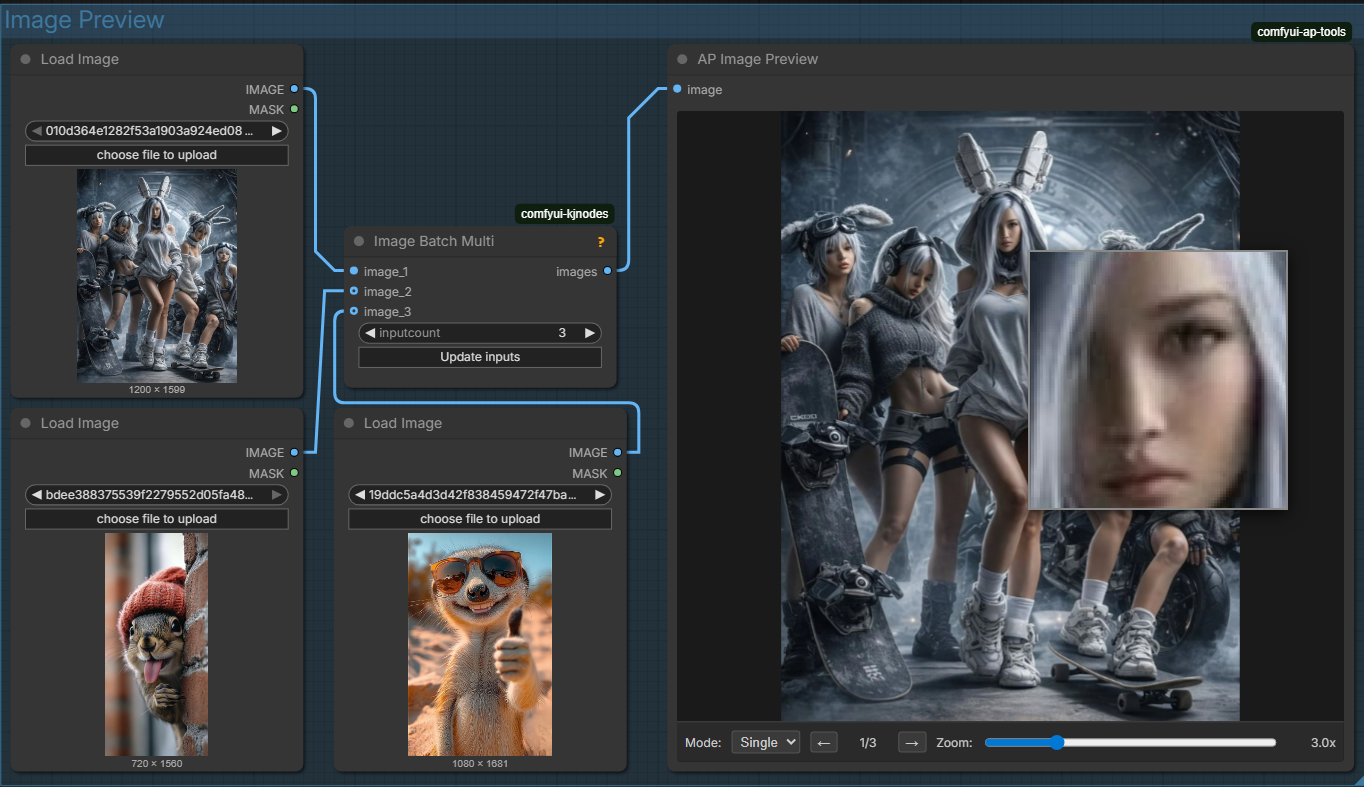
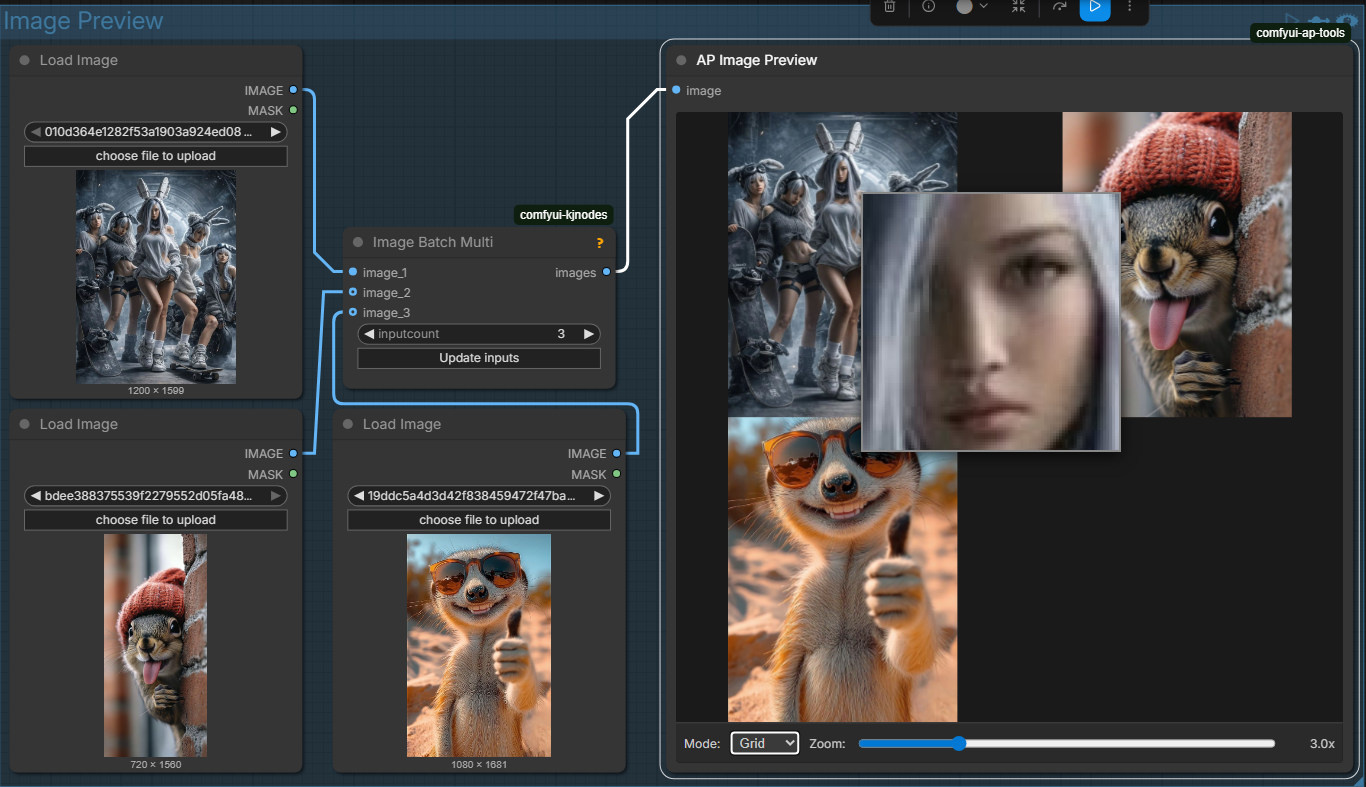
Improved image previewer with zoom, loupe, and grid mode support.
Inputs:
image(IMAGE): Image or image batch for preview
Outputs:
No outputs (display only)
Features:
- ✅ Display modes: Single and Grid
- ✅ Batch image navigation (← → arrows)
- ✅ Scalable loupe (zoom 1.5x - 8.0x)
- ✅ Automatic size fitting to node
- ✅ Browser DPI scaling support
- ✅ Minimum node size: 420x460 pixels
- ✅ Hides standard ComfyUI output
Controls:
- Mode: Switch between single and grid display
- Zoom: Change loupe magnification level
- ← →: Navigate through images in batch
- Mouse hover: Shows loupe with magnified fragment
🔍 AP Image Compare
Category: ap-tools
https://github.com/user-attachments/assets/95954dc6-0af3-4eb9-930e-3bb57473aa06
Tool for comparing two or more images with different modes.
Inputs:
image_1(IMAGE): First image (required)image_2(IMAGE): Second image (required)image_3(IMAGE): Third image (optional)image_4(IMAGE): Fourth image (optional)
Outputs:
No outputs (display only)
Features:
- ✅ Two comparison modes: Overlay and Split
- ✅ Select any two images for comparison from 4 inputs
- ✅ Transparency adjustment in overlay mode
- ✅ Interactive splitter (draggable with mouse)
- ✅ Zooming and panning
- ✅ Center and Reset buttons for quick view reset
- ✅ Minimum node size: 520x500 pixels
- ✅ Mouse wheel for quick zoom
Modes:
- Overlay: First image over second with adjustable transparency
- Split: Vertical splitter that can be dragged to compare details
⏱️ AP Execution Timer
Category: ap-tools
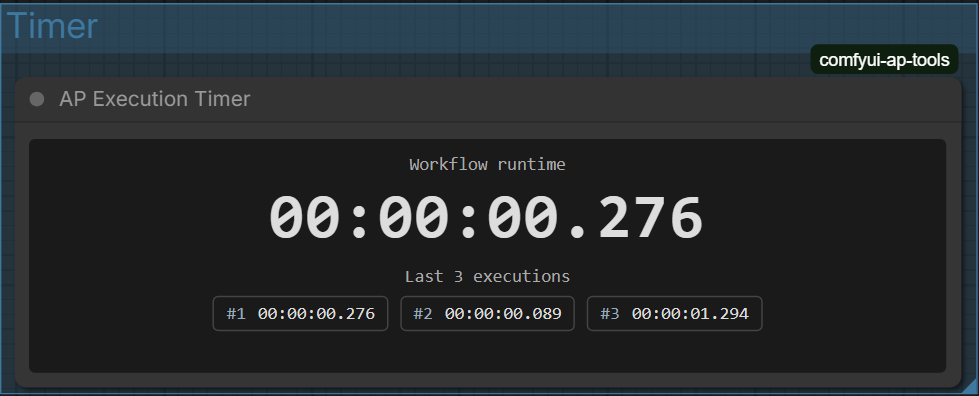
Workflow execution timer with history of recent runs.
Inputs:
No inputs
Outputs:
No outputs (display only)
Features:
- ✅ Real-time from execution start to end
- ✅ History of last 3 runs
- ✅ Time format:
HH:MM:SS.ms - ✅ Automatic start/stop when queue runs
- ✅ Preserves state on page reload
- ✅ Minimum node size: 440x160 pixels
- ✅ Monospace font for easy reading
Display:
- Main counter with millisecond precision
- List of last 3 executions with number and time
📂 Project Structure
comfyui-ap-tools/
├── __init__.py                # Node registration and API endpoints
├── templates.json             # Saved path templates storage
├── nodes/
│   ├── ap_image_file_path.py  # AP Image File Path node logic
│   ├── ap_image_preview.py    # AP Image Preview node logic
│   ├── ap_image_compare.py    # AP Image Compare node logic
│   └── ap_execution_timer.py  # AP Execution Timer node logic
└── web/js/
    ├── ap_image_file_path.js  # Template manager frontend
    ├── ap_image_preview.js    # Previewer with loupe frontend
    ├── ap_image_compare.js    # Image comparison frontend
    └── ap_execution_timer.js  # Timer frontend
🔌 API Endpoints
Module provides following API methods for working with templates:
| Method | Path | Description
|--------|-------------------------------|-------------------------------------
| GET | /ap-tools/templates | Get list of all template names
| GET | /ap-tools/templates/all | Get all templates with paths
| POST | /ap-tools/templates | Save new template
| DELETE | /ap-tools/templates/{name} | Delete template by name
| GET | /ap-tools/execution-timer/uptime | Get ComfyUI uptime
💡 Usage Tips
- AP Image File Path works great with image save nodes — use the
full_pathoutput as input forfilename_prefix - For comparing different generation variants use AP Image Compare — it's much faster than opening images in separate programs
- AP Execution Timer helps optimize workflows — notice execution time grew? Means something can be optimized
- All nodes automatically adapt to ComfyUI interface scale
🛠️ Technical Details
- All nodes use native ComfyUI extension mechanisms
- Frontend written in pure JavaScript without external dependencies
- Path templates are stored in
templates.jsonfile in module root - Timer history is stored locally in browser
localStorage - Only Windows path style is supported (backslashes
\) - Preview and comparison images are saved in ComfyUI temp folder
📋 Requirements
- ComfyUI version 0.1.0 or higher
- Python 3.8+
- Compatible with all operating systems (Windows, Linux, macOS)
🤝 Support
If you found a bug or want to suggest an improvement, create an issue in the repository.