
ComfyUI Extension
Slimy_ImageComparer
A/B image interactive comparison node for ComfyUI with multiple comparison modes (A, B, Slide). (Description by CC)
Slimy-Comfy/Slimy_ImageComparer
Nodes1
On cloudLocal install
CategorySlimy
Stars2
Updated6 months ago
Readme
Slimy_ImageComparer
A/B画像をインタラクティブに比較できる ComfyUI カスタムノードです。 rgthree氏のコードを参考に改良を加えたものです (https://github.com/rgthree/rgthree-comfy)
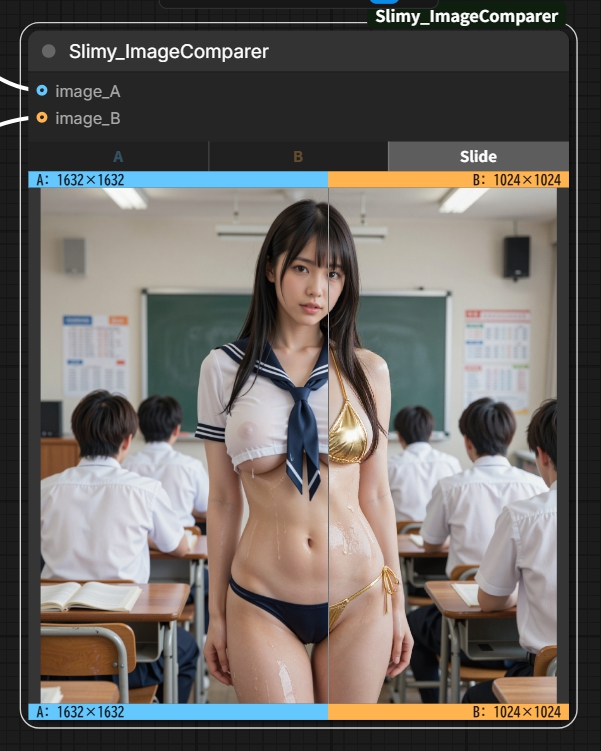
機能
- [ A / B / Slide] の3モードで2枚の画像を比較
- 各画像の解像度をノード上に表示
- A/Bそれぞれ色分けされたラベル付き
インストール
cd ComfyUI/custom_nodes
git clone https://github.com/Slimy-Comfy/Slimy_ImageComparer
その後 ComfyUI を再起動してください。
使い方
- ノード追加メニューから
Slimyカテゴリを開く - Slimy_ImageComparer を追加
image_Aとimage_Bに比較したい画像を接続- ノード上部のボタンでモードを切り替え
- 表示されている画像を保存したい場合は、画像を右クリックで「画像Aをコピー/画像Aを保存/画像Aを開く」といったメニューが利用できます
| モード | 動作 | |--------|------| | A | 画像Aのみ表示 | | B | 画像Bのみ表示 | | Slide | スライダーでA/Bを分割比較 |
動作環境
- ComfyUI(最新版推奨)
- 追加の pip インストールは不要
ライセンス
MIT