
Slimy_CueTimer
Queue progress monitor accessory for ComfyUI that displays rendering progress, processing speed, history, and KSampler preview in a single node. (Description by CC)
Slimy_CueTimer
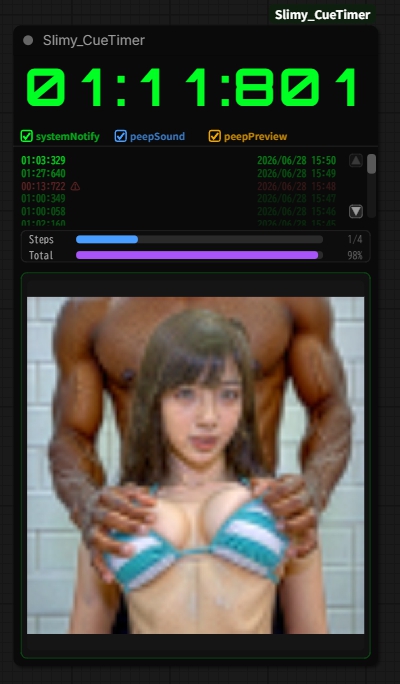
A progress monitor node for ComfyUI.
Monitor rendering progress, processing speed, render history, and live previews from a single node.
Features
- PeepPreview displays live previews even when the KSampler is running inside a subgraph.
- No node connections are required, so the node can be placed anywhere in your workflow.
Main Functions
Progress Display
- Steps progress bar
- Total progress bar
- Processing speed (it/s)
- Completion percentage (%)
- Elapsed time
- Estimated remaining time
Note: The Total progress bar estimates overall progress and remaining time based on recent rendering history.
History
- Displays the latest five render jobs
- Scroll through history using the ▲▼ buttons
- History is retained after rendering completes
PeepPreview
Displays the current render in real time.
The preview can be shown or hidden at any time.
Even when the preview is hidden, the progress bars and history remain visible.
Notifications
- SystemNotify – Displays a system notification when rendering finishes.
- PeepSound – Plays a notification sound when rendering finishes.
- AutoQueue – Automatically starts the next queued job after the current one completes.
Desktop Widget (optional)
DesktopApp/CueTimerDesktop.exe launches the Windows desktop widget. Keep CueTimerDesktop.exe and CueTimerDesktop.ps1 in the same folder. The widget mirrors CueTimer progress/preview, can jump to an existing ComfyUI browser tab, and shows the final video when available.
The public GitHub build has the private Email feature disabled (
ENABLE_EMAIL = False).
Typical Uses
- Monitoring long rendering jobs
- Tracking batch processing progress
- Watching generated images in real time
- Estimating render completion time
Requirements
- ComfyUI
- Slimy Custom Nodes
Changelog
v1.0
- Steps and Total progress bars
- Five-entry render history
- History scroll buttons
- PeepPreview
- Preview show/hide toggle
- SystemNotify
- PeepSound
- AutoQueue
- Elapsed time, remaining time, and processing speed display