
Grok Prompt Forge (xAI)
NEW VERSION UNDER: https://registry.comfy.org/publishers/slartibart23b/nodes/prompt-writer-grok-api-and-llm-gguf ComfyUI nodes for the xAI Grok API: turn ideas or captions (any language) into optimal English prompts for Krea 2, Qwen-Image 2.1, Z-Image, FLUX, Illustrious, Pony, SDXL, Wan and MiniMax H3 — editable, savable task presets, up to three reference images, standard negative prompts, LoRA caption refinement and image captioning.
Nodes (6)
The little file that decides what your API node actually does
Crank a folder of ideas through your queue, one run at a time
A rewrite node whose job you get to define
Point it at an image, get a caption back
comfyui-grok-prompt-forge
[!IMPORTANT] This repository has moved and is archived. Development continues as prompt-writer-grok-api-and-llm-gguf (Prompt Writer – Grok API & LLM GGUF). It adds a local uncensored LLM (GGUF) besides the Grok API, persons, style blocks, a prompt archive and more.
To switch: delete
ComfyUI/custom_nodes/comfyui-grok-prompt-forge, then install the new pack. The main nodes keep their IDs, so your workflows load unchanged, and your presets stay inComfyUI/user/grok_prompt_forge/. The new pack no longer contains the legacy Grok Text Refine and Grok Vision Caption nodes.
ComfyUI custom node pack for the official xAI Grok API (OpenAI-compatible endpoint https://api.x.ai/v1). Its main node, Grok Prompt Forge (xAI), takes a short idea or an existing caption, in any language, and writes an English prompt tuned for the target model. It can also rewrite captions for LoRA training and caption images.
- Presets per target model: each target model has its own task preset with a matching system prompt, standard negative prompt and sampling settings.
- Your own persons and style blocks: pick them from a local library and they appear in every prompt, with every action clearly assigned by name.
- Grok Show Prompt displays the result with a word count.
- English or German: the nodes can be shown in either language. Hover over any option for a beginner-friendly explanation.
Screenshots
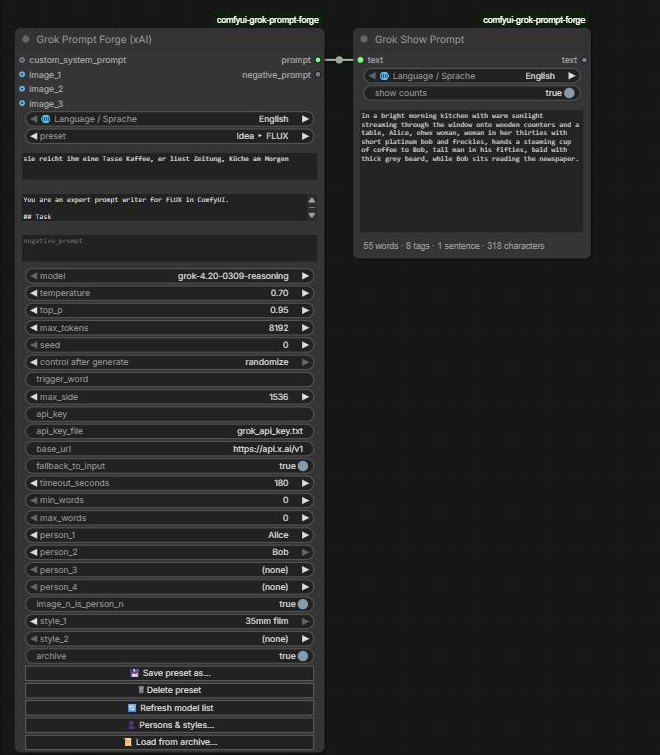
Grok Prompt Forge turns a German idea into a FLUX prompt featuring two persons from the library. Grok Show Prompt displays the result with its counts.
| Persons & style blocks | Prompt archive |
|---|---|
|  |
|  |
|
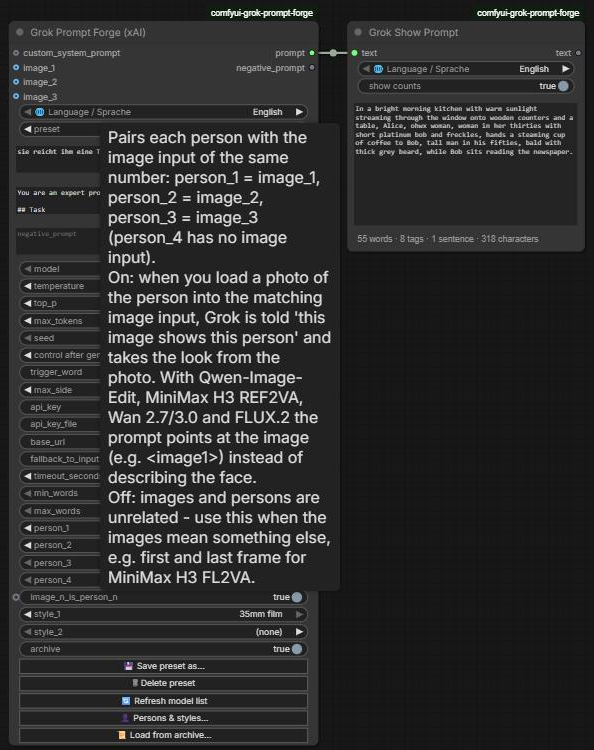
Every option has a tooltip. The language switch at the top of each node also shows everything in German.
Typical pipelines
Idea -> prompt:
[your idea, any language] -> [Grok Prompt Forge: "Idea ▸ FLUX"] -> prompt -> [Grok Show Prompt] -> [CLIP Text Encode +]
                                                                  -> negative_prompt ------------> [CLIP Text Encode -]

Caption rewriting (batch):
[Text File Loader] -> [Grok Prompt Forge: "Caption ▸ LoRA training caption"] -> [Save Text File]

Edit instruction with reference images:
[Load Image] x2 -> image_1, image_2 -> [Grok Prompt Forge: "Idea ▸ Qwen-Image-Edit 2.1"] -> [Qwen edit workflow]
Nodes
| Node | Purpose |
|---|---|
| Grok Prompt Forge (xAI) | One node for prompt writing, caption rewriting and image captioning. It has three optional image inputs, a custom system prompt input and 30 built-in task presets. You can save your own presets under any name, pick up to four persons and two style blocks from your own library, and reload results from the prompt archive. Outputs prompt and negative_prompt. |
| Grok Show Prompt | Shows a text on the node and passes it on unchanged, e.g. between Grok Prompt Forge and CLIP Text Encode. Below the text, a status line counts words, tags (comma-separated parts), sentences and characters. It can be switched off with "show counts". The counting is done locally, needs no API call, and never re-runs anything. The last text is kept with the workflow. |
| Grok System Prompt Loader | Loads a system prompt from a .txt file and reloads it automatically when the file changes. Connect it to custom_system_prompt. |
| Grok Text File Loader (Batch) | Loads .txt files from any folder one after another, in natural sort order, for batch runs. Outputs the text, the filename without extension, the full path and the file count. |
| Grok Text Refine / Grok Vision Caption (legacy) | The two separate API nodes from v2. They are still registered so existing workflows keep loading and running, but they are hidden from the node search. Their tasks are now done by Grok Prompt Forge. |
Grok Prompt Forge (xAI)
Language
The switch 🌐 Language / Sprache at the top of Grok Prompt Forge and Grok Show Prompt shows the nodes in English or Deutsch: field labels, tooltips, inputs and outputs, buttons, dialogs, notifications and preset notes.
- It only changes what you see. It is not saved in the workflow and it doesn't re-run a node. Your choice is remembered in the browser and applies to all nodes of this pack.
- Preset names stay English because they are saved in workflows.
- The system prompts sent to Grok and the generated prompt stay English.
- The short node description shown when you hover over a node's title stays English, because ComfyUI keeps it read-only.
Presets
Choosing a preset fills system_prompt, negative_prompt, temperature, top_p and max_tokens with values tuned for that task, and a short note about the preset pops up. You can change any of these values on the node.
- 💾 Save preset as... stores the current values under a name you choose.
- The presets are saved in
ComfyUI/user/grok_prompt_forge/presets.json, so they survive updates of the pack. - Saving under the name of a built-in preset replaces its values on your install.
- The presets are saved in
- 🗑 Delete preset removes one of your presets. On an overridden built-in preset it restores the built-in values.
- 🔄 Refresh model list reloads the model dropdown from the xAI API. The list is also refreshed in the background every time ComfyUI starts.
The preset only labels the values. The node always runs with the values shown in its fields, so a workflow shared with someone who doesn't have your presets still runs unchanged.
| Preset | What it does |
|---|---|
| Custom system prompt | Your own system prompt. Left empty, only the node's own rules are sent (see below). |
| Caption ▸ LoRA training caption | Refines a raw caption (e.g. from JoyCaption) into a training caption. If you put your LoRA's trigger token into trigger_word, the subject's fixed traits are removed so they bind to that token. |
| Caption ▸ Describe image | Captions image_1. Optional text adds extra instructions or a question about the image. |
| Recast ▸ Swap persons | Swaps the persons in an existing prompt for the selected person_1..4; everything else stays (see below). |
| Idea ▸ target | Expands a short idea into a full prompt for the target model. |
| Caption ▸ target | Rewrites an existing caption faithfully (nothing new is added) into the target model's prompt style. |
Targets: Krea 2 · Qwen-Image 2.1 · Qwen-Image-Edit 2.1 · Z-Image · FLUX · Illustrious · Pony · SDXL · Wan 2.2 · Wan 2.7 · Wan 3.0 · MiniMax H3 FL2VA · MiniMax H3 REF2VA
| Target | Prompt style | Standard negative prompt |
|---|---|---|
| Krea 2 | One natural-language paragraph, 60–200 words; text to render goes in quotes | Generic. Only used by Raw at CFG > 1; Turbo runs at CFG 0. |
| Qwen-Image 2.1 | Observer-style paragraph of about 400–500 words that walks through the frame and ends with "The overall composition …" | Official Qwen negative (Chinese). Ignored at CFG 1. |
| Qwen-Image-Edit 2.1 | Edit instruction that refers to the inputs as <image1>…<image3>, plus one preservation clause | none (CFG 1) |
| Z-Image | Long natural-language description; constraints phrased positively | Generic. Only used by Base; Turbo has no CFG. |
| FLUX (FLUX.2 / FLUX.1) | Subject → action → style → context, 30–80 words | none (FLUX does not support negatives) |
| Illustrious | Danbooru tags, quality tags first | Official Illustrious negative |
| Pony | score_9, score_8_up, … + source and rating tags + short description + tags | Community standard |
| SDXL | Short sentence + comma phrases, 30–75 words | Community standard |
| Wan 2.2 | T2V: cinematic setting terms + subject + detailed motion. I2V (start frame on image_1): motion and camera only | Official Wan negative (Chinese) |
| Wan 2.7 / 3.0 | Entity + scene + motion + aesthetics + sound; multi-shot Shot 1 [0-3s]; references as "Image 1" | Official Wan negative (Chinese) |
| MiniMax H3 FL2VA | Alignment line + integrated_multimodal_description / overall_soundscape / non_diegetic_music; image_1 = first frame, image_2 = last frame | none |
| MiniMax H3 REF2VA | The six full-reference sections with <Subject N> / <Picture N> labels; image_1..3 = reference pictures | none |
The guides inside the presets follow each model's official sources:
- Krea 2:
docs/prompting.mdanddocs/expansion.txt - Qwen-Image 2.1: the PE-T2I and PE-I2I rewriter prompts
- Z-Image: the official prompt enhancer
- FLUX: BFL's FLUX.2 prompting guide
- Wan 2.2:
system_prompt.py - Wan 2.7 / 3.0: the Alibaba Model Studio video guide
- MiniMax H3: its own prompt-writing guides
For Illustrious, Pony and SDXL they follow the model cards plus established community practice. For Wan 3.0 there is little model-specific guidance yet, so its preset follows the Wan 2.7 guide.
Inputs
| Input | Meaning |
|---|---|
| text | Your input in any language: an idea, a caption or an edit request. You can type it or connect a string. The output is always English. Only text that should appear in the picture and spoken dialogue stay in their original language. |
| custom_system_prompt | When connected and not empty, it always replaces the preset's system prompt. |
| image_1 … image_3 | Optional single images, not batches; only the first image of a batch is used. Grok sees each one as "Image N" by its slot number, so an empty slot doesn't shift the numbering. The tooltip explains how each preset uses them. |
| trigger_word | Trigger token for "Caption ▸ LoRA training caption". It replaces {trigger} in the system prompt. |
| negative_prompt | Passed straight to the negative_prompt output. It is not sent to Grok. |
| min_words / max_words | Optional length of the result, 0 = off. The tooltip shows the length recommended for the selected preset's target model. When set, the range is binding and overrides the preset's length guidance. Tag lists count each tag as one word; MiniMax H3 formats apply the range to the main description. |
Persons, style blocks and the archive
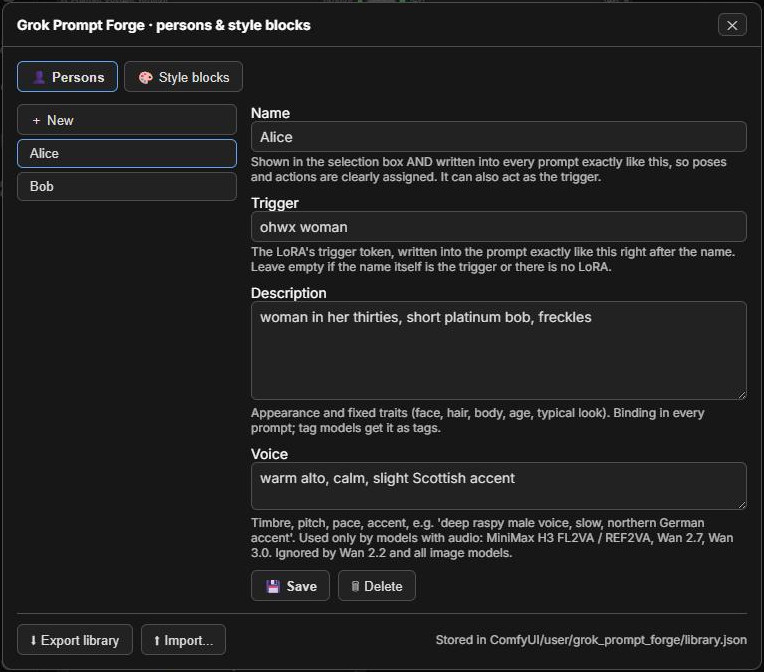
👤 Persons & styles... opens your library. It is stored in ComfyUI/user/grok_prompt_forge/library.json, so your characters never end up in the node pack or a repository.
| Library entry | Fields | Used by |
|---|---|---|
| Person | Name: written into every prompt exactly as given, so every pose and action is clearly assigned; it can also act as the trigger. Trigger: the LoRA's trigger token, written right after the name (leave it empty if the name is the trigger). Description: appearance and fixed traits, binding. Voice: timbre, pitch, pace, accent. | person_1 … person_4. The voice is used only by MiniMax H3 FL2VA / REF2VA, Wan 2.7 and Wan 3.0, the models with audio. |
| Style block | Text: e.g. a camera look, a lighting mood or a ban list | style_1, style_2; applied to every result |
-
Using persons in your text: refer to a selected person by name or as "Person 1"…"Person 4". Selected persons always appear in the result, even if the text doesn't mention them.
- Each person is introduced once as "name, trigger, description".
- After that, every pose, action, gaze and line of dialogue is attributed to a person by name, with no ambiguous "she" or "the woman" when several persons are present.
- Tag models (Pony, Illustrious, SDXL) get the name first, then the trigger, then the description as tags.
-
image_n_is_person_n(on by default) pairs each person with the image input of the same number:person_1=image_1,person_2=image_2,person_3=image_3.person_4has no image input.- Load a photo of the person into the matching image input, and Grok takes the look from it.
- With Qwen-Image-Edit (
<imageN>), MiniMax H3 REF2VA (<Picture N>), Wan 2.7 / 3.0 reference-to-video ("Image N") and FLUX.2 multi-reference, the prompt points at the image instead of describing the face. - Turn it off when the images mean something else, e.g. the first and last frame of H3 FL2VA.
-
Export / Import in the dialog moves the library between installs. On import you choose whether names that already exist are replaced or kept.
-
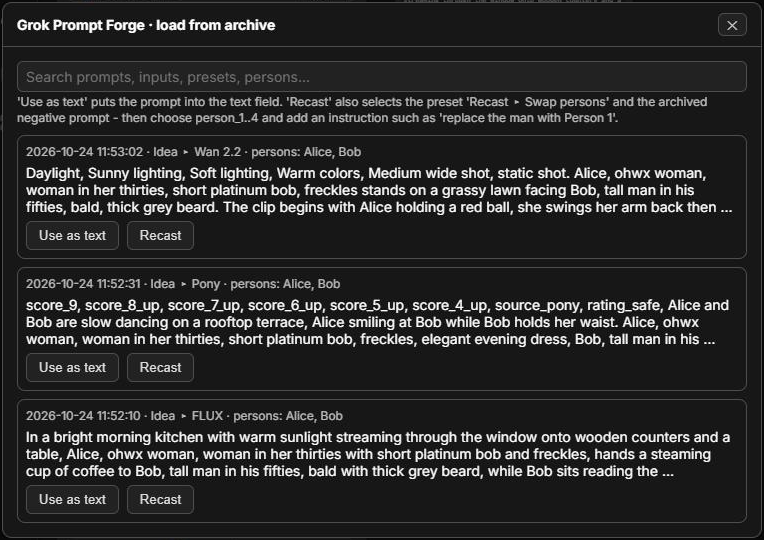
Archive: with
archiveon, every result is appended toComfyUI/user/grok_prompt_forge/archive.jsonltogether with its input, preset, persons and settings. 📜 Load from archive... searches it:- Use as text puts an archived prompt into
text. - Recast also selects the preset "Recast ▸ Swap persons" and the archived negative prompt.
Then pick the new person(s) and add an instruction such as "replace the man with Person 1". The action, background, lighting, camera, style and format stay as they are; only the person changes, including pronouns and gendered details.
- Use as text puts an archived prompt into
Rules added to every request
These rules are appended to every system prompt, whether built-in, edited or connected via custom_system_prompt. The two below always apply; the persons and the selected style blocks are added as binding sections in the same way.
- The user's input is binding. Every explicit wish or instruction in
textis carried out, for example "no people", "night scene" or "write it as one sentence without score tags". If it conflicts with the preset's guidance, the input wins. Only the output format and the English-output rule stay. - Length, only if
min_wordsormax_wordsis set.
The console logs the word and tag count of each result whenever a range is set. Reasoning models count well but not perfectly, so expect an occasional miss of a few words.
Model
The default model is grok-4.20-0309-reasoning. Tested against the API on 2026-10-24:
- It accepts
temperatureandtop_p. - It rejects
presence_penalty,frequency_penaltyandreasoning_effort, so Grok Prompt Forge has no penalty settings. - It thinks before answering, and the hidden reasoning counts against
max_tokens. An edit instruction took about 3 500 reasoning tokens. The presets therefore use 8192–12288; you only pay for the tokens actually used. - If
max_tokensruns out before any answer is written, the node reports it clearly instead of returning an empty string.
The model dropdown lists every model your key can use with these nodes. It is loaded from the API at start-up and on 🔄 Refresh model list, and cached in ComfyUI/user/grok_prompt_forge/models.json.
Multi-agent models such as grok-4.20-multi-agent-0309 are left out. The API rejects them on chat completions ("Multi Agent requests are not allowed on chat completions"), which these nodes use. They are research models that run several agents in parallel to search and cross-check facts, so they bring nothing for prompt writing.
Sampling: temperature and top_p
Every time the model writes a word, it ranks all candidate words by probability and draws one.
- temperature reshapes the dice. Low values (0.1–0.4) almost always pick the top-ranked word, so the output is faithful and repeatable. Use them for caption rewriting and edit instructions. High values (0.7–1.0) give unusual words a real chance, so ideas get expanded in varied ways. Above about 1.3, grammar falls apart.
- top_p removes dice faces. It keeps only the most likely words up to the probability share
pand throws away the rest entirely. Keep it high (0.9–1.0) and steer with temperature. At1.0it is not sent at all.
The preset values follow what official prompt enhancers use:
- Qwen-Image's rewriter: 1.0 / 0.95
- Z-Image: 0.7 / 0.8
- Hunyuan: 0.7 for T2I, 0.1 for edits
- FLUX.2: 0.15
| Task | temperature | top_p | |---|---|---| | Idea ▸ image models | 0.7 – 0.8 | 0.9 – 0.95 | | Idea ▸ video models | 0.8 (H3: 0.6, strict format) | 0.95 | | Idea ▸ Qwen-Image-Edit | 0.3 | off | | Caption ▸ … (faithful rewrite) | 0.2 – 0.4 | off | | LoRA training caption / describe image | 0.2 / 0.3 | off |
What sampling can not fix
Sampling only adds variety at the word level. It cannot stop the model from favouring the same motifs, like golden-hour backdrops or centered poses. If your images still look alike:
- Add a ban list to the system prompt. For example:
Never use: golden hour, neon lights, rain-slicked streets, .... Save the result as your own preset. - Feed randomness in. Put randomized scene ingredients into
text, using wildcard nodes or the Text File Loader withloop_at_end.
seed (cache-breaker)
The seed is not sent to the API. ComfyUI only re-runs a node when one of its inputs changed.
- randomize: a fresh prompt on every queue run.
- fixed: identical input reuses the cached result. This saves money when rewriting captions.
Installation (Windows, Portable ComfyUI)
- Clone or copy this folder into
ComfyUI\custom_nodes\, so you getComfyUI\custom_nodes\comfyui-grok-prompt-forge\. - Install the dependencies; they are usually already present. From the portable root:
python_embeded\python.exe -m pip install requests Pillow numpy - Restart ComfyUI. The nodes appear under Grok → Text.
Upgrading from v2: existing workflows load unchanged, because the legacy nodes keep their IDs. For new workflows, use Grok Prompt Forge.
Upgrading within v3: new fields are always added at the end of the node, so workflows saved with an older 3.x version keep their values in place. See CHANGELOG.md for what changed.
API key setup
Get a key at https://console.x.ai. The key is looked up in this order:
-
api_keywidget. Not recommended, because the key would be saved inside exported workflows. -
Environment variable
XAI_API_KEY. -
Key file (recommended):
grok_api_key.txt, containing only the key. It is searched for in:- the ComfyUI root (next to
main.py) - the portable root (next to
run_nvidia_gpu.bat) - this pack's folder
Beware Windows hiding file extensions: make sure the file is not named
grok_api_key.txt.txt. - the ComfyUI root (next to
Never share workflows or screenshots containing your key.
Tests
Offline tests need no key, network or ComfyUI. Run them from the pack folder:
..\..\..\python_embeded\python.exe -m unittest discover -s tests -v
Notes
- The xAI API is a paid service billed per token. A prompt costs a fraction of a cent; images and long reasoning cost a bit more.
docs/NOTE_settings_guide.txtis a plain-text version of the sampling guide, sized to paste into a ComfyUI Note node.- If the API fails,
fallback_to_inputpasses the input text through so batch runs keep going. Check the console log for the reason. - Your presets, persons, style blocks, archive and model cache live in
ComfyUI/user/grok_prompt_forge/. Nothing personal is ever written into this node pack's folder.
License
MIT