
ComfyUI Silver Nodes
A collection of utility nodes for ComfyUI that enhance workflow capabilities with advanced loaders and processing tools.
Nodes (24)
Pull Live Text From Any URL Straight Into Your Prompt
Free Random Reference Images From CivitAI's Public API — No Key Required
The Reset Button for Silver's Shared Model Cache
Stop Re-Reading Your UNet on Every Prompt
Feed Prompts From a Text File and Step Through Them One Queue Run at a Time
A Random Real Photo From Flickr, Filtered by Search, Style, and Date
Hand You File Paths Out of a Folder — and Wait for New Ones If You Ask Nicely
Walk a Folder of Images in Order, or Batch Them, Without a Single Dropdown Edit
Extract Frames — and the Audio Track — From a Video in Your Folder
A dozen MiniMax-H3 clips without paying the model-reload tax twelve times
The two-second adapter that adds one more clip to a batch
One text box, forty prompts, five clips at a time
Fix ten seconds of a video instead of re-shooting the whole thing
Making MiniMax-H3 hold one shot for a minute and a half
Hand the model a clip and ask it to change one thing
The LoRA 'Loader' That Cycles Through Your Whole Folder So You Don't Have To
CPU Voice Cloning Straight Into ComfyUI
The Six-Line Node That Picks a Random Item From Any List
Stock Photos in ComfyUI, No API Key Required
Swap a Word in Your Prompt for a Random Pick — Your Mini Wildcard Engine
Keep Your Text Encoder Warm Between Prompts
Grab a Fresh Image From Any Direct URL — Built for /random/ Endpoints
N talking-head clips from one audio track — and yes, the node tells you it's untested
Pull the Biggest Real Photo Off a Webpage (and Skip the Logos)
ComfyUI Silver Nodes
A collection of utility nodes for ComfyUI that enhance workflow capabilities with advanced loaders and processing tools.
Documentation
The repo keeps deep-dive docs in companion markdown files alongside this README:
- H3BATCH.md - living design/usage reference for the H3 Batch and Staged long-form nodes (continuity modes, audio spine, refs/keyframe conflict, griding). Updated as those nodes evolve.
- CHANGELOG.md - detailed per-feature changelog (the README's changelog section is only the brief summary).
- PERFORMANCE_INVESTIGATION.md - notes from a ComfyUI performance/VRAM-regression investigation on the developer's RTX 3060 box (driver/torch/hardware specifics and measurements).
Features
Silver Nodes provides several specialized nodes designed to improve your ComfyUI workflows:
Loading Nodes
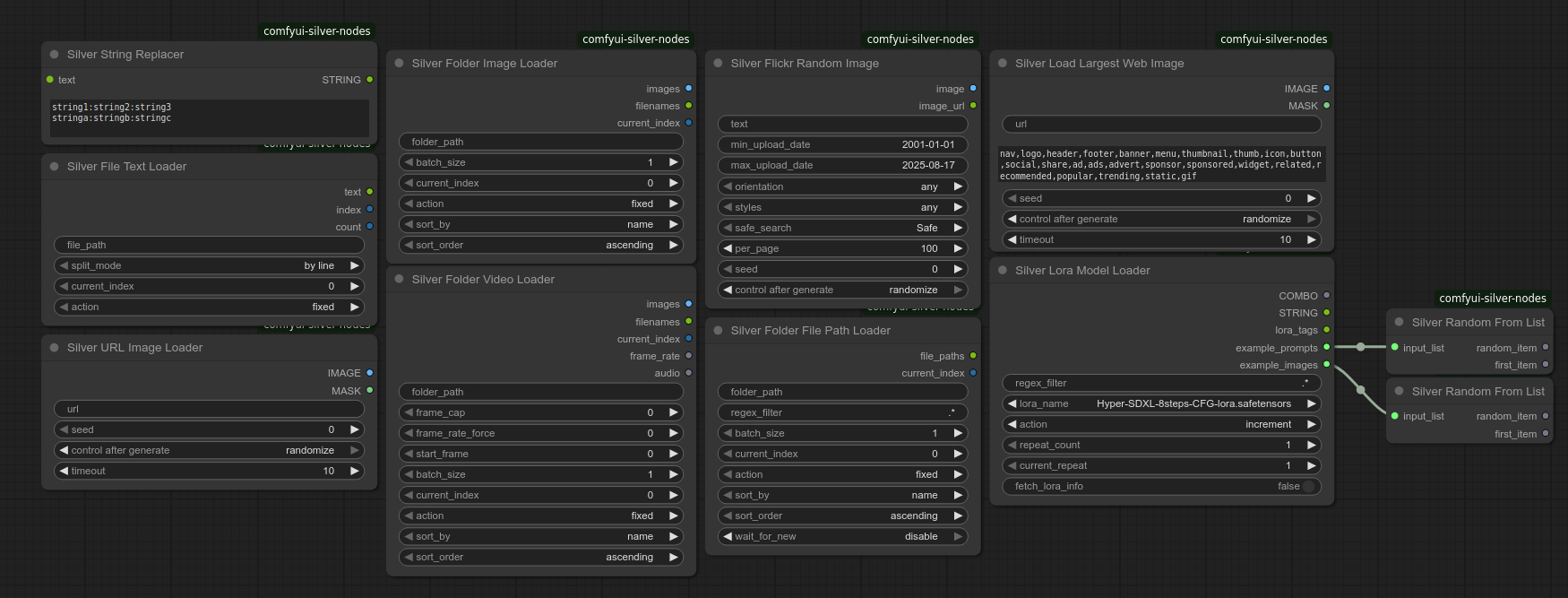
Silver URL Image Loader
Load images directly from URLs with cache busting and duplicate prevention. Designed to work with /random/ URLs for img2img processing.
- Features:
- Cache busting with random query parameters to prevent caching
- Duplicate detection using content hashing
- Retry mechanism for failed downloads (5 attempts by default)
- Supports common image formats (JPEG, PNG, WebP, etc.)
- Tracks previously loaded images to avoid duplicates
- Note: If image loading fails after all retry attempts, the entire workflow execution will be skipped to prevent partial processing
Silver Web Image Loader
Extract and download images from webpages with smart selection. Optimized for /random/ URL endpoints that serve random images.
- Features:
- Analyzes webpage for images with size information
- Filters out non-content images (icons, buttons, logos, ads, etc.)
- Handles lazy-loaded images and responsive designs
- Note: "Largest" is determined by HTML attributes, not actual download size
Silver Folder Image Loader
Load images from folders with advanced sorting and batching.
- Features:
- Batch loading of multiple images
- Sorting by name, date modified, or file size
- Sequential or random access patterns
- Recursive directory scanning
- Image format detection and filtering
Silver Folder Video Loader
Load and process video frames with audio extraction.
- Features:
- Frame extraction with configurable frame rate
- Audio track extraction
- Support for common video formats (MP4, AVI, MOV, etc.)
- Frame skipping and batching
- Memory-efficient processing
Silver File Text Loader (Beta)
Load and process text files with encoding detection.
⚠️ Note: This node is currently in beta and has not been fully tested. Some edge cases may not be handled correctly.
- Features:
- Automatic encoding detection
- Support for multiple text formats (TXT, JSON, CSV, etc.)
- Line or paragraph splitting
- Large file handling
- Error handling for malformed files
Silver Folder File Path Loader
Get file paths from folders with regex filtering.
- Features:
- Recursive directory scanning
- Regex pattern matching
- Sorting and filtering options
- Batch processing support
- File type filtering
Processing Nodes
- Silver String Replacer: Perform text replacements using pattern matching with support for random selection from multiple alternatives
- Silver Lora Model Loader: Advanced LORA model loading with filtering and cycling
Media Nodes
Silver Flickr Random Image
Fetch random images from Flickr based on search criteria.
- Features:
- Search by keywords, date ranges, and orientation
- Safe search filtering
- Duplicate prevention
- Configurable image quality
- Attribution handling
- Requirements:
- Requires a valid Flickr API key
- Respects Flickr's rate limits
- Includes proper attribution in output
Sampling Nodes
- Silver H3 Staged Multishot: Long-form MiniMax-H3 video+audio sampler - encode once, sample once, decode once (detailed section below)
Core Features
- Resource Management: Memory-efficient loading with configurable caching and automatic cleanup
- Batch Processing: Parallel processing with progress tracking and memory monitoring
- Sequential Processing: Multiple iteration strategies with state preservation
- Sorting Options: Sort by various file attributes with natural sorting support
- Error Handling: Graceful degradation with detailed logging and retry mechanisms
Installation
-
Clone this repository into your ComfyUI
custom_nodesdirectory:cd ComfyUI/custom_nodes git clone https://github.com/yourusername/comfyui-silver-nodes.git -
Restart ComfyUI
Nodes
Silver H3 Staged vs Silver H3 Batch
Both nodes stage the work into the same three phases (encode -> sample -> decode) and cut the dominant cost the same way - the text encoder loads exactly once for the whole run. Only Batch keeps the full "each model loads exactly once" discipline (~2 swaps total). Staged cannot: its join chain works on decoded pixels (each finished shot's tail must be decoded and re-encoded as the next shot's keyframe/ref), and that forces a model swap at every join. They are built for different jobs:
| | Staged Multishot | Batch | |---|---|---| | Output | ONE continuous long-form take | N independent clips | | Prompts | N scenes of the same take | N unrelated videos | | Inter-shot continuity | join keyframes / latent handoff, audio lock, onset guard | none - clips share nothing | | Re-rolling | whole chain (deterministic start-to-finish) | any single clip | | Generation time per entry | slightly higher - handoff injection adds per-step ops | baseline |
Staged chains its shots into a single video: each shot re-wakes inside the previous tail latent (latent_handoff, the default) or, when a start_image is provided, opens on the previous shot's actual last frame (native keyframe channel); the audio spine is locked across every join, and the seams are trimmed and crossfaded into one master. It is the "do it right" long-form tool - continuity is engineered in - at the price of coupled, slightly more expensive shots that cannot be re-rendered independently (a bad shot 3 means re-running the chain).
Batch renders N standalone videos from N independent prompts with the same one-load-each discipline, so a 12-clip batch costs ~2 model swaps instead of ~3 x 12. It is the cheaper long-form approximation when roughly-stable identity is good enough: combine_videos stitches the clips frame-to-frame with the raw guide track laid over the whole master, but there is no cross-shot conditioning, so each join is a hard cut, not a transition. Any single clip can be re-rolled on its own without touching the others.
Rule of thumb: need a genuinely continuous take (a voice that cannot change, motion that carries through cuts) -> Staged. Want maximum output per compute, or independent clips you can re-queue individually -> Batch.
Silver H3 Staged Multishot
A long-form MiniMax-H3 pipeline (video + audio, 24 fps) built around one observation: a naive per-shot chain (encode -> sample -> decode per clip) pays three model swaps per shot, because ComfyUI loads the text encoder for conditioning, evicts it for the DiT, then evicts that for the VAE - over and over. This node reorders the work into three phases and cuts the biggest cost flat: the text encoder loads exactly once no matter how many shots, and full decode happens in a single Phase C. The one cost that cannot be scheduled away is the keyframe channel itself - it works on decoded pixels, so the video VAE must load mid-sampling and a DiT <-> VAE swap occurs at every join (shots 2+). See swap accounting below.
How it works - three phases
| Phase | Models hot | What happens | |---|---|---| | A - ENCODE | text encoder + video/audio VAE | Every prompt's conditioning is built in ONE text-encoder session. The character reference (image + voice) and shot-1 keyframe are VAE-encoded here, and the optional audio spine is encoded once. One controlled VRAM sweep ends the phase. | | B - SAMPLE | DiT (+ video VAE, swapped in per join) | Every shot is sampled back-to-back. Shots join IN LATENT SPACE or through the native keyframe channel (see continuity modes below). The join itself needs the video VAE - each finished shot's tail is decoded and re-encoded as the next shot's keyframe/ref - and loading the VAE mid-sampling forces a DiT <-> VAE swap at every join. | | C - DECODE + SAVE | VAEs | Each stored latent is decoded and streamed straight to disk as it goes - always ONE mp4 per shot (with that shot's audio) plus the combined master. Replayed join heads trimmed, audio seams crossfaded. One shot's frames in RAM at a time, never a full master tensor. |
Swap accounting: the text encoder loads exactly once for the whole run (all shot conditionings in one session - the largest of the three models). The join chain, however, makes a DiT <-> VAE swap per join unavoidable: the keyframe channel works on decoded pixels, so the VAE has to load while the DiT owns the card, evicting it - the next shot pays a reload. There is no "co-resident, swap-free" variant: decoding the keyframes IS the swap. What the staging buys you is that it stays ONE small VAE swinging in and out per join instead of the naive pipeline's three full model reloads per shot, and the text encoder never reloads between shots.
Continuity modes
How consecutive shots join. The mode is implied by the inputs - the continuity widget is gone:
first_frame- selected by PROVIDINGstart_image. Each shot opens on the previous shot's actual last frame through H3's native keyframe channel (the stock I2V path, chained). The model gets clean re-planning semantics: "here is a picture of frame 0." 1 duplicate frame trimmed per join. Requires decoding the tail of each finished shot - and that decode is exactly what forces the per-join DiT <-> VAE swap (the VAE must load while the DiT is resident, evicting it for the next shot).- Keyframe/ref interaction:
model_base.py:2173overwritescond_video_latentswith ref block latents, destroying keyframe conditioning when both are present. A shot that carries a keyframe carries NO character refs:start_image+ char refs are mutually exclusive, and when both are given the REFS are dropped with a warning (start-image chaining wins), so the keyframe stays clean.
- Keyframe/ref interaction:
latent_handoff(default when NOstart_image) - the previous shot's tail video rows / audio columns are locked into the next shot's trajectory at every sampling step (re-noised to the current sigma inside the packed stream). The new shot literally wakes up inside its own previous state - motion, exposure and speech carry. The replayed head (5+17x repeated rows) is regenerated and trimmed on join. This is not decoder-free: the tail is still decoded each shot to build the next shot's chain reference (and motion context), so it pays the same per-join swap.
Why there is no "first_frame without decoding": H3's video latent mixes ~3.4 frames into each latent row (5 frames across 2 bootstrap rows, then 17 frames per 5-row block), pooled causally - the final frame has no isolated latent representation. The keyframe slot also expects an image-mode latent positioned outside the target timeline, while tail rows are continuation state. Converting between those regimes requires pixels; latent_handoff simply skips the keyframe channel instead.
| | first_frame | latent_handoff | |---|---|---| | Join mechanism | native keyframe channel | per-step noise-domain lock | | Model semantics | re-planning from a still | continuation of prior state | | VAE touches during sampling | tail decode + keyframe re-encode per join | tail decode + chain-ref re-encode per join | | DiT <-> VAE swap per join | yes (unavoidable) | yes (unavoidable) | | Trim per join | 1 duplicate frame | 73-frame overlap |
Character references (char_refs_all / char_refs_index)
Two optional IMAGE lists, each encoded once in Phase A and ridden through both ref2va channels:
char_refs_all— EVERY image rides EVERY shot (stable<Picture N>labels).char_refs_index— imageirides SHOTi(a list shorter than the shots reuses its last image for the rest); labels shift per shot.
Both can be connected at once (deduped). Connecting neither = no refs. Each image gives:
- a DiT-side image ref row (
minimax_refs) - spatial identity without any temporal claim, so it never fights the join keyframes the way a start-frame copy would; <Picture N>vision tokens spliced into every applicable shot's text conditioning - semantic grounding through the text encoder.
Aspect preserved: downscaled toward the generation's pixel area (stock policy), never stretched onto the canvas grid. Works on shot 1 when no prior shots exist.
Note: refs are mutually exclusive with
start_image- when the latter is given, ALL character refs (images + voice) are dropped with a warning, before any VAE encoding (they sharecond_video_latents; see the keyframe/ref interaction note above).
Character voice reference (char_audio)
One voice, encoded once in Phase A (the same audio-VAE session as the spine) and ridden by EVERY shot through both ref2va channels:
- a DiT-side audio ref row (
minimax_refs,ref_audio_t+audio_latent) - voice/style identity with no timing claim, so it never fightsguide_audio(the driving spine) or the generated speech; <Audio N>tokens spliced into every shot's text conditioning, in the reference node's fixed order (images first, then standalone audio) so the labels stay in sync with the DiT's ref rows.
Single track ([:1], reused for every shot). Any sample rate; mono is upmixed. Dropped (with the warning above) when start_image rides.
Audio spine (guide_audio)
A continuous audio track for the WHOLE take (voice recording, song, low-res long pass). Encoded ONCE in Phase A; every shot's entire audio stream is then locked to its time-slice of the spine at every sampling step - the video follows the locked audio (lips included) and the voice cannot change between shots. Shot stride accounts for the join trim so the spine stays in sync. A spine shorter than the run degrades gracefully: partial coverage locks the covered prefix, exhausted coverage improvises freely. Any sample rate; mono is upmixed.
Join mechanics
- Trim: shots 2+ drop their replayed head on decode (1 frame in FF, 22 in LH); the latent outputs carry the WRONG head - only the trimmed decoded mp4s /
_master.mp4are correct to use. - Seam bleed (
latent_handoff_taper): percent of each shot that carries the previous shot's motion as a linear fade (15% default = 1.5s of a 10s clip; 0 = hard seam). This makes the seam CONTINUE - the cut stays invisible - it does NOT create a transition. The locked boot rows (~0.9s of exact continuation) plus the fade mean each shot opens with a few seconds of previous action carrying through, then the new description takes over by relay - the point of a long continuous take. Scene transitions are prompt-authored, not mechanical: if a shot's prompt opens with its own transition, drop this toward 0-5% so stale motion doesn't fight the described cut. Injection runs while sigma > 0.30 (fixed in the backend), so late detail steps are free to reconcile. - Audio lock (
audio_lock): ON = the next shot's audio head is a locked replay of the previous tail, dropped symmetrically on decode. OFF = silent-join: the new head is kept in full and the PREVIOUS tail is trimmed instead (with a fade-out) - script each shot to land its line and hold still for the last beat. - Onset guard (
audio_onset_guard): appends the quietest ~0.4s of the previous shot's audio latent just past the locked span so the model cannot plan speech under the replay. - Assembly: each shot's frames are muxed straight into the master mp4 as they decode; cosine crossfade welds the audio seams.
- Streamed save (matches the Batch node's save process): the whole take always lands in a DATED
prefix_yyyymmddHHMMSS/subfolder as ONE mp4 per shot (shot_01.mp4,shot_02... - each with that shot's own audio) PLUS the combined_master.mp4(H.264 + AAC fixed at 24 fps - the model's audio-sync rate;format/frame_compressioncontrols). Each shot is saved to its own file the moment it decodes and freed, so at most one shot's frames are ever in RAM - a very long take's progress survives even if a later shot fails (the per-shot files stay on disk for manual re-combining), instead of the old single-file path that could overload RAM and lose everything.
VRAM & model management notes
- One controlled sweep at each clean phase boundary (ENCODE -> SAMPLE, SAMPLE -> DECODE) plus the unavoidable DiT <-> VAE swap at every join, where the chain-frame decode forces the VAE to load while the DiT is resident.
- The chain-frame work is deliberately kept to a 1-frame plain decode (plus one keyframe/ref re-encode) per join: a full-clip decode mid-sampling would make model management reserve the whole clip's footprint on top of the VAE. Full shots are still decoded once, in Phase C, streamed and freed immediately - after the final SAMPLE -> DECODE sweep the DiT is gone for good.
latent_handoffis not decoder-free either: the tail is decoded and re-encoded per shot for the chain reference, so it pays the same per-join swap.- No
soft_empty_cache()between shots: it releases warm weight pages on DynamicVRAM/arena setups and would cost a full remap per shot. - Verbose
[SilverH3][dbg]forensics are currently compiled in (_DBG = True) for the shot-2 color-block investigation; expect extra log lines.
Inputs
Required: model, clip, video_vae, audio_vae, prompts, overall_prompt, width, height, frames_per_shot (17k+5 grid at 24 fps; trained range ~124-362), seed, steps, sampler_name, scheduler.
Optional: start_image (I2V first frame of shot 1), latent_handoff_taper, audio_onset_guard, audio_lock, context_frames (multi-frame temporal context, default 5), pin_renorm (latent std normalisation, default ON), color_reanchor (colour stabilisation + seam match, default ON), seed_per_shot, guide_audio, char_refs_all, char_refs_index, char_audio, filename_prefix, format, frame_compression, double_pass (refine pass), double_pass_denoise, double_pass_steps, upscale_factor (latent upscale before decode).
Outputs
master_audio- master audio at the audio VAE's rate, assembled + crossfaded at the seamssaved_video- path of the combined_master.mp4(the take is written to disk, per-shot files alongside, not held in RAM as frames)
Prompt format
Identical to the Batch node: ONE master prompt in overall_prompt (prepended to EVERY shot => "overall shot"), plus a prompts STRING_LIST with one prompt PER SHOT. A plain string is accepted as a 1-shot list; blank entries are skipped. Feed the list from the Silver H3 Line Batch (SilverH3PromptsBuilder) or Silver H3 Prompt List (SilverH3PromptListBuilder) node, or wire a STRING_LIST straight in.
Silver H3 Batch
Render N independent MiniMax-H3 videos (video + audio, 24 fps) from N independent prompts, keeping a strict one-load-per-model discipline: the text encoder, DiT and VAE each load exactly once for the whole batch (2 model swaps total instead of ~3 x N). Unlike Staged, Batch has no mid-sampling keyframe decodes - start/end keyframes and character refs are encoded once in Phase A - so the "no mid-phase swaps" claim holds unconditionally here. Every prompt is text-encoded in one TE session; the optional start/end keyframes and character refs (image + voice) are VAE-encoded once and reused; every video is sampled back-to-back with the DiT resident; every latent is decoded in one VAE session.
Model requirements
start_imagedrives H3's native first/last keyframe channel (the last frame is derived from the next start image whencombine_videosis on). Use an fl2v-capable (first/last-to-video) model when you supply start frames - a plain t2v model will ignore the keyframes.char_refs_indexrides H3's ref2va reference channel (DiT-side image ref rows plus<Picture N>vision tokens), INDEXED BY CLIP: imageirides clipi(imagei+1too whencombine_videosis on, so the zoom/pose transition reads continuous). Use a model that supports reference-to-video (ref2v) for character identity to take effect.char_refs_allrides the same ref2va channel as an apply-to-all list: EVERY image in it rides EVERY clip with stable<Picture N>labels. Both lists can be connected at once (deduped).char_audiorides the same ref2va channel as a single standalone audio ref (<Audio N>tokens + a DiT-side audio ref row), one voice shared by every clip. Use a ref2va/voice-aware model. It carries voice/style identity with no timing claim - it never fightsguide_audio(the driving spine) or the generated speech, so you can give a character a face (viachar_refs_index/char_refs_all) and a voice (viachar_audio) together.
Keyframe/ref conflict: the keyframe pair and the character refs are mutually exclusive - when minimax_refs is set, model_base.py:2173 replaces cond_video_latents with only the refs' latents and wipes the keyframes. When both start_image and character refs are given, the character refs are dropped with a warning. An I2V clip cannot carry identity/voice refs, and a ref-driven clip cannot key its open frame.
Keyframe / chaining behaviour
start_imageis an IMAGE batch. Imageiis the first frame of clipi, so feeding N+1 images chains N clips frame-to-frame (image 2 = end of clip 1 = start of clip 2) - the natural "keyframes -> long-form video" workflow.- A single image (batch size 1) is reused as the start frame for every clip.
- The number of clips is the prompts list length, never the image count. If an image batch is shorter than the prompts, its last image is reused for the remaining clips; if longer, the extras are ignored.
- There is no separate
end_imageinput. Whencombine_videosis ON, clipi's LAST frame is automatically taken as imagei+1(the next clip's start frame) and applied as aframe_count-1keyframe - that is what stitches the clips seamlessly. Whencombine_videosis OFF, each clip is a standalone I2V take from its own start frame only (no end keyframe).
Other inputs
prompts- one per video (e.g. the Silver H3 Line Batch builder). Empty entries skipped.overall_prompt- prepended to every video's prompt.char_refs_all- one or more identity images that ride every clip (stable labels). Encoded once in Phase A.char_refs_index- identity images indexed by clip: imageirides clipi(imagei+1too when combining); a list shorter than the prompts reuses its last image. Keyframe conflict: whenstart_imageis given, ALL character refs (images + voice) are dropped with a warning, before any VAE encoding -minimax_refsreplacescond_video_latentsand wipes the keyframes.char_audio- ONE voice, ridden by every clip (first entry used if a batch is supplied). Encoded once in Phase A, ridden via ref2va as<Audio N>+ a DiT-side audio ref row. Any sample rate; mono is upmixed. Also dropped whenstart_imagerides (see above).guide_audio/step_guide_audio- a continuous audio spine locked per clip. Each clip is generated against its spine slice; a clip without a guide produces its own AV audio. Whencombine_videosis ON andguide_audiois supplied, the saved master file's audio is the raw full guide track, unprocessed, laid over the whole combined video (truncated to its length). Without a guide, the master uses the assembled per-clip audios (crossfaded at the seams). Theaudiooutput always carries the per-clip audios.seed_per_shot- vary the seed per clip (default on).combine_videos(default OFF) - SAVED FILES only: ON stitches every clip into one master video (frames + the full guide audio, or per-clip audio crossfaded at the seams) saved into a dated subfolderprefix_yyyymmddHHMMSS/asclip_01.mp4,clip_02.mp4, ... plus_master.mp4- every clip is on disk so you can re-combine manually if needed. OFF (default) saves one flat file per clip, the original behaviour.filename_prefix,format,frame_compression- standard save controls (always 24 fps).- Streamed saves - each clip is encoded straight to disk as it is decoded and then freed, so at most ONE clip's frames are ever in RAM regardless of batch size (12 clips of ~2.3GB each fit a 25GB box; the old full-master path thrash was ~54GB).
Outputs
audio- list of audio dicts, one per rendered video[{v1 audio}, {v2 audio}, ...](None for silent clips)saved_videos- newline-separated saved paths (the clips + master inside the dated subfolder whencombine_videosis on, else one flat path per clip)videos_rendered- how many videos rendered (the prompts list length)
Silver H3 Line Batch
Helper for the Batch / Staged nodes: paste one prompt per line, emit a sliding window of batch lines (essentially unlimited) addressed by index x batch as a single list that wires straight into either node's prompts input - one text box can drive a long queue of batch renders (or one long staged video) just by bumping index each run.
Silver H3 Prompt List
Also feeds the Batch / Staged nodes' prompts input: accepts a plain string OR an existing STRING_LIST as string (a single string becomes a 1-entry list; blank entries dropped) and optionally appends the append string as a new final entry - so one primary prompt + a secondary prompt here renders two videos.
Recommended workflow (long-form keyframe video)
- Generate the keyframes. Produce the start/end images with an image model (e.g. a Klein 9B model) - one image per clip boundary, so you end up with N+1 images for N clips (image
i+1is both the end of clipiand the start of clipi+1). - Write the prompts. Generate one video prompt per clip with a language model, or write them by hand. Each prompt describes the motion from that clip's start frame to the next image (its end frame).
- Batch the images. Load all the keyframe images and combine them into a single IMAGE batch in order (N+1 images for N clips), then feed that batch to
start_image. - Run the node. Pass the prompt list to
promptsand the image batch tostart_image. Setcombine_videosON so clipi's end frame is auto-taken from imagei+1and the clips are stitched into one master video; OFF keeps one standalone file per clip (start frame only, no end keyframe).
What is NOT supported (yet)
Inputs are deliberately shaped around whole-sheet / positional semantics. These situations are not supported:
- A reference on a specific clip/shot only. There is no way to attach a character image (or voice) to just clip 3 while leaving 1 and 2 without it. The two supported shapes are
char_refs_index(imageirides clip/shoti- a positional list, so images 1 and 2 are still consumed) andchar_refs_all(everything rides everywhere). No sparse/gap targeting, no per-clip on/off. - Multiple voices / dialogue. Only ONE
char_audioat a time, ridden by every clip/shot. No "Character 1 voice" vs "Character 2 voice" refs, so a two-character conversation can only be driven by prompt text, theguide_audiospine, or sampled speech. Audio is never indexed per clip. - Sparse
start_image(gaps). You cannot key only clip 3. Batch: an image batch shorter than the prompt list reuses its last image for the remaining clips (never "no keyframe"); a single image keys every clip. Staged:start_imageis the first frame of shot 1 only (per-index start frames and the "ease into the next shot's start frame" end-keyframe are not built yet). start_image+ character refs at once. They share thecond_video_latentsslot, so when both are given the character refs (images + voice) are dropped with a warning. No I2V-with-identity combo, either node.- Staged per-index start frames / end-keyframe easing (planned, not built) and arbitrary per-shot identity swaps mid-take (same sparse-targeting gap as above).
Silver WAN HuMo Batch
⚠️ Untested: the developer has NOT run this node end-to-end. It is written against the WAN HuMo pipeline and code in a ComfyUI environment, but the audio-conditioning path, the HuMo audio-embed wiring and the model-management assumptions are all unverified - expect it to need fixes and to report errors until validated. Use it as a starting point, not as a proven node.
Audio-conditioned talking-head / motion clips for the WAN HuMo model (e.g. WAN-RVC-TalkingHed-1.3B). WAN HuMo consumes audio as conditioning and does not generate a track - so the guide_audio is REQUIRED: it drives the lips/expression and is the clip's saved audio. Same staging discipline as the H3 Batch: text encoder, audio encoder, DiT and VAE each load once for the whole batch.
guide_audio(required) +audio_encoder(required) - the drive track and ComfyUI's Audio Encoder (Load Audio Encoder + Audio Encoder Encode normally feed the native HuMo node; here they're passed straight to this node). Encoded once, windowed per clip.step_audio- OFF (default) locks every clip to the FIRST window; ON advances clipito window[i*clip, (i+1)*clip]. Auto-ON whenevercombine_videosis ON.ref_image(optional) - per-clip identity sheet (imagei-> clipi, single image reused). Applied as the model'sreference_latent.length- frames per clip (HuMo default 97 = ~4s @ 24fps);cfgfor CFG guidance on the pos/neg pair.combine_videos- ON stitches the clips into one master file with the full guide audio laid over the whole take; OFF saves one file per clip with its per-clip audio window.- Outputs:
video_frames,audio,saved_videos,videos_rendered(per-clip lists plus paths).
Silver Lora Model Loader
A specialized LoRA model loader that allows cycling through models with various selection strategies.
Features
- Regex Filtering: Filter LoRA models by name using regular expressions
- Sequential Selection: Increment, decrement, or randomize through filtered models
- Repeat Control: Apply the same LoRA multiple times before moving to the next
Parameters
regex_filter: Regular expression to filter available LoRA modelslora_name: Currently selected LoRA modelaction: Selection strategy (fixed, increment, decrement, randomize)repeat_count: Number of times to use the same LoRA before changingcurrent_repeat: Current repeat iteration
Silver Folder Image Loader
Loads images from a specified folder with advanced sorting and selection options.
Features
- Batch Loading: Load multiple images at once
- Flexible Sorting: Sort by name, creation date, modification date, or file size
- Sort Direction: Choose ascending or descending order
- Selection Strategies: Fixed position, increment, decrement, or wrap-around
Parameters
folder_path: Path to the folder containing imagesbatch_size: Number of images to load at oncecurrent_index: Starting position in the sorted file listaction: Selection strategy (fixed, increment, decrement, increment_wrap, reset)sort_by: Sorting criterion (name, created, modified, size)sort_order: Sort direction (ascending, descending)
Silver File Text Loader
Loads text from files with options for splitting and sequential selection.
Features
- Text Splitting: Split by line or paragraph
- Sequential Access: Increment, decrement, or randomize through text segments
Parameters
file_path: Path to the text filesplit_mode: How to split the text (by line, by paragraph)current_index: Current position in the split textaction: Selection strategy (fixed, increment, decrement, randomize)
Usage Examples
Cycling Through LoRA Models
- Add the Silver Lora Model Loader to your workflow
- Set a regex filter (e.g., "style.*" to match all style LoRAs)
- Set action to "increment" to cycle through matching models
- Connect the output to your workflow
Processing a Folder of Images
- Add the Silver Folder Image Loader to your workflow
- Set the folder path containing your images
- Configure batch size and sorting options
- Set action to "increment" to process images sequentially
- Connect the image output to your processing nodes
Using the String Replacer
The Silver String Replacer node allows you to perform text substitutions with support for random selection from multiple alternatives.
Pattern Format
Each replacement rule is defined on a new line in the format:
search_term:replacement_1:replacement_2:replacement_3:...
- The first part is the text to search for
- Subsequent parts (after colons) are possible replacements
- One replacement is randomly selected when a match is found
Example 1: Simple Replacement
dog:cat
- Replaces all occurrences of "dog" with "cat"
Example 2: Multiple Replacements
dog:cat:puppy:wolf
- Randomly replaces "dog" with either "cat", "puppy", or "wolf"
Example 3: Multiple Rules
dog:cat:puppy:wolf
house:home:apartment:building
- Replaces "dog" with a random animal
- Replaces "house" with a random dwelling
Using Text Prompts from a File
- Add the Silver File Text Loader to your workflow
- Set the path to your text file containing prompts
- Choose split mode based on how your prompts are formatted
- Set action to "increment" to use a different prompt each run
- Connect the text output to your prompt input
Changelog
v1.1.0
- New Node:
Silver API Text Loader- Fetch text directly from an API URL with support for extracting nested JSON tags (e.g.data.prompt) - New Node:
Silver Stock Random Image- Pull random stock images from Lorem Picsum, Wikimedia Commons, LoremFlickr, and Unsplash with no API keys required, including duplicate prevention via local history caching - New Nodes: Shared model loaders that keep weights cached across API prompts instead of re-reading from disk every run:
Silver Shared Diffusion Model- cached UNet/Flux loader (adapted from ComfyUI-Inspire-Pack)Silver Shared Text Encoder- cached CLIP/text-encoder loaderSilver Clear Model Cache- clears all cached models to free RAM- Note: These two cache loaders also require a companion patch to ComfyUI's
comfy/model_management.py(adding amodel_keyto loaded model patchers soLoadedModel.__eq__can deduplicate separate patcher objects of the same weights). Without it, the same file loaded via different patchers is treated as two distinct models, causing doubled VRAM usage and spurious reloads that defeat the cache.
- Improvements to Silver Web Image Loader:
- Whole path-segment keyword exclusion (no more false positives from substring matches)
- Referer header for hotlink-protection bypass
- Exponential-backoff retries for connection issues
- WEBP and other transparency-heavy formats handled correctly via RGBA conversion
- Removed:
Silver Lipsync (Wav2Lip)placeholder node - Pinned
opencv-pythondependency for compatibility with ComfyUI's NumPy version
Credits
- The shared model caching approach in the
Silver Shared Diffusion Modelnode is adapted from ComfyUI-Inspire-Pack by ltdrdata. Many thanks for the original work.
Contributing
Contributions are welcome! Please feel free to submit a Pull Request.