
SSG Smart Suite
A native, high-performance signal-routing, workflow-organization, and virtual-memory architecture for ComfyUI
Nodes (9)
An inline valve that detours your whole pipeline through a subgraph
The intake valve at the start of an injection loop
How the injection loop sends its answer back
The 'wireless' bus that's really a shared dictionary
Flip between two full pipelines with one switch
The wireless receiver that lives where the spaghetti was
A pass-through that morphs its pins to host plug-in modules
The naming label that keeps your wireless tracks readable
Cache a generation in RAM and stop re-running the model
SSG Smart Suite V4.0 for ComfyUI




"We build tools that tune the engine. We don't just repaint the chassis."
⚠️ Migration & Nodes 2.0 Compatibility Notice
IMPORTANT ARCHITECTURAL UPDATE: Version 4.0 complies with the ComfyUI Nodes 2.0 execution specifications and includes an upstream pin latency engine bypass.
- Workflow Breaking Change: Version 4.0 standardizes internal widget indexing into a deterministic 4-slot structure: Slot 0 Banner, Slot 1 Buttons, Slot 2 Selectors, and Slot 3+ Toggles. Saved workflows and exported
.jsonfiles from V3.5 or earlier will encounter widget desynchronization (e.g., boolean toggles shifted into dropdown indices). Re-verify toggle positions and re-save workflows upon first launch. - Mandatory Dependency for SSG Smart Modules: Version 4.0 is required to pair with the
ComfyUI-SSG-Smart-Modulesecosystem. The topological quarantine flattener operates specifically against V4.0 runtime signatures to excise bypassed companion decks and prevent execution leaks. - Upstream Latency Mitigation: Earlier implementations experienced variable registration lag when dynamically polling upstream execution pins. Version 4.0 incorporates a dedicated upstream pin sniffer that eliminates execution delays and guarantees deterministic payload handoffs.
- Payload Auto-Detection: The receiver subsystem automatically discriminates between legacy execution models and Nodes 2.0 payloads on initialization, preventing severed channels or deserialization faults without requiring manual topology remapping.
- Deprecation Notice: Legacy fixed-width containers (
220px) and static channel aliases (↳ [Alias]) have been completely superseded. Workflows authored in earlier versions will automatically mount inside the updated flexible responsive layout.
🚨 Known Upstream Issue: Dynamic Button and Pin Naming Latency (Nodes 2.0)
- The disconnect between LiteGraph and Vue is currently hindering the dynamic button naming on the Satellite. In the current official Frontend release we swapped to a static
[ Spawn / Prune ]button, but after the Frontend updates pastv1.53.6it should cycle between[ Spawn Tracks ]and[ Prune Tracks ]as intended. - When connecting wires to dynamic input slots via the parking dot engine, an upstream UI render lag in ComfyUI Nodes 2.0
v1.52.7can delay input slot name updates: - The Glitch: Connecting an input leaves the newly generated pin visually blank (an unnamed, hollow parking dot
"◦") until a canvas interaction event triggers a redraw (such as grabbing the next wire). - The Final Pin Bug: When connecting your final wire before locking the schema, the last pin can remain unnamed. If locked in this state, it remains blank until a canvas reload.
- The Workaround: Before locking the schema, click or tap the slot once to force the UI to resolve and display the correct dynamic name.
Both issues were resolved in the official ComfyUI Frontend v1.53.6, but both were reintroduced in the ComfyUI 0.37.0 update with the Fontend rollback. Both issues should be corrected with the next Frontend rollout.
🚀 What's New in V4.0
- Universal Slot 0 DOM Status Architecture: Replaced full-node perimeter border glows with an integrated, high-visibility micro-status display anchored at Slot 0. Border outlines have been eliminated to keep dense workflows visually clean.
- Dynamic Status Serialization: All node diagnostics and lifecycle changes reflect in real time directly across the Slot 0 banner surface and sync instantaneously to the HUD Command Deck.
- Calibrated Status Matrix: Standard operational ("Nominal") state integrates with native ComfyUI interface theming rather than overriding it with electric cyan, reserving bright warning signatures strictly for operational exceptions: Amber Yellow (Edit/Setup), Fire Opal Orange (Fault/Desync/Vacant), Crimson Red (Critical Blocker), Mint Green (Playback), Deep Ice Blue (Frozen), and Neon Purple (Buffer).
- Vacant Bay Diagnostic Contract: Empty Sockets configured with a module schema immediately escalate to Tier 2 Fire Opal Orange (
[Vacant Bay]), preventing silent workflow execution failures when downstream nodes are wired without a physical module appliance. - Active Tenant Eviction: Swapping module schemas on an active Socket cleanly purges and evicts previous companion appliances, severing dormant background links and eliminating ghost pairings.
- Upstream Latency & Version Sniffer Engine: Low-overhead sniffer directly resolves dynamic upstream socket states before graph execution dispatch, resolving execution stutter on dynamic track groups.
- Universal Geometric Bounding Resolution: Halo beacons dynamically query native
node.getBounding()on the canvas engine, ensuring pixel-perfect highlight outlines across all node types without visual clipping on Nodes 2.0. - Streamlined HUD Deck: Integrated native ComfyUI Node ID toggling (
#), instantaneous two-way label synchronization, single-click channel-wide canvas focus, single-pair Gate spawner enforcement, and direct offline documentation viewing (?) for both Smart Suite and Smart Modules.
🧭 Overview & Command Deck Architecture
The SSG Smart Suite is a 9-node, industrial-grade, signal routing, state sequencing, and wireless execution architecture designed for complex ComfyUI workflows. It eliminates visual wiring clutter across complex graphs through reliable zero-latency wireless bus topologies, dynamic slot scaling, and centralized real-time telemetry.
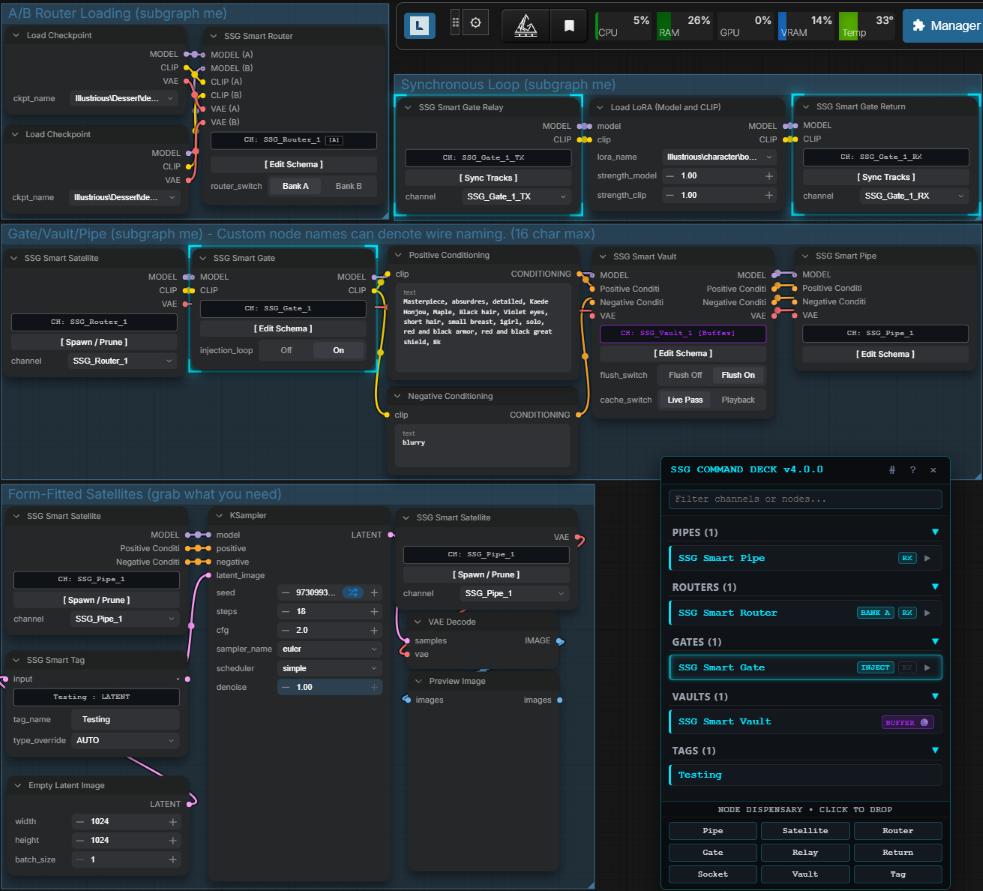
Every SSG node operates as an intelligent terminal:
- Dynamic Footprint: Nodes feature flexible, content-responsive bounds. Legacy static constraints have been updated to allow wide labels and custom track nomenclature to breathe without visual clipping.
- Integrated Micro-Status Banner: Anchored at the top of each node, the Slot 0 banner serves as an onboard flight recorder, displaying active state telemetry, channel modes, and schema locks at a glance.
- Headless Background Bus: Signals are serialized and resolved across subgraphs without performance degradation, execution loops, or serialization overhead.
- Pre-Pass Topological Loop Quarantine: Bypassed injection loops now excise downstream companion modules (e.g., Face Detailers, LoRA Decks) and nested SSG nodes during prompt compilation, ensuring unengaged loops consume zero compute and zero VRAM.
⚡ Installation
Option 1: ComfyUI-Manager (Recommended)
- Open ComfyUI-Manager inside ComfyUI.
- Search for
SSG Smart Suite. - Click Install and restart ComfyUI.
Option 2: Git Clone
Open a terminal in your ComfyUI/custom_nodes directory and run:
git clone https://github.com/SgtSauv/ComfyUI-SSG-Smart-Suite.git
Option 3: Comfy Registry
Run the following from the terminal window in your active ComfyUI environment:
comfy node registry-install comfyui-ssg-smart-suite
Option 4: Civitai Download
Download the zip file and extract the ComfyUI-SSG-Smart-Suite folder and its contents to your custom_nodes folder. Make sure to not use the initial unzip folder path if present.
ComfyUI/custom_nodes/ComfyUI-SSG-Smart-Suite/README.md is correct, ComfyUI/custom_nodes/name-of-zip-file/ComfyUI-SSG-Smart-Suite/README.md is wrong.
Restart ComfyUI.
🎮 SSG Smart HUD Command Deck (Alt + S)
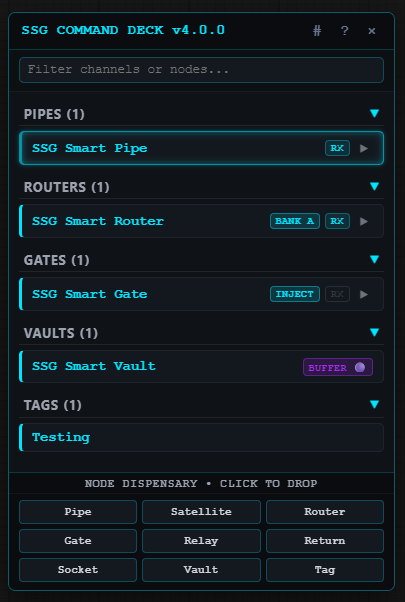
Press Alt + S (or click the floating SSG HUD button) to open the Command Deck:
- 🔍 Filter & Search: Filter across channels, tracks, aliases, and paired modules in real time.
- 🛠 Bottom Quick-Palette: Click any dock chip (Pipe, Satellite, Router, Gate, Relay, Return, Socket, Vault, Tag) to instantiate an unassigned node attached to your cursor; click the canvas to place it.
- ⚡ Contextual Auto-Spawners:
[RX](Pipe / Router): Spawns an unprunedSSGSmartSatellitepre-bound to that channel.[RX](Gate): Spawns a synchronizedSSGSmartGateRelayandSSGSmartGateReturnpair under cursor (enforces a strict 1-pair limit per Gate).[MOD](Socket): Spawns the companion appliance deck bound to that bay (enforces 1:1 pairing).
- 📌 Canvas Glow Beacon: Single-click any row to display a calibrated pin-point bounding halo across all transmitters, receivers, and companion modules tied to that channel.
- 🎯 Camera Auto-Focus: Right-click any row to open the unified control deck and teleport the camera directly to transmitters or bound receivers.
- ✏️ Double-Click Node Renaming: Double-click any channel row to rename node titles directly (up to 16 characters).
#Native ComfyUI Node IDs: Toggle native ComfyUI graph IDs across all titles, telemetry drawers, and context menus (persists across sessions).- 📖 Integrated Documentation (
?): Click the question mark icon in the header for offline access to manuals and module documentation.
🧩 The Core Node Roster
1. SSG Smart Pipe (SSGSmartPipe)
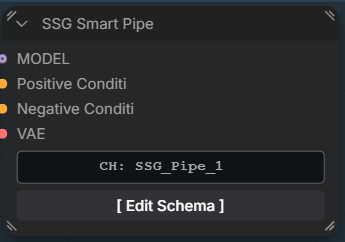
Master signal broadcaster bundling up to 24 arbitrary lanes (MODEL, CLIP, VAE, LATENT, Prompts, etc.) into a named wireless bus. Spawns in Edit Mode with wildcard parking dots ("◦"); click [ Lock Schema ] to serialize and broadcast.
2. SSG Smart Satellite (SSGSmartSatellite)
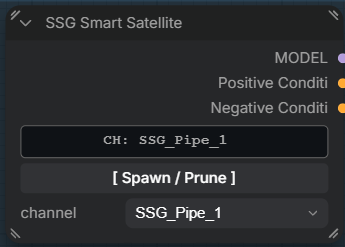
Multi-track bus receiver consuming signal subsets from active Pipe or Router channels across the root canvas or within subgraphs. Select a channel, click [ Spawn Tracks ], connect needed outputs, and click [ Prune Unused ] to collapse unlinked slots while preserving track indexing.
3. SSG Smart Router (SSGSmartRouter)
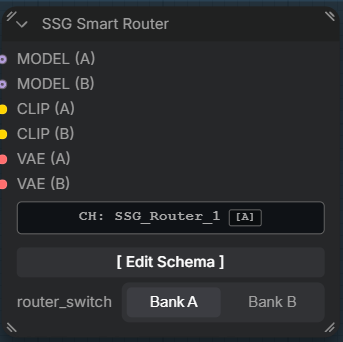
A/B crossbar selector for comparing models, conditioning stacks, or pipelines. Connect paired inputs (A0/B0 through A11/B11). Toggling Bank A / Bank B switches downstream receivers instantly without severing wires. All inputs on both banks are tagged with native ComfyUI lazy evaluation, so the graph compiler treats the inactive bank as completely detached for that run. This results in zero VRAM usage and zero compute time on the dormant branch.
4. SSG Smart Gate Trio (SSGSmartGate, SSGSmartGateRelay, SSGSmartGateReturn)
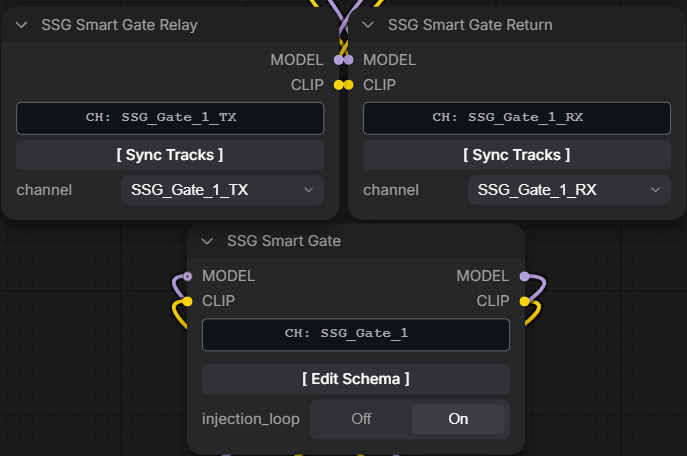
- Master Gate: Inline valve managing
{Channel}_TXand{Channel}_RXstreams. - Gate Relay: Placed at loop entry to receive live
{Channel}_TXdata. - Gate Return: Placed at loop exit (
OUTPUT_NODE = True) to return{Channel}_RXsignals back to the main pipeline. - Bypass / Inject: When bypassed, signals pass through internally, and loop nodes are quarantined from execution to eliminate compute and VRAM overhead.
5. SSG Smart Vault (SSGSmartVault)
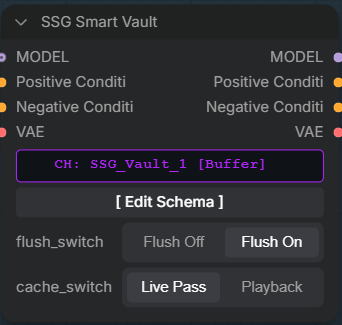
Inline tensor buffer and execution severer for prompt iteration and caching utilizing native ComfyUI lazy evaluation, meaning zero compute time and zero VRAM usage for all cached upstream tensors while in Playback mode:
- ⚡
[ PLAYBACK ](Mint Green): Severs upstream dependencies during prompt compilation; outputs cached tensors from memory with zero upstream computation. - 🔴
[ BUFFER ](Neon Purple): Passes signals through live while continuously caching in-memory tensor buffers. - ❄
[ FROZEN ](Deep Ice Blue): Passes signals live while locking buffer contents against upstream overwrites.
6. SSG Smart Socket (SSGSmartSocket)
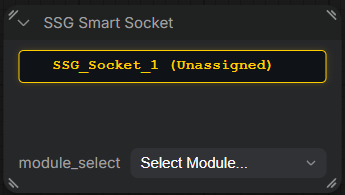
Universal in-line transceiver that dynamically morphs its physical inputs and outputs to host zero-wire companion modules from the SSG Smart Modules pack. Enforces strict 1:1 tenant pairing and escalates to Tier 2 Fire Opal Orange if vacant.
7. SSG Smart Tag (SSGSmartTag)
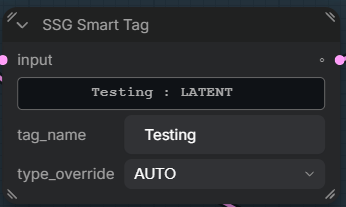
Single-slot passthrough node acting as an explicit naming boundary and datatype override for upstream anchor sniffing. The SSG TX nodes utilize a recursive drill engine to auto-name slot inputs upon connection. The tag can be used prior to those nodes to override what the drill decided on. CUSTOM NAMED NODES are also used to name incoming slot connections.
🔍 Recursive Autonaming Drill Engine
Connecting a wire to an SSG dynamic slot crawls upstream topology across reroutes, subgraphs, and bridges to resolve track names automatically:
- 🏷 SSG Smart Tag (Hard Stop): Halts immediately upon encountering a Tag, capturing its custom label and datatype override.
- ✏ Custom Renamed Node: Captures user-defined custom named node titles (
node.title !== node.type) as definitive track names. - 📦 Multi-Output Slot Mapping: Resolves known multi-output slot signatures automatically (e.g.,
CheckpointLoaderSimpleslot 0 =MODEL, slot 1 =CLIP, slot 2 =VAE). - 🌉 Subgraph Bridge Proxies: Traverses
GraphInput/SubgraphInputproxies to find origin labels across nested subgraphs. - ⚙ Fallback Output Definitions: Uses upstream slot labels or output datatypes (
LATENT,IMAGE,CONDITIONING, etc.).
🚦 Visual Diagnostics & Telemetry
Status indicators render across the Slot 0 banner and Command Deck:
| Diagnostic Tier | Hex Code | Visual State | Trigger Condition |
| :--- | :--- | :--- | :--- |
| Tier 0: Nominal | #00e5ff | Electric Cyan | Channel locked, registry synchronized, all links verified active. |
| Tier 1: Advisory / Setup | #ffcc00 | Amber Yellow | Node in [Edit Mode], Satellite unpruned, Socket unassigned, or generation desync. |
| Tier 2: Critical Fault | #ff7700 | Fire Opal Orange | Severed loop wire, unlinked input on locked node, vacant module bay, or datatype collision. |
| Tier 3: Execution Fault | #ff3333 | Crimson Red | Channel unassigned, invalid ID, or target channel [Unavailable]. |
| Live Recording / Buffer | #b026ff | Neon Purple | SSGSmartVault live caching pass active ([flush_switch = True], [cache_switch = False]). |
| Frozen Buffer / Locked | #38bdf8 | Deep Ice Blue | SSGSmartVault cache retention locked against overwrites ([flush_switch = False], [cache_switch = False]). |
| Active Cache / Playback | #00ff88 | Mint Green | SSGSmartVault in-memory playback mode with upstream severed ([cache_switch = True]). |
| Loop Bypassed | #555b66 | Muted Charcoal | SSGSmartGate injection disabled or path deactivated ([injection_loop = False]). |
📚 Documentation & Architecture Manual
For complete technical specifications, schema generation tracking, and PyTorch runtime memory management, refer to the full manual:
👉 SSG Smart Suite V4.0 System Architecture Manual
🤝 Community & Links
- GitHub Issues: Report a Bug / Feature Request
- Civitai: SSG Smart Suite on Civitai
- Civitai Red: SSG Smart Suite on Civitai Red
Created by SgtSauv
Support
If you find these nodes helpful and want to support continued development:
