
Santodan Random LoRA Node
Randomizes selected LoRAs and strengths. Includes trigger word output and support for exclusive/random selection.
Nodes (14)
The do-not-roll list for folder roulette
Lift the LoRAs out of an old image and reuse them
Step through a prompt list across queue runs
Eat the CivitAI lookup cost on your schedule
Get your random LoRAs into the saved image metadata
One loader node for full checkpoints and fp8 components
Five prompt slots, saved and reloadable
Re-roll your LoRA picks until one lands
Skips the stack, applies directly
Roll from a folder, not a curated list
Folder roulette, applied for you
Let the machine power down when the queue empties
Un-batch images into individually named saves
The Santodan Wildcard Manager
Santodan Custom Nodes for ComfyUI
This is a group of nodes that I've build to achieve my goals.
🪄 Wildcard Manager Node
The Wildcard Manager is a powerful dynamic prompt and wildcard processor. It allows you to create complex, randomized text prompts using a flexible syntax that supports nesting, weights, multi-selection, and more. It is designed to be compatible with the popular syntax used in the Impact Pack's Wildcard processor, making it easy to adopt existing prompts and wildcards.<br> It supports both .txt ( default one, not needing the extension) and YAML files ( both .yaml and .yml)
Reading the files from the default ComfyUI folder ( ComfyUi/Wildcards )
✨ Key Features & Syntax
- Dynamic Prompts: Randomly select one item from a list.
- Example:
{blue|red|green}will randomly becomeblue,red, orgreen.
- Example:
- Wildcards: Randomly select a line from a
.txtfile in yourComfyUI/wildcardsdirectory.- Example:
__person__will pull a random line fromperson.txt.
- Example:
- Nesting: Combine syntaxes for complex results.
- Example:
{a|{b|__c__}}
- Example:
- Randomize: Randomize the wildcard independently from the seed.
- Example:
__*person__w ill always pulls a random line from person.txt, regardless of the seed. - Example:
{*red|blue|green}always pulls a random item from the list, regardless of the seed.
- Example:
- Sequential: Use
+to select items in order across different queue runs.- Example Wildcard:
__+person__ - Example Dynamic:
{+red|blue|green}
- Example Wildcard:
- Weighted Choices: Give certain options a higher chance of being selected.
- Example:
{5::red|2::green|blue}(red is most likely, blue is least).
- Example:
- Multi-Select: Select multiple items from a list, with a custom separator.
- Example:
{1-2$$ and $$cat|dog|bird}could becomecat,dog,bird,cat and dog,cat and bird, ordog and bird.
- Example:
- Quantifiers: Repeat a wildcard multiple times to create a list for multi-selection.
- Example:
{2$$, $$3#__colors__}expands to select 2 items from__colors__|__colors__|__colors__.
- Example:
- Comments: Lines starting with
#are ignored, both in the node's text field and within wildcard files.
🔧 Wildcard Manager Inputs
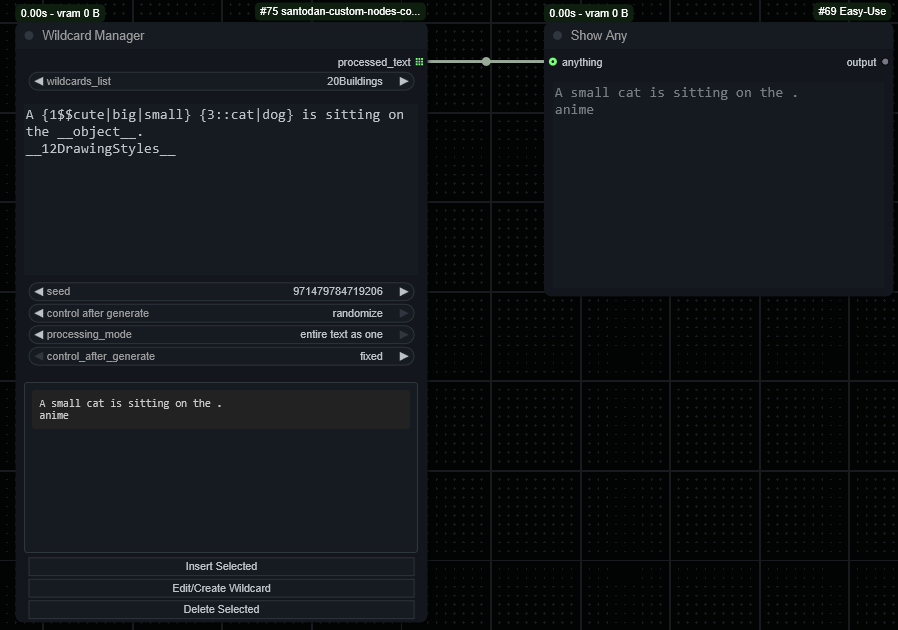
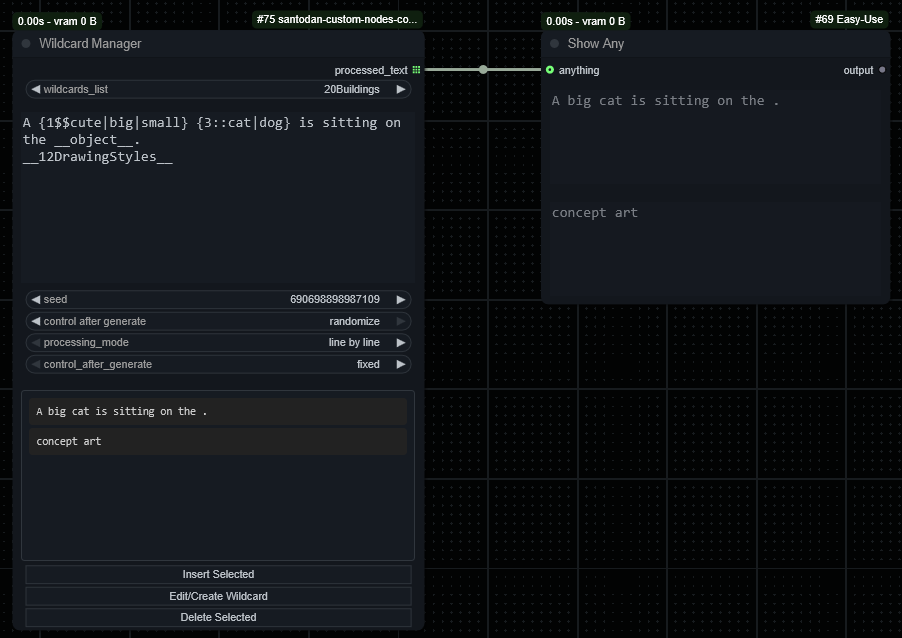
wildcards_list: A dropdown of your available wildcard files. Selecting one inserts its tag (e.g.,__person__) into the text.processing_mode:line by line: Treats each line as a separate prompt for batch processing.entire text as one: Processes the entire text block as a single prompt, preserving paragraphs.
🗂️ File Management
The node includes buttons for managing your wildcard files directly from the ComfyUI interface, eliminating the need to manually edit text files.
- Insert Selected: Insertes the selected wildcard to the text.
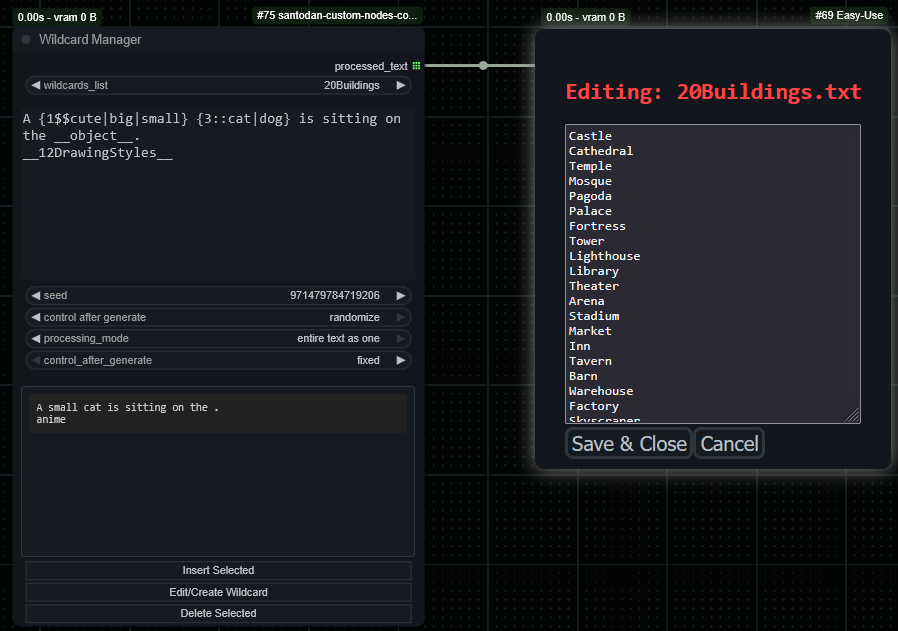
- Edit/Create Wildcard: Opens the content of the wildcard currently selected in the dropdown in an editor, allowing you to make changes and save/create them.
- You need to have the
[Create New]selected in thewildcards_listdropdown
- You need to have the
- Delete Selected: Asks for confirmation and then permanently deletes the wildcard file selected in the dropdown.
📸 Screenshot / Demo
-
Wildcard - Entire Text As One
-
Wildcard - Line By Line
-
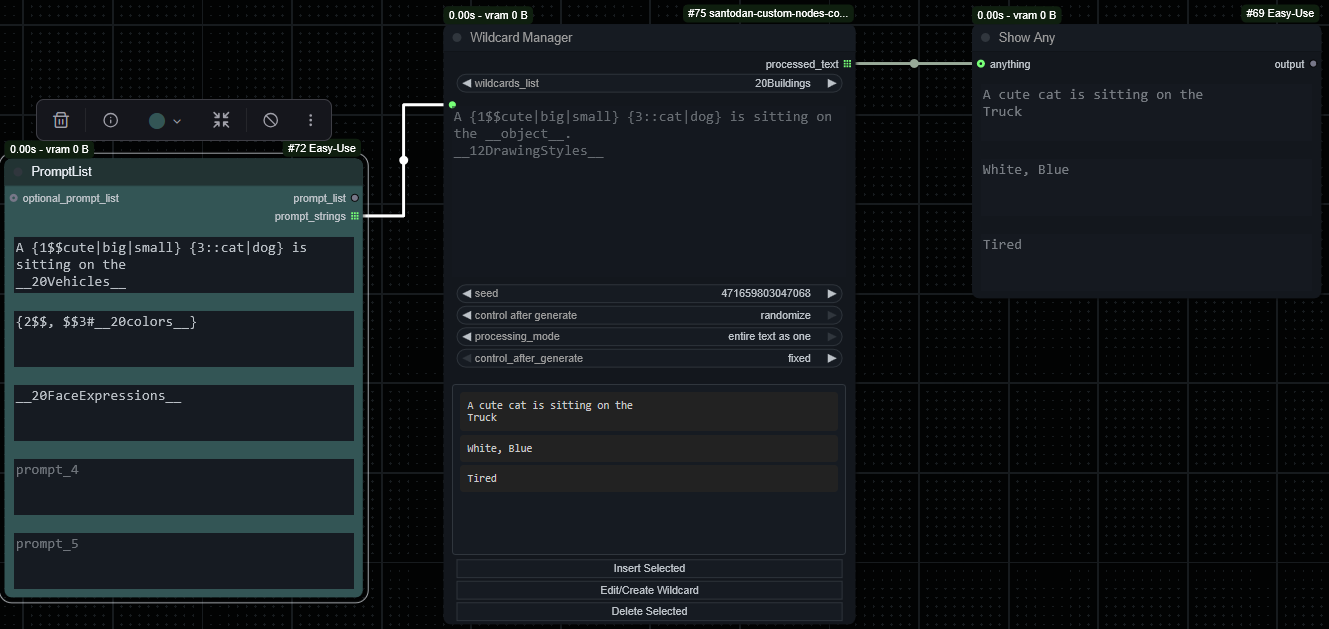
Wildcard - Comptability with PromptList for a batch processing
-
Wildcard - View Content
LoRAs Nodes
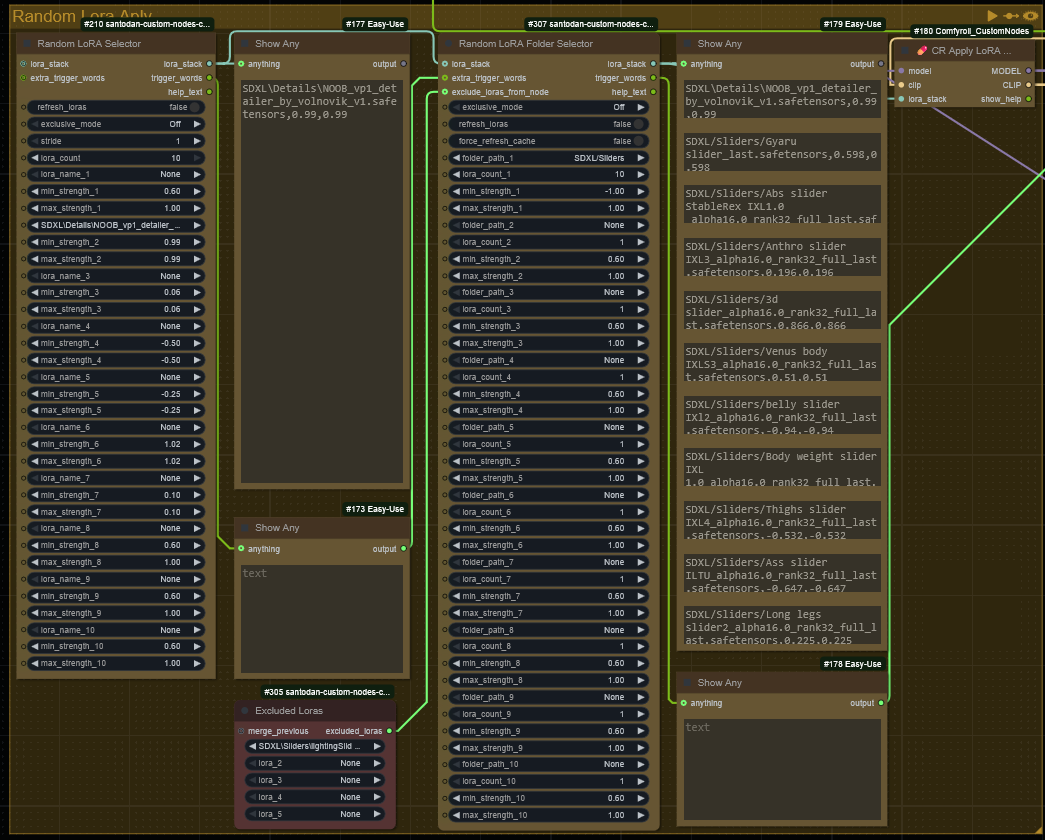
🎲 Randomize LoRAs Node
The Randomize LoRAs node lets you experiment by randomly selecting LoRAs from a list and assigning randomized strengths. You can enable exclusive selection (just one LoRA) or allow multiple LoRAs to be mixed.<br>
There are two nodes for this, the Random LoRA Selector and the Random LoRA Selector to Model Selector, the difference between them is that one uses the lora_stack and the other one applies the loras directly to the model.
🎲 Random LoRA Folder Selector
The Random LoRA Folder Selector node lets you experiment by randomly selecting LoRAs from a doler and assigning randomized strengths. You can enable exclusive selection (just one LoRA) or allow multiple LoRAs to be mixed and how many to be selected by folder. <br>
Additionally, if the LoRA includes trigger words (via lora-info), these are extracted and returned for use in prompts.<br>
There are two nodes for this, the Random LoRA Folder Selector and the Random LoRA Folder to Model Selector, the difference between them is that one uses the lora_stack and the other one applies the loras directly to the model.
✅ Compatible with comfyui_image_metadata_extension by using the
💊 CR Apply LoRA Stackfrom Suzie1 / Comfyroll_CustomNodes
✅ Compatible with comfyui_image_metadata_extension by using the
LoRA Metadata Hub
🎲🚫 Excluded Loras
The Excluded Loras node lets you select 5 lroas to be excluded in the Random LoRA Folder Selecto, this way you don't need to worry about the select getting an unwanted lora from the folder
🎲⛏️ Extract And Apply LoRAs
The Extract And Apply LoRAs node lets you extract the LoRAs that were saved using the comfyui_image_metadata_extension node and apply them to a workflow.<br> This was created so I could try to generate better enhancement workflow but with the same loras and weight as the initial one.<br> I would recommend use the SDBatchLoader to load multiple images at the same time and connecting the output to the path field in my node<br>
🎲📦 LoRA Cache Preloader
This is a node to have the information for the loras preloaded into the db.json <br>
You can select the folder that you want to run it.<br>
This way you don't need to wait for the information to be gathered when running the other two nodes<br>
🔧 Node Inputs
I'll describe only the inputs that aren't straight forwards here:
refresh_loras: To force a refresh of LoRAs everytimeexclusive_mode:- On – choose 1 LoRA only
- Off – choose a random number from the list
stride: Number of runs before re-randomizing (not currently enforced)lora_count: the number of LoRAs to be extracted from the list ( if 0 it will be a random value /exclusive_modewill overcome this is set to On )lora_stack: (Optional) Input for chaining or merging with existing LoRA stackextra_trigger_words: (Optional) Additional text to append from previous nodeforce_refresh_cache: Set to True to clear and regenerate cached LoRA metadata
📤 Node Outputs
LORA_STACK: A list of(name, min_strength, max_strength)tuplesTrigger Words: Comma-separated string of trigger words for selected LoRAsHelp Text: Describes the meaning of each setting for reference
📤 Cache Behavior
LoRA metadata (like trigger words) is cached to speed up repeat runs.
Use force_refresh_cache: True to clear and reload cache.
This helps avoid performance issues with large LoRA libraries.
📸 Screenshot / Demo
🔄 Other Nodes:
PromptList w/ Template
Based on the PromptList from Impact, but this one will be able to save, edit and delete templates
SaveWorkflowAndShutdown
A simple node to shutdown the PC at the end of the workflow if there are no more jobs in the queue.<br> There is a delay input, if you want to interrupt, cancel comfyui's process
Split Batch With Prefix
A node to to transform a batch of images into a list.<br> It will also ask for a prefix and an index, so it will generate a prompt list.<br> The purpose is to save each image from a batch with a corresponding index.<br> Example, you have a 5 images batch, you run the node and will output the images as a list and a prompt string of the index+Prefix ( example 0-SDXL_, 1-SDXL_, 2-SDXL_, 3-SDXL_, 4-SDXL_)
Model Assembler
A Model to combine the model checkpoint, unet loader, clip loader and vae loader.<br> Created so I don't have to change connections when testing full models and fp8 versions
LoRA Metadata Hub
Node used to add the metadata from the loras to the image metadata together with the comfyui_image_metadata_extension node.<br>
You may need to add/edit the modules/defs/ext/SantodanNodes.py file to add the following code - SantodanNodes.py - since the node OP hasn't updated the node for a couple of months, or just my whole node
📥 Installation
Option 1: ComfyUI-Manager (recommended)
- Open ComfyUI
- Open ComfyUI-Manager
- Search for
SantodanorRandomize LoRAs - Click Install
Option 2: Manual Install
cd ComfyUI/custom_nodes
git clone https://github.com/Santodan/santodan-custom-nodes-comfyui/
Then restart ComfyUI.
🔁 Updating
cd ComfyUI/custom_nodes/santodan-custom-nodes-comfyui
git pull
Restart ComfyUI to apply the update.
❌ Uninstallation
cd ComfyUI/custom_nodes
rm -rf santodan-custom-nodes-comfyui
Restart ComfyUI.
🧠 Credits
-
Suzie1 / Comfyroll_CustomNodes
Provided the original randomization logic inspiration. -
jitcoder / lora-info
Used for extracting trigger words from LoRA files. -
ChatGPT
Used to create the whole code as I only have some basic programming knowledge -
Claude.ai
Used to create the whole code as I only have some basic programming knowledge -
Gemini (Google AI)
Used to create the whole code as I only have some basic programming knowledge