
RetroTape
NTSC/VHS analog tape effect for ComfyUI, with a live preview inside the node.
Nodes (1)
ComfyUI-RetroTape
A ComfyUI custom node for adding VHS and NTSC-style effects to images and video.
<table> <tr> <td valign="top"><img src="docs/banner.webp" alt="The Retro Tape node" width="360"></td> <td valign="top"><img src="docs/demo.webp" alt="Every preset, in motion" width="192"></td> </tr> </table>Includes 19 presets and a live preview inside the node.
Features
- 19 presets
- Live preview
- Image and video support
- CPU and CUDA
- 28 controls
- JSON copy / paste for settings
Effects include tracking errors, chroma bleed, noise, colour drift, tape warping, dropouts, ghosting, scanlines, interlacing, glow and head switching.
Install
Clone the repository into ComfyUI/custom_nodes:
cd ComfyUI/custom_nodes
git clone https://github.com/SKBv0/ComfyUI_RetroTape
Install the dependencies and restart ComfyUI:
pip install -r ComfyUI_RetroTape/requirements.txt
Usage
Add Retro Tape (VHS / NTSC) from the RetroTape category and connect an image.
Three widgets control the node:
settings_jsonstores the panel settingsframe_offsetleave at 0 unless you split a long video into passesdevicecan be set toauto,cpuorgpu
Presets
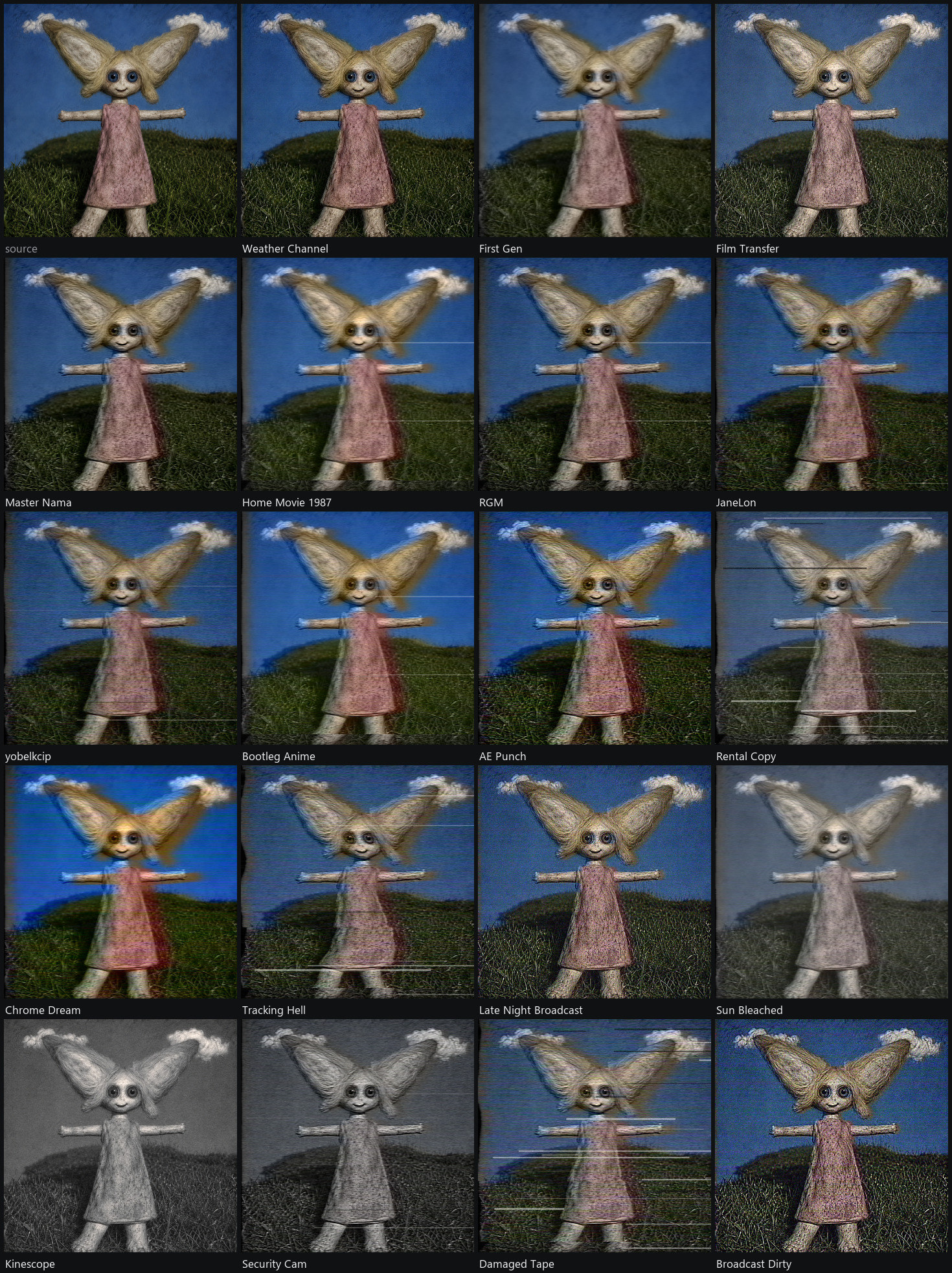
Live preview
The preview uses the same processing pipeline as the node output.
With LoadImage, ComfyUI's LoadVideo through GetVideoComponents, VHS_LoadVideo and VHS_LoadVideoPath, the source can be read directly without running the workflow first.
For other inputs, run the workflow once. The incoming image or frames are then cached for preview.
Still images up to about three megapixels are processed at source resolution. Larger images use a reduced preview resolution.
The panel also includes:
- A/B to compare with the source
- Refresh to render the preview again
- Reset to restore the selected preset
- Copy / Paste for settings JSON
- Live / Paused to enable or disable automatic previews
Video
Tracking, edge movement and dropouts change over time instead of being generated independently for every frame.
frame_offset is only needed if you render a long video in several passes. Leave it at 0 otherwise.
Performance
device can be set to auto, cpu or gpu.
auto uses CUDA when available and falls back to CPU if needed.
| Work | CPU | GPU | | ------------------------- | -----: | ----: | | 1024 × 1024, one frame | 180 ms | 12 ms | | 1920 × 1080, one frame | 363 ms | 22 ms | | 120 frames at 1024 × 1024 | 11.1 s | 1.4 s |
CPU and GPU use different random generators, so noise patterns are not identical. For video, use the same device for the whole render.
Notes
RGBA inputs keep their original alpha channel. The effect is applied only to the colour channels.
Preview access is limited to ComfyUI's input, output and temp folders. Additional paths for VHS_LoadVideoPath can be added with RETROTAPE_EXTRA_PREVIEW_ROOTS.
Credits
Based in part on ntscQT by JargeZ, which is based on composite-video-simulator by Jonathan Campbell.
RGM, Master Nama, JaneLon and yobelkcip are ntscQT community presets, copied verbatim from its builtin_templates.json.
License
Apache-2.0. See LICENSE.