
Palette Director
ComfyUI nodes for palette-card image conditioning and structured palette prompts.
Nodes (2)
Palette Director for ComfyUI
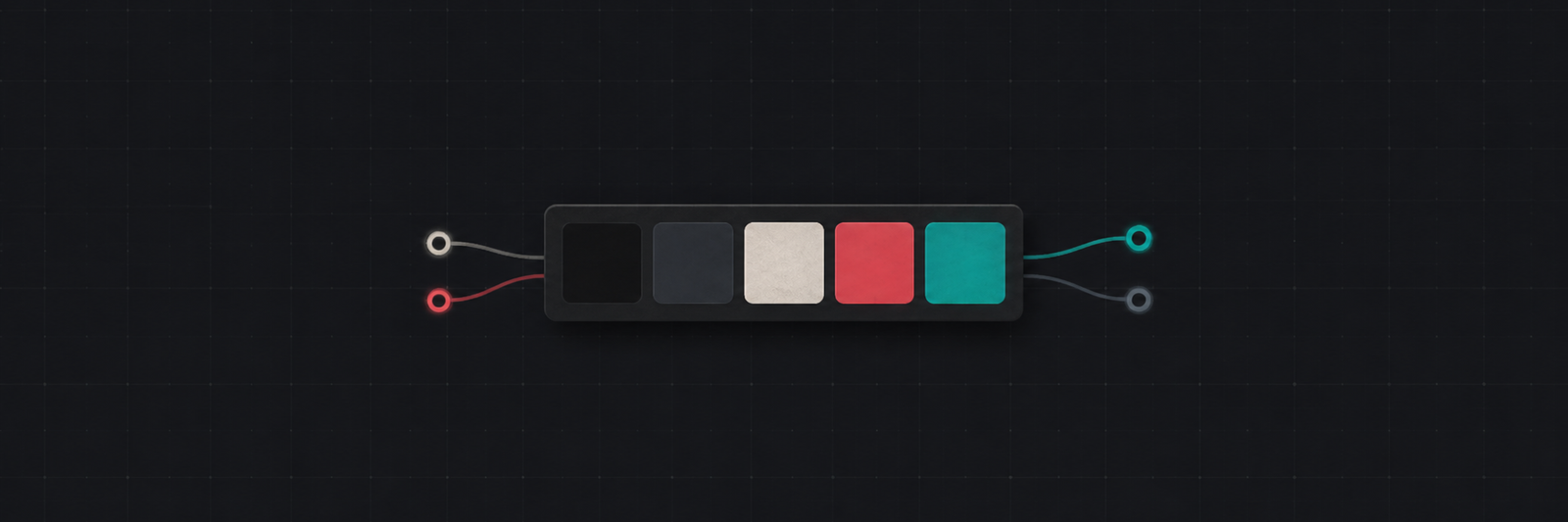
A ComfyUI custom node pack for a palette-trained LoRA workflow.
The intended setup is:
- a palette-card image generated by the nodes
- a structured prompt suffix that names palette roles such as background, main, human, material, and accent
A palette-trained LoRA reads this palette-card + prompt-suffix format and pushes generation toward the selected palette. These nodes prepare that conditioning; they do not add meaningful color control to a normal model on their own.
Download the Palette Director v1.0 LoRA (Flux.2 Klein) from Civitai.
Nodes
After installation, you will see these under Palette Director:
Palette Composer
Palette Director
Palette Composer is the visual editor. Use it when you do not want to type hex colors by hand.
Palette Director turns the palette into:
palette_image
positive conditioning
negative conditioning
debug text
palette report
Load your palette LoRA with a normal ComfyUI LoRA loader and connect the Director outputs into your sampling graph.
Basic Usage
Connect Composer outputs to the Director optional inputs:
Palette Composer.palette_hex -> Palette Director.palette_hex_input
Palette Composer.role_hex    -> Palette Director.role_hex_input
Palette Composer.weights     -> Palette Director.weights_input
Then wire:
Palette Director.palette_image -> VAE Encode -> ReferenceLatent
Palette Director.positive      -> your guider positive input
Palette Director.negative      -> your guider negative input
In the example workflow, the LoRA loader is placed before the guider. Replace the placeholder LoRA filename with the file you downloaded from Civitai.
There is also an example workflow:
examples/flux2_palette_director_workflow.json
Model and LoRA names in the example are placeholders. After loading it in ComfyUI, pick your local files from the dropdowns and point the LoRA loader at the file you downloaded from Civitai.
Example Results
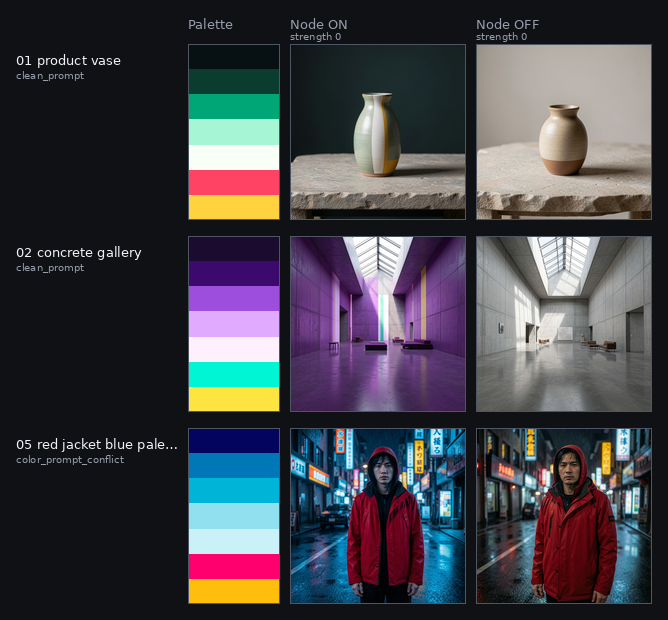
I deliberately included some bad results in the examples so you can inspect the limits and outcomes and avoid wasting time if it is not a fit for you. There is no guarantee that every model will follow the palette the same way. I tested with the flux-2klein-9b-kv-fp8 model.
This short comparison shows the difference between PaletteDirector on and off while LoRA strength is still 0. With the palette card and palette prompt still connected, strength 0 is not a clean baseline.
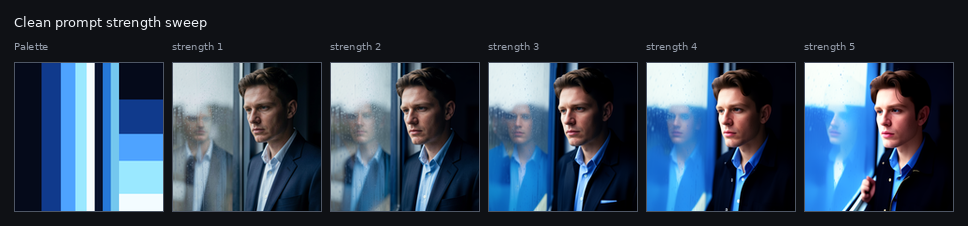
Palette effect on a clean prompt with LoRA strength enabled:
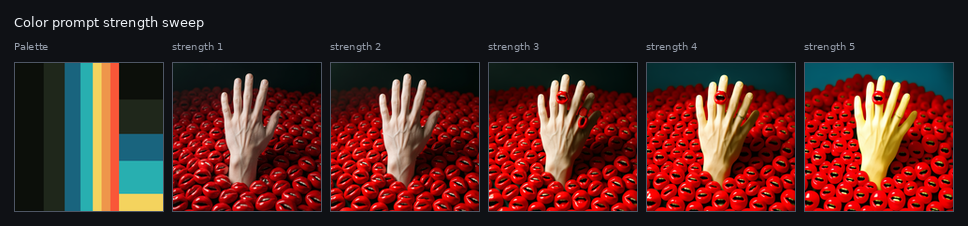
If the prompt already contains color words, the palette still has an effect, but it can fight the prompt:
Other result pages are shown below as small previews. Click an image to open the full version.
<table> <tr> <td><a href="assets/clean_page_01_rows_001-004.png"><img src="assets/result_thumbs/clean_page_01_rows_001-004.jpg" alt="Clean prompt page 1"></a><br><sub>Clean prompt 1</sub></td> <td><a href="assets/clean_page_02_rows_005-008.png"><img src="assets/result_thumbs/clean_page_02_rows_005-008.jpg" alt="Clean prompt page 2"></a><br><sub>Clean prompt 2</sub></td> </tr> <tr> <td><a href="assets/clean_page_03_rows_009-012.png"><img src="assets/result_thumbs/clean_page_03_rows_009-012.jpg" alt="Clean prompt page 3"></a><br><sub>Clean prompt 3</sub></td> <td><a href="assets/clean_page_04_rows_013-016.png"><img src="assets/result_thumbs/clean_page_04_rows_013-016.jpg" alt="Clean prompt page 4"></a><br><sub>Clean prompt 4</sub></td> </tr> <tr> <td><a href="assets/clean_page_05_rows_017-020.png"><img src="assets/result_thumbs/clean_page_05_rows_017-020.jpg" alt="Clean prompt page 5"></a><br><sub>Clean prompt 5</sub></td> <td><a href="assets/colorprompt_page_01_rows_001-004.png"><img src="assets/result_thumbs/colorprompt_page_01_rows_001-004.jpg" alt="Color-word prompt page 1"></a><br><sub>Color-word prompt 1</sub></td> </tr> <tr> <td><a href="assets/colorprompt_page_05_rows_017-020.png"><img src="assets/result_thumbs/colorprompt_page_05_rows_017-020.jpg" alt="Color-word prompt page 5"></a><br><sub>Color-word prompt 5</sub></td> <td></td> </tr> </table>Palette Text Format
If you are not using Palette Composer, you can enter values by hand.
Palette colors:
#111111 #2B2B2B #EDEDED #FF3158 #13D8C8
Weights:
0.34 0.24 0.18 0.14 0.10
Role colors are optional. If you use them, provide exactly five hex colors in this order:
bg main human material accent
Example:
#111111 #2B2B2B #EDEDED #2B2B2B #13D8C8
In these manual Director fields, invalid hex values such as #1234567 are rejected. Invalid weight values are also rejected instead of being silently ignored.
Palette Composer is more tolerant when loading saved widget state. Broken JSON, bad colors, or bad weights fall back to defaults so an old or corrupted workflow can still open.
Installation
Clone this repo into your custom nodes folder.
ComfyUI/custom_nodes/ComfyUI_PaletteDirector
Restart ComfyUI.
Known Limits
- First, know that this is a learning project and was made by an amateur.
- This is guidance, not exact hex color locking. The output may not use the selected colors one-to-one.
- If the prompt asks for specific colors, it can conflict with the palette. For example, a prompt that says
blue jacketmay ignore a warm red material role. - The palette card can sometimes leak into the image as blocks, stripes, borders, or UI-like shapes. This depends on the LoRA, model, strength, and sampling setup.
- Strong object priors still matter. Skin, sky, grass, metal, wood, and similar things may keep their natural colors if the LoRA was not trained strongly enough.
- Role names are hints only.
bg,main,human,material, andaccentare useful during training, but the model can still mix them up. - The node does not inspect or edit the final image. It only prepares the palette card and conditioning before sampling.
Small Notes
- Palette roles are fixed to five slots:
bg,main,human,material,accent. - During training I tried many different things and found the format closest to my goal in this one.
- Because I want to spot training issues more easily during use, I plan to run new training runs over time with more data targeted at those problems.