
ComfyUI Image Ledger
Batch image-to-video without repeats: tracks which source images already produced a video, with a gallery, random pick, and rerun for any LoadImage workflow
Nodes (6)
The node that decides a render actually counts
Unsticking sources that a crashed batch left running
Retro-fit the tracking onto videos you already made
Two dropdowns between you and never rendering a source twice
One line that tells you how much batch is left
The queue with all the knobs showing
ComfyUI Image Ledger


简体中文 · Security · Contributing
Run an image-to-video library, keep your progress, and find the video for each source.
Choose a folder or select images in the gallery, then run them one at a time through your existing LoadImage workflow. Image Ledger records a source only after its connected final video is saved successfully. Finished sources leave the pending queue; failed sources stay available. Progress is shared across workflows and survives restarting ComfyUI.
v0.3.0: category/selected-image batches, workflow bindings, and source/video history. Moving completed source files is off by default. Automated Python and bilingual browser tests cover this release; real ComfyUI/GPU video generation has not yet been verified.
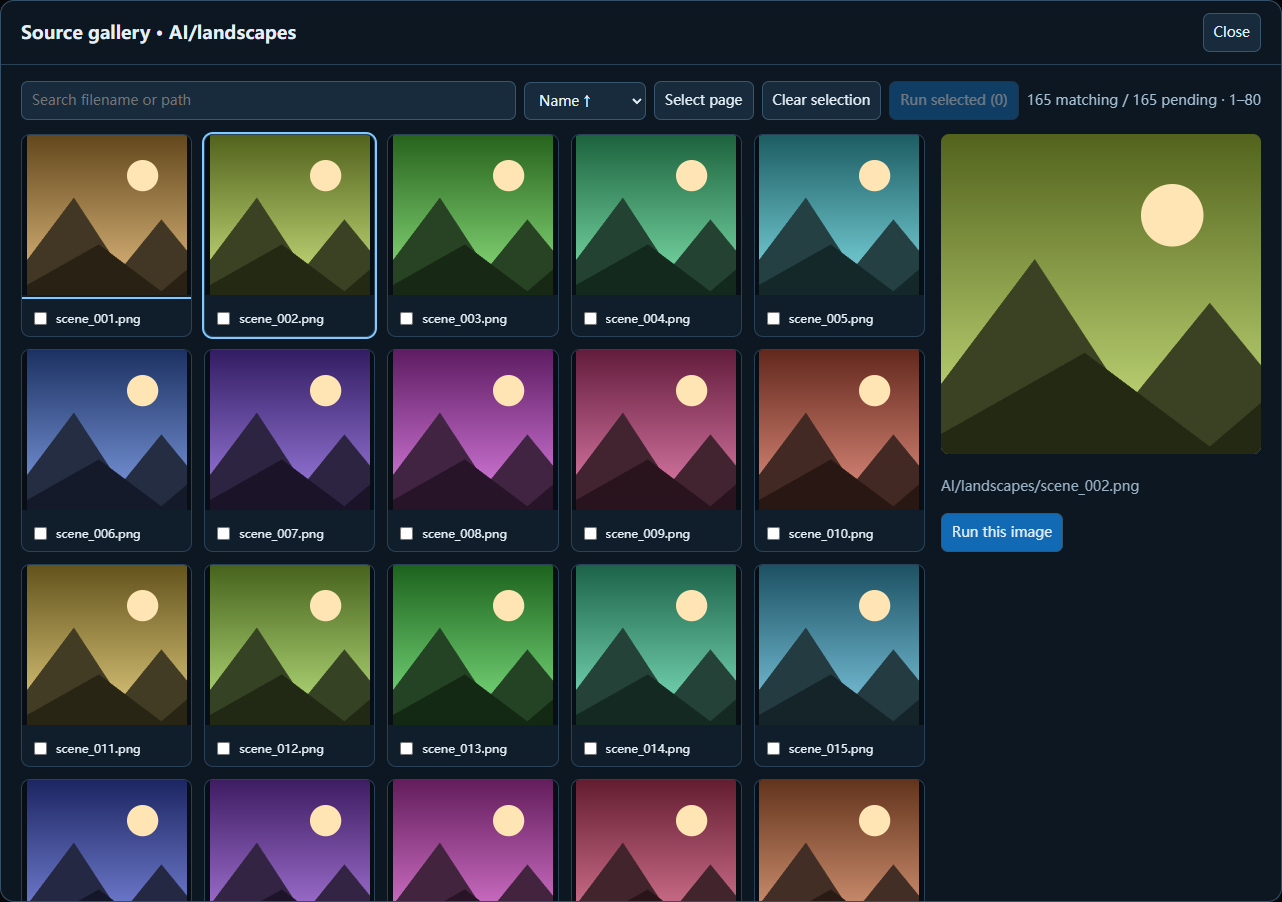
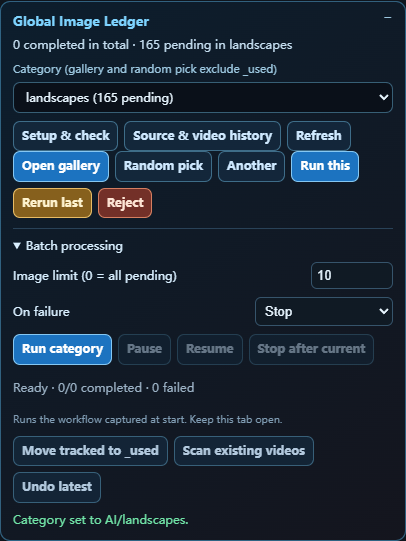
<sub>Current UI previews use sample records and illustrative thumbnails from the browser test harness. They do not represent a verified GPU generation run.</sub>
Why it exists
Large image-to-video libraries are surprisingly hard to manage: a source may be renamed, copied, interrupted halfway through a run, or accidentally processed twice. Image Ledger treats loading as “in progress” and only treats a source as complete after a real, non-empty output video exists.
Highlights
- Run a category or selected images: choose a limit, pause/resume, stop after the current image, and stop or skip on failures.
- Keep progress by content: renamed copies are skipped, while new content at an old filename is selectable. Exact byte-identical copies count as one source.
- Use your existing graph: Setup & check binds the source
LoadImageand final video writer, without adding ledger nodes. - Browse large libraries: paged gallery, search, natural filename/date sorting, multi-selection, and Left/Right preview keys.
- Find the result: source/video history, inline video playback, per-image rerun, and clearing completed status.
- Stay local: SQLite records, cached content hashes and thumbnails, no accounts or telemetry, optional move-on-success, and undo.
Installation
ComfyUI-Manager (recommended): open Manager → Custom Nodes Manager, search for Image Ledger, install, and restart ComfyUI.
comfy-cli:
comfy node install comfyui-image-ledger
Manual: clone this repository into ComfyUI/custom_nodes, then restart ComfyUI:
cd ComfyUI/custom_nodes
git clone https://github.com/Rona1do/ComfyUI-Image-Ledger.git
No extra Python package is required. Pillow, SQLite, and aiohttp are supplied by ComfyUI. Video-history import reuses FFmpeg from VideoHelperSuite or imageio-ffmpeg when available.
Quick start: global mode
-
Put sources in
ComfyUI/input/AI. Subfolders become categories; images directly inAIappear as Library root. For example:ComfyUI/input/AI/ ├── sample.png ├── portraits/ │ ├── 001.png │ └── 002.png └── illustrations/ └── 001.webpA directory link/junction under input can point to a library on another drive.
-
Open the included Wan 2.2 example, or your existing image-to-video workflow.
-
Open Setup & check in the lower-right panel. Set the library folder relative to
ComfyUI/input, choose the source image node and final video writer, then Save & check. Bindings are saved with the workflow JSON. -
Choose a category. Open the gallery, select a thumbnail, and Run this image. Or use random pick followed by Run this.
-
After a verified video is saved, that image leaves the pending list. Open Source & video history to preview the video or rerun a specific source.
Automatic matching uses a unique source node titled like first frame, 源图, 原图, or 首帧, ignoring last-frame and mask loaders. Ambiguous graphs need explicit binding. Tracking only accepts video outputs connected to that source; multiple video writers need an explicit final-writer choice.
Run a batch
- Category: set Image limit (default 10; 0 means all pending) and click Run category.
- Selected images: check thumbnails across gallery pages, then Run selected. The category limit does not truncate this explicit selection.
- Failures: stop by default, or select Skip and continue. Missing, cancelled, or unverifiable outputs never count as successful.
- Pause/stop: the currently accepted prompt finishes; no new image is submitted until Resume. Stop does not interrupt other ComfyUI jobs.
A batch captures the workflow when it starts, so changing graphs later does not change the queued recipe. It submits one source at a time and waits for backend confirmation before advancing. Keep this browser tab open. A lost connection pauses uncertain submissions and retains their ticket; Resume checks that ticket instead of submitting it again. Refreshing the browser discards the remaining batch plan, but completed records remain; start another batch for the remaining sources.
Completion and history
Content hashes exclude both completed and currently reserved sources. Panel submissions and recognized full video-workflow submissions reserve their source transactionally; duplicate queued submissions are rejected. Intentional Rerun and manual ComfyUI Run can repeat a completed source, but cannot overlap another reservation of that content. Restarting ComfyUI recovers unfinished reservations; a queued reservation also expires after 24 hours.
The default automatic tracking threshold is 50,000 video bytes, configurable in the local settings JSON as min_video_bytes. Verification checks the saved output file, not whether you like the generated result or whether the entire video decodes correctly.
History keeps source/video associations and reruns. Clear completed status makes an in-place source selectable again and preserves all videos and history. Archived files stay in their current folder; rerun them from history or move them back into the library yourself. A missing or changed source is shown as unavailable rather than silently replaced with another same-name image.
Safe file handling
By default, completion is recorded without moving anything. Completed images stay where they are, but the gallery and random pick skip them. To archive completed sources, enable:
Settings → Image Ledger → Global tracking → Move source
Then input/AI/portraits/001.png moves to input/AI/portraits/_used/001.png.
Rejected images move to _used/_rejected. The latest operation can be undone from the panel. Test move behavior on a small backup library before enabling it for valuable data.
Example workflow
An example Wan 2.2 image-to-video workflow is included for the global panel. It uses a LoadImage node titled First Frame, which Image Ledger can replace when you pick a source. The required Wan models are listed in the workflow notes.
Advanced mode: explicit workflow commit
Use the nodes under Image Ledger when you need exact queue/commit ordering:
Image Ledger · Visual Queue.image
    → your image-to-video workflow
    → VHS_VideoCombine.Filenames
    → Image Ledger · Commit Finished Video.filenames

Image Ledger · Visual Queue.job_ticket
    → Image Ledger · Commit Finished Video.job_ticket
The commit node verifies that the final video exists, is inside ComfyUI output, and is non-empty before marking the image complete. Put it directly after the final video writer and before any cleanup node.
Additional maintenance nodes provide status, reservation recovery, and dry-run import of old video metadata.
Data and privacy
Runtime data is stored outside the repository:
ComfyUI/user/default/image_ledger/ledger.sqlite3
ComfyUI/user/default/image_ledger/settings.json
ComfyUI/user/default/image_ledger/thumbs/
Set COMFYUI_IMAGE_LEDGER_DIR to override the data directory. Set COMFYUI_IMAGE_LEDGER_FFMPEG to override the FFmpeg executable used for history import.
The extension reads files only under ComfyUI input/output roots (including directory links placed there), writes its local SQLite database and thumbnail cache, and optionally moves source images after explicit opt-in. It sends no analytics or image data over the network.
Compatibility and limitations
- Python 3.10+ and a recent ComfyUI release are recommended.
- The source library must live under
ComfyUI/input(a directory link there can point anywhere). It defaults toinput/AI. - Deduplication uses exact file bytes, not visual similarity. Re-encoding an image creates a new source identity. First indexing reads source files; later scans reuse size/mtime hash caches.
- Automatic tracking requires a successful workflow result with a saved output video connected to the selected source. Custom video writers must expose compatible history metadata; use explicit ledger nodes when needed.
- Metadata import can only recover sources from videos that retained compatible prompt metadata.
- ComfyUI internal execution APIs can change; include your ComfyUI commit/date when reporting a compatibility issue.
Development
python -m pip install -r requirements-dev.txt
python -m unittest discover -s tests -v
python -m compileall -q -x '[\\/]\.venv[\\/]' .
npm run check
npm test

# Optional browser checks (development dependencies only)
npm ci
npx playwright install chromium
# Windows/macOS: installed Chrome is the default.
# Linux CI: LEDGER_BROWSER_CHANNEL=chromium npm run test:browser
npm run test:browser
See CONTRIBUTING.md for the project workflow, ROADMAP.md for planned work, and launch materials for a demonstration script and announcement drafts.
License
MIT. ComfyUI is a separate project and is not bundled with this repository.