
ComfyUI-FilePathsFromFolder
Load file paths from a folder by extension, then feed them into any ComfyUI node that accepts a path. (Description by CC)
Nodes (7)
The anchor that stops your save nodes from being skipped
Run your graph once per file, the lazy way
The loop terminator that's actually an output node
The wait point that lets your batch catch its breath
Run one cleanup exactly once between two batch stages
Pluck one file out of the list by number
Point it at a folder, get every file path back
ComfyUI-FilePathsFromFolder
Load file paths from a folder by extension (*.png, *.mp4, *.txt, etc.), then feed them into any ComfyUI node that accepts a path (image/video/audio/anything-from-path).
This repo is mainly for easy batch processing:
- Use it with your favorite loop/for/while node pack (pick items by index), or
- Use this repo’s simple loop node (
File Paths For Loop Start) to have ComfyUI run downstream nodes once per file (list batching).
Installation
Recommended: Git clone
- Clone into
ComfyUI/custom_nodes
cd path/to/ComfyUI/custom_nodes
git clone https://github.com/RockyHong/ComfyUI-FilePathsFromFolder.git
- Restart ComfyUI
- Search nodes by name:
Load File Paths From Folder,Get File Path By Index,File Paths For Loop Start,File Paths For Loop Sync
Alternative: Manual install (ZIP)
- Download ZIP from GitHub
- Extract
- Copy folder
ComfyUI-FilePathsFromFolderintoComfyUI/custom_nodes/ - Restart ComfyUI
<a id="option-a-external-loop"></a>
Integrate with external for/loop nodes (index-based)
Use this when you already have an external loop/for/while node pack and you want to drive it with “files in a folder” (by extension).
Nodes used
LoadFilePathsFromFolder: scan folder → getfilepaths/filenames/countGetPathByIndex: choose one item → getfilepath/filename(UI:Get File Path By Index)
Example workflow (external loop pack)
.jpg)
LoadFilePathsFromFolder(set folder path + extension)count→ your loop node “iterations” / “max” (names vary by pack)- Loop
index→GetPathByIndex.index LoadFilePathsFromFolder.filepaths+.filenames→GetPathByIndexGetPathByIndex.filepath→ your loader node (Load Image / Load Video / etc.)- Do your processing + save/export inside your external loop pack
<a id="option-b-internal-loop"></a>
Built-in simple for-loop node (list batching)
Use this when you want the simplest setup: File Paths For Loop Start returns lists, and ComfyUI runs downstream nodes once per file via list batching.
Nodes used
File Paths For Loop Start: generates the per-file list outputs (current_filepath,current_index, etc.)File Paths For Loop End: loop terminator / completion signal
Example workflow (internal loop: once per file)
.jpg)
File Paths For Loop Start(set folder path + extension)current_filepath→ your loader node (e.g. Load Image)- Your processing nodes
- (Optional) outputs you want to guarantee run (e.g. save/write/export nodes) →
FilePathsEnsureExecution.passthrough_1…passthrough_5 current_index→File Paths For Loop End.current_index- (Optional)
FilePathsEnsureExecution.passthrough→File Paths For Loop End.passthrough(this “anchors” the route so it executes)
Memory note
File Paths For Loop Start uses ComfyUI list batching (OUTPUT_IS_LIST): ComfyUI may run the workflow one node at a time for all files, rather than finishing file 0 completely before starting file 1.
- What you'll see: it may run like "load all → process all → save all", not "load → process → save" per file.
- When this is good: if you want to run many files with the same model/settings, batching can help keep the model "warm" and avoid offload/reload each file.
- Why memory can climb: more intermediate results may stay in RAM/VRAM until later nodes run.
- Solution for mid-batch cleanup: Use
File Paths For Loop Sync Trigger+File Paths For Loop Sync Resumeto run cleanup once between batch stages (see Batch Synchronization below). - Need true one-file-at-a-time? Use an external loop/for/while node pack that runs each file start→finish before moving on.
(Optional) Ensure execution for save/write/export routes
Some ComfyUI workflows can “skip” routes that don’t affect the final output the graph thinks it needs. If you have save/write/export nodes that you must run, use File Paths For Loop Ensure Execution as an anchor.
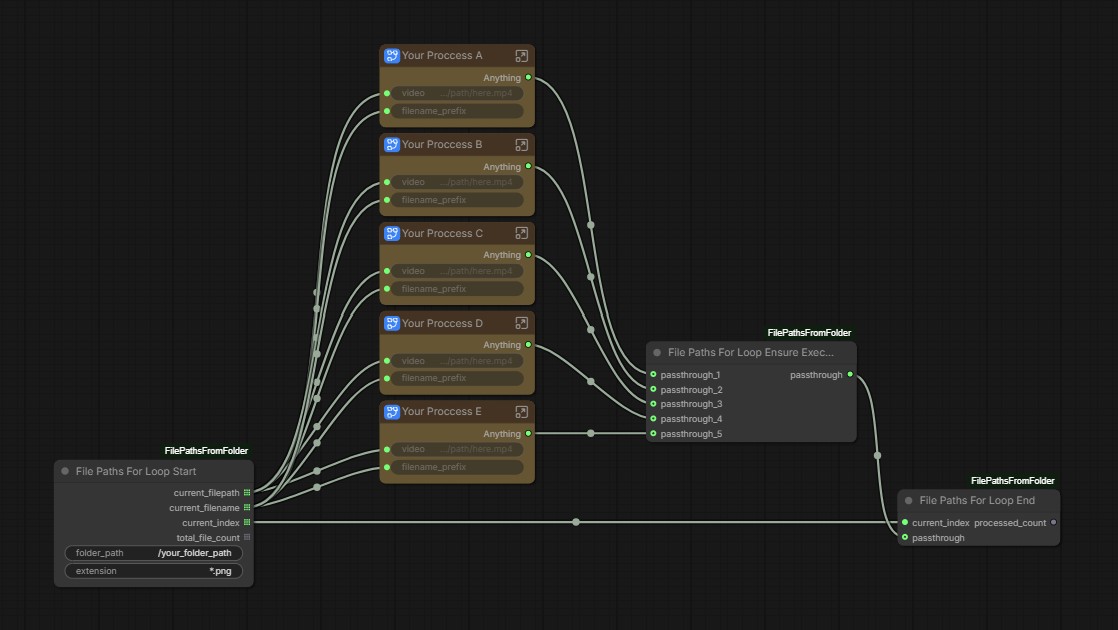
- Connect the nodes you want to guarantee run into
passthrough_1…passthrough_5 - Connect
passthroughoutput toFile Paths For Loop End.passthrough
<a id="batch-sync"></a>
Batch synchronization (run once between stages)
Use this when you need to run something exactly once between two batched stages (e.g. LLM batch → clear VRAM once → T2I batch), without switching to an external per-file loop.
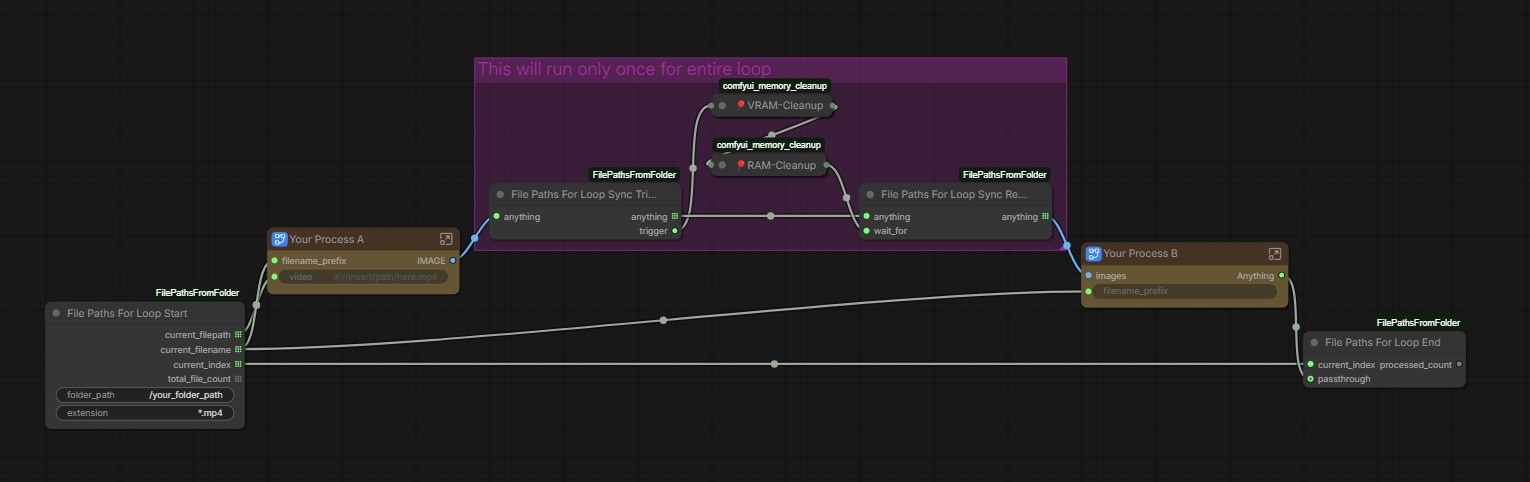
File Paths For Loop Sync Trigger: put this right after a batched output. It provides:anything: the original batch (passes through unchanged)trigger: a single (non-batched) value you can feed into any “run once” node
File Paths For Loop Sync Resume: a simple wait point. It:- Takes the batch on
anything(from Trigger) - Takes a completion signal on
wait_for(from your one-time node) - Outputs the same batch so downstream nodes continue as a batch
- Takes the batch on
How to wire it (in words): connect your batched data into Sync Trigger → connect Sync Trigger.anything into Sync Resume.anything → connect Sync Trigger.trigger into your one-time node → connect that one-time node’s output into Sync Resume.wait_for → continue the workflow from Sync Resume.anything.
What you can run once: clear RAM/VRAM, save/checkpoint, switch models, send notifications, write logs, etc.
License
MIT — see LICENSE.