
YOLOE-26 Open-Vocabulary Segmentation
Open-vocabulary prompt segmentation for ComfyUI powered by YOLOE-26.
Nodes (7)
All the people in one mask, all the cars in another — masks grouped by class
The YOLOE-26 node that gives you numbers instead of pictures
One mask per object, so you can grab the single dog out of the pack
Why every YOLOE-26 workflow starts at this one boring node
Type 'person, car, dog' and get a mask — this is the node that does it
Fix a rough mask without paying for a second detection pass
Pick the single best mask out of the pile, automatically
ComfyUI-YOLOE26
Open-vocabulary prompt segmentation nodes for ComfyUI powered by Ultralytics YOLOE-26.
Features
- Load YOLOE-26 models and reuse them across your workflow
- Segment objects using text prompts like
person,car,red apple - Get merged masks, per-instance masks, or per-class masks
- Structured JSON metadata for downstream automation
- Mask refinement without re-running detection
- Select the best instance from multiple detections
Installation
Via ComfyUI Manager (Recommended)
Search for YOLOE-26 in ComfyUI Manager and click Install.
Manual Installation
Clone this repository into your ComfyUI custom_nodes directory:
cd ComfyUI/custom_nodes
git clone https://github.com/Rinne414/ComfyUI-YOLOE26.git
pip install -r ComfyUI-YOLOE26/requirements.txt
Restart ComfyUI and look for YOLOE-26 nodes in the node menu.
Quick Start
- Add
YOLOE-26 Load Modelnode and select a model - Add
YOLOE-26 Prompt Segmentnode - Connect an image and enter a prompt like
person - Run the workflow
The model will auto-download on first use. Recommended settings for your first test:
| Parameter | Value |
|-----------|-------|
| model_name | yoloe-26s-seg.pt |
| device | auto |
| prompt | person |
| conf | 0.1 |
| iou | 0.7 |
Nodes
YOLOE-26 Load Model
Load and validate a YOLOE-26 model.
Inputs:
model_name— Model filename (dropdown shows official models plus local.ptfiles)device—auto,cpu,cuda,cuda:N, ormpsauto_download— Automatically download missing models (default: true)offload_to_cpu— Move the model to CPU after each segmentation node finishes, freeing VRAM for diffusion models (default: false)
Outputs:
model— YOLOE_MODEL for use with other nodes
Notes:
- Auto-downloaded weights are verified against pinned SHA256 digests before loading.
- The first text-prompt inference downloads the MobileCLIP text encoder (~250 MB) through Ultralytics and may install its CLIP dependency, so the first run needs network access (and
git). - Workflows saved with older versions of this pack that carry
(local)/(downloadable)suffixes inmodel_namekeep working.
YOLOE-26 Prompt Segment
Run prompt-based segmentation and get an annotated preview image.
Inputs:
model— YOLOE_MODEL from Load Modelimage— Input image(s)prompt— Comma-separated class names (e.g.,person, car, dog)
Optional:
conf— Confidence threshold (default: 0.1)iou— IoU threshold (default: 0.7)max_det— Max detections (default: 300)mask_threshold— Mask binarization threshold (default: 0.5)imgsz— Inference size (default: 640)
Outputs:
annotated_image— Preview image with detections drawnmask— Merged binary maskdetection_count— Number of detections
YOLOE-26 Instance Masks
Get one mask per detected instance.
Outputs:
instance_masks— MASK batch with one mask per instanceinstance_metadata_json— JSON with detection detailscount— Number of instances
YOLOE-26 Class Masks
Get one merged mask per prompt class.
Outputs:
class_masks— MASK batch with one mask per classclass_metadata_json— JSON with class-to-mask mappingoutput_mask_count— Number of class masks
YOLOE-26 Detection Metadata
Get structured detection data without generating images.
Outputs:
metadata_json— JSON with boxes, scores, mask areas, and class namesdetection_count— Number of detections
YOLOE-26 Refine Mask
Post-process masks without re-running detection.
Methods:
threshold— Binary thresholdingopen— Morphological openingclose— Morphological closingdilate— Expand maskserode— Shrink maskslargest_component— Keep only largest connected componentfill_holes— Fill holes in masks
YOLOE-26 Select Best Instance
Select a single best mask from instance outputs.
Selection Modes:
highest_confidence— Highest detection confidencelargest_area— Largest mask areaconfidence_then_area— Confidence first, then area as tiebreaker
Model Locations
Place .pt files in one of these directories:
ComfyUI/models/ultralytics/segm/ComfyUI/models/ultralytics/bbox/ComfyUI/models/ultralytics/ComfyUI/models/yoloe/
Directories configured through extra_model_paths.yaml under the ultralytics, ultralytics_segm, ultralytics_bbox, or yoloe keys are also picked up. After adding files, press r in ComfyUI to refresh the model list.
Auto-download supports: yoloe-26n-seg.pt, yoloe-26s-seg.pt, yoloe-26m-seg.pt, yoloe-26l-seg.pt, yoloe-26x-seg.pt (downloaded directly into models/ultralytics/segm/ and SHA256-verified)
Example Workflows
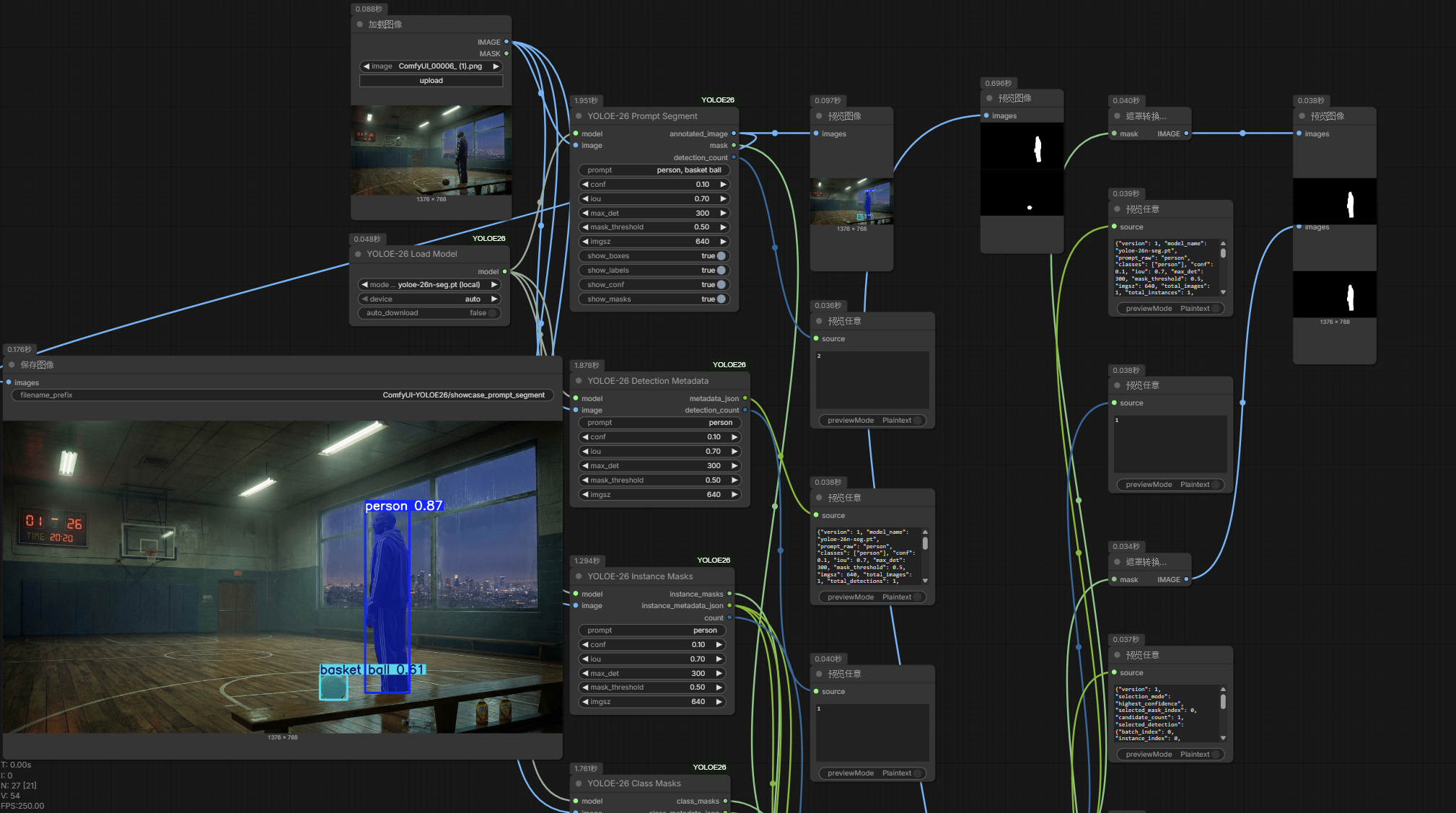
See examples/ for workflow JSON files:
| File | Description |
|------|-------------|
| basic_api_workflow.json | Minimal quick-start workflow |
| all_nodes_showcase_api.json | All 7 nodes demonstrated |
| practical_prompt_segment_api.json | Basic segmentation for inpainting |
| practical_best_instance_api.json | Best instance selection |
| practical_class_masks_api.json | Per-class mask routing |
| practical_refine_mask_api.json | Mask post-processing |
| practical_detection_metadata_api.json | Structured detection metadata |
| practical_batch_multi_class_api.json | Batch input with multi-class prompts |
Prompt Format
Use comma-separated class names:
person
person, car, dog
red apple, green bottle
Requirements
- ComfyUI
- Python 3.10+
- PyTorch
- ultralytics >= 8.3.200, < 9.0.0
Tested With
Validated end-to-end on 2026-07-04:
- ComfyUI 0.26.2 (Windows 11, NVIDIA RTX 3090)
- Python 3.11.9
- PyTorch 2.8.0+cu128
- ultralytics 8.4.26 (unit suite also run against 8.4.41)
Behavior Notes
- Masks are produced at the original image resolution (
retina_masks), so they align with detection boxes and downstream inpainting/compositing nodes. - Recent Ultralytics releases return already-binarized masks; in that case
mask_thresholdvalues below 1.0 have no additional effect. Select Best Instancepicks a single best mask across the whole batch when the metadata spans multiple input images.
Troubleshooting
Model not loading?
- Check the
.ptfile is in a supported model directory - If using
auto_download, verify network access
Download fails SHA256 verification?
- The file is removed automatically; retry once. If it fails for every model, Ultralytics may have republished the release assets — update this node pack or download the weights manually into a supported model directory.
First text-prompt run is slow or fails offline?
- The first prompt inference downloads the MobileCLIP text encoder (~250 MB) and may install the Ultralytics CLIP dependency (requires
git). Run it once with network access.
Inference failing?
- Try reducing
imgszif running out of GPU memory - Enable
offload_to_cpuon the Load Model node when sharing VRAM with diffusion models - Ensure your ultralytics version supports
from ultralytics import YOLOE
No detections?
- Lower the
confthreshold - Check that your prompt matches objects in the image
License
MIT License for this repository's original code and documentation.
Ultralytics and YOLOE model weights are separate third-party dependencies with their own licenses.
Credits
This project references implementation ideas from spawner1145's prompt_segment.py, used with permission.