
Sequential CSV Wildcard
Load prompts from a CSV file and walk through every {a|b|c} wildcard combination in order, row by row.
ComfyUI Sequential CSV Wildcard
A ComfyUI custom node that loads prompts from a CSV file and walks through every {option1|option2} wildcard combination in order — row by row, not at random.
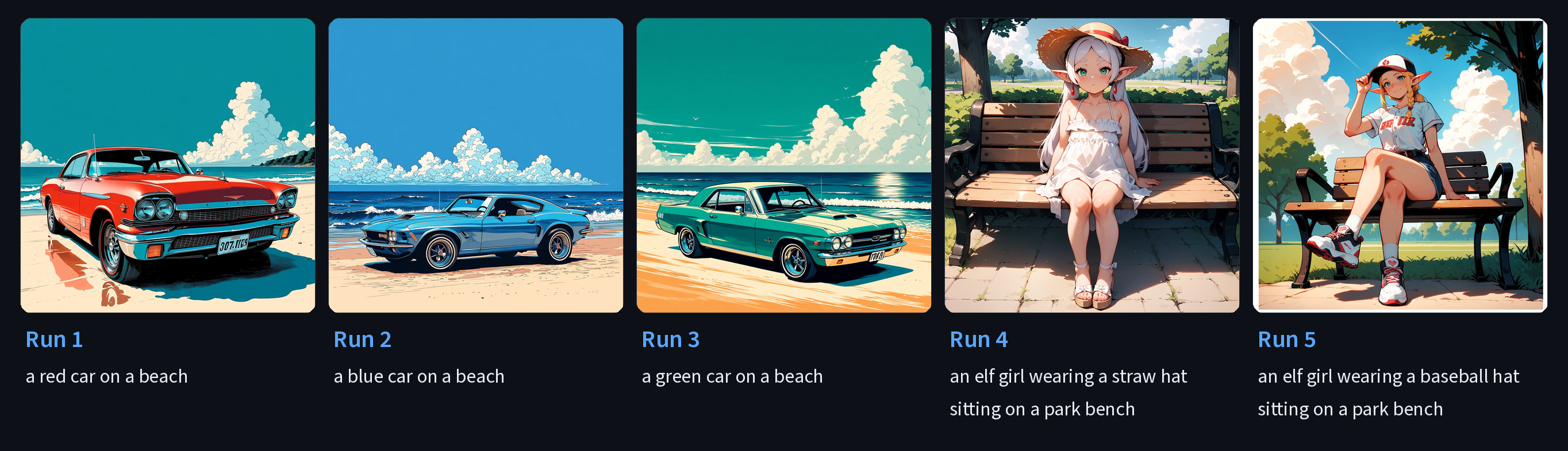
The grid above is a batch of 5 runs against examples/example.csv, with the seed starting at 0 and control after generate set to increment.
How it works
The example CSV has a header row and two data rows:
prompt
a {red|blue|green} car on a beach
an elf girl wearing a {straw| baseball} hat sitting on a park bench
The first row expands into 3 prompts (red, blue, green). The second expands into 2 (straw hat, baseball hat). That is 5 prompts in total, so total_rows is 2 and total_prompts is 5.
The seed walks through every combination of row 1 first, then every combination of row 2. If wrap is on, it then loops back to the start.
With seed 0 and increment, those 5 runs expand in this order:
| Run | Seed | Prompt | | ---: | ---: | --- | | 1 | 0 | a red car on a beach | | 2 | 1 | a blue car on a beach | | 3 | 2 | a green car on a beach | | 4 | 3 | an elf girl wearing a straw hat sitting on a park bench | | 5 | 4 | an elf girl wearing a baseball hat sitting on a park bench |
Set Batch count to total_prompts (5 in this example) to generate each prompt once.
The example images were generated with this prefix added in front of each expanded prompt (the table and grid captions show the CSV text only):
high contrast, masterpiece, best quality, amazing quality, very aesthetic, score_7, score_8, score_9,
The node lives under prompt/csv and is named CSV Sequential Wildcard Prompt. The screenshot shows the example settings, with the prompt output connected to a Preview as Text node so you can read the full expanded prompt for each run (here, the green-car combination).
Inputs
| Input | Description |
| --- | --- |
| csv_path | Full path to your .csv file |
| seed | Position in the expanded prompt list. Set control after generate to increment to step through combinations one per queued generation |
| column | Which column (0-based) holds the prompt text |
| has_header | Skip the first row if it is a header |
| wrap | Loop back to the first combination after the last one; if off, a seed past the end raises an error |
| prefix / suffix | Optional text added before / after the expanded prompt. Nothing extra is inserted between them, so include a trailing space or newline in the prefix if you want a separator |
Outputs
| Output | Description |
| --- | --- |
| prompt | The final prompt string, with wildcards expanded and prefix/suffix applied |
| used_index | The position in the expanded list (0-based). With wrap on, this is seed % total_prompts |
| total_rows | Number of data rows in the CSV (the header is not counted) |
| total_prompts | Total number of combinations across all rows. Set Batch count to this value to generate every prompt once |
Wildcard order
When a row has more than one {a|b} group, the first group changes fastest.
For example, a {red|blue} {car|bike} expands in this order:
a red cara blue cara red bikea blue bike
After that, the next CSV row begins.
Spaces around each option are trimmed, so {straw| baseball} is treated the same as {straw|baseball}.
Tips
- Run once (or inspect
total_prompts) and set Batch count to that number to get each prompt once. - Leave
wrapon to loop the list. Turn it off if you want an error once you pass the last combination. - Leave
has_headeron when the first row is a column name, likepromptin the example file. - Connect the
promptoutput to a Preview as Text node to see exactly which prompt each run produced — handy for checking the order before or while you generate images. csv_pathmust be a full path to the file on the machine running ComfyUI.
Installation
Install through ComfyUI-Manager (search for "Sequential CSV Wildcard"), or clone into your custom nodes folder:
cd ComfyUI/custom_nodes
git clone https://github.com/Rightey/ComfyUI-SequentialCSVWildcard
No extra Python dependencies are required. An example CSV is included at examples/example.csv.