RiceRound Cloud Node
This is an imaginative project that allows for one-click deployment, providing both an online page and a ComfyUI cloud node.[w/This custom node is vulnerable because it can dynamically download and execute nodes.]
Nodes (28)
Give your published RiceRound workflow a free-form input field
Turn a toggle into a form field on your published workflow
Call a published RiceRound workflow from inside another graph
Pull an image and its alpha straight from a URL
Fetch an image by URL instead of picking a local file
Pull a mask from a URL instead of drawing one
Package and encrypt your workflow to sell as a cloud node
A named, ranged number field for your published workflow
Mark a mid-graph image as a published input, not a local file
RiceRound's Load Image node, for testing before you publish
A debug pass-through for checking a URL before you wire it up
The multiline text field for your published workflow's form
A named, ranged integer field for your published workflow
Mark a mid-graph mask as a published input
Preview a toggle's value before you publish
Preview a number's value before you publish
Preview an image as text in RiceRound's debug log
The hidden node RiceRound wires in for you
Check an integer's value before you publish
Preview a mask's value before you publish
Check a string's value before you publish
The zero-setting seed node for RiceRound's published workflows
A free-form field for your published workflow's page
A lightweight local-file input, no mask attached
Turn text into a true/false value
Turn text into a decimal value
Turn text into a whole number
Check your file picker before you publish, not after
ComfyUI_RiceRound

📚 详细文档: 访问 https://help.riceround.online/ 获取完整使用指南
⭐ 喜欢这个项目? 请给我们的 GitHub 仓库 点个星标支持我们!
简介
RiceRound 是一个开源项目,旨在将本地 AI 工作流(通过 ComfyUI 创建)转移到云端,支持分布式部署。创作者可以轻松设计并运行工作流,实时监控任务进度与节点状态。平台支持一键生成云节点与在线页面,创作者可直接通过单次付费进行操作,收入全部归创作者。
一键部署,同时生成在线页面和 ComfyUI 云端节点。
快速启动
1. 安装节点
方法一:通过 ComfyUI-Manager 安装(推荐)
- 打开 ComfyUI-Manager
- 在搜索框中输入 "RiceRound"
- 点击安装按钮完成安装
方法二:通过 Git 克隆安装
cd ComfyUI/custom_nodes/
git clone https://github.com/RiceRound/ComfyUI_RiceRound
方法三:手动下载安装
- 下载 ComfyUI_RiceRound 压缩包
- 解压文件到
ComfyUI/custom_nodes/目录 - 重启 ComfyUI 使节点生效
2. 搭建工作流
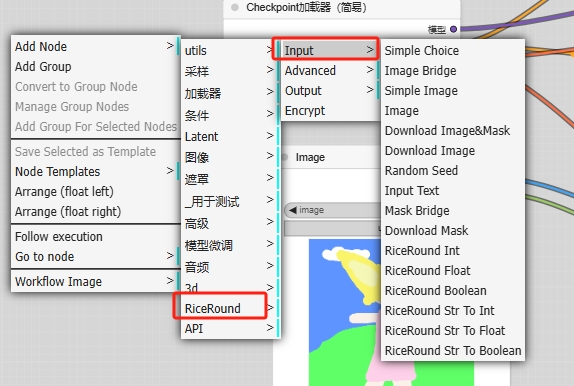
⚠️ 重要提示: 只使用 RiceRound -> input 里面的节点,Output 节点是用来排查部署问题使用的。
3. 发布工作流
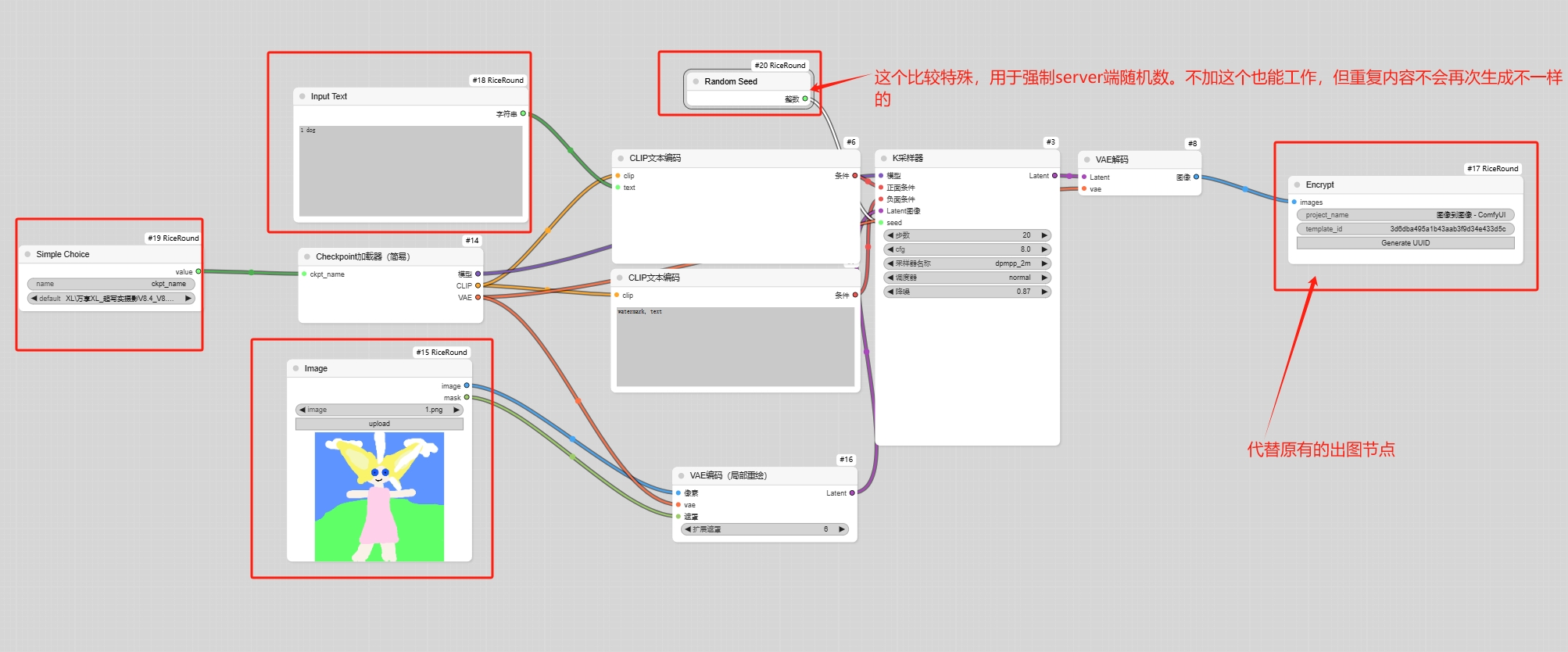
在工作流尾部加上 RiceRound Publish 节点用于发布,然后点击运行。
4. 查看结果
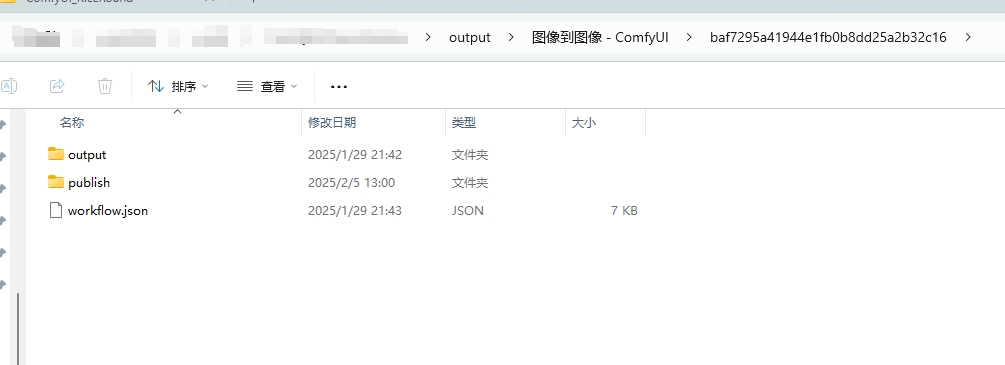
会在 output 文件夹生成一些加密工作流文件,其中 workflow.json 就是你拿去发布的加密工作流。
5. 管理工作流
在 https://www.riceround.online/ 可以管理你的工作流,也可以看见工作流生成的页面。

客户端节点部署
Windows 平台
- 下载 share_client_windows_setup.exe 全量安装包(带图形界面和启停管理)
- 或使用命令行绿色工具(将 share_client_windows.exe 重命名为 riceround-client)
Linux/MacOS 平台
- 下载对应平台的客户端
- 运行命令:
./riceround-client
更多详细安装和配置说明,请访问 https://help.riceround.online/
核心功能
- 🚀 云节点与页面生成: 一键生成云节点,自动展示在线页面
- 🌐 分布式部署与自动扩展: 支持多机器部署,智能化资源调度
- 💰 收入分配透明: 支持单次付费模式,创作者直接获得收入
- 🔓 开源计划: 逐步开放源代码,支持社区共建发展
常见问题
如遇问题,可查看日志文件进行排查:
- Windows:
C:\Users\<用户名>\RiceRound\logs\ - macOS:
/Users/<用户名>/RiceRound/logs/ - Linux:
/home/<用户名>/RiceRound\logs\
持续更新中
有时候教程、演示文件没有来得及更新,请联系我微信。